


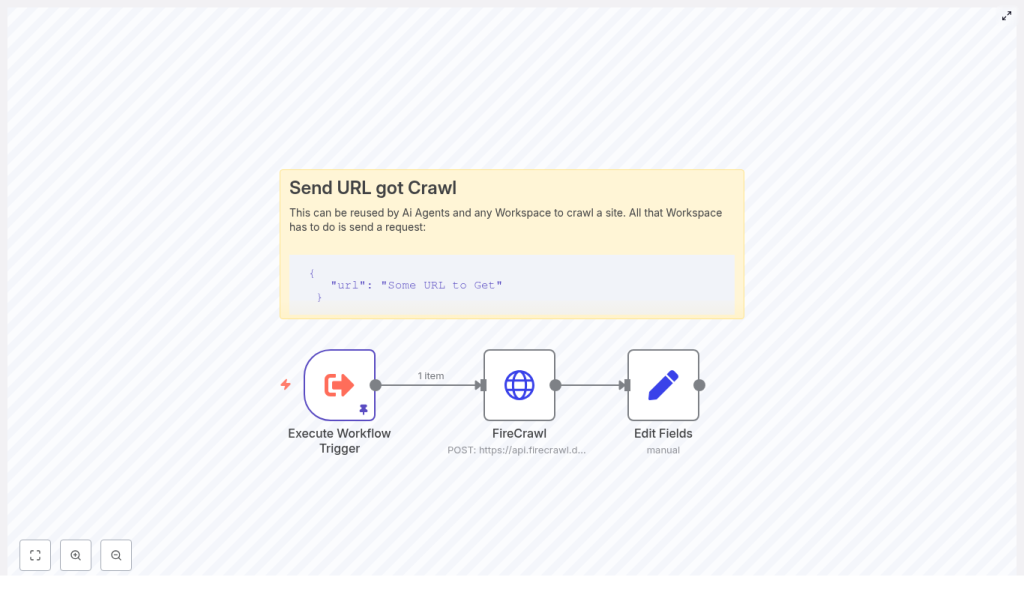
n8n + FireCrawl: Technical Guide to a Simple Web Crawl Workflow
This reference guide describes how to implement a compact, production-ready web crawling workflow in n8n using the FireCrawl API. The workflow accepts a URL as input, sends it to FireCrawl for scraping, receives the page content in Markdown format, and exposes that content in a dedicated field for downstream automation such as storage, enrichment, or AI processing.
The focus here is on a minimal architecture that is easy to debug and extend, while keeping all configuration steps and data flows explicit and transparent.
1. Workflow Overview
1.1 High-level behavior
The n8n + FireCrawl workflow performs the following core actions:
- Receives a URL to crawl via a trigger node (for example,
Execute Workflow Trigger). - Sends a POST request to
https://api.firecrawl.dev/v1/scrapewith the URL and the requested output format set tomarkdown. - Extracts the returned Markdown content from the FireCrawl JSON response and maps it into a dedicated field (for example,
response) for further processing in subsequent nodes.
This pattern is suitable for:
- Content aggregation pipelines
- Research automation workflows
- Preprocessing content for AI models or vector databases
1.2 Node architecture
The reference workflow uses three primary nodes:
- Execute Workflow Trigger – Entry point that accepts a JSON payload containing the target URL.
- HTTP Request (FireCrawl) – Sends the URL to FireCrawl and retrieves the scraped content as Markdown.
- Set (Edit Fields) – Normalizes the response by mapping the Markdown into a clean
responsefield.
You can then attach additional nodes for storage, summarization, or CMS ingestion depending on your use case.
2. Architecture & Data Flow
2.1 End-to-end data flow
- Input The workflow is triggered with a JSON payload containing:
{  "query": {  "url": "https://example.com/page"  }
}
The URL is accessed in n8n via the expression
$json.query.url. - Request to FireCrawl The HTTP Request node constructs a JSON body:
{  "url": "{{ $json.query.url }}",  "formats": ["markdown"]
}
and sends a POST request to
https://api.firecrawl.dev/v1/scrapeusing an API key in the header. - FireCrawl response FireCrawl returns structured JSON. The relevant field for this workflow is:
$json.data.markdownwhich contains the scraped page content as Markdown.
- Normalization The Set node creates a new field (for example,
response) and assigns:response = {{ $json.data.markdown }}This gives downstream nodes a stable, human-readable field to consume.
2.2 Trigger options
The template uses Execute Workflow Trigger for simplicity and testing. In a real deployment you can replace or complement it with:
- Webhook – For external systems to send URLs to crawl in real time.
- Cron – For scheduled crawling of known URLs.
- Other workflows – Using
Execute Workflowfrom parent workflows.
3. Node-by-node Breakdown
3.1 Execute Workflow Trigger node
Purpose
Defines the workflow entry point and provides a convenient way to test the workflow with static or pinned data. It exposes the $json object that downstream nodes use to access the incoming URL.
Key behavior
- Accepts a JSON payload that includes
query.url. - Allows pinning test data in the UI for repeatable runs.
- Can be replaced with other trigger nodes (Webhook, Cron, etc.) without changing the HTTP Request body expression, as long as the same JSON structure is preserved.
Example test payload (pinData)
Use this payload when testing manually:
{  "query": {  "url": "https://en.wikipedia.org/wiki/Linux"  }
}
This instructs FireCrawl to scrape the Linux Wikipedia page and return it as Markdown.
3.2 HTTP Request node (FireCrawl integration)
Purpose
Calls the FireCrawl scraping API, passing the target URL and requesting Markdown output. This node is the integration point between n8n and FireCrawl.
Endpoint and method
- Method:
POST - URL:
https://api.firecrawl.dev/v1/scrape
Authentication
Use HTTP Header Auth with your FireCrawl API key. In the node configuration:
- Set authentication type to Header (or equivalent HTTP Header Auth in n8n).
- Add a header such as:
Authorization: Bearer YOUR_API_KEY
Store the API key in n8n credentials, not directly in node parameters, to avoid exposing secrets in plain text.
Request body
Configure the body as JSON. The body should pass the URL from the trigger payload and request Markdown output:
{  "url": "{{ $json.query.url }}",  "formats": ["markdown"]
}
url– The URL to be scraped. It is dynamically populated from the incoming JSON using an n8n expression.formats– An array specifying the output formats. In this workflow it is limited to["markdown"]to keep the response focused.
Response structure
FireCrawl returns JSON that typically includes a data object containing format-specific fields, for example:
data.markdown– The scraped content as Markdown.- Other fields such as
data.htmlordata.textmay also be present, depending on FireCrawl’s configuration and response model.
The HTTP Request node also exposes:
- The HTTP status code in the node output metadata.
- The raw JSON body, which is accessed via
$jsonin subsequent nodes.
3.3 Set node (Edit Fields)
Purpose
Transforms the raw FireCrawl response into a clean, predictable field that downstream nodes can consume. It avoids coupling later logic directly to the nested API response structure.
Configuration
In the Set node:
- Add a new field, for example
response. - Set its value using an expression:
{{ $json.data.markdown }}
This produces an output structure similar to:
{  "response": "## Page title\n\nMarkdown content..."
}
Subsequent nodes can now simply reference $json.response without needing to know about FireCrawl’s internal JSON schema.
4. Step-by-step Setup in n8n
- Create a new workflow In the n8n UI, create a new workflow and give it a descriptive name, for example FireCrawl Markdown Scraper.
- Add the trigger node
- Add an Execute Workflow Trigger node.
- Optionally pin test data using the example payload:
{  "query": {  "url": "https://en.wikipedia.org/wiki/Linux"  }
}
- Add and configure the HTTP Request node
- Node type: HTTP Request.
- Method:
POST. - URL:
https://api.firecrawl.dev/v1/scrape. - Authentication: HTTP Header Auth.
- Header example:
Authorization: Bearer YOUR_API_KEY - Body content type: JSON.
- Body JSON:
{  "url": "{{ $json.query.url }}",  "formats": ["markdown"]
}
- Add the Set node
- Node type: Set (Edit Fields).
- Create a new field named
response. - Value (expression):
{{ $json.data.markdown }}
- Attach downstream nodes (optional) Depending on your use case, you can add:
- Storage nodes such as Write Binary File, Google Drive, or S3.
- AI or summarization nodes to generate summaries or metadata.
- CMS integration nodes for Notion, WordPress, or other systems.
5. Handling Responses, Errors, and Edge Cases
5.1 Response validation
FireCrawl returns structured JSON along with an HTTP status code. To make the workflow robust:
- Inspect the HTTP status code in the HTTP Request node output.
- Ensure
dataanddata.markdownexist before attempting to read them.
5.2 Branching on success vs failure
To avoid propagating invalid data, add an If node or a Function node after the HTTP Request:
- Example condition in an If node:
$json["status"] === 200or use the status code field that n8n exposes for HTTP responses.
- Route the “true” branch to the Set node and downstream logic.
- Route the “false” branch to error handling (logging, notifications, or retry logic).
5.3 Retry and backoff strategies
For transient errors or rate limiting:
- Use a Wait node combined with a Repeater or loop logic to implement simple backoff.
- Log errors and the original URL so failed requests can be retried later.
5.4 Common issues
- Empty response
- Verify that the target URL is reachable from the FireCrawl environment.
- Check if the site is blocking bots or restricted by
robots.txt. - Test the URL in a browser or via
curlto confirm it loads correctly.
- Authentication errors
- Confirm that the API key is valid and active.
- Check that the
Authorizationheader is correctly formatted. - Ensure the n8n credentials are correctly referenced by the HTTP Request node.
- Partial or malformed Markdown
- Inspect the raw JSON from FireCrawl to see all available fields (for example,
data.html,data.text,data.markdown). - Confirm you are mapping the correct field in the Set node.
- Inspect the raw JSON from FireCrawl to see all available fields (for example,
6. Best Practices for Web Crawling with n8n and FireCrawl
- Respect site policies Always follow
robots.txt, website terms of service, and applicable legal requirements when scraping content. - Use a descriptive User-Agent If FireCrawl or your configuration allows, set a clear User-Agent string to identify your use case.
- Implement rate limiting Avoid sending too many requests in a short time. Space out calls using Wait nodes or queueing logic and respect your FireCrawl API plan limits.
- Sanitize URLs Validate and sanitize the input URL before forwarding it to FireCrawl to reduce the risk of SSRF or malicious inputs.
- Cache results For URLs that do not change frequently, consider caching results in a database or storage system and reusing them instead of scraping repeatedly.
7. Extensions and Advanced Customization
7.1 Persisting scraped Markdown
To store the Markdown content for later use, connect the Set node to storage or CMS nodes, for example:
- Write Binary File – Save the Markdown to disk in self-hosted environments.
- Google Drive – Store as a file in a shared drive or folder.
- Amazon S3 – Save content to an S3 bucket for archival or downstream processing.
- CMS connectors – Create or update posts in systems like WordPress or Notion.
7.2 Automated ingestion into CMS or knowledge bases
Once you have $json.response as Markdown, you can:
- Convert it into a CMS post body for WordPress or Notion.
- Store it in a knowledge base or document management system.
- Feed it into a vector database for semantic search and AI-driven retrieval.
7.3 Scheduled crawling
To keep content up to date:
- Replace the Execute Workflow Trigger with a Cron node.
- Maintain a list of URLs to crawl and iterate over them on a schedule.
- Add logic to detect and process only pages that changed since the last crawl, if your architecture tracks versions or hashes.
7.4 AI summarization and extraction
Use the scraped Markdown as input to AI or LLM nodes:
- Generate concise summaries of long articles.
- Extract structured metadata such as title, author, and publish date.
- Parse entities or structured data using parser or function nodes combined with AI output.
8. Security and Compliance Considerations
- Secret management Store FireCrawl API keys in n8
