


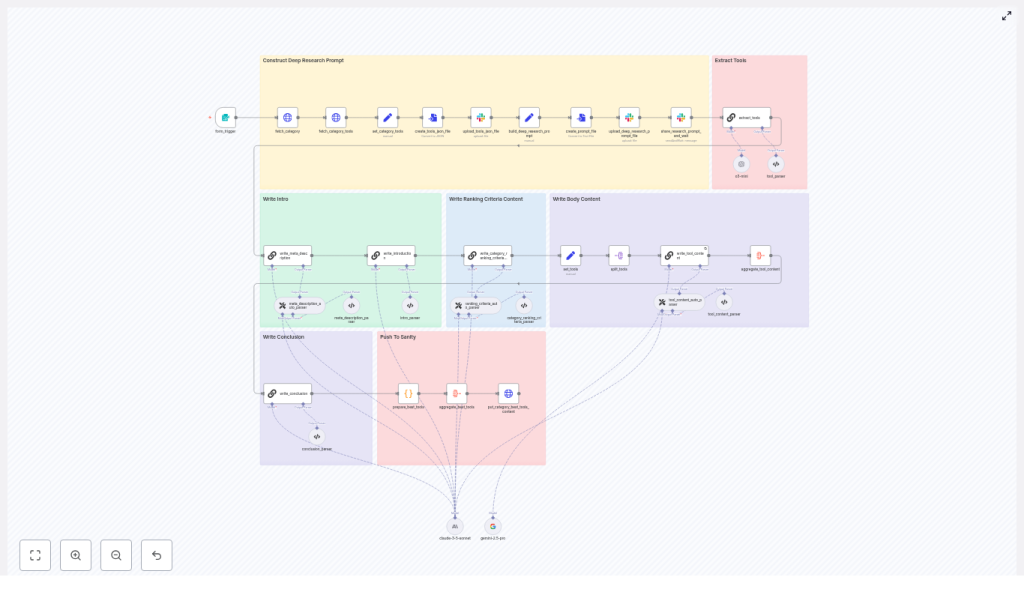
n8n Workflow: Best Tools In Category Guide
This reference-style guide documents the “Content – Write Best Tools In Category Article” n8n workflow. It explains how the workflow automates the full pipeline from form submission to CMS publishing for “best tools in category” content, and how each node participates in data retrieval, research, LLM content generation, validation, and delivery.
1. Workflow Overview
The workflow is designed to generate a complete, SEO-optimized “best tools in category” article from a single structured input. It is particularly useful for content teams that want repeatable, auditable production of list-style articles while keeping tight control over the underlying tool catalog.
1.1 Functional scope
- Accepts a form input with:
- Category Slug (required)
- Audience (required)
- Tool Slugs To Include (optional)
- Fetches category metadata and the canonical tool list via HTTP requests.
- Constructs a structured, tightly scoped research prompt and supporting JSON artifact.
- Uses Slack as the integration point for a deep research step and human or external system review.
- Parses the research output and maps tools to canonical
_idvalues. - Generates all article sections via LLM nodes:
- Introduction
- Ranking criteria / methodology
- Per-tool profiles
- Meta description
- Conclusion
- Aggregates all generated content into a single JSON payload.
- Pushes the final article to a category content endpoint via an HTTP PUT request.
1.2 Primary use cases
- Automated “best tools for X” articles driven from an internal catalog.
- Standardized content production across multiple categories or audiences.
- Scalable workflows that combine LLM generation with manual QA gates.
2. Architecture and Data Flow
The workflow is structured as a sequence of clearly separated phases. Each phase uses dedicated n8n nodes for I/O, transformation, and validation.
2.1 High-level data flow
- Input phase A form trigger node captures the category context and optional tool filters.
- Fetch phase HTTP Request nodes retrieve:
- Category metadata
- Canonical tool list for that category
- Research preparation phase The tool list is normalized into JSON, written to a file, and uploaded to Slack (or another storage). A structured research prompt is constructed as a separate file.
- Deep research phase Slack integration posts the prompt and JSON, waits for a research report, and then returns the result into n8n.
- Extraction & mapping phase An LLM node parses the research output and selects the final tools, mapping them back to canonical
_idvalues from the original tool JSON. - Content generation phase Multiple LLM nodes generate article sections. Parser nodes validate and normalize these outputs.
- Aggregation & publishing phase All sections and selected tools are aggregated into a single JSON payload and sent to the CMS or content API via a PUT request.
2.2 Core input and output contracts
- Input contract (Form Trigger):
categorySlug– string, requiredaudience– string, requiredtoolSlugsToInclude– string or array, optional
- Fetch contract (Category & tools HTTP responses):
- Category JSON with fields like title, slug, and other metadata.
- Tool array JSON with at least:
_id,title,slug,websiteUrl(and any other fields your CMS expects).
- Output contract (Final PUT payload):
- List of selected “best tools” with exact
_idvalues. - Intro, ranking criteria, per-tool content, meta description, conclusion.
- Any additional category fields required by the target CMS.
- List of selected “best tools” with exact
3. Node-by-Node Breakdown
3.1 Form Trigger
Role: Entry point for each article generation run.
Key configuration:
- Fields:
- Category Slug – identifies which category JSON to fetch.
- Audience – used to tailor tone and positioning in LLM prompts.
- Tool Slugs To Include (optional) – can bias selection toward certain tools.
- Trigger type: Webhook or native n8n form, depending on your environment.
Data considerations:
- Validate that Category Slug is non-empty before progressing.
- If Tool Slugs To Include is provided, downstream nodes can prioritize or filter tools accordingly, but must still respect the canonical tool list.
3.2 fetch_category & fetch_category_tools
Role: Retrieve the authoritative category and tool data from your catalog or CMS API.
Node type: HTTP Request (typically GET).
Typical configuration:
fetch_category:- URL template using
categorySlugfrom the form. - Authentication via n8n credentials (API key, OAuth, etc.).
- URL template using
fetch_category_tools:- URL template that returns the tool list for the given category.
- Same or compatible credentials as
fetch_category.
Output:
- Category JSON – metadata for the article context.
- Tool list JSON – array of tools that must be treated as the canonical set.
Edge cases:
- Empty tool array: downstream nodes should short-circuit or raise an error rather than generating content with no tools.
- Missing required fields like
_id,title,slug,websiteUrl: should be caught by schema validation before research or LLM steps.
3.3 set_category_tools, create_tools_json_file, upload_tools_json_file
Role: Normalize the tool list into a canonical JSON artifact and make it available for research and auditing.
set_category_toolsA Set or Function node that:- Extracts and formats the tool array from
fetch_category_tools. - Ensures the structure is consistent (for example, only required fields, standardized keys).
- Extracts and formats the tool array from
create_tools_json_fileA node that serializes the normalized tool array into a JSON file buffer.upload_tools_json_fileA Slack (or alternative storage) node that uploads this JSON file to a channel or file store.
Purpose of the JSON artifact:
- Provides a single canonical representation of tools used across:
- Deep research step
- LLM prompts
- Audits and debugging
- Improves reproducibility: the same JSON can be referenced if the article needs to be regenerated.
3.4 Deep Research Prompt Construction
Role: Build a structured, constrained prompt that guides the deep research process.
Typical behavior:
- Assemble a large, explicit instruction set that includes:
- How to search for information (e.g., search operators, preferred sources).
- Rules for excluding specific domains, such as:
- Append
-site:aitools.incto queries to avoid that domain.
- Append
- Requirement to only consider tools present in the provided JSON file.
- Instructions to extract and preserve exact
_idvalues from the tool JSON. - Guidance to prioritize recent content, usually within the last 12 to 18 months.
- Embed the canonical tool JSON or refer to the uploaded file so that researchers or external systems know the exact candidate set.
- Save this prompt as a file that can be sent to Slack or other research systems.
Outcome: A consistent, repeatable deep research specification that reduces ambiguity and enforces catalog integrity.
3.5 Slack Integration: share_research_prompt_and_wait
Role: Hand off the prompt and tool JSON to a research channel, then wait for the completed research report.
Node type: Slack node(s) plus optional Wait or webhook-based callback.
Behavior:
- Posts a message to a dedicated Slack channel with:
- The research prompt file.
- The tools JSON file.
- Allows either:
- Manual research by humans who follow the instructions and upload a report, or
- An external automated process that reads the prompt and JSON, performs research, and posts back the result.
- Waits for the research result to be returned to n8n (for example via a Slack trigger, webhook, or polling pattern).
Purpose:
- Acts as a quality control gate between catalog data and LLM synthesis.
- Allows human reviewers to inspect or augment findings before content generation.
3.6 extract_tools
Role: Parse the research output and map referenced tools back to canonical tool IDs.
Node type: LLM node with an output parser.
Responsibilities:
- Read the research report returned from Slack.
- Identify the tools selected as “best” or recommended.
- For each selected tool:
- Map it to the exact
_idpresent in the original tool JSON. - Output a structured list of selected tools with their
_id, slug, and other relevant metadata.
- Map it to the exact
Why exact ID mapping matters:
- The CMS or content API expects stable, canonical IDs.
- Any mismatch or fabricated ID can lead to broken references or incorrect tool associations.
- Downstream nodes rely on these IDs when constructing the final article payload.
Error handling considerations:
- If the LLM cannot find a matching
_idfor a tool mentioned in the research, the workflow should:- Halt or branch to a manual review step.
- Present a candidate list of tools for human selection rather than guessing.
3.7 LLM Content Generation Nodes
Role: Produce all textual components of the article from structured prompts and research data.
Typical breakdown:
- Introduction node Generates a category-specific intro that:
- Explains the category and its importance.
- Addresses the specified audience.
- Sets expectations for the list of tools.
- Ranking criteria / methodology node Describes how tools were evaluated, referencing:
- Deep research findings.
- Factors like features, usability, pricing, integrations, etc.
- Per-tool profile node Iterates over the selected tools and generates:
- Short description and positioning.
- Key features or differentiators.
- Ideal use cases for the target audience.
- Meta description node Produces an SEO-friendly meta description that respects character limits and keyword usage.
- Conclusion node Summarizes the recommendations and may include a call to action or guidance on choosing among tools.
Output parsers:
- Each LLM node feeds into a parser that:
- Validates JSON structure or specific schema.
- Enforces formatting rules such as:
- Required headings (H2/H3, lists, etc.).
- Maximum length for meta description and titles.
- Normalizes whitespace, bullet styles, and basic HTML or Markdown conventions as needed.
3.8 Aggregation & put_category_best_tools_content
Role: Combine all generated and selected data into a single payload and publish it to the CMS.
Aggregation step:
- Merge:
- Selected tools with exact
_idvalues. - Introduction content.
- Ranking criteria section.
- Per-tool profiles.
- Meta description.
- Conclusion.
- Selected tools with exact
- Structure the payload to match the category content endpoint’s contract.
put_category_best_tools_content node:
- Node type: HTTP Request (PUT).
- Targets the category content endpoint of your CMS or content store.
- Includes authentication credentials managed within n8n.
Expected outcome: The CMS receives a fully formed, structured “best tools in category” article that is ready for publishing or further editorial review.
4. Rules, Validation, and Safety Checks
4.1 Exact ID matching
- Every reference to a tool must use the
_idvalue from the original tool JSON without modification. - Parsers and validation nodes should:
- Reject any tool entry that lacks a valid
_id. - Prevent the workflow from publishing if IDs do not match the canonical list.
- Reject any tool entry that lacks a valid
4.2 Canonical tool list enforcement
- Only tools present in the fetched category tool JSON are eligible for inclusion.
- The deep research prompt explicitly instructs
