


Automate YouTube to Raindrop Bookmarks with n8n
This reference guide describes an n8n workflow template that automatically saves new videos from a YouTube playlist into Raindrop.io bookmarks. The workflow queries the YouTube Data API for playlist items, normalizes the response, filters only unseen videos using workflow static data, then creates structured bookmarks in Raindrop with consistent titles, links, and tags.
1. Overview
The workflow is designed for users who regularly track specific YouTube playlists and want a reliable way to archive or curate videos in Raindrop.io without manual intervention. It supports both manual execution and scheduled polling via a Cron trigger.
Primary capabilities
- Polls the YouTube API for all items in a specific playlist.
- Flattens the playlist item structure to expose key fields from the
snippetobject. - Maintains a persistent list of previously seen video IDs using n8n workflow static data.
- Filters out already processed videos to avoid duplicate bookmarks.
- Creates Raindrop bookmarks with a normalized URL, formatted title, and predefined tags.
Typical use cases
- Content curation pipelines and research libraries.
- Personal learning playlists and watch-later archives.
- Team knowledge bases that rely on video resources.
2. Workflow architecture
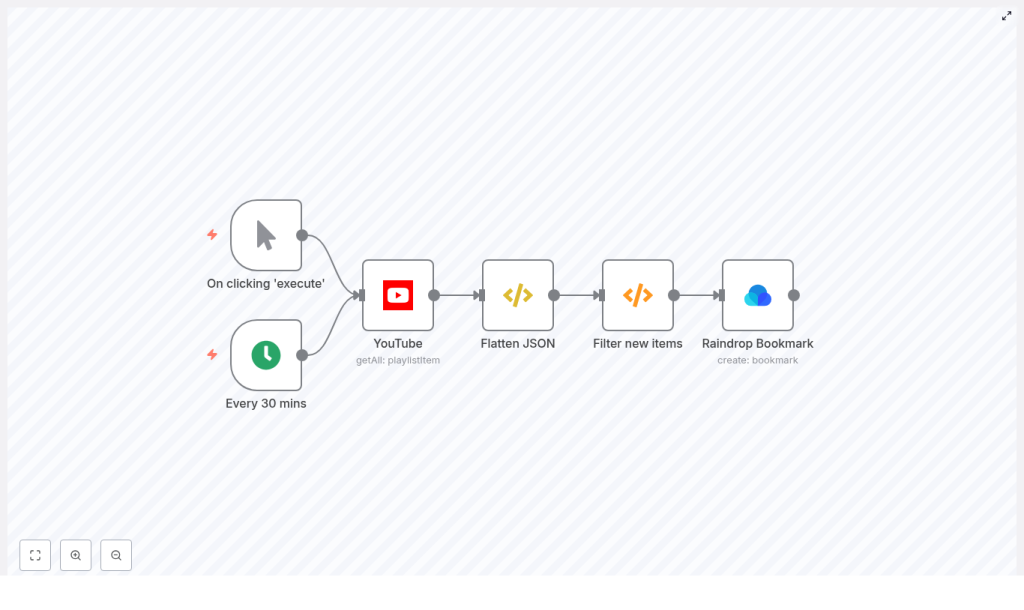
The template is built as a linear data flow with optional triggers and a small amount of custom logic. At a high level:
- Trigger – Start the workflow manually or on a schedule using Cron.
- YouTube node – Retrieve all items from the target playlist.
- FunctionItem node (Flatten JSON) – Replace the item payload with the
snippetobject for simpler downstream access. - Function node (Filter new items) – Compare video IDs against stored static data to return only new videos.
- Raindrop Bookmark node – Create a bookmark in Raindrop for each new video.
State is stored using getWorkflowStaticData('global'), which persists across workflow executions on the same n8n instance. This is used solely to track previously seen videoId values.
3. Node-by-node breakdown
3.1 Triggers: Manual Trigger and Cron
- Manual Trigger
- Purpose: Run the workflow on demand, for example during initial setup or debugging.
- Usage: Start the workflow from the n8n UI to test configuration or initialize static data.
- Cron
- Purpose: Schedule periodic checks of the YouTube playlist.
- Typical configuration: Every 30 minutes (adjustable based on your needs and API quotas).
- Behavior: Each Cron execution runs the full workflow, which then filters out already processed videos.
You can keep both triggers in the workflow and enable or disable them depending on whether you want scheduled polling, manual runs, or both.
3.2 YouTube node
This node communicates with the YouTube Data API to retrieve playlist items.
- Resource:
playlistItem - Operation:
getAll - playlistId:
CHANGE_ME- Replace
CHANGE_MEwith the ID of the playlist you want to monitor. - To obtain the playlist ID, open the playlist in YouTube and copy the value of the
list=query parameter in the URL. - Example: in
https://www.youtube.com/playlist?list=PLxxxx, the playlist ID isPLxxxx.
- Replace
- Credentials: Google (YouTube) OAuth2 credentials
- Configure a Google OAuth2 credential in n8n with access to the YouTube Data API.
- Attach this credential to the YouTube node.
The node returns playlist items that include a snippet object containing fields such as title, resourceId.videoId, and videoOwnerChannelTitle. These are used later to construct Raindrop bookmarks.
3.3 FunctionItem node: Flatten JSON
The FunctionItem node simplifies the structure of each item so that downstream nodes can reference fields directly on $json without deep nesting.
Code used in the template:
item = item["snippet"]
return item;
After this node:
- The current item payload is the
snippetobject from the YouTube response. - Fields like
$json["title"],$json["resourceId"]["videoId"], and$json["videoOwnerChannelTitle"]are available at the top level of the JSON for that item.
If the snippet field is missing from a playlist item (which is uncommon for standard playlist queries), this node would fail. In that case, verify your YouTube API configuration and playlist permissions.
3.4 Function node: Filter new items
This node implements deduplication logic using workflow static data. It ensures that only videos that have not been processed in previous executions are passed to the Raindrop node.
Code used in the template:
const staticData = getWorkflowStaticData('global');
const newIds = items.map(item => item.json["resourceId"]["videoId"]);
const oldIds = staticData.oldIds;  if (!oldIds) {  staticData.oldIds = newIds;  return items;
}

const actualNewIds = newIds.filter((id) => !oldIds.includes(id));
const actualNew = items.filter((data) => actualNewIds.includes(data.json["resourceId"]["videoId"]));
staticData.oldIds = [...actualNewIds, ...oldIds];

return actualNew;
Logic and behavior
- Static data storage:
getWorkflowStaticData('global')returns an object that persists across executions.- The property
staticData.oldIdsis used to store an array of video IDs that have already been seen.
- First execution:
- If
oldIdsis not defined, this is treated as the first run. - All current playlist video IDs are stored into
staticData.oldIds. - The node returns all current items. These are considered “seen” from this point onward.
- If
- Subsequent executions:
- The node computes
newIdsfrom the current items. - It compares
newIdstooldIdsand identifies only those IDs that are not already stored. - It filters the
itemsarray to include only playlist items whosevideoIdis inactualNewIds. staticData.oldIdsis updated by prepending the newly discovered IDs to the existing array:[...actualNewIds, ...oldIds].
- The node computes
Edge cases and notes
- If the playlist is empty,
itemswill be an empty array and the function returns an empty array without modifying static data. - If the node returns an empty array on a non-initial run, it means no new video IDs were detected compared to
staticData.oldIds. - If static data is reset (for example after a server reset or manual clearing), the workflow will treat the next run as a first run, which may result in previously processed videos being treated as new. In that case, you may see duplicate bookmarks unless you add an additional de-duplication mechanism on the Raindrop side.
3.5 Raindrop Bookmark node
This node creates a bookmark in Raindrop.io for each new YouTube video passed from the Filter node.
- Link:
=https://www.youtube.com/watch?v={{$json["resourceId"]["videoId"]}}Constructs a canonical YouTube watch URL using the
videoIdfrom the flattened snippet. - Title:
= {{$json["videoOwnerChannelTitle"]}} | {{$json["title"]}}Formats the bookmark title as “Channel Name | Video Title” for better searchability and context inside Raindrop.
- CollectionId:
- Default value:
0, which typically refers to the default collection. - Replace with a specific collection ID if you want to route these bookmarks to a dedicated folder.
- Default value:
- Tags:
- Example:
youtube. - You can add additional tags or change them to match your taxonomy.
- Example:
- Credentials:
- Configure Raindrop OAuth credentials in n8n.
- Attach these credentials to the Raindrop Bookmark node.
If the Raindrop node fails, check that the OAuth credential is correctly configured and that the link and title expressions resolve to valid values in the execution data.
4. Configuration notes
4.1 Required credentials
- Google / YouTube OAuth2
- Configure an OAuth2 credential in n8n with access to the YouTube Data API.
- Assign this credential to the YouTube node.
- Raindrop OAuth
- Create a Raindrop credential in n8n using OAuth.
- Assign it to the Raindrop Bookmark node.
4.2 Playlist ID selection
To monitor a specific playlist:
- Open the playlist in your browser.
- Locate the
list=parameter in the URL. - Copy the value and paste it into the
playlistIdfield of the YouTube node.
4.3 Trigger strategy
You can choose between or combine:
- Manual Trigger for ad-hoc runs, testing, and first-time initialization of static data.
- Cron for continuous polling, for example every 30 minutes. Adjust the interval if you are close to YouTube API quota limits or if the playlist updates infrequently.
4.4 Static data initialization
To avoid creating bookmarks for all existing videos when you first deploy the workflow:
- Import the workflow template into n8n.
- Configure credentials and set the correct
playlistId,collectionId, and tags. - Run the workflow manually once.
- This will populate
staticData.oldIdswith the current playlist video IDs. - From then on, only newly added videos in the playlist will be treated as new items.
- This will populate
5. Step-by-step setup guide
- Import the template
- Use the provided template link to import the workflow into your n8n instance.
- Configure Google / YouTube OAuth credentials
- Create a Google OAuth2 credential in n8n.
- Grant access to the YouTube Data API.
- Attach the credential to the YouTube node.
- Configure Raindrop OAuth credentials
- Create a Raindrop OAuth credential in n8n.
- Attach it to the Raindrop Bookmark node.
- Set the playlist ID
- Replace
CHANGE_MEin the YouTube nodeplaylistIdfield with your actual playlist ID.
- Replace
- Adjust Raindrop target collection and tags
- Set
collectionIdto your desired Raindrop collection (or leave as0for the default). - Customize tags (for example
youtube,learning,research).
- Set
- Configure triggers
- Decide whether to use Manual Trigger, Cron, or both.
- If using Cron, set the interval, for example every 30 minutes.
- Run an initial manual execution
- Execute the workflow once manually.
- This initializes
staticData.oldIdswith the current playlist contents. - Subsequent runs will bookmark only newly added videos.
6. Troubleshooting and diagnostics
6.1 No bookmarks are created
If the workflow runs but you do not see new bookmarks in Raindrop, inspect each step:
- Check YouTube node output
- Open the execution log and inspect the YouTube node.
- Confirm that the node returns playlist items and that the
snippetfield is present.
- Verify Flatten JSON node
- Ensure that after the FunctionItem node,
$json["title"]and$json["resourceId"]["videoId"]are available.
- Ensure that after the FunctionItem node,
- Inspect Filter node output
- If the Filter node returns an empty array on the very first run, static data may have already been initialized in a previous execution.
- On subsequent runs, an empty result simply means no new videos were detected.
- Check Raindrop node execution
- Verify that the Raindrop node receives input items from the Filter node.
- Check for authentication or rate-limit errors in the node logs.
6.2 Common issues and constraints
- Private or unlisted playlists
- You must have appropriate permissions on the YouTube account used for OAuth.
- If the playlist is private or unlisted, ensure the authenticated account can access it.
- YouTube API quota
- YouTube enforces quotas on API usage.
- If you encounter quota errors, reduce the Cron frequency or consolidate workflows where possible.
- Duplicate bookmarks
- <
