


Automate LinkedIn Lead Enrichment with n8n
High quality, well-enriched leads are essential for any modern revenue operation. Yet manually sourcing contacts, checking email validity, and researching LinkedIn profiles for personalization is slow, inconsistent, and difficult to scale.
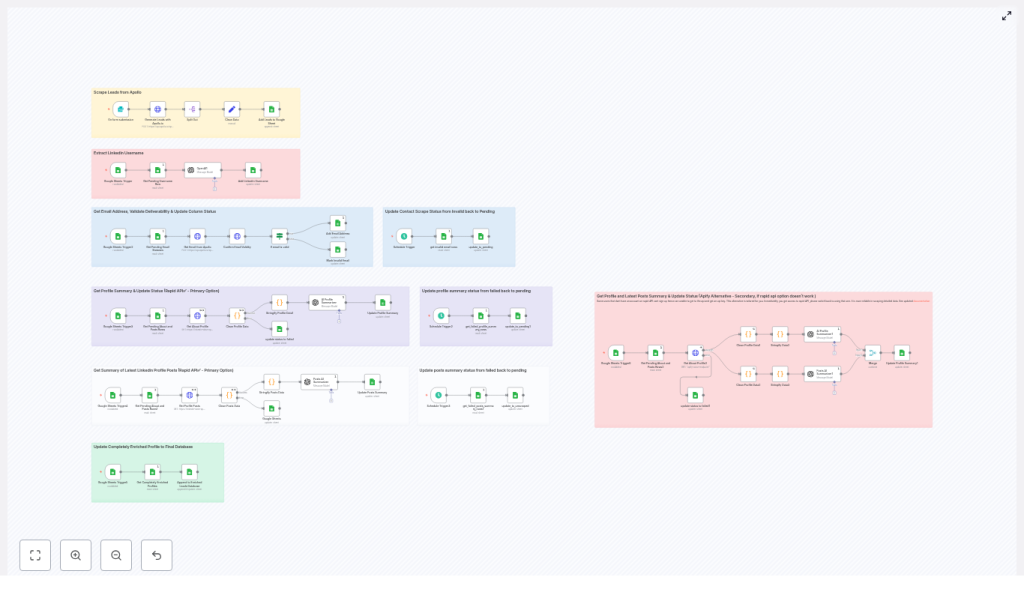
This article presents a production-grade n8n workflow template that automates LinkedIn-focused lead enrichment end to end. It uses Apollo.io for lead generation and email discovery, external LinkedIn scraping services for profile and post data, OpenAI for AI-driven summarization, and Google Sheets as the operational database and final lead repository.
The result is a repeatable, resilient pipeline that turns raw prospect lists into fully enriched, outreach-ready records.
Use case and value of automating LinkedIn lead enrichment
For sales, marketing, and growth teams, LinkedIn is often the primary source for B2B prospecting. However, manual workflows do not scale beyond a few dozen contacts per day and are prone to errors or inconsistent research depth.
Automating LinkedIn lead enrichment in n8n enables you to:
- Programmatically generate prospect lists from Apollo.io based on job title, seniority, company size, geography, or other filters
- Extract LinkedIn usernames from profile URLs to standardize scraping inputs
- Reveal and validate business or personal emails before they enter your CRM or outreach tool
- Collect profile data and recent posts, then summarize them with OpenAI for targeted, personalized messaging
- Coordinate parallel enrichment steps with explicit status flags and structured retry logic
For automation professionals, this workflow illustrates how to design a modular enrichment pipeline with clear separation between data sourcing, enrichment, AI transformation, and storage.
Architecture overview of the n8n workflow
The workflow is intentionally modular so that each stage can be monitored, tuned, or replaced without affecting the entire system. At a high level, the pipeline covers:
- Lead generation – Apollo.io API returns prospects that match defined search criteria.
- Staging and normalization – Key fields are extracted and written into a staging Google Sheet with status columns.
- LinkedIn username extraction – LinkedIn URLs are cleaned to produce canonical usernames for scraping.
- Email enrichment and validation – Apollo.io and an email validation API are used to reveal and verify email addresses.
- LinkedIn profile and posts scraping – External services fetch the “About” section and recent posts.
- AI summarization – OpenAI generates concise profile and post summaries suitable for outreach templates.
- Final aggregation – Fully enriched rows are appended to an “Enriched Leads Database” sheet.
Each stage is orchestrated by n8n using scheduled triggers, Google Sheets lookups, and robust error handling to avoid duplicate processing or stalled records.
Core components and integrations
The workflow relies on several key services, each handled through n8n nodes or HTTP requests:
- n8n – Acts as the central orchestration engine, handles triggers, branching, retries, and error management.
- Apollo.io API – Provides person search and email reveal endpoints used for initial prospecting and contact enrichment.
- Google Sheets – Serves as both the operational staging area with status columns and the final “Enriched Leads Database” for downstream tools.
- RapidAPI / LinkedIn Data API – Primary provider to scrape LinkedIn profile details and recent posts.
- Apify – Alternative scraping provider for environments where RapidAPI is not available or desired.
- OpenAI (GPT) – Consumes structured profile and post data to generate short, actionable summaries for personalization.
- Email validation API – Verifies email deliverability, checks MX records, and flags invalid or risky addresses.
All credentials are configured via n8n’s credential system or environment variables to maintain security and facilitate deployment across environments.
Designing the Google Sheets data model
Google Sheets is used as the central data store and control plane. Proper column design is critical to coordinate asynchronous tasks, avoid race conditions, and implement reliable retries.
Essential identifier and data columns
- apollo_id – The unique identifier from Apollo.io, used for deduplication and updates.
- linkedin_url – The raw LinkedIn profile URL retrieved from Apollo.io or other sources.
- linkedin_username – The cleaned username extracted from the URL, used as input for scraping services.
Status and workflow control columns
Each enrichment step is managed via explicit status columns. Typical examples include:
- extract_username_status – Tracks LinkedIn username extraction, values such as
pendingorfinished. - contacts_scrape_status – Reflects email enrichment and validation, for example
pending,finished, orinvalid_email. - profile_summary_scrape – Indicates whether profile scraping and summarization are
pending,completed, orfailed. - posts_scrape_status – Manages post scraping, values such as
unscraped,scraped, orfailed.
These status fields enable targeted queries such as “fetch the first row where profile_summary_scrape = pending” and support scheduled retry logic that periodically resets failed rows back to pending.
Detailed flow: from raw lead to enriched record
The following sequence describes how a single lead progresses through the system. In practice, n8n processes many rows concurrently within the constraints of API rate limits and your infrastructure.
1. Lead generation and initial staging
- A form submission, cron schedule, or manual trigger in n8n initiates an Apollo.io person search based on predefined filters such as role, geography, or industry.
- The Apollo.io response is normalized and key attributes are extracted (name, company, LinkedIn URL, Apollo ID, role, location, etc.).
- These records are appended to a staging Google Sheet. Newly created rows are marked with appropriate initial statuses, for example
extract_username_status = pendingandcontacts_scrape_status = pending.
2. LinkedIn username extraction
- An n8n workflow periodically queries the staging sheet for the first row where
extract_username_status = pending. - The workflow parses the
linkedin_urlto remove URL prefixes and query parameters, leaving a cleanlinkedin_username. - The cleaned username is written back to the sheet and
extract_username_statusis set tofinished.
This normalization step creates a consistent identifier for downstream scraping services, which often expect only the username rather than the full URL.
3. Email enrichment and validation
- A separate n8n workflow looks for rows where
contacts_scrape_status = pending. - Using the Apollo.io match or email reveal endpoint, the workflow requests available personal and business emails associated with that contact.
- Any returned email addresses are sent to an email validation API, which checks syntax, domain configuration, and deliverability.
- If a valid email is identified,
contacts_scrape_statusis updated tofinished. If all discovered emails are flagged as invalid, the status is set toinvalid_email.
By centralizing validation in this step, only high quality email addresses proceed to your downstream CRM or outreach platform.
4. LinkedIn profile and posts scraping
- Another scheduled workflow picks up rows where
profile_summary_scrape = pendingorposts_scrape_status = unscraped, depending on how you structure the jobs. - The workflow calls a LinkedIn scraping provider, typically via RapidAPI’s LinkedIn Data API as the primary option.
- If the primary scraping call fails or is unavailable, an Apify actor is used as a fallback to retrieve similar profile information.
- The returned data usually includes the profile headline, “About” section, and a list of recent posts. This raw content is stored in intermediate fields or passed directly to the AI summarization step.
- On success, the relevant status columns are updated, for example
profile_summary_scrape = completedandposts_scrape_status = scraped. Errors set the status tofailedso that scheduled retries can handle them.
5. AI-driven summarization with OpenAI
Once profile and post data are available, the workflow sends structured content to OpenAI. The prompts are designed for concise, outreach-ready outputs rather than verbose biographies.
- The profile headline and “About” text are summarized into 2 to 3 short sentences that highlight key professional themes and potential outreach hooks.
- Recent posts are analyzed to extract recurring topics, tone, and interests, then combined into two short paragraphs that capture what the person frequently talks about.
These summaries are written back to the Google Sheet, where they can be referenced directly by your email or LinkedIn messaging templates.
6. Final aggregation into the Enriched Leads Database
Once all enrichment steps are complete for a row, a final n8n workflow checks for records that meet the following criteria:
contacts_scrape_status = finishedprofile_summary_scrape = completedposts_scrape_status = scraped(or another success state depending on your design)
Records that satisfy these conditions are appended to the “Enriched Leads Database” sheet. This final dataset is clean, validated, and enriched with AI-generated personalization fields, ready for syncing into CRMs, sales engagement platforms, or marketing automation tools.
Error handling, retries, and resilience patterns
To ensure reliability in production, the workflow incorporates several best practices around error handling and idempotency.
- Execute-once patterns – Each enrichment step selects a single row at a time using “return first match” queries in Google Sheets. This reduces the risk of concurrent workflows processing the same row.
- Retry strategies – HTTP requests to external services such as RapidAPI or email validation APIs are configured with retry logic and a maximum number of attempts. Optional fields use “continue on error” so that a partial failure does not block the entire lead.
- Scheduled reset of failed rows – Cron-based workflows periodically search for rows with statuses like
failedorinvalid_emailand, where appropriate, reset them topendingafter a cooldown period. This creates a safe, automated retry loop without manual intervention. - Status-driven orchestration – By centralizing state in Google Sheets, each workflow can be stateless and idempotent. The sheet becomes the single source of truth for the lead’s journey.
This design makes the automation robust against transient API failures and rate limit issues, which are common in scraping and enrichment workloads.
AI summarization strategy and best practices
AI is used in a focused way, with clear constraints on length and structure to maintain consistency and control costs.
- Prompts instruct OpenAI to produce short, high-signal summaries rather than long narratives.
- Outputs are structured into specific fields, for example “Profile summary” and “Recent posts summary”, which can be inserted directly into outreach templates.
- Token usage is controlled by keeping prompts lean and limiting the amount of raw text passed from LinkedIn scraping to only what is necessary.
For sales teams, this approach yields concise talking points tailored to each prospect’s profile and content, without requiring manual research.
Privacy, security, and compliance considerations
Scraping and enriching personal data requires careful attention to legal and ethical standards. Before deploying this workflow, ensure that:
- You review LinkedIn’s terms of service and confirm that your usage complies with their policies.
- You understand and adhere to applicable data protection regulations such as GDPR, CCPA, or local equivalents.
- You minimize the collection and storage of sensitive personal data, and only use the data for legitimate, permitted business purposes.
- All API keys and credentials are stored securely using n8n credentials or environment variables, never hard-coded into nodes or committed to public repositories.
These practices help maintain trust and reduce regulatory risk while benefiting from automation.
Operational tips for running the workflow at scale
To operate this automation reliably in production, consider the following recommendations:
- Start with small batches – Use low
per_pagevalues and limited search scopes in Apollo.io when first deploying. This helps validate the end-to-end flow and surface bottlenecks before scaling up. - Monitor rate limits and costs – Apollo.io, RapidAPI, OpenAI, and email validation providers typically have quotas and usage-based pricing. Track consumption and set alerts where possible.
- Use the staging sheet as a control center – Add operational columns such as
last_attempt_atandlast_errorto aid debugging and performance tuning. - Iterate on prompts – Refine OpenAI prompts to balance personalization quality, tone, and token usage. Compact, structured prompts generally perform best.
End-to-end example: lifecycle of a single lead
To summarize, a typical lead progresses through the system as follows:
- A scheduled n8n job triggers an Apollo.io search and appends new prospects to the staging sheet, marking
extract_username_status = pending. - A username extraction workflow converts
linkedin_urltolinkedin_usernameand setsextract_username_status = finished. - A contacts enrichment workflow uses Apollo.io to reveal emails, validates them, and sets
contacts_scrape_statusto eitherfinishedorinvalid_email. - A profile scraping workflow processes rows where
profile_summary_scrape = pending, retrieves LinkedIn profile and posts data, calls OpenAI for summaries, and updatesprofile_summary_scrapeandposts_scrape_statusto success or failure states. - Once all required statuses indicate success, the lead is appended to the “Enriched Leads Database” sheet as a fully enriched, validated record.
Conclusion and next steps
This n8n-based workflow provides a scalable, modular framework for LinkedIn lead enrichment. It accelerates research, improves data quality, and equips sales teams with personalized, context-aware insights at the moment of outreach.
Because each stage is decoupled, you can easily swap providers, fine-tune prompts, or adjust retry policies without redesigning the entire pipeline. For example, you might replace the email validation service, experiment with different scraping providers, or add new enrichment steps such as company-level technographic data.
If you would like the exported JSON of this workflow for direct import into n8n, or a deployment checklist that covers environment variables, credential mapping, and recommended rate limits, a step-by-step setup guide can be prepared to match your specific stack and providers.
Call to action: If you are ready to operationalize automated lead enrichment, decide on your preferred scraping provider (RapidAPI or Apify), then request a tailored deployment checklist that outlines required credentials, recommended schedules, and configuration details.
