


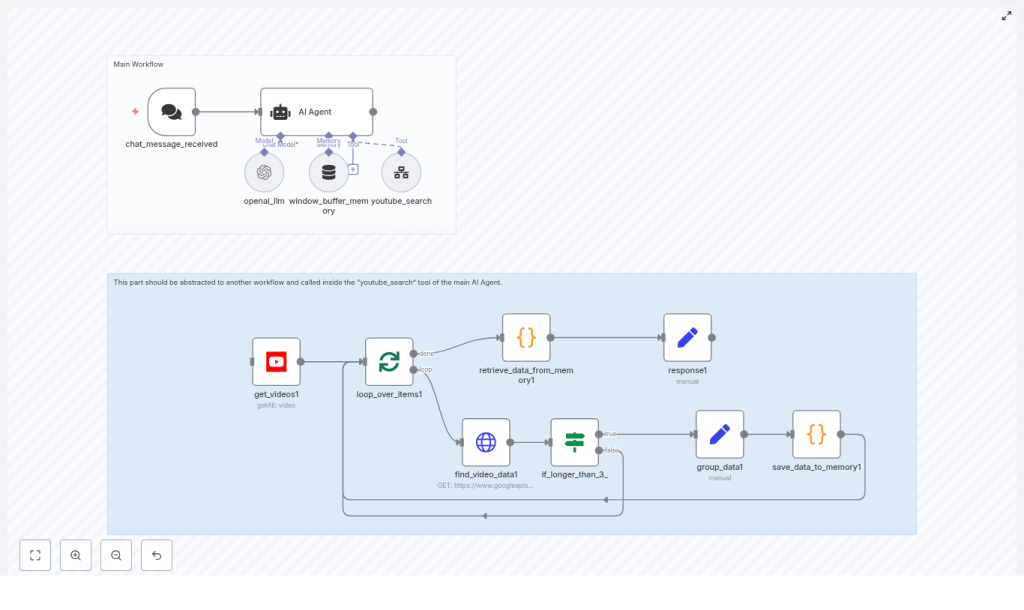
n8n + LangChain: YouTube Trending Finder (Technical Workflow Guide)
This guide explains, in a technical and implementation-focused way, how to build and run a YouTube trending-finder workflow using n8n, a LangChain-based AI Agent, and the YouTube Data API. The workflow automatically searches for highly relevant videos published in the last 48 hours, normalizes and aggregates metadata, and exposes structured information back to the AI Agent for trend analysis.
The content below is organized as reference-style documentation so you can understand the architecture, node configuration, data flow, and customization options without losing any of the original implementation details.
1. Workflow Overview
The workflow is designed for creators, social media managers, and growth teams that need a systematic way to detect what is gaining traction on YouTube in near real time. Instead of manually browsing search results, the workflow:
- Receives a niche or topic via chat or webhook.
- Uses an AI Agent (LangChain) to plan up to three tailored YouTube searches.
- Delegates execution of those searches to a youtube_search sub-workflow.
- Collects and cleans video metadata, including statistics and content details.
- Stores results in global static memory as a single aggregated text payload.
- Returns that payload to the AI Agent, which then extracts patterns, trends, and recommendations.
The core building blocks are:
- Trigger:
chat_message_received - AI Agent (LangChain): main orchestrator and analyst
- Sub-workflow:
youtube_searchfor YouTube queries - YouTube node:
get_videos1for initial search - Looping node:
loop_over_items1(Split in Batches) - HTTP Request node:
find_video_data1forvideos.list - If node:
if_longer_than_3_for duration-based routing - Data processing & memory nodes:
group_data1,save_data_to_memory1,retrieve_data_from_memory1,response1
2. High-Level Architecture
2.1 Control Flow
- chat_message_received listens for incoming user input (for example from a chat UI or webhook).
- The input is passed to the AI Agent (LangChain), which:
- Validates that a niche is present, or requests one if missing.
- Plans up to three YouTube searches with niche-specific query terms.
- Invokes the youtube_search sub-workflow as a tool.
- youtube_search executes the actual YouTube Data API calls using the get_videos1 node and, optionally, find_video_data1 for enriched metadata.
- Results are looped, cleaned, normalized, and appended into global static memory with a fixed separator token.
- The aggregated payload is returned to the AI Agent through retrieve_data_from_memory1 and response1.
- The AI Agent analyzes patterns in titles, tags, and engagement metrics, then outputs recommendations for the creator.
2.2 Separation of Concerns
- AI Agent (LangChain): Handles strategy, search term selection, and interpretation of trends.
- youtube_search sub-workflow: Handles concrete API interaction, filtering, and normalization.
This separation keeps the LangChain logic focused on reasoning, while n8n nodes manage API details, pagination, and structured data handling.
3. Node-by-Node Breakdown
3.1 Trigger: chat_message_received
Purpose: Entry point for the workflow. It receives a message that typically includes the user’s niche or topic of interest.
- Type: Trigger node (chat or webhook based, depending on your environment).
- Output: Text payload (e.g.,
messageorcontent) passed to the AI Agent.
Edge cases:
- If the message does not contain a niche, the AI Agent is responsible for asking the user to specify one. The trigger itself does not enforce validation.
3.2 AI Agent (LangChain)
Purpose: Acts as the “brain” of the workflow. It interprets user intent, plans search strategies, and performs the final trend analysis.
3.2.1 System Prompt Responsibilities
The system prompt for the AI Agent should instruct it to:
- Verify that the user has specified a niche or topic. If not, ask the user to provide one.
- Call the youtube_search tool up to three times, each time with different but related search terms tailored to the user’s niche.
- Expect the sub-workflow to return results as a single aggregated text payload where each video is separated by:
### NEXT VIDEO FOUND: ### - Focus on patterns and trends across videos instead of evaluating any single video in isolation.
3.2.2 Tool Integration: youtube_search
- Type: Sub-workflow exposed as a tool to LangChain.
- Usage: The Agent passes a search query and optional parameters (e.g., niche-related keywords) to
youtube_search. - Execution limit: Up to three calls per Agent run, as suggested by the system prompt, to balance coverage and API quota usage.
3.3 Sub-workflow: youtube_search
Purpose: Encapsulates all YouTube Data API interactions and result normalization. It returns a memory-style aggregated payload back to the AI Agent.
The sub-workflow typically contains the following nodes:
- YouTube Search node:
get_videos1 - Batch processing node:
loop_over_items1(SplitInBatches) - HTTP Request node:
find_video_data1forvideos.list - If node:
if_longer_than_3_for duration-based filtering - Data aggregation nodes:
group_data1andsave_data_to_memory1 - Memory retrieval and response nodes:
retrieve_data_from_memory1,response1
4. YouTube Data Integration
4.1 Node: get_videos1 (YouTube Search)
Purpose: Fetches videos from YouTube that match the search query and are published within the last 48 hours, ordered by relevance.
4.1.1 Key Parameters
- API: YouTube Data API (via n8n’s YouTube node).
- Filter:
publishedAfterset to “now minus 2 days” in ISO 8601 format. - Ordering:
order = relevanceto prioritize high-relevance results.
Expression for publishedAfter in n8n:
new Date(Date.now() - 2 * 24 * 60 * 60 * 1000).toISOString()
This expression ensures that only videos from the last 48 hours are returned.
4.1.2 Credentials
- Use n8n’s Credentials feature for your Google / YouTube API key or OAuth configuration.
- Avoid hardcoding keys directly in node parameters. Prefer environment variables where possible.
4.1.3 Edge Cases
- If
regionCodeor other filters are set too narrowly, you may receive no results.
4.2 Node: loop_over_items1 (SplitInBatches)
Purpose: Iterates over the list of videos returned by get_videos1 and optionally fetches more detailed data for each video.
- Type: SplitInBatches node in n8n.
- Usage: Processes each video item in sequence or in manageable batches, which is useful for quota control and error isolation.
Error Handling:
- If a single video fails in a downstream node, you can configure the workflow to continue processing the remaining items, depending on your n8n error settings.
4.3 Node: find_video_data1 (HTTP Request)
Purpose: Enriches each video with detailed metadata that is not available in the initial search response, such as duration and statistics.
4.3.1 API Endpoint
The node calls the YouTube Data API videos.list endpoint:
GET https://www.googleapis.com/youtube/v3/videos ?key=YOUR_API_KEY &id={videoId} &part=contentDetails,snippet,statistics
4.3.2 Data Retrieved
The response includes, among other fields:
- Statistics:
viewCount,likeCount,commentCount - Content details:
durationin ISO 8601 format (for example,PT6M30S) - Snippet:
title,description,tags,channelId
4.3.3 Common Pitfalls
- Empty stats: If statistics fields are missing or empty, verify that:
- The correct
videoIdis passed fromloop_over_items1. - The
partparameter includesstatisticsandcontentDetailsas required.
- The correct
- Quota usage: Each
videos.listcall consumes quota. Consider limiting the number of items or skipping details for low-priority results if needed.
4.4 Node: if_longer_than_3_ (If)
Purpose: Filters or routes videos based on their duration, specifically to identify content longer than approximately 3 minutes and 30 seconds.
4.4.1 Duration Conversion
Since YouTube returns duration in ISO 8601 format, a helper function in a Code node or expression is used to convert it to seconds. The If node then checks if the duration is greater than 210 seconds (3 minutes 30 seconds).
Behavior:
- Videos longer than 3m30s can be routed through one branch (for example, “keep” or “prioritize”).
- Shorter videos can be excluded or handled differently, which is useful when you want to filter out very short clips for certain niches.
4.5 Nodes: group_data1 and save_data_to_memory1
Purpose: Normalize, clean, and persist video data into n8n’s global static memory for later retrieval by the AI Agent.
4.5.1 Normalization & Cleaning
A Code node (often part of or preceding group_data1) typically performs:
- Description cleaning: Remove URLs, emojis, and unnecessary characters from
description. - Whitespace trimming: Normalize spacing in titles and descriptions.
- JSON stringification: Convert each normalized item into a JSON string for consistent storage.
4.5.2 Memory Storage
Each JSON-stringified video record is appended to global static memory with a fixed separator:
" ### NEXT VIDEO FOUND: ### "
This design allows the AI Agent to receive a single text payload that can be easily split on the separator token, while still being readable as a long-form text block.
Best practices:
- Sanitize text to avoid storing external URLs or personally identifiable information (PII) in memory.
- Consider truncating very long descriptions to control memory size.
4.6 Nodes: retrieve_data_from_memory1 and response1
Purpose: Read the aggregated data from global static memory and return it to the AI Agent as a single payload.
retrieve_data_from_memory1: Fetches the stored concatenated JSON strings from static memory.response1: Sends the aggregated payload back to the AI Agent in the expected format.
The AI Agent then uses this payload to detect patterns in tags, titles, and engagement metrics.
5. Agent-Side Analysis Logic
5.1 Trend Detection Strategy
Once the AI Agent receives the aggregated memory payload, it should:
- Identify repeated tag clusters across many videos, such as:
"how-to","review","vs", or other niche-specific trending keywords.
- Observe recurring title patterns, for example:
- Listicles
- Question-based titles
"X vs Y"comparisons"new feature"or"reacts to"formats
- Compare engagement signals:
- Views, likes, and comments within the 48-hour window.
- Emphasis on fast-rising engagement rather than absolute numbers.
- Produce actionable recommendations, including:
- Effective hooks and title styles.
- Ideal video length for the niche.
- Additional search terms or angles to test next.
6. Example Output for Creators
The Agent should focus on surfacing patterns instead of pointing to a single “best” video. Typical insights might look like:
Short explainers with “Why” in
