


Modern marketing organizations depend on automation, repeatable processes, and fast content delivery. The Recap AI – Marketing Team Agent is an n8n workflow template that centralizes daily content creation, repurposing, and research into a single, orchestrated system. This guide explains the use case, core architecture, node configuration, and operational best practices so you can confidently run this template in a production-grade n8n environment.
Overview: The Recap AI Marketing Agent Template
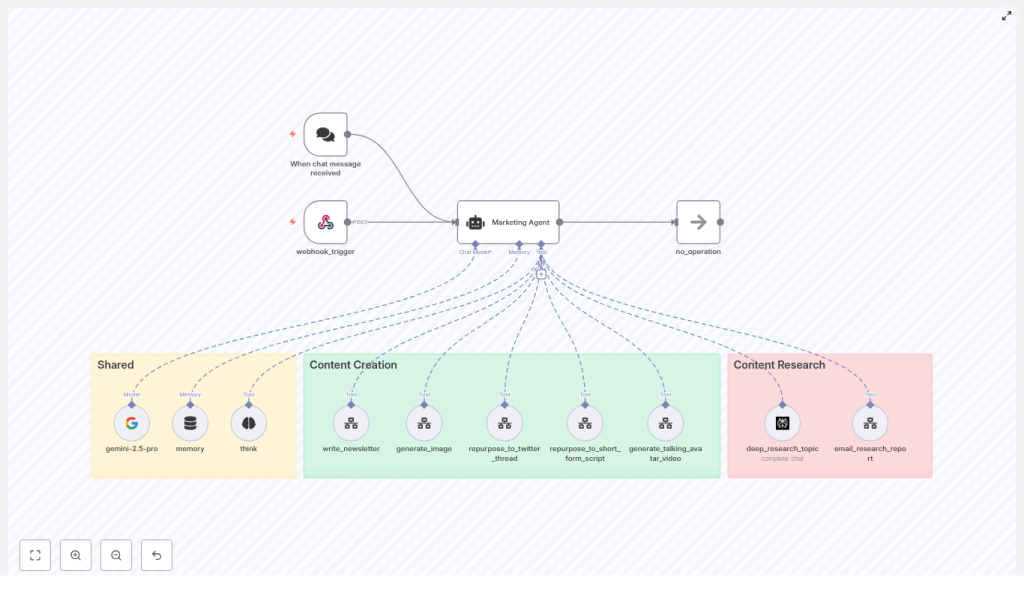
The Recap AI Marketing Agent acts as a central marketing automation layer in n8n. It listens to both webhook events and chat-based commands, then routes each request to a specialized AI agent that understands your brand, uses shared memory, and calls the appropriate tools.
Out of the box, the agent can:
- Write a daily newsletter (
write_newsletter) - Generate brand-aligned images (
generate_image) - Repurpose newsletter content into Twitter threads (
repurpose_to_twitter_thread) - Create scripts for short-form video content (
repurpose_to_short_form_script) - Produce talking avatar videos for featured stories (
generate_talking_avatar_video) - Conduct deep web research (
deep_research_topic) and distribute findings via email (email_research_report)
This makes the template suitable for teams that want a consistent, AI-driven marketing engine with minimal manual coordination.
Architecture and Design Principles
The workflow is structured around three logical groups of nodes that reflect how a mature marketing automation system should be designed: shared intelligence, content production, and research operations.
1. Shared Components
The shared layer contains the foundational intelligence and state management:
- Language model (gemini-2.5-pro) – The primary LLM used for copywriting, summarization, and script generation. It can be replaced with any compatible model available in your n8n environment.
- Memory buffer (
memoryBufferWindow) – Manages short-term context across interactions for a given day. The template uses a dynamic session key such asmarketing-agent-YYYY-MM-DD-1so that all tasks for that day share context while avoiding cross-day contamination. - Strategic planning tool (
think) – A planning utility that helps the agent break down complex requests and decide which tools to call in sequence.
2. Content Creation and Repurposing
This group includes all tools responsible for generating and transforming content:
write_newsletter– Creates the daily newsletter, leveraging input such as date and optional previous content.generate_image– Produces featured or supporting images aligned with your brand style.repurpose_to_twitter_thread– Converts newsletter content into structured Twitter threads.repurpose_to_short_form_script– Outputs concise scripts optimized for short-form video platforms.generate_talking_avatar_video– Generates talking avatar videos, typically for the top story or key announcements.
3. Research and Reporting
The research layer integrates external intelligence and email delivery:
deep_research_topic– Uses Perplexity Sonar to perform in-depth research on a given topic.email_research_report– Packages and sends research findings via email to designated recipients.
This separation of concerns makes the template easy to extend, monitor, and maintain.
Entry Points and Core Agent Logic
Webhook Trigger and Chat-based Trigger
The workflow exposes two primary entry mechanisms:
- Webhook trigger – Ideal for scheduled or programmatic automation, for example a daily cron job that initiates newsletter production with a payload such as
{"date":"2025-09-23"}. - When chat message received – Designed for interactive use via internal chat interfaces, enabling your team to request content, research, or repurposing tasks on demand.
Both triggers ultimately route into the same Marketing Agent node, which interprets intent and orchestrates the downstream tools.
The Marketing Agent Node
The Marketing Agent node is the central orchestrator. It is configured with a detailed system prompt that defines:
- Agent identity and role as a marketing assistant
- Available tools and when to use them
- Memory usage rules and session behavior
- Brand tone, style, and constraints
Based on the incoming request, the agent uses the planning tool and memory to determine which sub-workflows to call, in what order, and with which parameters. It also ensures that work is not duplicated across repeated requests within the same day.
Memory Configuration
The memoryBufferWindow node provides short-term, day-specific context. The template uses a session key pattern such as marketing-agent-YYYY-MM-DD-1 so that:
- All content and decisions for a single day share context.
- The agent can reference earlier outputs, such as the newsletter, when creating threads or scripts.
- Cross-day drift is mitigated, keeping each day’s content coherent and focused.
You can adjust the session key format to align with your locale or internal conventions, but the daily scoping is a deliberate design choice to maintain content quality.
Tool Sub-workflows
Each tool node like write_newsletter or generate_image represents a sub-workflow with a clearly defined contract. The Marketing Agent passes structured inputs, and the sub-workflow returns standardized outputs that can be reused elsewhere.
For example:
write_newsletterexpects a date and may optionally receive prior newsletter content or guidance.repurpose_to_twitter_threadconsumes the newsletter body and outputs a thread-ready sequence of tweets.generate_talking_avatar_videoreceives a script and metadata needed to render a video.
Step-by-step Setup in n8n
To operationalize the Recap AI Marketing Agent in your own environment, follow these configuration steps.
- Import the template
Load the workflow template into your n8n instance using the provided link or JSON import. - Configure credentials
In the n8n credential manager, add and link:- Language model credentials (Google PaLM / Gemini for
gemini-2.5-pro) - Perplexity API credentials for
deep_research_topic - Any additional services used by your sub-workflows (email provider, image generation APIs, video services, etc.)
- Language model credentials (Google PaLM / Gemini for
- Set environment variables and memory keys
Review environment values and confirm that thesessionKeyformula in the memory node matches your date formatting and naming conventions. - Test the webhook entry point
Trigger the webhook with a sample payload such as{"date":"2025-09-23"}and verify that:- The Marketing Agent node is called successfully.
- The language model responds properly.
- Downstream tools are invoked as expected.
- Customize the system prompt and brand voice
Adapt the agent’s system message to reflect your brand guidelines, legal requirements, tone, and any domain-specific constraints.
Example: Daily Operational Flow
The following illustrates a typical daily automation sequence using this template.
- A scheduler or external system calls the webhook with today’s date.
- The Marketing Agent loads the memory associated with today’s session key.
- The agent calls
write_newsletterto generate the primary newsletter content. - Once the newsletter is complete, the agent triggers:
repurpose_to_twitter_threadto create a Twitter threadrepurpose_to_short_form_scriptto output short-form video scripts
- If the workflow or user request specifies it:
generate_imageproduces featured images for the newsletter or social posts.generate_talking_avatar_videogenerates a talking avatar video for the top story or key highlight.
- For research-driven tasks, the agent invokes
deep_research_topic. If email delivery is requested, it then callsemail_research_reportto send a structured report to stakeholders.
Best Practices for Production Use
To run this template reliably in a professional or enterprise context, consider the following recommendations.
- Scope memory per day
Keep the memory window confined to a single day by using the daily session key pattern. This limits context drift and keeps outputs focused. - Refine the system prompt
Explicitly encode legal, compliance, and brand requirements in the agent’s system message, especially in regulated industries. - Validate sub-workflows individually
Before enabling full automation, test each sub-workflow (newsletter, images, research, etc.) in isolation to confirm inputs, outputs, and error handling. - Implement logging and observability
Persist outputs and success or failure states to a database, logging service, or cloud storage. This supports auditing, troubleshooting, and rollback if needed. - Control API usage and costs
Apply rate limits and usage budgets for external APIs and large language models. Estimate expected daily volume and configure safeguards accordingly.
Troubleshooting Common Issues
If you encounter issues during setup or execution, review the following checks.
- No response from the agent
Ensure that:- Language model credentials are valid and active.
- The Marketing Agent node is correctly wired to the model node.
- Network access to the model provider is not blocked.
- Memory not loading or persisting
Confirm that:- The
sessionKeyformula is correctly formatted and consistent across runs. - The memory window length is appropriate for your use case.
- The
- Sub-workflow failures
Check the execution logs for the relevant sub-workflow and verify:- All required inputs are present and correctly mapped.
- API credentials for external tools are configured and not expired.
- Error handling nodes or conditions are behaving as intended.
Security and Compliance Considerations
Because the Marketing Agent may handle sensitive content and research topics, security and compliance should be considered part of the design, not an afterthought.
- Secure credential management
Store API keys and secrets exclusively in n8n’s credential manager. Avoid embedding secrets directly in nodes or workflow variables. - Access control
Restrict workflow access using role-based permissions so that only authorized users can modify or trigger the automation. - Content review for regulated sectors
In industries such as healthcare, finance, or legal, introduce manual review steps or approval queues before publishing AI-generated content.
Extending and Customizing the Template
The modular structure of this n8n workflow makes it straightforward to extend as your marketing operations evolve.
- Connect to your CMS
Integrate with platforms like WordPress or Contentful to automatically publish newsletters, articles, or landing pages once content passes review. - Integrate collaboration tools
Use the chat trigger to surface drafts in Slack or Microsoft Teams, enabling human review, comments, and approvals within your existing communication channels. - Add analytics feedback loops
Attach analytics nodes to capture performance metrics for newsletters, threads, and videos. Feed this data back into the agent’s planning process to refine future content.
Conclusion and Next Steps
The Recap AI Marketing Agent template provides a robust, production-ready foundation for AI-driven marketing operations in n8n. By combining a memory-aware agent, specialized content tools, and integrated research capabilities, it reduces manual work while maintaining brand consistency and daily continuity.
To get started:
- Import the workflow into your n8n instance.
- Configure all required credentials and environment values.
- Run a test webhook with a sample date payload.
- Iterate on the agent’s system prompt to align with your brand and compliance needs.
If you require a tailored implementation, custom tools, or guidance on adapting the system prompt to complex organizational requirements, consider scheduling a consultation. A brief setup session is often enough to align the template with your team’s workflows and governance standards.
Need a guided walkthrough or help customizing this n8n template for your marketing team? Reach out or schedule a consultation to fine-tune the agent and streamline your automation stack.
