


Automating Employee Leaves with n8n & GraphQL
Every growing team eventually hits the same wall: manual leave tracking. Spreadsheets get messy, HR inboxes overflow, and managers spend more time chasing data than leading people. It is not just inefficient, it quietly drains focus from the work that really moves your business forward.
Automation changes that story. With a thoughtful workflow, your tools can handle the repetitive steps, your data can stay in sync, and you can reclaim time for higher value work. This is where n8n and GraphQL together become a powerful ally.
In this article, you will walk through a complete n8n workflow template that talks to an AWS AppSync GraphQL API, fetches employee leave data (regular and festival leaves), handles pagination behind the scenes, and cleans up temporary session files. Along the way, you will see how this template can become a building block for your HR automation stack, reporting pipelines, and broader integrations.
From manual tracking to scalable automation
Imagine never having to manually compile leave reports again, or copy data from an HR tool into a spreadsheet, or chase down who is off next week. This workflow is designed to be that quiet engine in the background, continuously feeding accurate leave data to wherever you need it.
At its core, the template:
- Accepts input from another n8n workflow, so it easily plugs into your existing automations.
- Reads a session file that contains an auth token and user email, then safely removes that file.
- Calls an AWS AppSync GraphQL API using either the LeaveByEmployee or ListFestivalLeaves operation.
- Handles pagination by looping through pages using
nextTokenuntil all items are collected. - Returns a clean, flat list of leave items ready for reports, dashboards, or notifications.
Real world uses include generating leave reports, syncing to Google Sheets or Airtable, feeding BI tools, or triggering Slack or email notifications when new leave entries appear. You can start small, then expand as your confidence with n8n grows.
Mindset first: building a reusable leave automation block
Instead of thinking of this as a single workflow that does one job, think of it as a reusable building block. You can call it from scheduled workflows, webhooks, or admin tools, and let it handle the heavy lifting of:
- Authenticating with your AppSync GraphQL API
- Choosing the right query based on what you want to fetch
- Handling pagination reliably
- Returning a predictable, structured list of leave items
This mindset is powerful. Once you have one solid building block like this, it becomes easier to chain multiple automations together. You start with leave reports, and before long, you have automated reminders, dashboards, and HR analytics, all powered by the same pattern.
The big picture: how the n8n workflow fits together
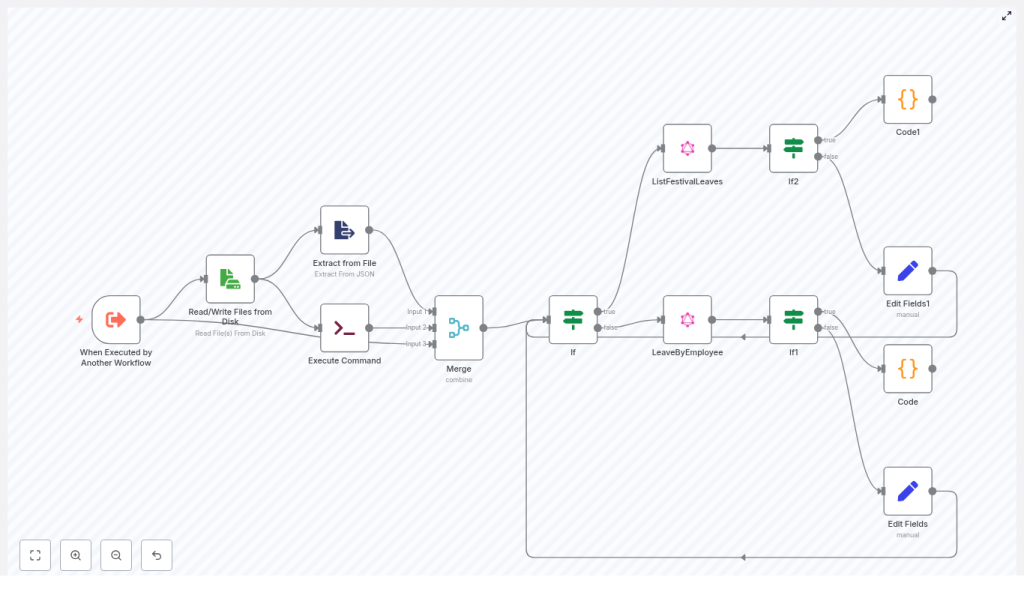
Here is the high level architecture of the template you will be working with:
- Trigger: Another workflow invokes this one with inputs such as
filename,adjustment_type,leave_type, andoperation_name. - Session handling: A file is read from disk to get the auth token and email, then cleaned up once used.
- Control flow: An If node decides which GraphQL operation to call, LeaveByEmployee or ListFestivalLeaves.
- GraphQL requests: GraphQL nodes talk to AWS AppSync, send the Authorization header, and support pagination using
nextToken. - Pagination merge: Custom Code nodes merge items from multiple pages into a single list.
- Final mapping: Set nodes arrange fields and metadata so downstream workflows can consume them easily.
Let us now walk through the journey node by node, so you can understand how each piece contributes to a smoother, more automated leave process.
Step 1: Let another workflow trigger this one
When Executed by Another Workflow
The entry point is the When Executed by Another Workflow trigger. This is what turns your leave fetcher into a reusable module.
It expects these inputs:
filename– the session file name that stores authentication and user context.adjustment_type– optional filter for leave adjustments.leave_type– type of leave you are interested in.operation_name– tells the workflow which GraphQL query to run.
You can call this trigger from a scheduled workflow, a webhook-driven endpoint, or any other n8n flow. For example, a daily scheduled workflow could pass a specific employee email and pull their latest leaves for reporting.
Step 2: Securely read and clean up the session file
Read/Write Files from Disk
The next step is a Read/Write Files from Disk node. It reads the session file whose name was provided by the trigger. If no name is provided, the template uses a default.
This session file usually contains:
auth_token– used as the Authorization header for AppSync.email– the user email that becomes a GraphQL variable, such asemployeeLeavesIdoremployeeFestivalLeavesId.
Extract from File
An Extract from File node then parses the JSON payload using fromJson. This is where the workflow cleanly pulls out the auth_token and email that will be used in subsequent GraphQL calls.
Execute Command (optional cleanup)
To keep your system tidy and reduce risk from leftover files, an Execute Command node runs a shell command to remove the session file:
rm -rf <fileName>If you prefer to keep files or manage cleanup differently, you can disable or remove this node. However, timely cleanup is a healthy habit, especially when dealing with sensitive tokens.
Merge (combine mode)
A Merge node with combineByPosition mode then brings together three streams:
- The original file read result
- The extracted JSON data
- The execute command output
By combining them by position, n8n keeps all related information aligned as a single stream that can be passed into the decision step.
Step 3: Choose which GraphQL operation to run
If (operation_name)
Next comes a key decision point. An If node checks the value of operation_name to determine which GraphQL query to execute.
- True branch: Runs
ListFestivalLeaves. - False branch: Runs
LeaveByEmployee.
This simple condition makes the workflow flexible. The same template can serve both regular leave queries and festival leave queries, just by changing the input parameter.
Step 4: Call the AWS AppSync GraphQL API
GraphQL nodes (LeaveByEmployee and ListFestivalLeaves)
Each branch has its own GraphQL node configured for AWS AppSync. They share a common pattern, with some differences in variables and operation names.
Key configuration details:
- Endpoint: something like
https://…appsync-api.us-east-2.amazonaws.com/graphql. - Authorization header: the
auth_tokenfrom the session file is injected into the header so AppSync can authenticate the request. - Variables:
- The
emailis used to setemployeeLeavesIdoremployeeFestivalLeavesId. adjustment_typecan be passed as a filter when present, so you can narrow down the results.
- The
- Pagination:
- The API returns
itemsand anextTokenfor pagination. - The workflow sets
limit: 999to fetch up to 999 items at a time. - When
nextTokenis present, it is fed back into subsequent calls until no more pages remain.
- The API returns
This is where the workflow connects your automation to your live HR data. Once configured, you can rely on it to fetch accurate leave information on demand.
Step 5: Handle pagination and merge all results
If1 / If2 for pagination checks
To make sure you never miss data that lives on later pages, the workflow uses additional If nodes to check the value of nextToken.
Each If node checks whether nextToken is empty. Both true and false branches are kept to support n8n’s parallel pagination pattern. This structure allows the workflow to gracefully handle multiple pages of results without you needing to manually track where you left off.
Code / Code1 nodes for aggregation
The real magic of pagination happens in the Code nodes. They aggregate items returned from each paginated response into a single, flat array.
The general idea is:
const allData = [];
let counter = 0;
do {  // read both true/false branch responses at current counter  // extract items and append to allData  // track if any branch returned a nextToken  // break when no more tokens
} while (true);
return allData;
The code loops over the available branch items, extracts:
data.LeaveByEmployee.itemsfor regular leaves, ordata.listFestivalLeaves.itemsfor festival leaves,
then accumulates them into a single array. Downstream nodes receive this clean list, which makes it easy to export, analyze, or notify on.
Once you understand this pattern, you can reuse it in other workflows that need to handle GraphQL pagination or similar APIs.
Step 6: Map fields for downstream workflows
Edit Fields / Set nodes
After pagination and aggregation, the workflow uses Edit Fields or Set nodes to prepare the output for the next step in your automation chain.
These nodes place values such as:
nextTokenauth_tokenoperation_nameleave_typeemailadjustment_type
into the item JSON so that a parent workflow, or a final consumer, has full context.
Think of this as a small mapping layer that turns raw API responses into structured, automation friendly data.
How pagination works in practice
This template uses a practical approach for APIs that return nextToken. n8n executes repeated GraphQL calls until nextToken is empty, and the Code nodes merge all the results into a single list.
Here are some useful tips when working with this pattern:
- Respect rate limits: If AppSync starts throttling requests, add a small delay between iterations or implement exponential backoff to keep things stable.
- Adjust the limit: A limit of
999is efficient, but if you expect very large result sets or have memory constraints, reduce the limit to something more conservative. - Secure your tokens: Avoid long term credentials in plain text files. Prefer n8n credentials or encrypted storage, and use temporary files only when necessary.
With this pattern in place, you no longer need to worry about how many pages of leave data exist. The workflow quietly fetches everything it needs.
Security and reliability best practices
As your automations grow, good security and reliability practices become essential. This template already nudges you in that direction, and you can take it even further.
- Use n8n credentials where possible: Store auth tokens in n8n credentials instead of temporary files. If you use session files, encrypt them and clean them up promptly, as the Execute Command node does.
- Scope your AppSync access: Use a dedicated AppSync API key or Cognito token with minimal privileges that only allow the required queries.
- Plan for failures: Log failed requests and add retry logic. You can use an Execute Workflow node or a Function node to re-queue failed pages or rerun sections of the flow.
Building secure, resilient automations pays off quickly as more teams start relying on them.
Growing the workflow: common extensions and ideas
Once you have this leave fetcher working, you can extend it into a richer HR automation system. Here are some common directions people take:
- Export to Google Sheets or Airtable: Add a transform node to map fields and then use the Google Sheets or Airtable node to push aggregated leave items for reporting.
- Send summaries via email or Slack: Use a Code node to compute totals or summaries, then send them with the Email or Slack node to managers or HR.
- Filter by dates or project: Either enhance the GraphQL filter input or apply array filtering in a Code node after aggregation.
- Turn it into a microservice: Instead of relying on temporary files, expose a Webhook node as an entry point that accepts JSON payloads with auth and filter parameters.
Each extension builds on the same solid base, so you are not starting from scratch. You are iterating and improving, which is exactly how scalable automation grows.
Troubleshooting: quick checks when something feels off
As you experiment and customize, you might hit a few bumps. Here is a short checklist to help you move forward quickly:
- 403 or 401 errors: Verify that the Authorization token is valid and correctly added to the GraphQL header.
- Empty results: Confirm that
employeeLeavesIdoremployeeFestivalLeavesIdmatches the email format expected by your AppSync keys. - Long running executions or timeouts: Lower the
limit, introduce delays, or implement a resume-from-token pattern that storesnextTokenin a database for later continuation.
Each issue you solve here deepens your understanding and makes future automations even easier to build.
Example: add a Google Sheets export in minutes
To see how simple it can be to extend this workflow, here is a quick example of adding a Google Sheets export after the aggregation step:
1) After the Code node (aggregated items), add a Set node to map fields such as:  - date  - name  - leave_length

2) Add a Google Sheets node and configure it to "Append row(s)" using the mapped fields.

3) Optionally, add a final Webhook or Email node to confirm completion or return a summary.
With just a few nodes, your automated leave fetcher becomes a live reporting pipeline into a spreadsheet that your team can use every day.
Bringing it all together
This n8n workflow template shows a robust pattern for working with a GraphQL API, choosing between operations at runtime, handling pagination, and managing temporary credentials responsibly. It is a practical foundation for HR automation, leave reporting, and any integration that needs to fetch and merge paginated lists.
The real opportunity lies in what you build on top of it. Start in a test environment, plug in your own AppSync endpoint and credentials, and run a few sample executions. Then, step by step, add error handling, exports, notifications, and filters that
