


n8n Agent: The Story Of A Twitter Reply Guy Workflow
The marketer who was tired of missing the right conversations
By the time Sam opened Slack each morning, the most interesting Twitter conversations were already over.
Sam worked as a marketer for a growing AI tools directory, a carefully curated collection of AI products organized into clear categories. The team knew that many great users discovered them through social media, especially when someone asked on Twitter, “What is the best AI tool for X?” or “Any recommendations for AI tools that do Y?”
The problem was simple and painful: those questions were happening constantly, and Sam could not keep up. Slack alerts from their social listening tool poured into a channel: new tweets, threads, mentions, and random noise. By the time Sam clicked into a promising tweet, either someone else had already replied, or the conversation had cooled off.
Sam did not want a spammy bot that auto-replied to everything. They wanted something smarter. A kind of “Twitter Reply Guy” that would:
- Notice genuinely useful questions about AI tools
- Decide whether it was appropriate to reply
- Pick the most relevant page from their AI tools directory
- Write a short, friendly, non-annoying reply
- Report back to Slack so the team could see what was happening
That was when Sam discovered an n8n workflow template called the “Twitter Reply Guy” agent.
Discovering the Twitter Reply Guy workflow in n8n
Sam had used n8n before for basic automations, but this template felt different. It combined Slack triggers, filters, HTTP requests, LangChain LLM prompts, and Twitter API nodes into a single end-to-end automation designed for safe, targeted outreach.
The pitch was straightforward: connect Slack, Twitter, and an AI Tools directory API, then let an LLM decide which tweets deserve a reply. No more drowning in alerts. No more manually opening every single tweet.
Sam imagined a future where the AI Tools directory replied only when it could actually help, with short messages that linked directly to the best category page. The key was quality over volume, and the workflow promised exactly that.
How the idea turned into a working n8n agent
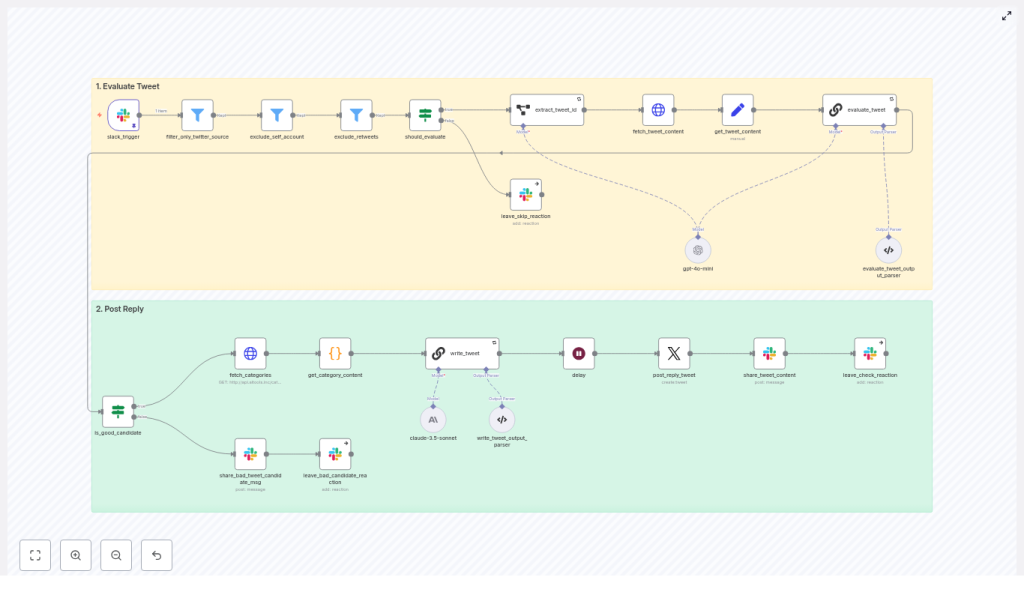
Before Sam imported the template, they sketched the high-level architecture on a whiteboard. The workflow had two big phases, and understanding them made everything click.
- Phase 1 – Evaluate Tweet Listen for Slack webhook alerts, filter for Twitter-origin messages, fetch full tweet content, and use an LLM to decide if the tweet is a good candidate for a reply.
- Phase 2 – Post Reply For tweets that pass the checks, fetch AI Tools categories, ask an LLM to pick the best category and write a reply, delay slightly to respect rate limits, then post the reply on Twitter and log everything back to Slack.
It felt more like orchestrating a careful conversation partner than building a bot. Sam imported the template into n8n and began walking through the nodes, one by one, as if they were characters in the story.
When Slack pings, the story begins
Listening to Slack: the spark of every interaction
Every reply started with a single Slack alert. The slack_trigger node was the entry point. Sam configured it to receive webhook alerts from their social listening or monitoring setup. Each payload carried metadata about a tweet, including an “Open on web” link that pointed directly to the tweet on X (Twitter).
Sam realized this link was crucial. Later in the flow, the workflow would extract the tweet ID from that URL, then call Twitter’s API to get full details. But first, the agent needed to make sure it was dealing with the right kind of alert.
Filtering the noise: only real tweets allowed
The next few nodes felt like a bouncer at the door of a party.
- filter_only_twitter_source This node inspected the Slack attachment fields and checked that the Source field was “X (Twitter)”. If the alert was from anywhere else, it simply stopped. No Reddit, no blogs, no random integrations slipping through.
- exclude_self_account Sam did not want the brand replying to its own tweets. This node filtered out tweets authored by the owner account, such as
@aiden_tooleyor whichever handle was configured. The agent would never talk to itself. - exclude_retweets Retweets usually were not good candidates for a thoughtful reply. This node looked for “RT” in the message text and removed those from the queue. The goal was to focus on original posts and direct questions.
Even at this early stage, Sam could see how the workflow protected against low-quality interactions. But there was one more gate before the LLM got involved.
A quick gate before deeper evaluation
The should_evaluate node acted as a lightweight decision point. It decided whether to continue or to stop the workflow early. If the gate failed, the workflow reacted in Slack with an “x” emoji to mark the tweet as skipped. If it passed, the tweet moved forward, and the workflow prepared to fetch the full content.
Sam liked this visible feedback. The Slack reactions would give the team a simple way to scan which tweets were considered and which were discarded, without clicking through each one.
Diving into the tweet: content, context, and safety
Extracting and fetching the tweet details
Once a tweet passed the initial filters, the workflow went hunting for details.
- extract_tweet_id This node parsed the “Open on web” link from the Slack payload and pulled out the tweet ID. Without that ID, nothing else could happen.
- fetch_tweet_content Using the ID, the workflow called Twitter’s syndication endpoint and retrieved the full JSON payload. That included the tweet text, author, replies, and other metadata.
- get_tweet_content (Set node) To keep things clean for the LLM, this node normalized the tweet text into a
tweet_contentvariable. Downstream prompts would not have to guess where the text lived.
Now the agent had the actual words the user had written. It was time to decide if a reply from the AI tools directory would be helpful or inappropriate.
The critical judgment call: should we reply at all?
The heart of the evaluation was the evaluate_tweet node, a LangChain chain powered by an LLM. Sam opened the prompt and read it carefully. It did more than just ask “Is this tweet relevant?”
The prompt instructed the model to:
- Decide whether the tweet was a good candidate for a reply that linked to the AI tools directory
- Return a clear boolean flag named
is_tweet_good_reply_candidate - Provide a chain of thought explaining the reasoning
- Enforce strict safety rules, such as:
- No replies to harmful or nefarious requests
- Avoid replying to tweets that start with “@” if they were clearly replies in an ongoing conversation
For Sam, this was the turning point. Instead of a blind bot, the workflow used an LLM to act as a cautious editor, deciding when silence was better than speaking.
Parsing the LLM’s decision and closing the loop in Slack
The next node, evaluate_tweet_output_parser, took the LLM’s response and shaped it into structured JSON. It extracted two key fields:
chainOfThought– the reasoning behind the decisionis_tweet_good_reply_candidate– true or false
If the tweet was not a good candidate, the workflow would post a message into the original Slack thread explaining why, attach the LLM’s reasoning, and react with an “x”. Sam liked that every no was documented. The team could audit the decisions and refine the prompts later.
If the flag was true, though, the story continued. Now the agent needed to figure out what to share.
Finding the right resource: connecting to the AI tools directory
Pulling in the categories from the AI Tools API
For good replies, the workflow moved into the discovery phase.
- fetch_categories This node called the AI Tools categories API at
http://api.aitools.inc/categoriesto retrieve a list of available category pages. Each category included a title, description, and URL. - get_category_content A small code node then formatted that list into a structured string. It joined together the category title, a concise description, and the URL in a way that was easy for the LLM to read in the next prompt.
At this point, the workflow knew two big things: what the person on Twitter had said, and what pages existed in the AI tools directory. It was time to match them.
Letting the LLM write the perfect short reply
The write_tweet node was another LangChain chain, but this time focused on creation rather than evaluation. The prompt gave the LLM both the tweet_content and the formatted list of categories, then asked it to:
- Choose a single best category URL from the list
- Write a short, helpful, and friendly reply
- Follow specific style rules:
- Keep it short and direct
- Avoid starting with the word “check”
- Prefer phrases like “may help” over “could”
- Always include a valid URL from the provided category list
Sam tested a few sample tweets. The replies were surprisingly natural. They read like a helpful person dropping into a conversation with a relevant link, not a stiff promotional script.
Verifying the reply before it goes live
To keep things safe and structured, the write_tweet_output_parser node validated the LLM’s output. It checked that:
- The response was a structured object
- The final tweet content included a real URL that came from the category list
- The chain of thought explaining why that category was chosen was captured
Only once everything passed these checks did the workflow prepare to actually reply on Twitter.
From decision to action: posting on Twitter and reporting back
Respecting rate limits and posting the reply
Sam knew Twitter could be strict about automation. The workflow handled this with a small but important step.
- delay A short wait, often around 65 seconds, gave breathing room between actions. This helped avoid triggering Twitter rate limits or suspicious spikes in activity.
- post_reply_tweet Using Twitter OAuth2 credentials and the previously extracted tweet ID as
inReplyToStatusId, this node posted the final reply. The agent was no longer just thinking about replies, it was actually joining conversations in real time.
Closing the loop: sharing outcomes in Slack
Sam did not want a black box. They wanted visibility into every decision. The final part of the workflow handled that.
- share_tweet_content and reactions
- For successful replies, the workflow posted the reply text and the reasoning into the original Slack thread, then added a checkmark reaction to show success.
- For skipped or rejected tweets, it left an “x” reaction and shared the chain of thought explaining why the tweet was not a good candidate.
Within a day of turning the workflow on, Sam could scroll through the Slack channel and see a clear narrative: which tweets were evaluated, which were answered, and which were intentionally left alone.
Staying safe, compliant, and non-spammy
Before rolling this out fully, Sam double checked the safety and moderation aspects. The workflow already had strong guardrails, but it helped to summarize them for the team.
- Safety by design The evaluation prompt explicitly avoided harmful or nefarious requests. The agent refused to reply when the tweet asked for assistance with wrongdoing or unethical behavior.
- Human-in-the-loop options For borderline or high-visibility tweets, Sam considered adding an approval step. Instead of auto-posting, the workflow could send the draft reply into Slack and wait for a human reaction or button click.
- Rate limiting Delays, backoff strategies, and careful monitoring helped respect Twitter API limits and avoid temporary blocks.
- Avoiding spammy behavior The workflow focused on helpful, low-volume replies, not mass posting. Sam configured it to prioritize high-value questions or influential accounts, keeping the brand’s presence thoughtful rather than noisy.
How Sam monitored and improved the automation
Once the agent was live, Sam treated it like a junior teammate that needed feedback and metrics.
- Logging decisions in Slack The LLM’s chain-of-thought was logged directly into Slack threads. This gave transparency into why a tweet was answered or skipped and made it easier to tune prompts.
- Tracking reply performance Sam started tracking basic metrics:
- Number of replies posted
- Engagement, such as likes, follows, and replies
- Clicks and downstream traffic to AI tools category pages
- Error and retry visibility HTTP and API errors were logged so Sam could fix OAuth issues, parsing problems, or rate limit errors quickly.
Best practices Sam followed while scaling the agent
As the workflow proved itself, Sam wrote down a few best practices for the rest of the team.
- Credential management Store Slack, Twitter, and OpenAI or Anthropic keys securely in n8n credentials and rotate them regularly.
- Prompt tuning Iterate on both evaluation and reply prompts, as well as the output parsers, to reduce false positives and keep replies high quality.
- A/B testing reply styles Small changes in phrasing could improve click-through rates. Sam experimented with variations in tone and structure to find what resonated best.
- Human review for high-stakes tweets For big accounts or sensitive topics, Sam added a human approval step instead of auto-posting.
- Scaling carefully As alert volume grew, Sam planned to shard or queue tweets, using additional delays or queues to stay within rate limits and maintain quality.
When things go wrong: how Sam debugged the workflow
Not everything worked perfectly on the first try. A few early issues taught Sam how to troubleshoot efficiently.
- Missing tweet ID When the workflow failed to reply, Sam checked that the Slack payload actually contained the “Open on web” link and that the extract_tweet_id node parsed it correctly.
- LLM hallucinations If the model tried to invent URLs, Sam tightened the output parser and made sure the prompt included the actual category URLs directly, instructing the LLM to only pick from those.
- Posting errors When Twitter replies failed, the fix was usually in OAuth2 scopes or formatting of
inReplyToStatusId. Once corrected, the replies went through reliably. - Rate-limit errors Increasing the delay node values, adding exponential backoff, and queuing retries helped smooth out spikes.
The resolution: a quiet but powerful shift in engagement
A few weeks later, Sam noticed something subtle but important. The AI tools directory was appearing in more Twitter conversations where it truly belonged. Users were clicking through to category pages that matched their questions. The Slack channel, once chaotic, now told a clean story of evaluated tweets, thoughtful replies, and clear reasons for skipped posts.
The n8n “Twitter Reply Guy” workflow had become a reliable agent, not a noisy bot. It combined event triggers, filters, HTTP calls, and LLM-driven decision making to create a safe
