


Automate Birthday Reminders To Telegram With n8n, Weaviate & OpenAI
Ever forgotten a birthday you really meant to remember? It happens. The good news is, you can completely offload that mental load to an automation that quietly does the work for you.
In this guide, we will walk through a ready-to-use n8n workflow template that:
- Captures birthday data via a webhook
- Uses OpenAI embeddings and Weaviate for smart, fuzzy lookups
- Generates personalized birthday messages with a RAG agent
- Sends reminders to Telegram and logs everything in Google Sheets
- Alerts you in Slack if something goes wrong
Think of it as your always-on birthday assistant that never forgets, never gets tired, and even remembers that your friend “loves coffee and vintage books.”
What This n8n Birthday Reminder Workflow Actually Does
Let us start with the big picture. This workflow takes structured birthday info from your app or form, enriches it with context, and turns it into a friendly, human-sounding Telegram message. Along the way it:
- Stores birthday-related context in a Weaviate vector index for future lookups
- Uses OpenAI to generate embeddings and birthday messages
- Keeps an audit trail in Google Sheets
- Sends Slack alerts if the RAG agent encounters an error
Once you plug it into your system, new birthday entries are handled automatically. No more manual reminders, no more last-minute scrambling.
When You Should Use This Template
This workflow is a great fit if you:
- Run a community, membership site, or customer-facing product where birthdays matter
- Want personalized messages instead of generic “Happy Birthday!” texts
- Use Telegram as a main communication channel (or want to start)
- Like the idea of having logs and alerts so you can trust your automation
In short, if you are tired of spreadsheets, sticky notes, or trying to remember dates in your head, this workflow will make your life much easier.
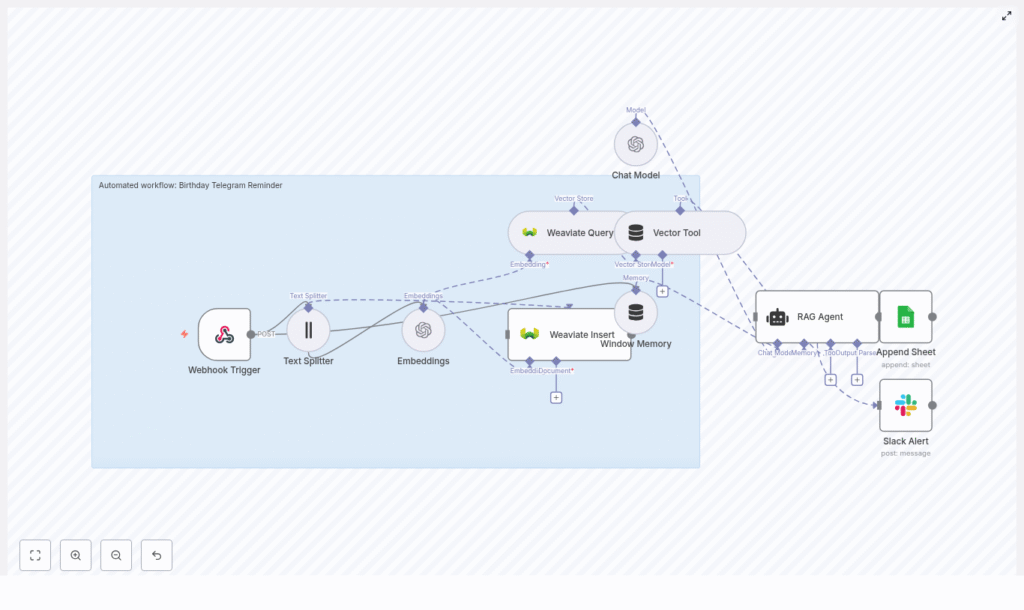
How The Workflow Is Built: High-Level Architecture
Here is what is happening behind the scenes, step by step, in n8n:
- Webhook Trigger – Receives birthday data via a POST request on a path like
birthday-telegram-reminder. - Text Splitter – Breaks long notes or context into smaller chunks so they can be embedded efficiently.
- Embeddings (OpenAI) – Uses an OpenAI embeddings model to convert each text chunk into vectors.
- Weaviate Insert – Stores those vectors in a Weaviate index named
birthday_telegram_reminder. - Weaviate Query + Vector Tool – Later retrieves relevant context for a given person or birthday.
- Window Memory – Keeps recent context available so the agent can maintain continuity.
- Chat Model (OpenAI) – Generates the actual birthday message text.
- RAG Agent – Coordinates the retrieval and generation to create a well-informed message.
- Append Sheet (Google Sheets) – Logs every generated message in a “Log” sheet.
- Slack Alert – Sends a message to Slack if the RAG agent hits an error.
If you want, you can add a Telegram node at the end so the message is sent directly to the person’s Telegram account using their telegram_id.
What You Need Before You Start
Before importing the template, make sure you have:
- An n8n instance (cloud or self-hosted)
- An OpenAI API key for embeddings and chat
- A Weaviate instance (cloud or self-hosted) plus an API key
- A Telegram bot (optional, but required if you want to send messages directly from n8n)
- A Google Sheets account and a Sheet ID for logs
- A Slack workspace and a bot token for alerts
End-To-End Flow: What Happens When A Birthday Is Added
To make this concrete, here is how the workflow behaves when your app sends a new birthday payload.
- Your app sends a POST request to the n8n webhook URL.
- The Webhook Trigger node receives the payload and passes it to the Text Splitter.
- The Text Splitter breaks long notes into chunks, and the Embeddings node turns those chunks into vectors.
- Weaviate stores these vectors in the
birthday_telegram_reminderindex, along with metadata like name or Telegram ID. - When it is time to generate a reminder, the RAG Agent queries Weaviate via the Vector Tool, pulls relevant context, and sends it to the Chat Model.
- The Chat Model generates a personalized message, for example:
“Happy Birthday, Jane! Hope you have an amazing day, maybe treat yourself to a great cup of coffee!” - The final message is appended to your Google Sheet for logging.
- If any part of the RAG step fails, the onError path triggers the Slack Alert node and posts details to
#alerts. - Optionally, a Telegram node can send that message directly to the stored
telegram_id.
Once configured, the whole process runs quietly in the background while you focus on everything else.
Step-By-Step Setup In n8n
1. Import The n8n Template
Start by importing the JSON workflow into your n8n instance. The template includes all the nodes and their connections, so you do not have to build it from scratch.
After importing:
- Open the workflow
- Click into each node
- Set the credentials and adjust parameters where needed
2. Configure Your Credentials
Next, connect the template to your actual services:
- OpenAI – Add your API key and assign it to both the Embeddings node and the Chat Model node.
- Weaviate – Set your Weaviate endpoint and API key. Make sure the index
birthday_telegram_reminderexists or allow the insert node to create it. - Google Sheets – Configure OAuth credentials, then update the Append Sheet node with your
SHEET_ID. - Slack – Add a bot token and set the channel (for example
#alerts) in the Slack Alert node.
3. Map The Webhook Payload
The Webhook Trigger exposes a POST endpoint at the path birthday-telegram-reminder. A typical request body might look like:
{  "name": "Jane Doe",  "date": "1990-09-05",  "notes": "Loves coffee and vintage books",  "timezone": "Europe/Berlin",  "telegram_id": "123456789"
}
You can map these fields in a few ways:
- Send
notesthrough the Text Splitter and Embeddings so they are stored in Weaviate for future context. - Pass
name,date,timezone, andtelegram_iddirectly into the RAG Agent prompt to generate a personalized message right away.
Feel free to adapt the payload format to match your app, as long as you update the node mappings accordingly.
4. Tune Chunking & Embeddings
The Text Splitter and Embeddings are where you control how much context is stored and how it is processed.
- Text Splitter – Default values are
chunkSize = 400andchunkOverlap = 40. - Embeddings – The default model is
text-embedding-3-small, which offers a good cost-quality balance.
If your notes are usually short, you might reduce chunk size. If you have richer notes or more detailed histories, you can keep or increase the chunk size. Need higher semantic accuracy? Switch to a larger embeddings model, keeping in mind that costs will increase.
5. Customize The RAG Agent Prompt
The RAG Agent is where the “personality” of your birthday messages lives.
By default, the system message is:
You are an assistant for Birthday Telegram Reminder
You can edit this to match your use case. For example:
- More formal: “Generate polite birthday messages for professional contacts.”
- More casual: “Create friendly short messages suitable for Telegram.”
You can also adjust tone, length, or formatting. Want short messages only? Add that. Want the message to reference specific interests from the notes? Mention that in the prompt.
6. Set Up Logging & Error Handling
Two things help you trust an automation: logs and alerts. This workflow includes both.
- Google Sheets logging – Successful outputs are appended to your chosen Google Sheet, in a sheet named Log. This gives you an easy audit trail of what was sent and when.
- Slack error alerts – If the RAG Agent fails, the onError branch sends a detailed message to the Slack Alert node, which posts in your selected channel (for example
#alerts).
You can extend this by adding more channels, email notifications, or even an incident-handling workflow if you want a more robust setup.
Best Practices For This Birthday Reminder Workflow
To keep your automation reliable, cost-effective, and privacy-conscious, keep these tips in mind:
- Be careful with PII – Store only non-sensitive context in Weaviate if possible. If you have to store personally identifiable information, consider encrypting it and make sure you comply with your privacy policies.
- Watch your OpenAI usage – Embeddings and chat calls can add up. Batch operations where possible and monitor usage regularly.
- Version your prompts – When you tweak the RAG prompt, keep a simple changelog in your repo or documentation so you can track how tone and output evolve.
- Clean up the vector store – Use a retention policy in Weaviate to remove or archive outdated entries. This keeps your index relevant and can improve retrieval performance.
Troubleshooting Common Issues
If something is not working as expected, here are some quick checks you can run:
- No data appears in Weaviate
Confirm your API credentials, endpoint, and that the index name is exactlybirthday_telegram_reminder. - RAG outputs are low quality
Try refining your prompt, increasing the amount of retrieved context, or using a more capable chat model. - Google Sheets append fails
Make sure your OAuth token has write access and that theSHEET_IDand sheet name are correct. - Slack alerts do not show up
Check bot permissions, verify the channel name, and confirm the bot is actually in that channel.
Ideas To Extend This Workflow
Once you have the basic reminder working, you can take it further. Here are some practical extensions:
- Direct Telegram delivery – Add a Telegram node after the RAG Agent and send the generated message straight to the user’s
telegram_id. - Admin dashboard – Build a simple dashboard that lists upcoming birthdays by querying Weaviate and presenting the data in a UI or a Google Sheet.
- Scheduled reminders – Use a scheduled trigger to run daily checks and send reminders the day before or on the birthday.
- Multi-language support – Add logic in the prompt so the RAG Agent generates messages in the recipient’s language, based on a language field in your payload.
Security & Privacy Checklist
Since this workflow touches user data and external services, it is worth hardening it a bit.
- Rotate API keys regularly and store them as environment variables, not in plaintext inside nodes.
- Minimize the amount of PII stored in vector databases. If you must store it, encrypt sensitive fields and decrypt only when needed.
- Limit access to your Google Sheet to service accounts or specific users, and keep share permissions tight.
Ready To Put Birthday Reminders On Autopilot?
If you are ready to stop worrying about forgotten birthdays, here is a simple way to get started:
- Import the workflow template into your n8n instance.
- Set your OpenAI, Weaviate, Google Sheets, Telegram (optional), and Slack credentials.
- Replace the
SHEET_IDin the Append Sheet node. - Send a test POST request to
/webhook/birthday-telegram-reminderwith a sample payload.
From there, you can tweak the tone of the messages, refine the prompts, and gradually add features like scheduling or multi-language support.
Get started now: import the workflow, plug in your API credentials and Sheet ID, and send a test birthday payload to your webhook. You will have your first automated Telegram birthday reminder in minutes.
Need help tailoring this to your team or product? Reach out any time. You can extend this template with scheduled triggers, direct Telegram delivery, or multi-language messaging, and we are happy to guide you through it.
