


Build an EV Charging Station Locator with n8n and Vector Embeddings
Designing a high quality EV charging station locator requires more than a simple keyword search. With n8n, vector embeddings, and a vector database such as Supabase, you can deliver fast, contextual, and highly relevant search results for drivers in real time. This guide explains the architecture, key n8n nodes, and recommended practices for building a production ready EV charging station locator workflow.
Why Vector Embeddings for EV Charging Station Search
Users rarely search with exact keywords. Instead, they ask questions like:
- “fastest DC charger near me with CCS”
- “stations on my route with free parking”
Traditional text or SQL filters struggle with these conversational queries. Vector embeddings solve this by converting station descriptions, metadata, and features into numerical vectors. A similarity search in a vector store can then retrieve the most relevant stations even when the query does not match stored text exactly.
Using embeddings with a vector database enables:
- Semantic search across descriptions, tags, and amenities
- Robust handling of natural language queries
- Flexible ranking that combines semantics, distance, and business rules
Solution Architecture
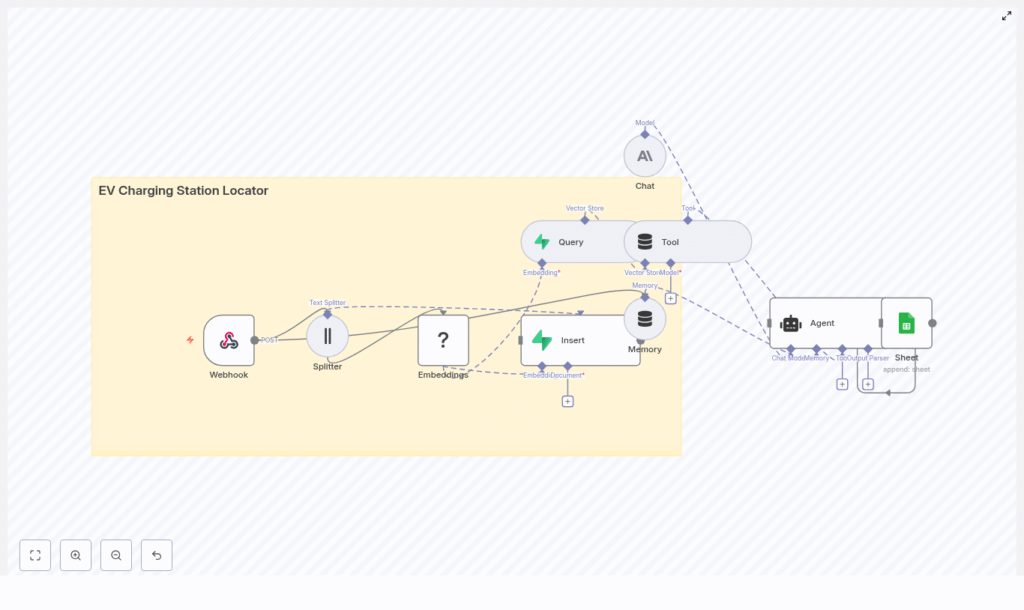
The n8n workflow integrates several components to support both data ingestion and real time user queries:
- Webhook node – entry point for station data and user search requests
- Text Splitter – prepares text chunks for embedding
- Hugging Face Embeddings – converts text into dense vectors
- Supabase Vector Store – persists vectors and metadata for similarity search
- Query node + Tool – runs vector similarity queries against Supabase
- Anthropic Chat + Memory (optional) – conversational agent that interprets queries and formats responses
- Google Sheets – logging, auditing, and analytics for queries and results
This architecture supports two primary flows:
- Batch ingestion – import and index new or updated charging station data
- Real time search – process user queries and return ranked results
Core Workflow Design in n8n
1. Data and Query Ingestion via Webhook
The workflow starts with an n8n Webhook node, for example at POST /ev_charging_station_locator. This endpoint can accept either station records or user search requests. For station ingestion, a typical JSON payload might look like:
{  "station_id": "S-1001",  "name": "Downtown Fast Charge",  "lat": 37.7749,  "lon": -122.4194,  "connectors": ["CCS", "CHAdeMO"],  "power_kW": 150,  "price": "0.40/kWh",  "tags": "fast,public,24/7",  "description": "150 kW DC fast charger near city center. Free parking for 2 hours."
}
Typical fields include:
station_id– unique identifiername,addresslat,lon– coordinates for geospatial filteringconnectors– array of connector types, for example CCS, CHAdeMOpower_kW,price,availability_notedescription,tags– free text for semantic search
For user queries, the same webhook can receive a query string, user coordinates, and optional filters such as connector type or minimum power.
2. Preparing Text with a Text Splitter
Long text fields, such as detailed descriptions or multi station CSV content, are routed through a Text Splitter node. The splitter divides content into smaller chunks that are compatible with embedding models, for example:
chunkSizearound 400 tokenschunkOverlaparound 40 tokens
This chunking strategy keeps embeddings both accurate and efficient and avoids truncation issues on large documents.
3. Generating Embeddings with Hugging Face
Each text chunk is sent to a Hugging Face Embeddings node. The node converts the text into a vector representation suitable for semantic search.
Key considerations:
- Select an embedding model optimized for semantic similarity search.
- Ensure the model license and hosting setup align with your compliance and latency requirements.
- Keep the vector dimension consistent with your Supabase vector index configuration.
4. Persisting Vectors in Supabase
The resulting vectors and associated metadata are written to a Supabase Vector Store. Typical metadata includes:
station_idlat,lonconnectors,power_kW,price- Original text content (description, tags, name)
Create an index, for example ev_charging_station_locator, and configure it to match the embedding dimension and similarity metric used by your Hugging Face model. This index supports fast approximate nearest neighbor searches.
5. Running Similarity Queries and Returning Results
For user searches, the workflow uses a Query node to execute similarity queries against Supabase. The node retrieves the top k candidate vectors that are most similar to the user query embedding.
The results are then passed through a Tool node into an AI Agent, typically implemented with Anthropic Chat and Memory. The agent can:
- Interpret the user query and extract filters (for example connector type, minimum power, radius).
- Apply business logic, such as prioritizing free parking or specific networks.
- Format the final response for the frontend, including station details and map links.
6. Optional Conversation Handling and Logging
To support multi turn interactions, combine Anthropic Chat with an n8n Memory node. This allows the system to remember:
- User vehicle connector type
- Preferred charging speed
- Previously selected locations or routes
In parallel, a Google Sheets node can log incoming queries, agent responses, and key metrics for auditing and analytics. This is useful for monitoring performance, debugging, and improving ranking rules over time.
Key Implementation Considerations
Geolocation and Distance Filtering
Vector similarity identifies stations that are conceptually relevant, but EV drivers also care about distance. For queries such as “nearest CCS charger”, combine:
- Semantic similarity from the vector store
- Geospatial filtering and ranking by distance
Store latitude and longitude as metadata in Supabase. Then:
- Pre filter by bounding box around the user coordinates to reduce the candidate set.
- Compute great circle distance (for example Haversine formula) in the agent logic or in a separate function node.
- Re rank the candidate stations by a combination of distance and relevance score.
Connector Compatibility and Power Rules
To ensure that recommendations are usable for the driver, maintain structured metadata for:
connectorsas an array of stringspower_kWas a numeric field
The agent or a dedicated filter node can then enforce rules such as:
- Connector type must include the user requested connector.
power_kWmust be greater than or equal to a user specified minimum.
Batch Ingestion vs Real Time Updates
Most production deployments need both scheduled and real time data updates:
- Batch ingestion Use a scheduled workflow or external ETL job to pull data from public datasets or internal systems, chunk the content, generate embeddings, and perform bulk inserts into Supabase.
- Real time ingestion For admin updates or user contributed stations, call the webhook to insert or update a single station record and regenerate its embeddings.
Best Practices for Performance and Reliability
- Model selection Choose an embeddings model that balances quality, latency, and cost. Smaller models are cheaper and faster but may provide less nuanced results.
- Chunking strategy Keep
chunkSizearound 300-500 tokens with modest overlap. Excessive overlap increases storage and query cost without significant quality gains. - Vector index configuration Align Supabase vector index settings (for example HNSW, pgvector parameters) with your embedding dimension and query volume. Tune parameters for recall vs speed trade offs.
- Geospatial pre filtering Before running similarity search, restrict candidates by a latitude/longitude radius or bounding box. This reduces query time and improves result relevance.
- Security Protect the webhook with API keys or OAuth, validate incoming payloads, and sanitize user inputs to prevent injection or malformed data issues.
Troubleshooting Common Issues
1. Missing or Low Quality Matches
If users receive irrelevant or empty results:
- Review chunking parameters to ensure that important context is not split incorrectly.
- Verify that all critical metadata (especially coordinates and connectors) is present.
- Experiment with different embedding models or adjust
top_kand similarity thresholds.
2. Slow Query Performance
When queries are slow under load:
- Apply geospatial pre filtering before vector similarity to limit candidate sets.
- Ensure your vector index is properly configured and indexed.
- Scale up Supabase or your vector DB resources as needed, and tune ANN index parameters for your workload.
3. Duplicate Station Records
To avoid duplicates in search results:
- Use
station_idas a unique key and perform upserts instead of blind inserts. - Optionally compare coordinates and station names to detect near duplicates.
- Update existing records and regenerate embeddings when station data changes.
Example End to End Query Flow
Consider the user query: “Find DC fast chargers with CCS within 5 km”. A typical n8n flow is:
- The user query and location are sent to the webhook.
- The agent interprets the request and extracts:
- Connector type =
CCS - Charging type = DC fast
- Radius = 5 km
- Connector type =
- The workflow pre filters stations by a bounding box around the user coordinates.
- Vector similarity search runs on the filtered set, then results are re ranked by actual distance and connector/power constraints.
- The agent returns the top 3-5 stations with name, distance, connectors, power rating, and a link or identifier for map navigation.
Deployment and Scaling Strategies
You can deploy the n8n workflow in several ways:
- Docker for self hosted setups
- n8n Cloud as a managed service
- Kubernetes for larger scale or enterprise environments
Use Supabase or another managed vector database with autoscaling to handle traffic spikes. For static or slowly changing datasets, precompute embeddings and cache frequent queries to reduce latency and cost.
Security and Privacy Considerations
As with any location based service, security and privacy are critical:
- Store API keys securely and avoid hard coding them in workflows.
- Secure webhook endpoints with authentication and rate limiting.
- If you collect user location, email, or identifiers, comply with applicable privacy regulations.
- Where possible, anonymize analytics data and provide clear privacy notices to users.
Next Steps and Template Access
To accelerate implementation, you can start from a ready made n8n template and adapt it to your data sources and business rules.
Get started:
- Deploy the workflow in your preferred n8n environment.
- Connect your Hugging Face and Supabase credentials.
- Send a few sample station payloads to the webhook and verify that embeddings are generated and stored correctly.
- Iterate on model choice, chunking, and ranking logic based on real user queries.
If you want a starter package with a downloadable n8n template, deployment checklist, and sample dataset, subscribe to our newsletter. For implementation support or architecture reviews, reach out to our engineering team.
Keywords: EV charging station locator, n8n workflow, vector embeddings, Supabase vector store, Hugging Face embeddings, Anthropic chat, geolocation search
