


Build an MQTT Topic Monitor with n8n, Redis and Embeddings
Imagine having a constant stream of MQTT messages flying in from devices, sensors, or services, and instead of digging through raw logs, you get clean summaries, searchable history, and a simple log in Google Sheets. That’s exactly what this n8n workflow template gives you.
In this guide, we’ll walk through how this MQTT Topic Monitor works, when you’d want to use it, and how to set it up step by step. We’ll use n8n, OpenAI embeddings, a Redis vector store, and a lightweight agent that writes summaries straight into Google Sheets.
If you’re dealing with IoT telemetry, sensor data, or any event-driven system and you want smarter, semantic search and automated summaries, you’re in the right place.
What this MQTT Topic Monitor actually does
Let’s start with the big picture. This n8n workflow listens for MQTT messages (via an HTTP bridge), breaks them into chunks, turns those chunks into embeddings, stores them in Redis, and then uses an agent to generate human-friendly summaries that are logged to Google Sheets.
Here’s what the template helps you do in practice:
- Receive MQTT messages through a webhook
- Split large payloads into smaller text chunks
- Convert those chunks into vector embeddings with OpenAI (or another provider)
- Store embeddings and metadata in a Redis vector store
- Query Redis for relevant historical context when needed
- Use an LLM-powered agent to summarize or respond based on that context
- Keep short-term memory so the agent understands recent activity
- Append final outputs to Google Sheets for logging, auditing, or reporting
So instead of scrolling through endless MQTT logs, you get searchable, contextualized data and a running summary that non-technical teammates can actually read.
Why use this architecture for MQTT monitoring?
MQTT is great for lightweight, real-time communication, especially in IoT and sensor-heavy environments. The downside is that raw MQTT messages are not exactly friendly to search or analysis. They’re often noisy, repetitive, and not designed for long-term querying.
This workflow solves that by combining:
- n8n for workflow automation and orchestration
- Text splitting to keep payloads embedding-friendly
- Embeddings (for example OpenAI) to represent text semantically
- Redis vector store for fast similarity search over your message history
- An agent with memory to create summaries or answers using context
- Google Sheets as a simple, shareable log
The result is:
- Fast semantic search across MQTT message history
- Automated summarization and alerting using an LLM-based agent
- Cost-effective, lightweight storage and processing
- Easy handoff to non-technical stakeholders via Sheets
If you’ve ever thought, “I wish I could just ask what’s been happening on this MQTT topic,” this setup gets you very close.
When should you use this n8n template?
This pattern is especially useful if you:
- Manage IoT fleets and want summaries of device logs or anomaly flags
- Work with industrial telemetry and need to correlate sensor data with past incidents
- Run smart building systems and want semantic search across event history
- Handle developer operations for distributed devices and want a centralized log with summaries
In short, if MQTT is your event pipeline and you care about searchability, context, and summaries, this workflow template will make your life easier.
High-level workflow overview
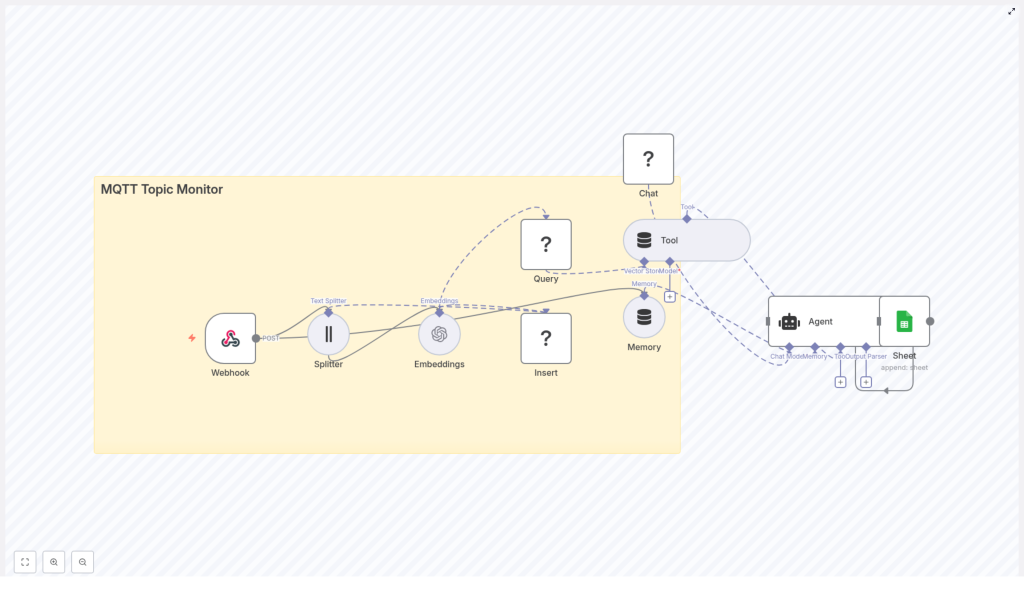
Here’s how the n8n workflow is structured from start to finish:
- Webhook – Receives MQTT messages via HTTP POST from a broker or bridge
- Text Splitter – Breaks long messages into smaller chunks
- Embeddings – Uses OpenAI or another provider to embed each chunk
- Redis Vector Store (Insert) – Stores embeddings plus metadata
- Redis Vector Store (Query) – Retrieves relevant embeddings for context
- Tool & Agent – Uses context, memory, and an LLM to generate summaries or responses
- Memory – Keeps a short window of recent interactions
- Google Sheets – Logs final outputs like summaries or alerts
Let’s unpack each part so you know exactly what is happening under the hood.
Node-by-node: how the workflow is built
1. Webhook – your MQTT entry point
The Webhook node is where everything starts. MQTT itself speaks its own protocol, so you typically use an MQTT-to-HTTP bridge or a broker feature that can send messages as HTTP POST requests.
In this workflow, the Webhook node:
- Exposes a POST endpoint for incoming MQTT messages
- Receives the payload from your broker or bridge
- Validates authentication tokens or signatures
- Checks that the payload schema is what you expect
It’s a good idea to secure this endpoint with an HMAC, token, or IP allowlist so only trusted sources can send data.
2. Splitter – breaking large payloads into chunks
MQTT payloads can be tiny, or they can be long JSON blobs full of logs, sensor readings, or diagnostic info. Embedding very large texts directly is inefficient and may hit model limits.
The Text Splitter node solves that by cutting messages into overlapping chunks, for example:
chunkSize = 400chunkOverlap = 40
That overlap helps preserve context between chunks so embeddings still capture meaning, while staying within the token limits of your embedding model.
3. Embeddings – turning text into vectors
Once you have chunks, the Embeddings node converts each one into a vector representation using OpenAI or another embedding provider.
Alongside each embedding, you store metadata such as:
topicdevice_idtimestamp
This metadata is important later when you want to filter or query specific devices, topics, or time ranges.
4. Redis Vector Store – insert and query
Redis works as a fast vector store where you can perform semantic search over your MQTT history.
There are two key operations in the workflow:
- Insert – Store new embeddings and their metadata whenever a message arrives
- Query – Retrieve similar embeddings when you need context for a summary or a question
This means that when your agent needs to summarize recent activity or answer “what happened before this alert,” it can pull in the most relevant messages from Redis instead of scanning raw logs.
5. Tool & Agent – generating summaries and responses
The Tool & Agent setup is where the magic happens. The agent uses:
- Retrieved context from Redis
- Short-term memory of recent interactions
- A language model (OpenAI chat models or Hugging Face)
With this combination, the agent can:
- Produce human-readable summaries of recent MQTT activity
- Generate alerts or explanations based on incoming messages
- Respond to queries about historical telemetry using semantic context
You configure prompt templates and safety checks so the agent’s output is accurate, relevant, and safe to act on. If you are worried about hallucinations, you can tighten prompts and add validation rules to the agent’s output.
6. Memory – keeping short-term context
The Memory node maintains a small window of recent messages or interactions. This helps the agent understand patterns such as:
- A device repeatedly sending warning messages
- A series of related events on the same topic
Instead of treating each message as isolated, the agent can reason over the last few exchanges and provide more coherent summaries.
7. Google Sheets – logging for humans
Finally, the Sheet node appends the agent’s output into a Google Sheet. This gives you:
- A simple, persistent log of summaries, alerts, or key events
- An easy way to share insights with non-technical stakeholders
- A base for dashboards or further analysis
You can treat this as your human-friendly audit trail of what has been happening across MQTT topics.
Step-by-step setup in n8n
Ready to put this into practice? Here’s how to get the workflow running.
- Provision n8n
Run n8n in the environment you prefer:- n8n.cloud
- Self-hosted Docker
- Other self-hosted setups
Make sure access is secured with HTTPS and authentication.
- Create the Webhook endpoint
Set up the Webhook node as the entry point. Then configure your MQTT broker or bridge to send messages as HTTP POST requests to this endpoint.
Include an HMAC, token, or similar mechanism so only authorized clients can send data. - Configure the Splitter node
AdjustchunkSizeandchunkOverlapto match your embedding model’s token limits and the typical size of your messages. You can start with something like 400 and 40, then tune as needed. - Set up Embeddings credentials
In n8n’s credentials manager, add your OpenAI (or alternative provider) API key. Connect this credential to the Embeddings node so each text chunk is turned into a vector. - Deploy and configure Redis
Use a managed Redis instance or self-hosted deployment. In the Redis vector store node:- Set connection details and credentials
- Choose an index name, for example
mqtt_topic_monitor - Ensure the index is configured for vector operations
- Configure the Agent node
Hook up your language model (OpenAI chat model or Hugging Face) via n8n credentials. Then:- Wire the agent to use retrieved context from Redis
- Connect the memory node so it has short-term context
- Attach any tools or parsing nodes you need for structured output
- Connect Google Sheets
Add Google Sheets credentials in n8n, then configure the Sheet node to append rows. Each row can store:- Timestamp
- Topic or device
- Summary or alert text
- Any additional metadata you care about
- Test and tune
Send sample MQTT messages through your bridge and watch them flow through the workflow. Then:- Adjust prompts for clearer summaries
- Tune chunking parameters
- Experiment with vector search thresholds and filters
Security and best practices
Since this workflow touches external APIs, data storage, and logs, it’s worth taking security seriously from day one.
- Authenticate the Webhook
Only accept messages signed with a shared secret, token, or from trusted IPs. Reject anything that does not match your expected headers or signatures. - Handle sensitive data carefully
If your MQTT payloads contain PII or sensitive details, strip, anonymize, or redact them before creating embeddings. While embeddings are less directly reversible, they should still be treated as sensitive. - Apply rate limits
For high-volume topics, consider throttling, batching, or queueing messages. This helps avoid API overage costs and protects your Redis instance from sudden spikes. - Monitor and retry
Add error handling and retry logic in n8n for transient failures when talking to external APIs or Redis. A short retry with backoff can smooth over network blips. - Restrict access to Redis and Sheets
Lock down your Redis instance and Google Sheets access to the minimum required. Rotate API keys regularly and avoid hard-coding secrets.
Tuning and scaling tips
Planning to run this in production or at larger scale? Here are some ways to keep it smooth and efficient.
- Use a dedicated Redis instance
Give Redis enough memory and configure the vector index properly, including distance metric and shard size, so queries stay fast. - Batch embedding calls
If messages arrive frequently, batch chunks into fewer API calls. This helps reduce latency and cost. - Offload heavy processing
Use the webhook mainly to enqueue raw messages, then process them with background workers or separate workflows. That way, your inbound endpoint stays responsive. - Manage retention
You do not always need to keep embeddings forever. Consider pruning old entries or moving them to cold storage if long-term search is not required.
Common issues and how to debug them
Things not behaving as expected? Here are some typical problems and what to check.
- No data reaching the webhook
Confirm your MQTT-to-HTTP bridge is configured correctly, verify the target URL, and check that any required authorization headers or tokens are present. - Embedding failures
Look at model limits, API keys, and payload sizes. If you hit token limits, lowerchunkSizeor adjustchunkOverlap. Also verify that your credentials are valid. - Redis errors
Make sure the vector index exists, connection details are correct, and the credentials have permission to read and write. Check logs for index or schema mismatches. - Agent hallucinations or inaccurate summaries
Tighten your prompts, provide richer retrieved context from Redis, and add validation rules or post-processing to the agent’s output. Sometimes simply being more explicit in the instructions helps a lot.
Real-world use cases
To recap, here are some concrete scenarios where this MQTT Topic Monitor pattern shines:
- IoT fleet monitoring – Summarize intermittent device logs, surface anomalies, and keep a readable history in Sheets.
- Industrial telemetry – Relate current sensor readings to past incidents using semantic search over historical events.
- Smart buildings – Search and summarize events from HVAC, lighting, or access control systems.
- DevOps for distributed devices – Centralize logs from many edge devices and generate concise summaries for on-call engineers.
Wrap-up and next steps
This MQTT Topic Monitor template turns noisy MQTT streams into something far more usable: searchable embeddings in Redis, context-aware summaries from an agent, and a clear log in Google Sheets that anyone on your team can read.
By combining text chunking, embeddings, a Redis vector store, and an LLM agent with memory, you get a scalable pattern for IoT monitoring, telemetry analysis, and event-driven workflows.
Ready to try it?
- <
