


Automate Golf Booking with n8n & Google Sheets
From Manual Chores To Effortless Golf Bookings
If you love golf but dread the constant back-and-forth of booking coaching sessions or tee times, you are not alone. Manually tracking dates, sending emails, double-checking card details and remembering who needs what booking each week can quietly eat up your energy and focus.
This is exactly where automation becomes a powerful ally. With a simple yet flexible n8n workflow, Google Sheets and SMTP email, you can turn a repetitive admin chore into a smooth, reliable system that runs in the background while you focus on your game, your work or your family.
In this article, you will walk through that journey. You will start with the problem, shift into what is possible with the right mindset, then explore a practical n8n template that automates golf bookings from end to end. Use this as a starting point to build your own automated ecosystem, one workflow at a time.
Why Automate Your Golf Bookings?
Every recurring task is an opportunity to reclaim time. Golf bookings are a perfect example. Once you automate them, you unlock:
- Freedom from repetition – No more typing the same booking emails week after week.
- Fewer mistakes – Standardized booking details reduce errors in dates, times or card-holder info.
- Consistency for everyone – Family members or multiple players get the same quality of service, every time.
- Scalability – As bookings grow, your workload does not. The workflow simply handles more data.
Instead of reacting to each booking need, you design a system once and let n8n take care of the rest. That shift from “doing” to “designing” is where real productivity and peace of mind begin.
Adopting An Automation Mindset
Before diving into nodes and code, it helps to approach this workflow with the right mindset:
- Start small, think big – This golf booking flow might be your first step, but the same pattern can later power other automations for your home, work or club.
- Iterate, do not aim for perfection – Launch a basic version, then refine date logic, email wording or sheet structure as you learn.
- Let data guide improvements – As the workflow runs, your logs and sheets will show where to enhance timing, reliability or personalization.
With that mindset, the template below becomes more than a single-use tool. It becomes a building block in a growing automated workflow ecosystem.
The n8n Golf Booking Template At A Glance
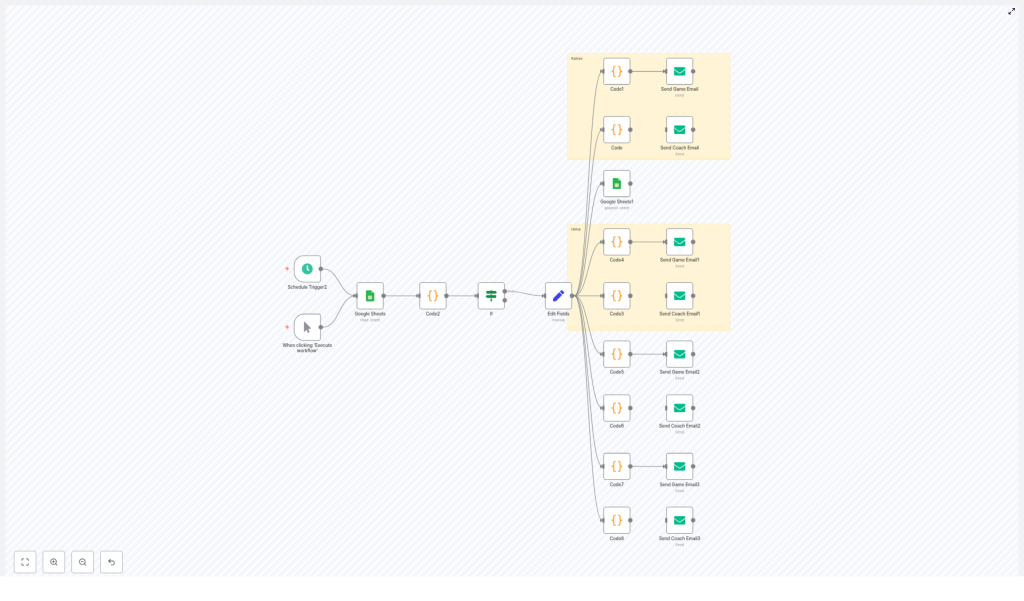
This n8n workflow connects three main components:
- Google Sheets as your booking log and trigger source.
- n8n core nodes for scheduling, logic, transformation and code.
- SMTP email nodes to send polished HTML booking requests to your concierge or club.
The flow reads booking triggers from your sheet, calculates the target booking date, builds a standardized HTML email with booking and card-holder details, and sends it automatically. You can run it on a schedule or on demand, and you can easily extend it for more people, more locations or different booking types.
Step 1 – Triggers That Respect Your Time
Schedule Trigger and Manual Trigger
The workflow usually starts with a Schedule Trigger node. You can configure it to run at a specific time each day, for example every morning, to check whether a new booking should be created. This keeps your bookings proactive and consistent.
Alongside that, a Manual Trigger is included for ad-hoc runs. If you want to test changes, or quickly send a one-off booking request, you can trigger the workflow whenever you like.
Together, these triggers give you both automation and control, so you are never locked into a rigid system.
Step 2 – Using Google Sheets As Your Booking Brain
Google Sheets (Read & Append)
Google Sheets acts as the central source of truth for your golf bookings. In this template, the sheet:
- Stores your booking-tracking log and trigger data.
- Provides the timestamp or conditions that tell n8n when to create a new booking.
- Can record a timestamp after a booking is scheduled, so you avoid sending duplicates.
The workflow uses a Google Sheets node to read the latest rows, analyze whether a booking is due, then optionally append a new entry or timestamp once the booking email has been sent. This simple sheet-driven approach makes the system easy to inspect and modify without touching code.
Step 3 – Smart Date Logic That You Control
Code Nodes (JavaScript)
Accurate dates are the backbone of any booking automation. In this workflow, Code nodes with JavaScript handle all the date logic in one place so you can maintain and adjust it easily.
These nodes are used to:
- Parse the spreadsheet timestamp and compute the difference in days from the current date.
- Decide whether a booking should be created based on that difference.
- Calculate the booking target date, such as an
afterFiveDaysdate or the next Sunday, depending on your preference. - Set a fixed booking time, for example 8:00 AM or 9:00 AM local time, and convert it into an ISO timestamp for reliable storage and comparison.
- Format the date into a friendly string like 25th May with the correct ordinal suffix (1st, 2nd, 3rd, 4th) and full month name for the email.
- Construct the HTML email body, including booking and card-holder details, in a structured and reusable way.
By centralizing this logic in code nodes, you get a clear, maintainable place to fine-tune how and when your bookings are created without rewriting the rest of the flow.
Step 4 – Directing The Flow With Clear Decisions
If Node (Decision)
Not every run of the workflow should send an email. The If node acts as your decision gate.
For example, the workflow can:
- Check the time difference between now and the last entry in the sheet.
- Proceed only if that difference meets your criteria for creating a new booking.
This simple decision step prevents duplicate booking requests and ensures that every email sent has a clear purpose.
Step 5 – Preparing Clean, Reusable Data
Set Node (Edit Fields)
To keep your workflow organized, a Set (Edit Fields) node is used to shape and map data for the later steps. Here you can:
- Store the computed booking date and time.
- Define recipient email addresses.
- Set placeholders for card-holder and verification details.
This makes your email nodes simpler, more readable and easier to duplicate when you want to support additional family members or booking types.
Step 6 – Sending Polished HTML Booking Emails
Email Nodes (SMTP)
Finally, one or more SMTP email nodes send your booking request to the concierge or club. The template:
- Builds a consistent HTML email body using the values prepared in previous nodes.
- Supports separate flows for coach and game bookings, so your messages stay clear and correctly labeled.
- Allows multiple sender accounts, so you can send emails on behalf of different family members while keeping everything in one workflow.
Once set up, you can trust that every outgoing email includes the right details, formatting and tone without you typing a single line each time.
Designing The Email Experience
Sample Email Structure
The workflow constructs a structured HTML email so your concierge receives all the information needed in one clean message. A typical email includes:
- Greeting and purpose – A short introduction that clarifies the email is a booking request.
- Booking details – Coach or game type, date, time and location so there is no confusion.
- Verification details – Card-holder name, last four digits, registered mobile and date of birth, with careful handling of sensitive information.
- Closing and contact information – A polite sign-off and any additional contact details if needed.
You can easily customize the wording to match your personal style or your club’s standard format while keeping the structure intact.
Staying Secure While You Automate
Security & Privacy Best Practices
Because this workflow can include card-holder verification data, it is important to follow security best practices as you scale it:
- Avoid full card numbers – Never store complete card numbers in Google Sheets or emails. Use only the last 4 digits for verification.
- Protect sensitive credentials – Use secure vaults like environment variables, HashiCorp Vault or n8n credentials for SMTP logins and API keys.
- Limit sensitive data in logs – Mask or redact personal information in logs or shared spreadsheets, especially if others have access.
By combining automation with thoughtful security, you create a system that is both powerful and trustworthy.
Scaling Your Workflow For Families, Teams Or Clubs
Scaling The Workflow
Once the basic flow is running smoothly, you can expand it to handle more people and more complexity without adding more manual work.
- Multiple tabs or columns – Use a dedicated Google Sheet tab for each family member or booking type, or add columns to map recipient and booking type.
- Parameterized settings – Make coach name, location and time configurable so different templates can share the same code nodes.
- Resilient email delivery – Add retry logic or exponential backoff in case of SMTP failures, so temporary issues do not block bookings.
- Audit-friendly logging – Log outgoing emails and responses, and store receipt IDs or timestamps in a hidden sheet column for easy tracking.
These enhancements turn a personal helper into a robust booking system that can support a household, a team or even a club.
Keeping Things Running Smoothly
Troubleshooting Tips
As you experiment and adapt this workflow, you might occasionally run into issues. Here are some focused checks to keep you moving forward:
- Unexpected dates – If dates look off, double-check timezone handling in your code nodes. The sample workflow uses IST offset logic when scheduling bookings for 8:00 AM IST.
- Email delivery problems – When emails do not send, review your SMTP credentials and the email node’s error messages. For Gmail, confirm that SMTP is allowed and that OAuth or app passwords are configured correctly.
- Empty or incorrect sheet data – If Google Sheets returns empty rows, adjust the range configuration or use a fixed range so the workflow reads only valid data.
Each small fix you make increases your confidence and helps you build more advanced automations later.
Adapting The Template To Your Style
How To Adapt The Workflow
This template is intentionally flexible so you can shape it around your life and your club’s processes. Common customizations include:
- Adjusting the trigger cadence – Edit the Schedule Trigger’s cron expression to run more or less frequently, or at times that fit your routine.
- Adding more recipients – Duplicate the email nodes and map different sender credentials for each family member or player.
- Switching data sources – Replace Google Sheets with Airtable, PostgreSQL or another datastore using the corresponding n8n integration nodes.
Every tweak you make teaches you more about n8n and sets you up to automate other parts of your personal or business workflows.
Your Next Step In The Automation Journey
Conclusion
Automating golf bookings with n8n, Google Sheets and SMTP email nodes is more than a convenience. It is a practical example of how you can move from manual repetition to intentional systems that support your goals.
With a few core building blocks – schedule triggers, sheet integrations, code nodes for date logic and structured email nodes – you create a reliable, repeatable booking process that can serve multiple people and booking types without extra effort each week.
Once you experience how much time and mental space this single workflow saves, you will start to see other areas of your life and work that are ready for automation too.
Start Automating Your Golf Bookings Today
Call To Action
If you want to explore this in your own setup, you do not have to start from a blank canvas. You can use the existing n8n template as a foundation, then customize it for your club, residence or family.
Need help tailoring it or integrating it into a larger system? Reach out for support or guidance, or download the example workflow and experiment at your own pace.
Take your first step now:
- Export or prepare your Google Sheet with booking data.
- Configure your SMTP credentials securely in n8n.
- Paste and adapt the date-formatting code nodes from the template.
- Run a manual test, verify the email output, then switch on the schedule.
Each run of this workflow is a reminder that your time is valuable and that automation can support the life and work you actually want to focus on.
