


Build an Automated Fact-Checking Workflow in n8n with Ollama and LangChain
In this tutorial-style guide you will learn how to build and understand an automated fact-checking workflow in n8n, powered by Ollama and LangChain. We will walk through the concepts, the nodes, and each step of the workflow so you can adapt it to your own editorial, moderation, or research processes.
Learning goals
By the end of this guide, you will be able to:
- Explain how n8n, Ollama, and LangChain work together in a fact-checking pipeline.
- Use a Code node in n8n to split long text into sentences while preserving dates and list items.
- Configure a LangChain LLM node to call an Ollama model (for example,
bespoke-minicheck) for per-sentence fact-checking. - Merge, filter, and aggregate model outputs into a clear summary report of potential factual errors.
- Apply best practices and understand the limitations of automated fact-checking.
Core concepts: n8n, Ollama, and LangChain
Why these three tools work well together
This fact-checking workflow combines three main components, each solving a specific part of the problem:
- n8n – A visual automation platform that lets you connect data sources, AI models, and post-processing steps using nodes and flows. It orchestrates the entire fact-checking pipeline.
- Ollama – A system for running LLMs locally or at the edge. You can pull a specialized model such as
bespoke-minicheckand run it close to your data for privacy and speed. - LangChain – A framework that helps you design prompts and structured LLM chains. Inside n8n, LangChain nodes make it easier to define how the model should behave and what output format it should return.
Together, they create a modular system where n8n handles workflow logic, LangChain manages prompts and structure, and Ollama performs the actual fact-checking inference.
What the n8n fact-checking workflow does
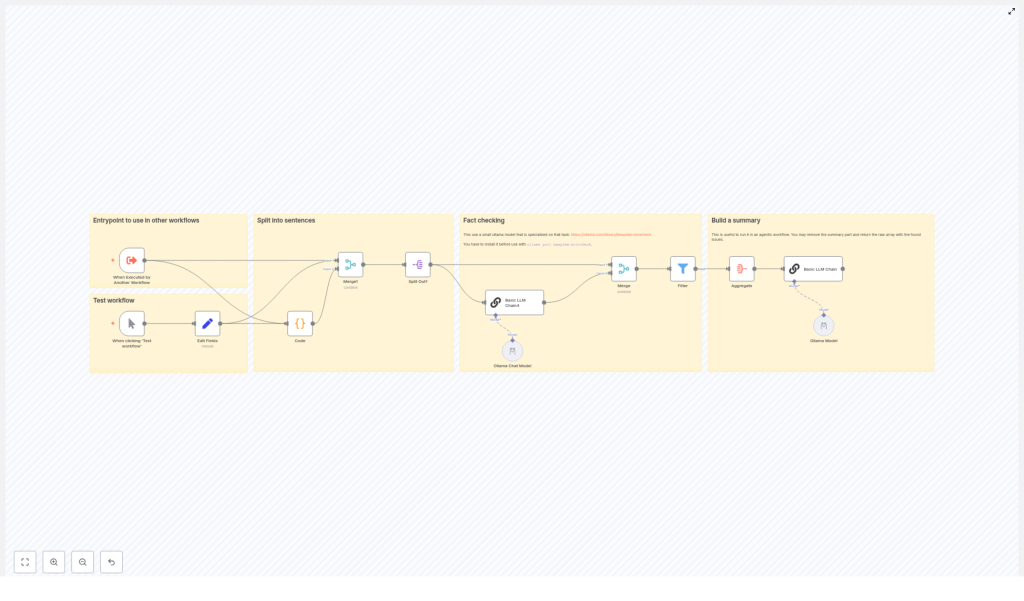
The template workflow is designed to take a block of text and highlight sentences that may contain incorrect factual statements. At a high level, it:
- Receives text input (either manually or from another workflow).
- Splits the text into individual sentences using a custom JavaScript function.
- Preserves dates and list items so they are not broken apart incorrectly.
- Processes each sentence through an Ollama model via a LangChain node.
- Collects and filters the results to keep only sentences flagged as potentially incorrect.
- Generates a structured summary report for editors or reviewers.
The end result is a scalable, transparent fact-checking assistant that you can plug into editorial pipelines, moderation queues, or research workflows.
Prerequisites
Before you build or use this workflow, make sure you have:
- An n8n instance, either self-hosted or n8n cloud.
- Ollama installed and configured if you are using local models. For example, to install the sample model:
ollama pull bespoke-minicheck - Ollama credentials or access configured in n8n so the LangChain / Ollama node can call the model.
- Basic JavaScript familiarity to understand or tweak the Code node used for sentence splitting.
Workflow architecture: Step-by-step overview
Let us look at the complete flow before we dive into each node. At a high level, the workflow follows these stages:
- Trigger – Start the workflow manually or from another workflow.
- Set input fields – Provide the text that you want to fact-check.
- Preprocess text – Use a Code node to split the text into clean sentences.
- Split into items – Convert the array of sentences into individual n8n items.
- Fact-check each sentence – Pass each sentence to a LangChain LLM node that calls an Ollama model.
- Merge and filter results – Combine model outputs, keep only problematic sentences.
- Aggregate into a report – Build a final summary of issues and recommendations.
Next, we will walk through each of these stages in more detail.
Stage 1: Trigger and input text
1. Trigger the workflow
The workflow typically starts with a Manual Trigger node while you are building and testing. In production, you might replace this with:
- A webhook that receives text from an external system.
- A schedule trigger that checks new content periodically.
- Another workflow that passes text into this fact-checking pipeline.
2. Set the input text field
Next, you use a Set node (or a previous node) to provide the text that you want to check. The important part is that the text ends up in a known field, for example:
{  "text": "Your article or content block here..."
}
The Code node in the next step expects this field to be named text.
Stage 2: Sentence splitting with a Code node
Before we can send content to the model, we need to break it into manageable pieces. In this workflow, each sentence is treated as a separate claim.
Why custom sentence splitting is needed
A naive split on periods can cause problems. For example:
- Dates like
12. März 2023might be split into multiple fragments. - Numbered lists or bullet points might be broken incorrectly.
- Abbreviations or punctuation can confuse a simple splitter.
To avoid this, the workflow uses a custom JavaScript function inside a Code node. It uses a regular expression that is tuned to:
- Keep date-like tokens intact.
- Ignore list bullets and hyphenated list items when splitting.
- Return a clean array of sentences ready for LLM processing.
Code node: sentence splitter
Here is the code used in the template, formatted for clarity:
// Get the input text
const text = $input.item.json.text;

if (!text) {  throw new Error('Input text is empty');
}

function splitIntoSentences(text) {  const monthNames = '(?:Januar|Februar|März|April|Mai|Juni|Juli|August|September|Oktober|November|Dezember)';  const datePattern = `(?:\\d{1,2}\\.\\s*(?:${monthNames}|\\d{1,2}\\.)\\s*\\d{2,4})`;  const regex = new RegExp(`(?<=[.!?])\\s+(?=[A-ZÄÖÜ]|$)(?!${datePattern}|\\s*[-•]\\s)`, 'g');  return text.split(regex)  .map(sentence => sentence.trim())  .filter(sentence => sentence !== '');
}

const sentences = splitIntoSentences(text);
return { json: { sentences: sentences } };
What this code is doing
- Input check - If
textis missing, it throws an error so you can catch configuration issues early. - Date handling - The
monthNamesanddatePatternvariables define what a date looks like, for example12. März 2023or12. 03. 2023. - Regex-based splitting - The
regexsplits only where:- There is a sentence-ending character (
.,!, or?). - Followed by whitespace and an uppercase letter or the end of the string.
- But not inside dates or right after list bullets such as
-or•.
- There is a sentence-ending character (
- Cleanup - The array is trimmed and empty entries are removed.
The Code node outputs a JSON object like:
{  "sentences": [  "First complete sentence.",  "Second complete sentence with a date like 12. März 2023.",  "Another sentence."  ]
}
Stage 3: Split sentences into individual items
After the Code node, all sentences are stored in a single array. To process each sentence independently with the LLM, you use a Split Out (or similar) node in n8n.
3. Split Out node
Configure the node to:
- Take the
sentencesarray from the previous node. - Create one n8n item per sentence.
Once this node runs, your workflow will have multiple items, each with a single sentence field. For example:
{ "sentence": "First complete sentence." }
{ "sentence": "Second complete sentence with a date like 12. März 2023." }
...
This item-per-sentence structure is ideal for calling an LLM, because it keeps the context small and focused.
Stage 4: Fact-checking with Ollama and LangChain
Now that each sentence is isolated, you can send them to an Ollama model using a LangChain LLM node in n8n.
4. Configure the LangChain LLM node
In this node, you typically:
- Select the Ollama model backend, for example
bespoke-minicheck. - Define a prompt template that receives the sentence as input.
- Specify what kind of output you want (yes/no, explanation, or both).
A typical prompt conceptually might say:
- Here is a single sentence that may contain factual claims.
- Your task is to identify if the sentence is factually incorrect.
- Return a clear, structured output, for example:
is_incorrect: yes/noexplanation: short text
- Ignore opinions, jokes, and non-factual chatter.
This design gives you a consistent shape of data that can be processed automatically in later nodes.
Prompt design tips for reliable automation
- Be explicit about format - Ask for a JSON-like or clearly structured response so you can parse it easily.
- Focus on factual content - Instruct the model to ignore chit-chat, subjective opinions, or style comments.
- Limit context - Send only one sentence or claim at a time. This reduces confusion and keeps the model focused.
- Use a small deterministic model when possible - Something like
bespoke-minicheckcan offer more repeatable behavior for classification-style tasks.
Stage 5: Merge, filter, and aggregate results
Once the LangChain node has evaluated each sentence, you have one model response per item. The final step is to turn these per-sentence results into a human-friendly report.
5. Merge model outputs with original data
Use merge or mapping nodes in n8n to attach the model's response back to each sentence. After this step, each item might look like:
{  "sentence": "Example sentence.",  "is_incorrect": true,  "explanation": "The stated year is wrong based on known facts."
}
6. Filter to keep only problematic sentences
Next, apply a Filter node (or similar logic) to keep only items where the model indicates a potential issue, for example:
is_incorrect == true
This gives you a focused list of sentences that may need human review.
7. Aggregate into a summary report
Finally, use an Aggregate or similar node to combine all flagged sentences into a single structured object. You can then optionally pass this into another LangChain node to generate a nicely formatted summary.
A typical report might include:
- Problem summary - Total number of sentences flagged as potentially incorrect.
- List of incorrect statements - Each problematic sentence plus the model's explanation.
- Final assessment - A short recommendation, such as:
- Low severity - minor factual issues, needs quick edit.
- High severity - major factual errors, requires full review.
Testing the workflow and best practices
How to test effectively
- Start small - Use short, well-understood text samples when you first tune prompts and model settings.
- Log intermediate outputs - Inspect:
- The array of sentences from the Code node.
- Each per-sentence response from the LangChain node.
This helps you debug regex issues, prompt wording, or model behavior.
- Iterate on prompts - Adjust the instructions until the model reliably distinguishes factual from non-factual content.
Operational best practices
- Use deterministic settings where possible - Lower temperature or use a small classification-focused model like
bespoke-minicheckfor consistent results. - Keep humans in the loop - Treat the workflow as a triage system. Flag questionable statements for editorial review instead of automatically deleting or publishing content.
- Scale carefully - When processing large volumes, batch requests and rate-limit calls to avoid overloading local models or GPU resources.
Limitations and ethical considerations
Automated fact-checking is powerful, but it is not perfect. You should be aware of its limitations and ethical implications.
- False positives and false negatives - The model may sometimes flag correct statements or miss incorrect ones. Always include a human review step for important decisions.
- Knowledge freshness - Models may not know the latest facts or may rely on outdated information. For time-sensitive or critical topics, consider augmenting with external knowledge sources.
- Transparency - Be clear with your users or stakeholders that automated tools are involved in the review process, and explain how decisions are made.
Next steps: Extending the fact-checking workflow
Once the basic template is working, you can extend it in several directions:
- Add source retrieval - Integrate web search or a private knowledge base to retrieve supporting documents and citations for each claim.
- Use multi-model voting - Run the same sentence through multiple models and combine their outputs for higher confidence.
- Build an editor UI - Create a simple interface where editors can:
- Review flagged sentences.
- Mark them as correct or incorrect.
- Use this feedback later to fine-tune models or improve prompts.
Recap and FAQ
Quick recap
- You built an n8n workflow that:
