


Evaluator-Optimizer + Human-in-the-Loop (HITL) Workflow Guide
Imagine having an automation that is smart enough to handle most of your work, but still knows when to tap you on the shoulder and say, “Hey, can you double-check this one?” That is exactly what the evaluator-optimizer pattern combined with Human-in-the-Loop (HITL) gives you in n8n.
In this guide, we will walk through a practical n8n workflow template that brings those ideas to life. It covers two connected flows:
- An Email Auto Responder with an evaluator-optimizer loop
- A Report Generator with a HITL review loop
We will look at what this template does, when it is worth using, and how each part fits together so you can adapt it to your own automations.
What this n8n workflow template actually does
The template is built around a simple idea: let large language models (LLMs) do the heavy lifting, but put a smart safety net around them. That safety net is a combination of:
- An evaluator that checks the model’s output using clear rules
- An optimizer loop that improves failed outputs automatically
- Human-in-the-loop steps for tricky or high-stakes cases
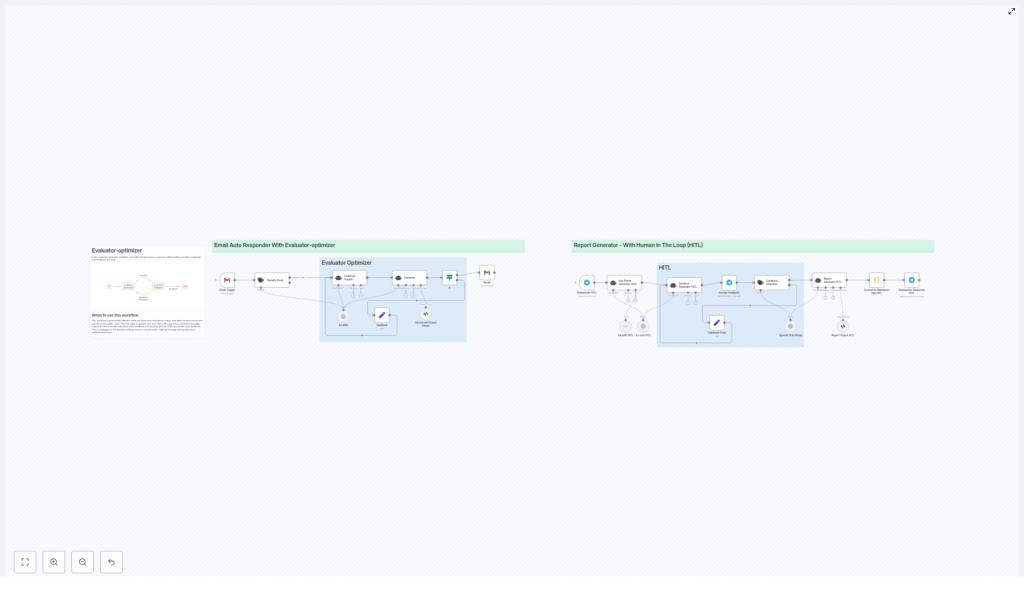
On the left side of the workflow you have an automated Email Auto Responder that:
- Listens for incoming emails
- Decides if a reply is needed
- Drafts a response with an LLM
- Evaluates the draft against your rules
- Either sends it automatically or routes it for refinement
On the right side you have a Report Generator that:
- Takes a request from Telegram or another input channel
- Researches the topic using a search tool like SerpAPI
- Builds a structured outline
- Generates a full report with an LLM
- Loops in a human reviewer for feedback
- Applies that feedback and delivers a polished markdown report
Together, they show a reusable pattern you can apply to lots of other n8n automations: email, support, content generation, internal reports, and more.
Why pair evaluator-optimizer with HITL?
LLMs are powerful, but they are not perfect. They sometimes:
- Miss subtle policy or tone requirements
- Include details you did not want (like subject lines inside the email body)
- Need domain-specific judgment that only a human can provide
That is where the evaluator-optimizer + HITL combo shines. You get:
Key goals of this pattern
- Higher reliability and accuracy for automated outputs
- Selective human review only when it truly matters
- Continuous improvement over time through feedback loops
In practice, that means your n8n workflows can run at scale, while still being safe, auditable, and aligned with your policies.
Inside the workflow: main components
Email Auto Responder (Evaluator-Optimizer loop)
Let us start with the email side. This part of the n8n template is built to automatically handle common support emails without losing quality.
- Gmail trigger picks up each incoming email.
- Text classification checks if the email actually needs a reply or action. Routine notifications might be ignored, while customer questions move forward.
- Customer Support LLM generates a draft response based on the email content and your prompt.
- Evaluator reviews the draft for:
- Clarity and correctness
- Appropriate tone
- Correct sign-off (for example, “John Doe”)
- Formatting rules like not repeating the subject line in the body
- Routing logic then decides:
- If the evaluator approves it, send the reply automatically.
- If it fails, capture feedback and send it back into the loop for refinement.
The result is an auto responder that feels thoughtful instead of risky.
Report Generator (HITL loop)
On the report side, the workflow is geared toward research-heavy content where human review is especially important.
- Telegram trigger (or another channel) receives a request, such as “Create a market overview for X.”
- A key-points generator uses a search tool like SerpAPI to pull in current, relevant sources, so your report is based on up-to-date information.
- A sections generator turns those key points into a structured outline with clear headings and sections.
- The report generator LLM takes the outline and writes a full draft report.
- A Human Feedback node invites a reviewer to check the draft, suggest changes, or flag issues.
- That feedback loops back into the workflow to update sections, prompts, or other parameters. The improved version is then converted to markdown and delivered in your chosen format.
This flow is perfect when you want AI to do the heavy lifting but still keep a human in control of the final quality.
How the loop works, step by step
Although the email and report flows look different on the surface, they follow the same core pattern. Let us break it down.
1. Input and classification
Everything starts with an incoming item:
- For emails, the Gmail trigger receives a message.
- For reports, Telegram (or another input) receives a request.
Then:
- A classifier decides if an email needs a response or can be ignored or handled differently.
- A key-points generator for reports may run searches first, so the LLM has context to work with.
2. Draft generation
Next, an LLM produces a first version of the content:
- In the email flow, it writes a concise, helpful reply tailored to the customer’s message.
- In the report flow, it fills in the sections of the outline to create a complete, structured document.
3. Automated evaluation
Before anything is sent or finalized, the draft goes through an Evaluator node. This is where your rules live.
The evaluator checks things like:
- Is the answer clear and coherent?
- Does the tone match your guidelines?
- Is the sign-off present and correct?
- Are formatting constraints followed, such as no subject line in the body?
- Is JSON output valid when a JSON format is required?
The evaluator returns a compact JSON object that looks like this:
{  "pass": true
}

or

{  "pass": false,  "feedback": "Concise, actionable feedback to improve the draft"
}
This structure makes it easy for n8n to branch the workflow based on a simple pass or fail condition, while still including useful feedback when needed.
4. Optimizer and feedback loop
Once the evaluator has done its job, the optimizer loop kicks in.
- If
"pass": true, the workflow goes ahead:- The email reply is sent automatically, or
- The report is finalized and delivered as markdown or another format.
- If
"pass": false, the feedback is fed back into the generator:- The LLM regenerates or edits the draft using the evaluator’s guidance.
- Optionally, a human reviewer can be pulled in, especially for repeated failures.
Over time, you can analyze these failures to:
- Improve your prompts
- Refine evaluation rules
- Adjust classifier thresholds
- Update templates for better performance
Real-world benefits of this design
So why go through the effort of setting this up in n8n instead of just calling an LLM and hoping for the best?
- Scalable automation Routine, low-risk cases are handled automatically, which frees your team from repetitive work.
- Risk mitigation Ambiguous or sensitive cases can be flagged for human review instead of going out unchecked.
- Continuous improvement The feedback loop helps you tune prompts, evaluation criteria, and classifiers based on real usage data.
- Transparency and auditability Evaluator outputs are structured JSON, so you can log them, analyze them, and use them as an audit trail.
Implementation tips and best practices
When you are building or customizing this template in n8n, a few choices make a big difference in reliability and maintainability.
1. Design clear evaluation criteria
The evaluator is only as good as the rules you give it. Try to keep those rules:
- Concise
- Measurable
- Easy to test and refine
For example, for email replies you might require that:
- The response is professional and polite.
- A proper sign-off like “John Doe” is included.
- The original subject line is not repeated in the body.
Having explicit criteria like this makes the evaluator’s job much easier and more consistent.
2. Keep evaluator outputs structured
Resist the temptation to return long paragraphs of explanation from the evaluator. Instead, keep it tight and structured:
- Use a simple JSON object with fields like
passandfeedback. - Make feedback concise and actionable.
- Ensure downstream nodes can reliably branch on
pass.
This makes your n8n workflow easier to maintain and less fragile.
3. Use HITL where it really counts
Human-in-the-loop is powerful, but you do not want every single item to require manual review. That would defeat the purpose of automation.
Instead, route to humans when:
- The evaluator fails repeatedly for a similar case.
- The content is high-importance or high-risk.
- There is ambiguity that the model cannot resolve confidently.
When you do bring in humans, capture their feedback in a structured way so it can be reused to:
- Update prompts automatically
- Improve evaluator rules
- Refine your templates over time
4. Leverage search and tools for freshness
For the report workflow, accuracy depends heavily on up-to-date information. That is why the template uses a live search tool such as SerpAPI to gather current sources before generating content.
For domain-specific topics, you can plug in your own trusted APIs and data sources. This keeps your reports relevant and grounded in real data instead of relying only on the LLM’s training.
5. Logging and monitoring
To keep improving your evaluator-optimizer setup, make sure you:
- Log classifications and evaluator pass or fail results.
- Track when humans override or adjust outputs.
- Look for patterns in repeated failures.
If a specific prompt or use case fails often, prioritize it for prompt engineering, rule refinement, or classifier tuning.
Security, privacy, and governance
When you are automatically replying to emails or generating reports, it is worth taking a moment to think about security and compliance.
- Data minimization Only send the minimum necessary context to the LLM and external tools.
- Access control Restrict who can see, review, and approve content in HITL steps.
- Audit trails Store evaluator decisions and human feedback so you can demonstrate how outputs were produced and improved.
- PII handling Mask or exclude sensitive personal data wherever possible before sending it to external services.
Example: handling a typical failure
Let us walk through a concrete scenario in the email flow.
Suppose the evaluator returns pass: false with feedback that the tone of the reply is too casual for your brand.
- The feedback is added to the context or prompt used by the Customer Support LLM, telling it to use a more formal tone.
- The LLM regenerates the reply, this time aiming for a more professional style.
- If the same issue keeps popping up, a human reviewer steps in to:
- Update the base prompt template, or
- Adjust evaluator rules, for example by adding required phrasing or stricter tone guidelines.
Over time, these small corrections add up to a much more reliable system.
Wrapping up: why this pattern is worth adopting
The evaluator-optimizer pattern, especially when combined with Human-in-the-Loop, gives you a practical balance:
- Automation speed and scale
- Human judgment where it matters
