

Evaluator-Optimizer & HITL: Build Better LLM Workflows
Working with large language models (LLMs) is amazing, right? You get fast, surprisingly good answers with almost no effort. But when you put those models into real products or business processes, the bar suddenly gets a lot higher. You need reliability, consistency, and compliance with your internal rules, not just “pretty good” text.
That is where the Evaluator-Optimizer pattern and Human-In-The-Loop (HITL) come in. Together, they give you a way to keep the speed of LLMs while adding the guardrails and human judgment you need in production. In this guide, we will walk through what this pattern is, when to use it, and how to implement it in n8n with tools like OpenAI and SerpAPI.
Think of it as setting up a feedback loop for your AI: the model generates, another model (or a rule-based evaluator) checks the result, and humans step in only when needed. Let us break it down.
Why You Might Want an Evaluator-Optimizer Workflow
Before diving into definitions, it helps to understand the problem this solves. LLMs are:
- Fast, but not always accurate
- Helpful, but not always aligned with your tone or policies
- Creative, but sometimes a bit too creative with facts
If you are dealing with customer emails, internal reports, legal content, or anything with real-world consequences, you probably cannot just send raw LLM output straight to users. You need checks, structure, and a way to continuously improve.
That is exactly what the Evaluator-Optimizer + HITL pattern gives you: an automated review process that can escalate tricky cases to humans, log what happened, and then use that feedback to improve future runs.
What Is the Evaluator-Optimizer Pattern?
The core idea is simple: you split “generate” and “judge” into two separate steps instead of letting a single model do everything at once.
How it works, step by step
- Optimizer step An LLM generates an initial response. This could be an email reply, a report section, a summary, or any other piece of content.
- Evaluator step A second model or a structured evaluation component checks that response against clear criteria you define, like:
- Is the tone appropriate?
- Did it follow the formatting rules?
- Are all required elements present?
- Does it comply with policy X or Y?
- Decision If the evaluator says “pass”, the output can go straight to the user. If it says “fail”, you can:
- Automatically ask the model to try again, using the feedback, or
- Route the result to a human for review and correction
Why this pattern is so useful
- It improves output quality through iterative refinement, not just a single shot.
- It gives you clear, programmatic evaluation rules so behavior is consistent.
- It lets you safely escalate edge cases to humans instead of guessing.
- It creates structured, traceable feedback that you can analyze to tune prompts, policies, and models.
In short, the Evaluator-Optimizer pattern turns “LLM magic” into a more controlled, auditable system.
What Is Human-In-The-Loop (HITL)?
Now let us add humans to the mix in a smart way. Human-In-The-Loop (HITL) means you intentionally place people at specific checkpoints in your automated workflow. They do not have to review everything, only the parts where their judgment really matters.
In practice, humans might:
- Approve or reject outputs
- Edit drafts for clarity, tone, or accuracy
- Provide corrections that you later use as labeled data to improve the system
HITL is especially valuable when:
- There are legal or compliance risks
- Domain expertise is required to spot subtle errors
- Mistakes are expensive or damage trust
Typical HITL roles in an LLM workflow
- Reviewers They approve or reject model outputs, for example in content moderation or customer support responses.
- Editors They refine drafts, like marketing copy or internal announcements, to match brand voice and strategy.
- Trainers They turn human corrections into structured training data so you can improve your evaluator, prompts, or models.
When you combine HITL with the Evaluator-Optimizer pattern, you get a powerful feedback loop: the model does most of the work, the evaluator checks it, and humans only step in where they are really needed.
Two Real-World n8n Workflows Using Evaluator-Optimizer + HITL
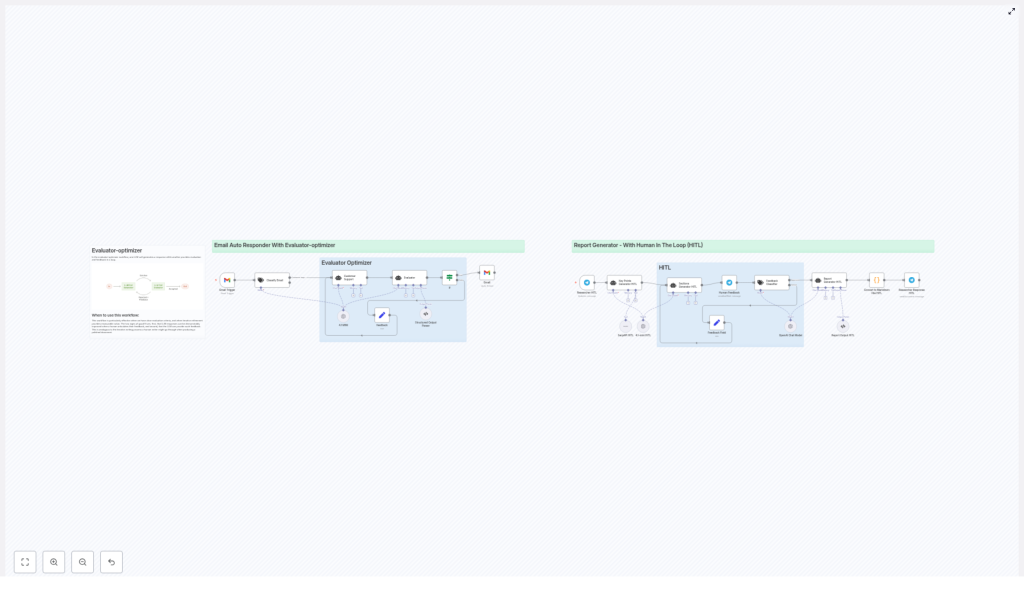
Let us look at two concrete examples you can implement in n8n: an email auto-responder and a report generator. Both use the same core pattern, just applied to different problems.
Workflow 1: Email Auto-Responder With Evaluator-Optimizer
Imagine your inbox is flooded with repetitive customer questions. You want to automate replies, but you also care a lot about tone, clarity, and compliance with your internal email rules. That is where this workflow shines.
Use case
Automatically respond to common customer emails while enforcing:
- Consistent tone of voice
- Clear, easy-to-understand responses
- Correct sign-off rules and formatting
- Details like “no subject line repeated in the body”
How the n8n workflow runs
- Gmail Trigger A new email arrives and triggers your n8n workflow.
- Classifier A classifier node decides if this email actually needs a response or if it should be ignored or routed elsewhere.
- Optimizer: LLM generates a draft reply An LLM (for example via an OpenAI node) writes an initial response based on the email content.
- Evaluator: quality and policy check A second LLM or structured evaluation node checks the draft against rules such as:
- Is the tone friendly and on-brand?
- Is the message clear and complete?
- Does it include the required sign-off?
- Did it avoid putting the subject line inside the body?
The evaluator returns a clear pass/fail result plus short feedback.
- Decision: send or escalate
- If it passes, n8n sends the email automatically via Gmail.
- If it fails, the draft and evaluator feedback are sent to a human reviewer.
- HITL feedback loop The human reviewer edits or approves the message. Their corrections and decisions are captured in n8n and stored as structured data. You can then use that data to refine your evaluator logic or update your prompts so similar issues are less likely in the future.
Why this setup works so well
Customer emails are often repetitive and high-volume, which makes them perfect for automation. At the same time, a single bad reply can hurt trust or feel off-brand.
The evaluator acts like a safety net for obvious policy or quality issues, while HITL catches the edge cases. Over time, as you learn from the human corrections, your system gets better and your human workload shrinks.
Workflow 2: Report Generator With Human-In-The-Loop
Now let us switch contexts. Suppose you want to create research or business reports that need:
- Up-to-date facts
- Clear structure
- High-quality writing
- Human validation before anything is published or shared
This is where an LLM-powered report generator with HITL is incredibly useful.
Use case
Generate well-structured reports from a topic or request, using fresh data, then refine them with human review before final delivery.
How the n8n workflow runs
- Trigger A webhook, chat input (for example from Telegram or Slack), or another event starts the workflow with a topic or question.
- Research step A research LLM or a tool like SerpAPI is used to gather current information and key facts. This helps avoid outdated or hallucinated data by pulling in live web results.
- Outline generator Another LLM creates a concise outline for the report, usually limited to around four core sections. Keeping the structure tight makes the final report clearer and easier to review.
- Optimizer: draft report generation Once the outline is approved, an LLM writes the full draft using that structure as a guide. This is the main “optimizer” step.
- HITL review and revision A human reviewer reads the draft, adds comments or edits, and may request changes. The workflow can then integrate that feedback into a revised draft automatically, or you can loop through another LLM pass with the reviewer’s notes.
- Final delivery The final report is converted into a markdown file or another desired format. n8n then delivers it, for example:
- Sending the file via Telegram
- Exporting it to a storage or file system
- Passing it on to another system for publishing
This flow blends automation speed with human judgment right where it matters: at the point of truth and quality.
Key Components of Evaluator-Optimizer + HITL in n8n
Whether you are building an email responder, a report generator, or another LLM-powered workflow, you will usually reuse the same building blocks in n8n.
Triggers
Triggers are how your workflow starts. Common examples include:
- Gmail trigger for inbound emails
- Webhooks for API-style requests from other systems
- Chat-based triggers from tools like Telegram or Slack
Classifiers and external tools
Before you generate content, it often helps to classify or enrich your input:
- Text classifiers Route messages based on intent, such as “customer inquiry”, “spam”, or “no action needed”.
- SerpAPI or similar tools Pull live web results to give LLMs access to current data and improve factual accuracy.
LLMs and evaluators
In the Evaluator-Optimizer pattern, you typically use:
- Optimizer model The main LLM that generates emails, reports, summaries, or other content.
- Evaluator model or logic A separate LLM or a structured evaluation node that:
- Checks the output against your criteria
- Returns a clear pass/fail signal
- Provides short, actionable feedback when something fails
A good evaluator response is strict and machine-readable, for example a small JSON object with fields like pass and feedback. That makes it easy for n8n to branch the workflow based on the result.
Human feedback loop
When the evaluator flags a problem or is unsure, you route the output to a human:
- Send the draft to a reviewer via chat or email
- Provide an interface where they can approve, reject, or edit
- Capture their decisions and edits in a structured format
Over time, that feedback becomes a goldmine. You can use it to:
- Refine prompts for both the optimizer and the evaluator
- Adjust your evaluation criteria
- Reduce recurring failure patterns through lightweight retraining or updated rules
Best Practices for Reliable LLM Feedback Loops
To make your Evaluator-Optimizer + HITL workflows robust in production, a few practices go a long way.
- Define clear, testable evaluation criteria Spell out what “good” looks like, for example:
- Tone must be polite and neutral
- All required sections are present
- Specific compliance rules are followed
- Keep evaluator outputs strict and structured Use a compact, machine-readable format like JSON with fields such as
pass,score, andfeedback. - Use HITL selectively Do not send everything to humans. Limit HITL to:
- Cases where the evaluator fails
- Low-confidence or ambiguous results
This keeps human workload manageable.
- Log everything Store:
- Inputs and prompts
- Model outputs
- Evaluator decisions
- Human edits and comments
These logs are crucial for debugging, auditing, and improving your workflow.
- Continuously improve using feedback Use human corrections to refine prompts, adjust evaluator thresholds, and reduce recurring errors over time.
Common Pitfalls to Watch Out For
As helpful as this pattern is, a few traps come up often. Being aware of them early saves a lot of frustration.
- Overly strict evaluators If your evaluator flags too many items as failures, you will overload your human reviewers and lose the benefit of automation. It is a balance.
- Unstructured human feedback Free-form notes are hard to learn from. Try to capture feedback in a structured way, such as tagging the type of error or using predefined fields.
- Slow human review loops If it takes days for humans to review items, automation value drops. Set expectations or SLAs and prioritize items where speed matters most.
- Ignoring model or data drift Models and upstream data change over time. Periodically recheck your evaluator and optimizer performance and adjust prompts or logic as needed.
How to

