


Build an Advanced VIN Decoder with n8n and LangChain
Vehicle Identification Numbers (VINs) encode a significant amount of structured information about a vehicle. With n8n, LangChain, and modern vector search, you can transform a basic VIN lookup into a robust, context-aware decoding pipeline. This guide explains how to implement a no-code VIN decoder workflow that accepts VINs via webhook, generates embeddings with HuggingFace, stores and retrieves vectors from Redis, and uses a LangChain agent to provide enriched responses while logging all activity to Google Sheets.
The result is a scalable, production-ready VIN intelligence layer suitable for fleet operators, automotive marketplaces, and engineering teams experimenting with VIN-driven automations.
Solution Overview
Traditional VIN decoders typically call a single API and return fixed fields such as make, model, and year. By combining n8n, LangChain, and a Redis vector store, you can move beyond static decoding and deliver contextual answers based on documentation, recall information, and OEM specifications.
This workflow enables you to:
- Index and search across vehicle documentation and technical references using vector similarity
- Handle complex questions about a VIN, such as trim-level specifics, factory options, or recall details
- Maintain a complete log of each VIN query and response in Google Sheets for analytics and auditing
- Scale efficiently using Redis as a vector store and HuggingFace embeddings for fast, semantic retrieval
High-level Architecture
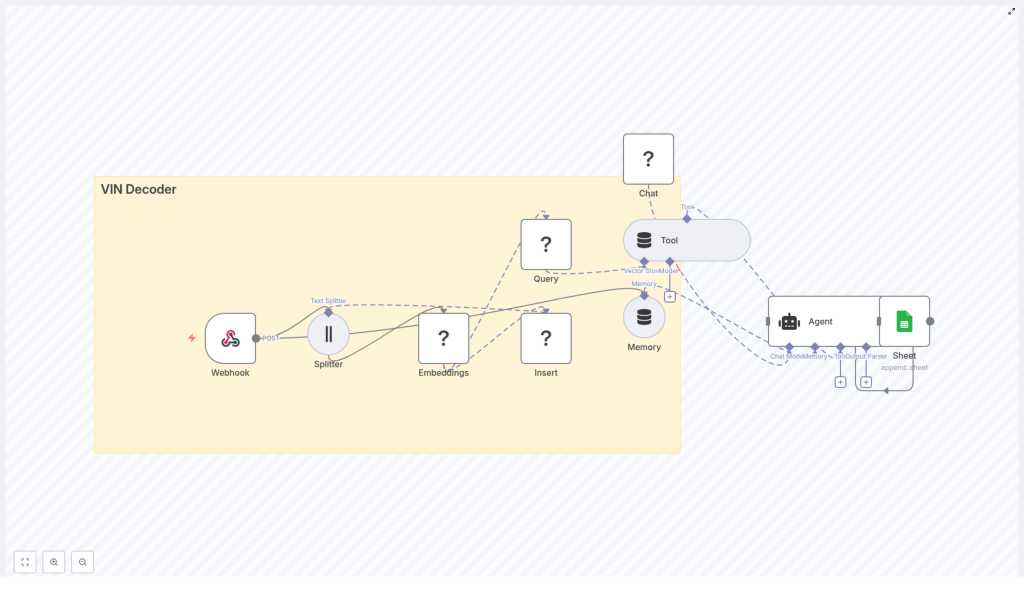
The n8n workflow is structured as a modular, event-driven pipeline. At a high level, it consists of:
- Webhook – Public HTTP entry point that receives VINs and user prompts
- Text Splitter – Optional pre-processing for long or multi-VIN inputs
- HuggingFace Embeddings – Transformation of text into numerical vector representations
- Redis Vector Store (Insert & Query) – Storage and retrieval of embeddings in the
vin_decoderindex - Vector Store Tool – Tool abstraction that exposes Redis search to the LangChain agent
- Memory (Buffer Window) – Short-term conversational memory for multi-turn VIN queries
- LangChain Agent + Chat Model – Core reasoning component that composes the final response
- Google Sheets – Persistent log of all VIN lookups and agent outputs
This architecture separates ingestion, enrichment, reasoning, and logging, which makes the workflow easier to maintain and scale.
Use Case and Data Flow
The workflow is designed for scenarios where a user or system submits a VIN and an optional prompt. The high-level data flow is:
- A client sends a POST request with a VIN and a natural-language prompt to the n8n webhook.
- The input is validated and optionally split into chunks for embedding.
- Text chunks are converted to embeddings using a HuggingFace model and stored in Redis under the
vin_decoderindex along with metadata. - When a query is made, the workflow searches Redis for the most relevant documents for that VIN.
- LangChain uses the vector store as a tool, together with conversational memory and a chat model, to generate a structured response.
- The complete interaction, including the VIN, prompt, response, and source context, is appended to Google Sheets.
Step-by-step Implementation in n8n
1. Configure the Webhook Entry Point
Create a new workflow in n8n and add a Webhook node. Set it to accept POST requests at a path such as /vin_decoder. This endpoint acts as the public interface for all VIN lookups.
Typical payload structure:
{  "vin": "1HGCM82633A004352",  "prompt": "Decode this VIN and list recalls or important notes."
}
Ensure the webhook is secured appropriately before using it in production (see the security section below).
2. Sanitize and Split Input Text
In many real-world cases you may receive more than a single VIN string, for example longer descriptions or combined queries. To prepare this content for embedding, add a Text Splitter node after the webhook.
Recommended configuration:
- Use a character-based splitter
- Set a chunk size around
400characters - Configure an overlap of approximately
40characters
This approach keeps chunks within the embedding model context limits while preserving cross-sentence meaning.
3. Generate Embeddings with HuggingFace
Next, add a HuggingFace Embeddings node and connect it to the Text Splitter (or directly to the Webhook if splitting is not required). Select an appropriate model, such as one from the sentence-transformers family, and configure your HuggingFace API key in n8n credentials.
For each text chunk, the node outputs a numerical vector representation. These vectors power semantic search against your VIN-related documentation and reference data.
4. Persist Vectors in Redis
To enable fast similarity search, add a Vector Store (Redis) Insert node. Configure it with:
- Index name:
vin_decoder - Embedding field: the vector output from the HuggingFace node
- Metadata fields: for example,
vin,source,timestamp, and any document identifiers
Redis then serves as a high-performance k-NN backend using vector similarity. This is critical for low-latency VIN lookups at scale.
5. Build the Query Path to the Vector Store
To answer questions about a specific VIN, you need a retrieval path. Add a Vector Store (Redis) Query node that points to the same vin_decoder index. Configure it to retrieve the top-k similar documents given the current prompt and VIN context.
Then, add a Vector Store Tool node. This tool wraps the Redis query functionality in a form that the LangChain agent can call when it needs external context. The agent will use this tool to fetch relevant documents and ground its responses in your indexed data.
6. Add Conversational Memory
For multi-turn interactions where a user may ask follow-up questions about the same VIN, introduce a Memory (Buffer Window) node. This node maintains a sliding window of recent messages and agent responses.
Connect the memory node to the agent chain so that:
- The agent can reference prior questions and answers in the same session
Proper use of memory improves user experience, particularly for complex diagnostic or investigative queries.
7. Configure the LangChain Agent and Chat Model
Now configure the core reasoning component. Add a LangChain Agent node and a compatible Chat Model node (for example, a HuggingFace chat model). Wire the following into the agent:
- Tool: the Vector Store Tool that exposes Redis search
- Memory: the Buffer Window node for short-term context
- Chat model: your selected HuggingFace chat model
In the agent prompt, instruct the model to:
- Use retrieved documents from the vector store as the primary source of truth
- Produce a structured response containing fields such as:
vinmakemodelyearengine- Trim and notable options, where available
- Recalls or important alerts
- Include notes or caveats if the information is uncertain or requires manual verification
This configuration enables the agent to synthesize detailed answers that go beyond simple VIN decoding.
8. Log Results to Google Sheets
For observability, auditing, and analytics, add a Google Sheets node configured with the Append operation. After the agent generates its response, append a new row capturing:
timestampvinuser_promptagent_responsesource_docsor document identifiers used for the answer
This logging pattern provides a complete history of VIN lookups, supports quality monitoring, and simplifies downstream reporting or BI integration.
Example Request and Response
Webhook request
POST /webhook/vin_decoder
{  "vin": "1HGCM82633A004352",  "prompt": "Decode this VIN and list recalls or important notes."
}
Representative agent output (JSON or plain text):
{  "vin": "1HGCM82633A004352",  "make": "Honda",  "model": "Accord",  "year": 2003,  "engine": "2.4L I4",  "recalls": ["Airbag inflator recall - NHTSA 05V"],  "notes": "Possible trim: EX; check door label for paint code"
}
The exact content depends on the indexed documents and the prompt design, but this illustrates the level of structured detail that the workflow can provide.
Best Practices for High-quality VIN Decoding
Curate Authoritative Data Sources
- Index high-quality reference materials such as OEM service manuals, NHTSA recall texts, and official specification sheets.
- Store URLs, document IDs, and text snippets as metadata so the agent can reference or cite original sources.
Optimize Text Chunking and Embeddings
- Use chunk overlap in the Text Splitter to avoid losing context across sentence boundaries.
- Periodically review vector dimensions and index configuration in Redis to balance accuracy, cost, and latency.
Protect Downstream Systems
- Implement rate limiting or throttling on the webhook endpoint to protect external APIs and models from abuse.
- Monitor Redis resource usage and tune query parameters such as top-k results and similarity thresholds.
Security, Privacy, and Compliance
In some jurisdictions, VINs may be considered personally identifiable information, particularly when linked to ownership records or location data. Treat VIN processing accordingly.
- Enable encryption at rest for Redis and Google Sheets where supported.
- Restrict access to the n8n instance and webhook using authentication, network controls, or a firewall for production deployments.
- Define and enforce data retention policies that comply with GDPR and relevant local privacy regulations.
Scaling the Workflow
As usage grows, the following practices help maintain performance and reliability:
- Run n8n in containers and scale horizontally behind a load balancer.
- Use a managed Redis service or Redis Enterprise to ensure predictable performance, monitoring, and backups.
- Pre-index VIN-specific knowledge bases and schedule periodic updates for new recalls, TSBs, and technical bulletins.
- Place an API gateway or dedicated front-end in front of the webhook to manage authentication, rate limits, and observability.
Conclusion
By integrating n8n, LangChain, HuggingFace embeddings, and Redis, you can deliver a VIN decoder that does far more than simple field parsing. This architecture enables reasoning over rich documentation, supports contextual Q&A, and provides a complete audit trail through Google Sheets logging.
Start by deploying the core path: webhook, text processing, embeddings, and Redis indexing. Once this foundation is in place, incrementally enrich the system with higher quality data sources, improved prompts, and more advanced analytics on your Google Sheets logs.
Next steps: connect your HuggingFace and Redis credentials in n8n, deploy the workflow, and test it with your own VIN dataset. For teams that prefer a faster start or guided implementation, a ready-made template and expert support are available.
Call to action: Get a free starter template or schedule a 30-minute consultation to tailor this VIN decoder to your environment. Sign up on our website or contact us by email to begin.
