


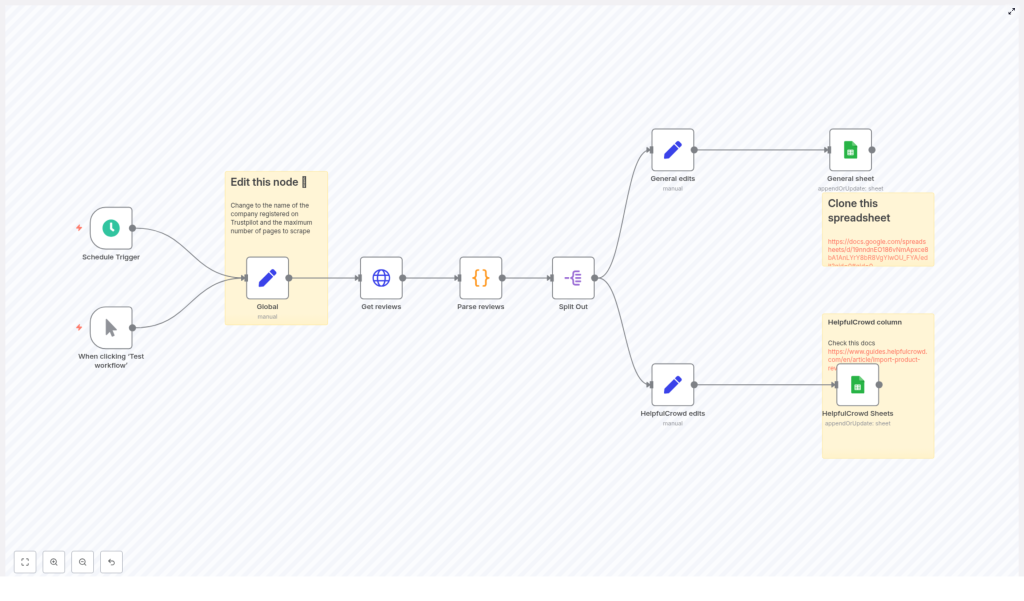
Scrape Trustpilot Reviews to Google Sheets with n8n
Automating the collection of Trustpilot reviews into Google Sheets gives you a reliable data source for monitoring customer sentiment, tracking issues, and feeding review data into downstream systems. This reference-style guide documents a ready-to-use n8n workflow that scrapes Trustpilot reviews, parses the embedded JSON, and appends or updates rows in Google Sheets with deduplication based on review_id.
1. Workflow overview
This n8n template is designed as a scheduled or manually triggered pipeline that:
- Requests paginated Trustpilot review pages for a specific company slug (
company_id). - Extracts and parses the
__NEXT_DATA__JSON structure that contains the review data. - Normalizes each review into a consistent schema.
- Writes reviews into one or two Google Sheets tabs using
appendOrUpdatewithreview_idas the unique key.
The workflow supports two output formats:
- A general archival sheet with standard review fields.
- A HelpfulCrowd-compatible sheet for direct import into HelpfulCrowd.
2. Architecture and data flow
The workflow is organized as a linear pipeline of nodes, from trigger to Sheets output:
- Schedule Trigger / Manual Trigger – entry point that controls when the workflow runs.
- Global (Set) – defines global configuration values, including
company_idandmax_page. - Get reviews (HTTP Request) – fetches Trustpilot review pages with pagination.
- Parse reviews (Code) – parses the HTML response, extracts
__NEXT_DATA__, and returns an array of review objects. - Split Out – converts the reviews array into individual items (one item per review).
- General edits (Set) – maps and normalizes fields for a generic Google Sheet.
- HelpfulCrowd edits (Set) – maps and normalizes fields to match HelpfulCrowd’s import schema.
- General sheet (Google Sheets) – writes to the general archival sheet using
appendOrUpdate. - HelpfulCrowd Sheets (Google Sheets) – writes to the HelpfulCrowd-formatted sheet using
appendOrUpdate.
Logical data flow:
- Trigger node starts the workflow.
- Global configuration is attached to each item and used downstream by the HTTP Request node.
- HTTP Request node returns one item per page, each containing HTML content.
- Code node transforms each HTML payload into an array of review objects.
- Split Out node flattens that array into separate n8n items.
- Set nodes project each review into the exact column layout expected by each Google Sheet.
- Google Sheets nodes write or update rows based on
review_id.
3. Prerequisites
- An n8n instance (Cloud or self-hosted) with access to the public internet.
- Google Sheets credentials configured in n8n using OAuth.
- Permission to access and scrape the specific Trustpilot pages (see legal section below).
- Basic understanding of n8n nodes, credentials, parameters, and how to modify node configurations.
4. Node-by-node breakdown
4.1 Trigger: Schedule Trigger / Manual Trigger
Purpose: Control when the workflow runs.
- Manual Trigger is typically used during initial setup and testing.
- Schedule Trigger is used for production runs, for example every hour or once per day.
Key considerations:
- Use the Schedule Trigger in production to continuously fetch new reviews.
- Choose an interval that respects Trustpilot rate limits and your own operational needs.
4.2 Global configuration: Global (Set)
Node type: Set
Purpose: Provide reusable configuration values to downstream nodes.
Typical fields set in this node:
company_id– the company slug used in Trustpilot URLs. Example: forhttps://www.trustpilot.com/review/n8n.io, the slug isn8n.io.max_page– maximum number of pages to fetch during pagination.
These values are referenced by the HTTP Request node via expressions like {{ $json.company_id }} and {{ $json.max_page }}.
4.3 HTTP Request: Get reviews
Node type: HTTP Request
Purpose: Fetch HTML pages containing Trustpilot reviews with built-in pagination.
Base URL:
https://trustpilot.com/review/{{ $json.company_id }}Pagination configuration (core parameters):
- Query or path parameter for page The page parameter increments using:
{{ $pageCount + 1 }} - maxRequests Set to:
{{ $json.max_page }}This caps the total number of page requests, regardless of what the site returns. - requestInterval (ms) A delay between requests, for example
5000(5 seconds), to reduce rate pressure and lower the chance of being blocked. - paginationCompleteWhen Set to
receiveSpecificStatusCodes, which means pagination stops when a configured status code is received. - statusCodesWhenComplete Set to
404, so the workflow stops when it hits a non-existent page.
Edge cases and behavior:
- If Trustpilot returns a 404 before reaching
max_page, the workflow stops early, which is expected and prevents unnecessary requests. - If Trustpilot changes its behavior and returns a different status code for “no more pages”, the pagination logic may need to be updated.
- If the site uses redirects or HTML shims instead of 404, the current paginationCompleteWhen configuration might not trigger as expected and may require adjustment.
Optional headers:
- To reduce the risk of being treated as a bot, consider setting a realistic
User-Agentheader in this node, especially if you encounter missing content or captchas.
4.4 Code node: Parse reviews
Node type: Code
Purpose: Parse the HTML from Trustpilot, locate the __NEXT_DATA__ script tag, extract the embedded JSON, and return an array of review objects.
The Code node uses cheerio to work with the HTML and to locate the script tag:
// Key parsing approach (simplified)
const cheerio = require('cheerio');
const $ = cheerio.load(content);
const scriptTag = $('#__NEXT_DATA__');
const reviewsRaw = JSON.parse(scriptTag.html());
return reviewsRaw.props.pageProps.reviews || [];
Core logic:
- The HTML response from the HTTP Request node is loaded into
cheerio. - The script tag with id
__NEXT_DATA__is selected. - The script content is parsed as JSON, which contains the page’s data, including reviews.
- The node returns
reviewsRaw.props.pageProps.reviewsor an empty array if that path is missing.
Error handling:
- The template includes a
try/catchblock so that malformed HTML, missing script tags, or invalid JSON do not crash the entire workflow. - On error, the node should fail gracefully and can return an empty set of reviews for that page, depending on how the code is written in the template.
Data extracted per review:
- Date
- Author
- Review text / body
- Review title / heading
- Rating
- Location
review_id(used as a unique identifier in Sheets)
Environment note:
- n8n’s Code node supports
require('cheerio')in environments where external modules are available. - In some self-hosted n8n setups, you must ensure that
cheeriois installed and accessible to the runtime, otherwise the Code node will fail when callingrequire('cheerio').
4.5 Split Out: expand review array
Node type: Item splitting node (for example Item Lists / “Split Out”)
Purpose: Convert the array of reviews returned by the Code node into one item per review, which is the standard pattern for processing each review independently in downstream nodes.
Behavior:
- Input: one item containing an array of review objects.
- Output: multiple items, each corresponding to a single review object.
This step is required so that each Set node and each Google Sheets node operates on individual reviews.
4.6 Field mapping: General edits (Set)
Node type: Set
Purpose: Map raw review fields into a normalized schema suitable for a general archival Google Sheet.
Typical mapped fields:
- Date – standardized review date.
- Author – reviewer name or identifier.
- Body – full review text.
- Heading – review title.
- Rating – numeric rating value.
- Location – reviewer location if available.
- review_id – unique identifier used for deduplication in Sheets.
The exact field names should match the column headers in your general Google Sheet tab.
4.7 Field mapping: HelpfulCrowd edits (Set)
Node type: Set
Purpose: Transform the same review objects into the schema expected by HelpfulCrowd’s import format.
Typical mapped fields:
- product_id
- rating
- title
- feedback – review body text.
- customer_name
- status – for example, published or pending (depending on how you map it).
- review_date
- verified – indicates whether the review is verified, if this information is available or inferred.
- review_id – still used as the unique key for Sheets operations.
Ensure that these field names align exactly with your HelpfulCrowd import template and with the column names in the corresponding Google Sheet tab.
4.8 Google Sheets: General sheet
Node type: Google Sheets
Operation: appendOrUpdate
Purpose: Write normalized reviews into a general archival sheet while avoiding duplicates.
Key parameters:
- Authentication Use your configured Google Sheets OAuth credentials.
- Spreadsheet / Sheet Point to the cloned sample spreadsheet and select the general tab.
- Operation Set to
appendOrUpdateso that existing rows are updated when a matching key is found. - matchingColumns Set to
review_id. This is critical for deduplication.
Behavior:
- If a row with the same
review_idalready exists, that row is updated with the latest data. - If no matching
review_idis found, a new row is appended. - This allows the workflow to be safely re-run without creating duplicate entries for the same review.
4.9 Google Sheets: HelpfulCrowd Sheets
Node type: Google Sheets
Operation: appendOrUpdate
Purpose: Write reviews into a second sheet that matches HelpfulCrowd’s import schema.
Key parameters:
- Authentication Use the same Google Sheets OAuth credentials as the general sheet node.
- Spreadsheet / Sheet Select the HelpfulCrowd-formatted tab in the cloned spreadsheet.
- Operation
appendOrUpdate, identical behavior to the general sheet node. - matchingColumns Set to
review_idto maintain consistency and avoid duplicates.
5. Step-by-step configuration
5.1 Clone the sample spreadsheet
The template assumes you are using a spreadsheet that contains two tabs:
- A general review sheet.
- A HelpfulCrowd-formatted sheet.
Steps:
- Clone the provided sample spreadsheet into your own Google account.
- In n8n, open each Google Sheets node and:
- Select your Google Sheets OAuth credentials.
- Point the node to the cloned spreadsheet and the correct tab.
5.2 Configure global variables
Open the Global (Set) node and set the following fields:
company_idSet to the Trustpilot company slug, for example:n8n.io.max_pageSet to the maximum number of pages to fetch, for example10. This value is referenced by the HTTP Request node for pagination.
5.3 Verify HTTP Request pagination
Open the Get reviews node and confirm the following:
- URL is set to:
https://trustpilot.com/review/{{ $json.company_id }} - Pagination is enabled:
- Page parameter increments with
{{ $pageCount + 1 }}. - maxRequests is
{{ $json.max_page }}. - requestInterval is configured (for example 5000 ms).
- paginationCompleteWhen is
receiveSpecificStatusCodeswithstatusCodesWhenComplete = 404.
- Page parameter increments with
5.4 Validate the Code node behavior
Open the Parse reviews Code node and
