

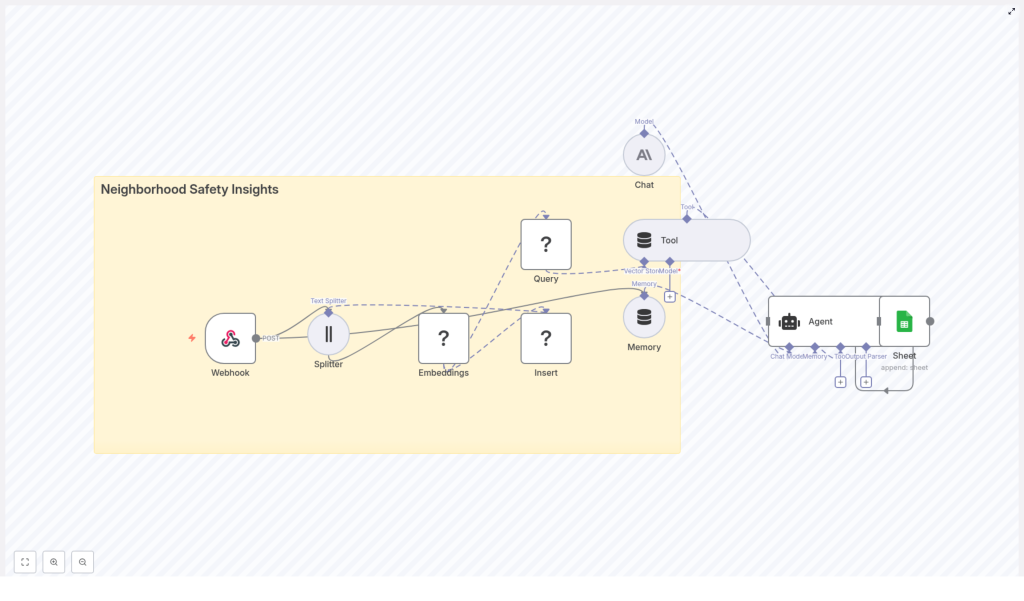
Neighborhood Safety Insights with n8n & LangChain: Technical Workflow Reference
This reference guide describes a production-ready n8n + LangChain workflow template for neighborhood safety analytics. The workflow ingests community incident reports, generates embeddings, stores them in a Redis vector index, retrieves relevant context via semantic search, uses a chat language model and agent tooling to generate insights, and finally logs outcomes to Google Sheets for audit and review.
1. Solution Overview
The workflow is designed for teams that receive unstructured neighborhood safety reports from web forms, mobile apps, or municipal systems and want to convert that data into searchable, contextual knowledge. Using n8n as the orchestration layer, and LangChain-style components for embeddings, retrieval, and agent behavior, the pipeline provides:
- Automated ingestion of incident reports via an n8n Webhook
- Text preprocessing and chunking for long reports
- Embedding generation using Hugging Face or compatible models
- Storage of vectors and metadata in a Redis vector store
- Semantic and geospatial-aware retrieval for queries
- Agent-driven reasoning using a Chat LM (for example Anthropic)
- Short-term memory for multi-turn or ongoing incident analysis
- Structured logging of AI outputs to Google Sheets
The same pattern can be reused for any domain that relies on unstructured incident reports, such as facility management, customer support, or operations monitoring.
2. High-Level Architecture
At a high level, the n8n workflow coordinates the following components:
- Webhook (n8n) – Entry point for incident reports via HTTP POST.
- Text Splitter – Splits long reports into manageable chunks.
- Embeddings (Hugging Face) – Converts text chunks into dense vector representations.
- Redis Vector Store – Persists embeddings and metadata for similarity search.
- Query & Tool Layer – Performs semantic retrieval based on user or agent queries.
- Memory Buffer – Maintains short-term conversational or decision context.
- Chat LM – Generates summaries, classifications, and recommended actions.
- Agent – Orchestrates tools, memory, and Chat LM; writes results to Google Sheets.
- Google Sheets – Stores structured logs of AI-generated outputs.
n8n coordinates data flow between these nodes, manages credentials, and exposes the workflow as a reusable, configurable template.
3. Node-by-Node Breakdown
3.1 Webhook Ingestion Node
The workflow begins with a Webhook node configured to accept HTTP POST requests. Typical upstream sources include:
- Custom web forms for incident reporting
- Mobile app backends sending JSON payloads
- Integrations with municipal hotlines or third-party tools
The webhook should standardize incoming payloads into a consistent schema. At minimum, the payload should contain:
- Reporter identifier (ID or pseudonym, optional)
- Timestamp of the report
- Text description of the incident
- Location (latitude/longitude or address)
- Media references (optional URLs to images or videos)
Within n8n, you can add validation and sanitization logic around this node to:
- Reject malformed or incomplete payloads
- Strip or escape dangerous characters to reduce injection risk
- Normalize timestamps and location formats
3.2 Text Splitter Node
Many reports are long or contain concatenated message threads. A Text Splitter node segments the report text into smaller, overlapping chunks to improve embedding quality and later retrieval.
Typical configuration:
- Chunk size: around
400characters - Chunk overlap: around
40characters
This balance helps embeddings capture local context while avoiding context loss between chunks. Overlap prevents important phrases that span boundaries from being split in a way that harms semantic search.
3.3 Embeddings Node (Hugging Face)
Each text chunk is passed to an Embeddings node backed by a Hugging Face embeddings model (or equivalent provider). The node converts each chunk into a dense vector representation suitable for similarity search.
For each chunk, the workflow should preserve:
- The vector (embedding output)
- The original chunk text
- Location metadata (lat/lon or address)
- Reporter identifier (if available)
- Timestamp of the incident
When selecting an embedding model:
- Favor models optimized for semantic search and event-level understanding.
- Consider trade-offs between accuracy, latency, and cost.
3.4 Redis Vector Store Node
A Redis vector store node receives the embeddings and persists them using Redis with vector similarity search capabilities (for example via RediSearch modules).
Typical configuration includes:
- A dedicated index name, for example
neighborhood_safety_insights - Definition of the vector field for embeddings
- Indexing of key metadata fields such as:
- Location (lat/lon or region ID)
- Timestamp or date
- Severity labels (if available)
- Category tags (for example theft, noise complaint)
- Optional TTL policies if you want data to expire after a certain retention period
Redis provides high-performance nearest-neighbor search across large embedding sets. Index design and metadata indexing are critical for low-latency queries and combined semantic-plus-structured filtering.
3.5 Query & Retrieval Tool Layer
When an analyst, dispatcher, or automated system issues a question, the workflow uses a query tool that:
- Converts the natural-language question into an embedding using the same or a compatible model.
- Performs a vector similarity search against the Redis index.
- Returns the top matching chunks and associated metadata as context.
Example query:
Has there been an uptick in break-ins on Maple Ave in the last 30 days?
For such a query, the retrieval tool can combine:
- A semantic embedding of the question
- Time filters, for example last 30 days
- Location filters, for example Maple Ave or a relevant geospatial bounding box
The resulting set of context chunks is then passed to the language model for summarization or analysis.
3.6 Agent Node (LangChain-style)
A central Agent node coordinates interactions between:
- The Redis retrieval tool
- The Chat LM (for example Anthropic or another provider)
- The memory buffer
- The Google Sheets logging node
Typical responsibilities of the agent include:
- Fetching relevant context from Redis based on the user query
- Summarizing incidents or generating situation overviews
- Classifying urgency or severity levels
- Recommending next steps or suggested actions
- Writing structured log entries into Google Sheets for later review
You can expose the agent through:
- A chat-style interface (for analysts or dispatchers)
- An additional webhook endpoint for automated alerts or external integrations
3.7 Memory Buffer Node
To maintain continuity across a session, the workflow uses a windowed memory buffer. This memory:
- Stores the most recent exchanges or decisions
- Prevents the agent from repeating information unnecessarily
- Helps the agent maintain context across follow-up questions and incident threads
The memory window should be configured to retain enough context for coherent multi-turn interactions while avoiding excessive token usage for the language model.
3.8 Google Sheets Logging Node
The final node in the pipeline logs AI-generated outputs to a Google Sheets document. A common pattern is to maintain a dedicated “Log” sheet.
Each appended row can include:
- Incident summary generated by the Chat LM
- Assigned severity level (for example low, medium, high)
- Suggested action or follow-up steps
- Location associated with the incident
- Timestamp of the report or query
- Raw report identifier or reference ID
Google Sheets provides a low-friction interface for stakeholders to:
- Audit AI outputs
- Export data for further analysis
- Share summaries with non-technical collaborators
4. Configuration & Implementation Notes
4.1 Credentials & Security
Configure and protect the following credential sets in n8n:
- Hugging Face (or embedding provider) API keys
- Redis connection credentials (host, port, password, TLS settings)
- Chat LM credentials (for example Anthropic API key)
- Google Sheets OAuth or service account
Security best practices:
- Use TLS for webhook endpoints and Redis connections where available.
- Store secrets in n8n’s credentials store, not in plain-text node parameters.
- Restrict Google Sheets and Redis access using role-based access control.
- Anonymize or pseudonymize reporter identifiers if you are processing sensitive data.
4.2 Model & Embedding Tuning
To optimize retrieval quality:
- Experiment with several embedding models on a sample of your real incident data.
- Prefer models that capture commonsense reasoning and event semantics for neighborhood reports.
- Tune chunk size and overlap:
- Too small: risk of losing important context.
- Too large: semantic signal becomes diluted and embeddings may be less precise.
4.3 Filtering & Classification Before Indexing
For better retrieval and analytics, consider inserting a lightweight classification step before writing to Redis:
- Tag each report with categories such as:
- Theft
- Suspicious person
- Noise complaint
- Vandalism
- Assign a severity level such as low, medium, or high.
These tags can be stored as metadata fields in Redis and used to:
- Filter search results
- Build dashboards and trend visualizations
- Trigger alerting rules based on severity
4.4 Handling Geospatial Queries
Many neighborhood safety use cases are inherently location-sensitive. To support geospatial queries:
- Store lat/lon coordinates with each incident in Redis metadata.
- For queries such as “near 5th & Main”, derive a bounding box or radius around that point.
- Apply geospatial filters before or after the vector similarity search to ensure location relevance.
Combining semantic similarity with geospatial constraints often yields far more relevant results than either approach alone.
4.5 Monitoring & Observability
For reliable operation at scale, track:
- Workflow throughput (reports processed per minute or hour)
- Redis query latency and error rates
- Embedding API failures or timeouts
- Chat LM usage and cost metrics
Set alerts for:
- Spikes in error rates
- Sudden increases in incident volume (which might indicate coordinated reporting events)
5. Scaling & Cost Management
The primary cost drivers in this workflow are:
- Embedding generation for each chunk
- Chat LM calls for summarization and reasoning
To optimize for scale and cost:
- Batch embeddings where possible to reduce overhead.
- Cache repeated queries and their results when users ask similar questions frequently.
- Use a lower-cost embedding model for bulk indexing and reserve higher-quality models for critical or high-value queries if your budget requires it.
- Plan Redis for horizontal scaling, including sharding and index optimization, as data volume grows.
6. Example Agent Prompt Flow
Consider a dispatcher asking:
Summarize incidents near

