


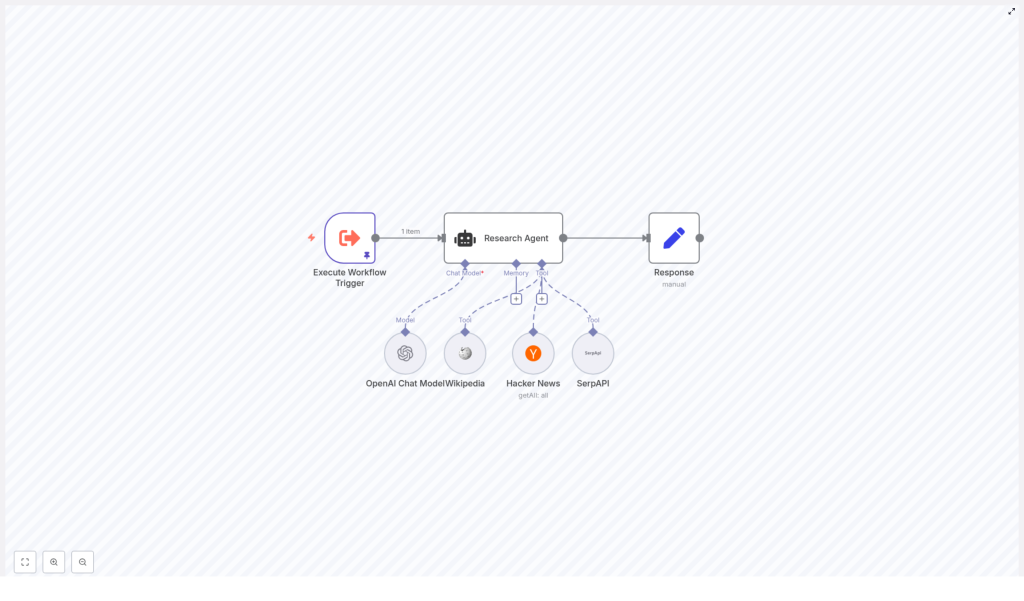
Create a Research Agent in n8n with LangChain
Automating research workflows in n8n lets you delegate time-consuming tasks like source discovery, content summarization, and article curation to a repeatable, deterministic pipeline. This documentation-style guide explains how to implement a LangChain-powered Research Agent in n8n that uses OpenAI, Wikipedia, Hacker News, and SerpAPI in a prioritized order to answer user queries.
The focus is on predictable tool selection, minimal unnecessary API calls, and structured outputs that can be consumed by downstream systems such as Slack, email, or a CMS.
1. Workflow Overview
The Research Agent workflow is designed to accept a natural language query, route it through a LangChain Agent with multiple tools, and return a curated response. A typical input might look like:
{  "query": "can you get me 3 articles about the election"
}
The workflow then executes a deterministic sequence of lookups:
- Attempt to answer using Wikipedia first for authoritative summaries.
- If Wikipedia is insufficient, query Hacker News for recent, developer-centric or tech-focused articles.
- If both fail to produce a suitable answer, fall back to SerpAPI for a broader web search.
This ordered strategy keeps responses focused, reduces latency, and avoids unnecessary calls to external APIs where possible.
2. High-Level Architecture
The workflow is composed of several key n8n nodes wired together to implement the research logic:
- Execute Workflow Trigger – Receives the initial query payload and starts execution.
- Research Agent (LangChain Agent) – Central orchestration node that chooses and invokes a single tool based on the system prompt.
- LangChain Tools – Configured within the agent:
- Wikipedia Tool
- Hacker News API Tool
- SerpAPI Tool
- Response (Set node) – Normalizes and formats the agent output into a structured response.
The data flow is straightforward:
- Trigger node injects a JSON object with a
queryfield. - The LangChain Agent reads this query, applies the system prompt, and selects exactly one tool.
- The selected tool queries its respective external API and returns results to the agent.
- The agent composes a final answer, which is then shaped by the Response node into your preferred output schema.
3. Node-by-Node Breakdown
3.1 Execute Workflow Trigger
Purpose: Entry point for the Research Agent workflow.
Typical usage patterns:
- Manual execution from the n8n editor with a test payload.
- Triggered via another workflow using the Execute Workflow node.
- Invoked indirectly through a Webhook or a scheduled trigger in a parent workflow.
Expected input: A JSON object that includes at least a query field, for example:
{  "query": "can you get me 3 articles about the election"
}
Configuration notes:
- Ensure that the field name used for the research prompt (
query) is consistent with how the LangChain Agent node expects to read it. - If the trigger is part of a larger pipeline, validate that upstream nodes always provide a non-empty query string.
3.2 Research Agent (LangChain Agent Node)
Purpose: Core decision-making component that uses LangChain with an OpenAI Chat Model and multiple tools. It decides which tool to call and composes the final answer.
Key configuration aspects:
- Language Model: OpenAI Chat Model (configured via n8n credentials).
- Tools:
- Wikipedia
- Hacker News API
- SerpAPI
- System prompt: Enforces the tool ordering and the single-tool rule.
The system prompt used in the template is:
You are a research assistant agent. You have Wikipedia, Hacker News API, and Serp API at your disposal.

To answer the user's question, first search wikipedia. If you can't find your answer there, then search articles using Hacker News API. If that doesn't work either, then use Serp API to answer the user's question.

*REMINDER*
You should only be calling one tool. Never call all three tools if you can get an answer with just one: Wikipedia, Hacker News API, and Serp API
Behavior:
- The agent reads the user query from the input data.
- Based on the system instructions, it evaluates which tool is most appropriate starting with Wikipedia, then Hacker News, then SerpAPI.
- It must call exactly one tool per query, which helps control API usage and keeps the behavior predictable.
Edge considerations:
- If the model attempts to call multiple tools, verify that the system prompt above is applied exactly and that no other conflicting instructions are present.
- If the agent returns an empty or low-quality answer, you can tighten the instructions in the system prompt to encourage more detailed responses or stricter adherence to the tool order.
3.3 Wikipedia Tool
Purpose: Primary lookup tool for quick factual summaries and background information.
Typical use cases:
- High-level overviews of events, concepts, or entities.
- Authoritative background context before moving to news or opinion sources.
Behavior in this workflow:
- The agent will attempt a Wikipedia search first, in line with the system prompt.
- If Wikipedia returns relevant content, the agent can answer using only those results.
Configuration notes:
- Adjust search parameters such as language or result limits if supported by the node.
- If you see frequent “no results” scenarios, consider instructing the agent to broaden the phrasing of queries in the system prompt.
3.4 Hacker News Tool
Purpose: Secondary lookup tool for developer-centric and technology-related discussions and articles.
Typical use cases:
- Recent technical news and community discussions.
- Links to blog posts, tutorials, and opinion pieces that may not be in Wikipedia.
Behavior in this workflow:
- Invoked by the agent only when Wikipedia does not provide sufficient information.
- Used to surface up-to-date content or niche technical topics that are better covered in community sources.
Configuration notes:
- Provide any required credentials or API configuration for the Hacker News node, if applicable in your n8n setup.
- Use filters such as score, time, or domain (when available) to reduce noise and irrelevant results.
3.5 SerpAPI Tool
Purpose: Final fallback tool for broad web search when Wikipedia and Hacker News are not sufficient.
Typical use cases:
- General web research across multiple domains.
- Topics that are not well covered on Wikipedia or Hacker News.
Behavior in this workflow:
- Only used if the first two tools cannot answer the question adequately.
- Provides wide coverage at the cost of potentially higher API usage.
Configuration notes:
- Requires a valid SerpAPI API key configured as n8n credentials.
- Consider setting result limits and safe search or localization parameters, depending on your use case.
- To control costs, you may want to cache results or restrict SerpAPI calls to only when strictly necessary, which is already encouraged by the system prompt.
3.6 Response Node (Set Node)
Purpose: Final formatting step that transforms the agent’s raw output into a structured, predictable schema for downstream systems.
Typical output formats:
- JSON with fields like
title,link,summary, andsource. - HTML snippet for direct embedding into a CMS or newsletter.
- Plain text summaries for email, chat, or logging.
Example JSON structure:
{  "query": "can you get me 3 articles about the election",  "results": [  {  "title": "Election coverage - Example",  "link": "https://...",  "summary": "...",  "source": "Hacker News"  },  {  "title": "Election background - Wikipedia",  "link": "https://...",  "summary": "...",  "source": "Wikipedia"  }  ]
}
Configuration notes:
- Map fields from the agent’s output to a consistent schema so downstream consumers do not need to handle variable structures.
- Add default values or fallbacks in case some fields are missing from the tool response.
- If you plan to send data to multiple destinations (Slack, email, database), consider including both a machine-readable JSON object and a human-friendly summary string.
4. System Prompt and Tool Selection Strategy
The system prompt is central to how the LangChain Agent behaves. In this template, it encodes two key rules:
- Ordered tool preference: Always try Wikipedia first, then Hacker News, then SerpAPI.
- Single-tool rule: The agent should call exactly one tool for each query.
This approach:
- Reduces latency by avoiding unnecessary multi-tool calls.
- Controls costs for APIs like SerpAPI and OpenAI.
- Makes behavior easier to reason about and debug.
If you need different behavior, you can modify the system prompt. For example, to prioritize recent news, you might instruct the agent to check Hacker News before Wikipedia. Always keep the single-tool reminder if you want to maintain the deterministic, cost-efficient behavior.
5. Step-by-Step Setup
- Provision an n8n instance
Use n8n Cloud or deploy a self-hosted instance. Ensure it has outbound internet access to reach OpenAI, SerpAPI, and any other APIs you plan to use. - Configure LangChain and OpenAI credentials
In n8n, enable the LangChain integration and create OpenAI credentials. The OpenAI Chat Model will be used by the LangChain Agent node. - Add external API credentials
- Configure SerpAPI credentials for the SerpAPI tool.
- Configure Hacker News credentials or parameters if required by your specific node configuration.
Store all keys in n8n’s credentials store, not directly in node parameters.
- Import the Research Agent template
Import the “Research Agent Demo” workflow template into your n8n instance. This provides a ready-made configuration of the nodes described above. - Adjust system prompt and tool parameters
Edit the LangChain Agent node to:- Refine the system prompt for your domain or tone.
- Set any tool-specific options, such as result limits or filters for Wikipedia, Hacker News, or SerpAPI.
- Test with sample queries
Use the Execute Workflow Trigger node to run the workflow with various queries. Validate:- Which tool is selected for different query types.
- That the agent respects the single-tool rule.
- That the Response node returns data in the expected format.
- Connect downstream integrations
Once the output is stable, connect the Response node to:- Slack, for posting curated research updates.
- Email, for sending research digests.
- A CMS or database, for storing citations and summaries.
6. Configuration Tips and Best Practices
6.1 API Keys and Security
- Store all API keys (OpenAI, SerpAPI, Hacker News, etc.) in n8n credentials.
- Avoid hardcoding secrets directly in node parameters or expressions.
- Use environment variables or n8n’s built-in credential encryption for secure deployments.
6.2 Rate Limits and Reliability
- Check rate limits for OpenAI, SerpAPI, and any other APIs used.
- Where possible, add retry or backoff logic around nodes that call external services, especially SerpAPI and OpenAI.
- Consider caching frequent queries if your use case involves repeated research on similar topics.
6.3 Tool Selection Logic
- Modify the system prompt if your priority changes, for example:
- Prefer recent news (Hacker News, then SerpAPI) before static background (Wikipedia).
- Skip SerpAPI entirely for cost-sensitive environments.
- Keep the instructions explicit and concise so the model reliably follows them.
6.4 Result Limits and Response Size
- Limit the number of results returned by Hacker News or SerpAPI to avoid overly long or noisy responses.
- In the Response node, cap the number of items in the
resultsarray if your downstream consumers expect a fixed or small list.
6.5 Memory and Context
- For repeated queries on similar topics, consider adding a lightweight memory or cache layer to store previous results.
- This can reduce repeated API calls and improve response times, especially for SerpAPI.
6.6 Error Handling
- Check for empty or error responses from each tool and provide a fallback message.
- In the Response node, you can include a field such as
statusorerrorto signal when no suitable sources were found. - Log failures or unexpected outputs for later analysis and prompt refinement.
7. Customizing Output
The Response (Set) node is where you control exactly what the workflow returns. Some common patterns:
7.1 JSON Output
- Ideal for APIs, webhooks, or other workflows.
- Include fields like:
queryresults[]withtitle,link,summary,source
7.2 HTML Output
- Useful for CMS, newsletters, or dashboards.
- Generate an HTML list (for example,
<ul>with<li>entries) containing links and short summaries.
7.3 Plain Text Output
- Suitable for Slack, email, or logging.
- Return short summaries followed by links for human review.
You can combine these approaches, for example returning a JSON object that includes both a structured
