


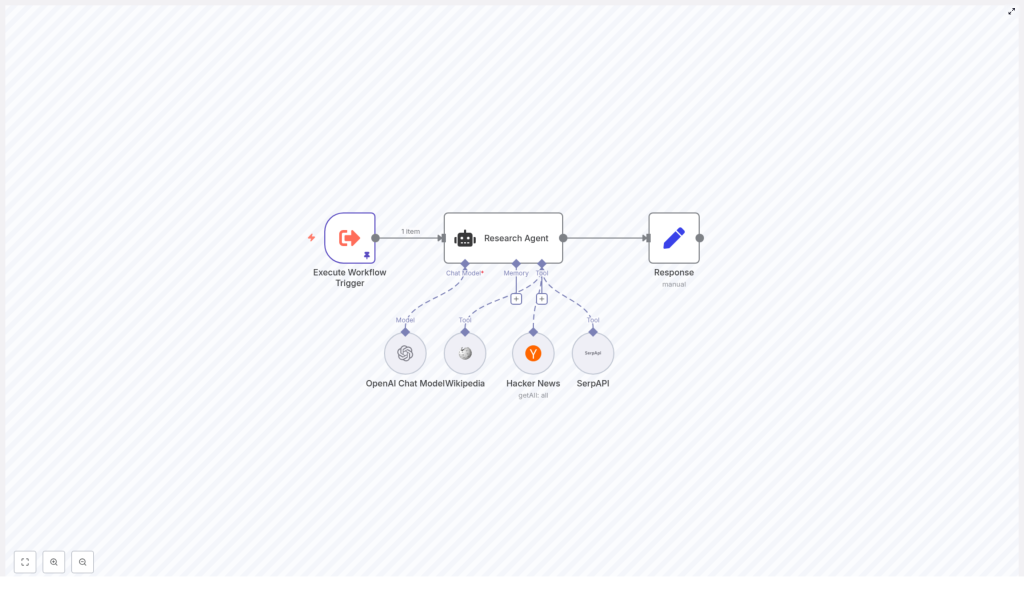
Research Agent Demo – n8n + LangChain Workflow
On a rainy Tuesday afternoon, Lena, a content strategist at a fast-growing startup, stared at her screen in frustration. Her editor had just pinged her again: “Can you get me 3 solid articles about the election for tomorrow’s briefing?”
It was not a hard request, but it was the tenth one that week. Each time, Lena bounced between Wikipedia tabs, Hacker News threads, and generic web searches, trying to find credible, relevant links fast enough to keep up with the pace of her team. She knew there had to be a better way to automate this research without losing quality.
That was the day she discovered the Research Agent demo template built with n8n and LangChain.
The problem: manual research in a multi-source world
Lena’s job was to curate reliable information from multiple sources. She needed:
- Background context from Wikipedia
- Tech and community perspectives from Hacker News
- Fresh, broad coverage from the wider web via SerpAPI
Every time she received a question like “can you get me 3 articles about the election,” she had to decide:
- Which source to check first
- How many tabs to open
- How to avoid wasting time and API credits on redundant searches
The mental overhead was small per request, but it added up. She wanted something that could:
- Choose the right research tool automatically
- Return concise, usable results
- Be predictable and cost-efficient
A colleague suggested she try n8n and showed her a workflow template that sounded exactly like what she needed: a Research Agent powered by LangChain and an OpenAI chat model.
Discovery: an intelligent research agent in n8n
Lena opened the template page labeled “Research Agent Demo – n8n + LangChain Workflow.” The description promised a smart research automation that could query Wikipedia, Hacker News, and SerpAPI, then decide which one to use based on the question.
At a high level, the workflow contained:
- Execute Workflow Trigger to start the automation with a query like “can you get me 3 articles about the election”
- Research Agent, a LangChain agent node that interprets the query and chooses the most suitable tool
- Tools registered as LangChain tools:
- Wikipedia
- Hacker News API
- SerpAPI
- An OpenAI Chat Model that gives the agent reasoning and formatting abilities
- A Response (Set) node that shapes the final output for sending to Slack, email, or a database
It was not just a collection of nodes. It was a small research assistant, ready to be trained.
Rising action: building the workflow into her daily routine
Importing the template
Lena started by importing the provided JSON template into her n8n instance. In seconds, the structure appeared on her canvas:
Execute Workflow Trigger → Research Agent → Response, with the Wikipedia, Hacker News, and SerpAPI integrations wired into the agent node as tools.
She realized that instead of manually clicking around the web, she could trigger this workflow with a simple JSON payload containing a query field and let the agent handle the rest.
Connecting the right credentials
To bring the agent to life, she needed to supply a few keys and credentials:
- OpenAI API key for the OpenAI Chat Model node
- SerpAPI key for the SerpAPI tool node, which the agent would only use as a fallback
- Hacker News access, configured in the Hacker News node according to her environment
She made sure each of these tool nodes was:
- Properly authenticated using n8n credentials (not plain text)
- Exposed to the Research Agent in the node’s AI tool configuration
Once connected, the workflow had everything it needed to query real data sources.
The secret sauce: how the agent decides what to do
The turning point in Lena’s understanding came when she opened the Research Agent node and read the system instruction. This prompt was the rulebook the agent followed.
The instruction told the agent to:
- Search Wikipedia first.
- If the answer was not found there, search for relevant articles using the Hacker News API.
- If both failed, use SerpAPI for a broader web search.
Most importantly, it enforced a strict single-tool policy. The agent was reminded:
You are a research assistant agent. You have Wikipedia, Hacker News API, and Serp API at your disposal.

To answer the user's question, first search wikipedia. If you can't find your answer there, then search articles using Hacker News API. If that doesn't work either, then use Serp API to answer the user's question.

*REMINDER*
You should only be calling one tool. Never call all three tools if you can get an answer with just one: Wikipedia, Hacker News API, and Serp API
This single-tool rule mattered. It kept Lena’s workflow:
- Efficient, by avoiding unnecessary API calls
- Predictable, since the agent used one source per query
- Cost-conscious, staying within rate limits and budgets
She realized she could customize this behavior. For developer-heavy topics, she could prioritize Hacker News. For fast-moving news, she could prefer SerpAPI first. The prompt was her control panel.
Mapping inputs and outputs into a smooth flow
Next, Lena checked how the query moved through the workflow. The template used a simple payload mapping pattern:
- The Execute Workflow Trigger node held the initial JSON payload, for example:
{ "query": "can you get me 3 articles about the election" } - The Research Agent node read that query using expressions like
{{ $json.query }} - Tool nodes used expressions like
{{ $fromAI("keyword") }}or{{ $fromAI("limit") }}to receive dynamic parameters from the agent
This meant the agent could decide not only which tool to use but also how to shape the search, for example:
- What keyword to send
- How many articles to request
At the end, the Response node collected the agent’s final answer and formatted it into a compact list of article titles, descriptions, and URLs, ready to be used by other workflows.
The turning point: testing “3 articles about the election”
With everything wired up, Lena pinned a test query to the trigger:
“can you get me 3 articles about the election”
She hit execute and watched the agent in action.
Following its instruction, the agent:
- First tried Wikipedia, looking for pages or references related to the election that contained useful links or summaries
- If Wikipedia did not provide specific article links, the agent switched to the Hacker News API, searching for related posts and selecting the top 3 results
- Only if both of those failed would it call SerpAPI to perform a broad web search and choose the top 3 articles
The result that landed in the Response node was exactly what she needed: a short, curated list of articles, each with a title, a brief description, and a URL. From there, she could send it to Slack, email it to her editor, or store it in a database for later reporting.
For the first time that day, Lena felt ahead of her research queue instead of behind it.
Resolution: turning a demo into a powerful research system
Once the initial test worked, Lena started thinking about how to adapt the workflow to her team’s needs.
Customizing the Research Agent for different priorities
She experimented with the system prompt and node settings to create variations of the agent:
- Source prioritization She changed the search order in the agent prompt for different use cases:
- For breaking news, she told the agent to check SerpAPI first
- For developer-focused content, she made Hacker News the primary source
- Result filtering She added post-processing nodes that:
- Filtered articles by date
- Excluded certain domains
- Kept only results that matched specific keywords
- Summarization For longer briefs, she added another OpenAI model call to summarize each article snippet before returning results, so stakeholders could skim quickly.
- Automatic publishing She extended the workflow to send output directly to:
- A CMS for content drafts
- A newsletter system for scheduled digests
- Internal Slack channels for daily research drops
Best practices she learned along the way
Costs and rate limits
Lena quickly understood why the single-tool rule in the prompt was so important. Every tool call had a cost, and APIs like OpenAI and SerpAPI had rate limits. By instructing the agent to use only one tool per query when possible, she kept:
- API usage under control
- Costs predictable
- Performance stable, even as the team scaled up requests
Accuracy and freshness
She also learned to choose tools based on the type of information needed:
- Wikipedia for stable background context and high-level overviews
- Hacker News for developer and tech community discussions, trends, and commentary
- SerpAPI for the most current web coverage, especially for time-sensitive or rapidly changing topics
When using SerpAPI, she added checks to validate domains and links to keep quality high.
Security and privacy
As she integrated the workflow into more internal systems, she made sure to:
- Store all API keys in n8n credentials, not in plain text fields
- Mask or redact any personal or confidential data before sending it to external APIs
- Limit who could edit the workflow in n8n to avoid accidental exposure of keys or sensitive logic
When things went wrong: quick troubleshooting wins
Not every test went smoothly. A few early runs taught her how to debug effectively:
- Agent chose the wrong tool She tightened the system prompt, making the single-tool requirement more explicit and clarifying the conditions under which each tool should be used.
- Wikipedia returned no results She verified the Wikipedia tool configuration and tested manual queries in the node to confirm connectivity and query formatting.
- Hacker News returned too many or too few items She adjusted the limit parameter, mapped from the agent using expressions like
{{ $fromAI("limit") }}, and added logic to select the top N results by score or recency.
Key configuration details she kept an eye on
Over time, Lena developed a checklist of node settings to review whenever she cloned or modified the template:
Execute Workflow TriggerEnsured the initial JSON payload contained thequeryfield, for example:{ "query": "can you get me 3 articles about the election" }Research AgentVerified the systemMessage string, tool attachments, and that theai_languageModelwas correctly set to the OpenAI Chat node.Hacker Newsnode Checked that:resource: allwas selected- The
limitfield was mapped from agent inputs, for example{{ $fromAI("limit") }}
What changed for Lena and her team
Within a week, Lena’s workflow had shifted from frantic tab juggling to calm automation. The Research Agent handled routine questions, delivered consistent results, and scaled effortlessly as her team’s demands grew.
The Research Agent demo had become more than a tutorial. It was a practical example of how n8n, LangChain agents, and external tools like Wikipedia, Hacker News, and SerpAPI could work together to create a reliable research assistant.
Her team now used it for:
- Curated article lists for newsletters
- Regular internal briefings
- Quick background research for new topics
Your next step: put the Research Agent to work
If you recognize yourself in Lena’s story, you can follow a similar path:
- Import the Research Agent template into your n8n instance.
- Connect your OpenAI and SerpAPI credentials, and configure any required access for the Hacker News node.
- Review and adjust the agent’s system prompt to match your priorities for Wikipedia, Hacker News, and SerpAPI.
- Trigger the workflow with a query like “can you get me 3 articles about the election” and inspect the output.
- Extend the workflow with filters, summaries, or publishing steps tailored to your content sources and channels.
If you want a faster start, you can adapt the template to your own stack: internal knowledge bases, different news APIs, or custom dashboards.
Call to action: Import the Research Agent template into n8n, wire up your OpenAI and SerpAPI credentials, and run your first research query. From there, refine the prompt, add post-processing, and turn it into the research assistant your team has been missing.
