


n8n AI Agent: Code Tool for Random Color Selection
On a late Tuesday afternoon, Maya, a marketing automation specialist, stared at yet another confusing chatbot transcript.
The bot had replied, “I suggest the color green” right after the user clearly wrote, “Anything but green or blue, please.”
Maya sighed. She had wired a powerful OpenAI chat model into her n8n workflows, but every time she asked it to make a simple, deterministic choice, it occasionally ignored rules, hallucinated options, or gave inconsistent answers. All she wanted was a predictable way to select a random color while excluding certain colors, and to do it as part of a friendly, conversational chatbot.
That small problem turned into a bigger question: how could she combine the flexibility of AI with the reliability of code inside n8n?
The problem: powerful AI, unreliable logic
Maya’s team was building an interactive color picker experience for their website. Visitors could type messages like:
- “Give me a random color, but not green or blue.”
- “Pick a bright color that is not black or brown.”
The OpenAI chat model handled natural language beautifully. It understood what users meant, but when it came to actually choosing a color and respecting exclusions, it sometimes slipped. A language model is not optimized for strict logic, and Maya needed:
- Predictable, reproducible results every time.
- A simple way to test and debug the selection logic.
- Less risk of the model “inventing” options that were not allowed.
She wanted AI to understand what the user was asking, but she wanted code to make the final decision.
The discovery: an n8n AI Agent with a Code Tool
While exploring n8n’s documentation, Maya found exactly what she needed: the n8n AI Agent node, combined with a custom Code Tool. The idea was simple but powerful:
- Let the AI Agent handle the conversation and interpret user intent.
- Let a JavaScript Code Tool handle the deterministic logic of filtering and randomly selecting a color.
This pattern meant she could keep the “brain” of the interaction in the AI model while delegating strict rules to code she fully controlled. It was also reusable for many other automation tasks, not just colors.
How Maya’s workflow came together
Maya opened n8n and started sketching her workflow. Instead of thinking in isolated nodes, she imagined the conversation flow:
- A user sends a chat message, or she tests the workflow manually.
- The AI Agent reads the message, understands which colors to exclude, and decides to call a custom tool.
- The Code Tool receives the list of colors to ignore, runs a clean JavaScript function, and returns one random color.
- The AI Agent wraps that result into a friendly response and sends it back to the user or the next workflow step.
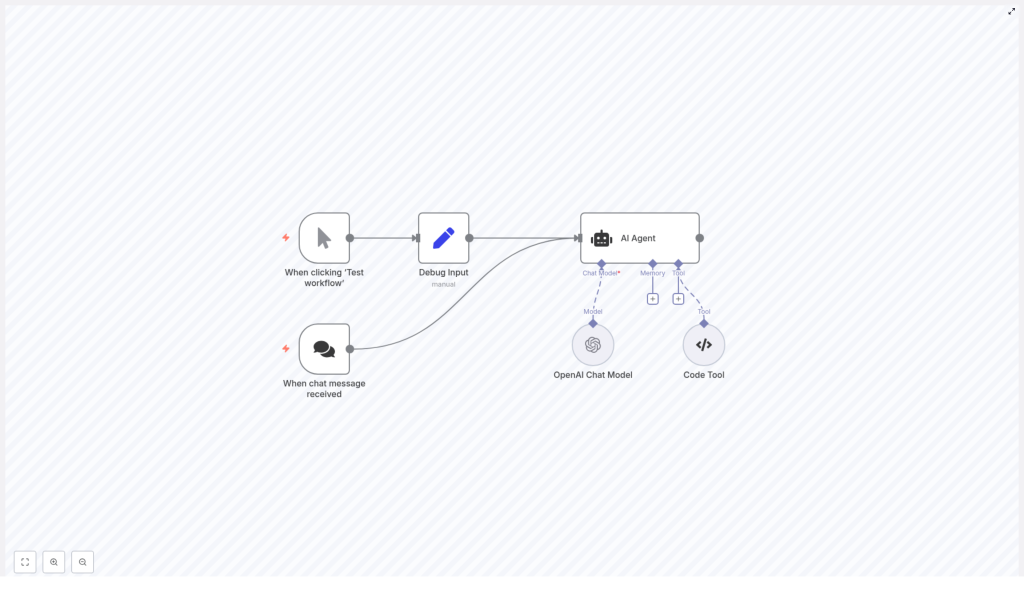
To make that happen, she added the following nodes:
- When clicking ‘Test workflow’ – a manual trigger for local testing.
- When chat message received – a webhook or chat trigger to receive live messages from users.
- Debug Input – a Set node to simulate chat input during development.
- AI Agent – the orchestrator that uses a chat model and can call tools.
- OpenAI Chat Model – the language model (for example,
gpt-4o-mini) that understands user messages. - Code Tool (my_color_selector) – the JavaScript function that returns a random color while excluding specified colors.
The heart of the story: the my_color_selector Code Tool
The key to making the workflow reliable was the Code Tool. Maya created a new n8n Code Tool node, set its Tool Type to Code, and named it my_color_selector. Inside, she pasted the following JavaScript:
const colors = [  'red',  'green',  'blue',  'yellow',  'pink',  'white',  'black',  'orange',  'brown',
];

const ignoreColors = query.split(',').map((text) => text.trim());

// remove all the colors that should be ignored
const availableColors = colors.filter((color) => {  return !ignoreColors.includes(color);
});

// Select a random color
return availableColors[Math.floor(Math.random() * availableColors.length)];
She liked how transparent this logic was. No guessing, no hidden behavior. Just a clear sequence:
- colors – the base list of allowed colors.
- ignoreColors – the colors to exclude, parsed from the incoming query string and trimmed.
- availableColors – the filtered list after removing ignored colors.
- Return – a single random color from the remaining options.
In the AI Agent configuration, she attached this Code Tool so the agent could call it whenever a user asked for a color with exclusions. The tool’s input would be a simple string, for example "green, blue", representing the colors to ignore.
Rising action: wiring the AI and automation together
With the core logic in place, Maya focused on the full workflow. She wanted to test quickly, iterate safely, and then go live.
1. Setting up triggers for testing and chat
First, she added two different entry points:
- Manual trigger using When clicking ‘Test workflow’ so she could run the flow from the editor.
- Chat trigger using When chat message received to handle real-time messages from users via a webhook or chat integration.
This gave her a smooth path from development to production. She could iterate with the manual trigger, then switch to the chat trigger when ready.
2. Creating the Debug Input
Next, she added a Set node called Debug Input. During development, this node would simulate what a user might say. For example, she defined a simple field like:
Return a random color but not green or blue
She mapped this field to the AI Agent’s input parameter, which she called something like chatInput. This way, each time she clicked “Test workflow,” the AI Agent would receive the same test message and she could see exactly how the flow behaved.
3. Configuring the AI Agent
Now came the orchestration layer. In the AI Agent node, Maya:
- Set the promptType to an appropriate value for her use case, for example
define. - Connected the AI Agent’s Chat Model input to an OpenAI Chat Model node.
- Attached the my_color_selector Code Tool so the agent could call it as needed.
The AI Agent’s role was to analyze the text, decide when the Code Tool should run, pass the right input string (like "green, blue"), and then format the final answer in natural language.
4. Adding and tuning the OpenAI Chat Model
In the OpenAI Chat Model node, she:
- Provided her OpenAI credentials.
- Selected the model
gpt-4o-minias a compact yet capable choice. - Configured options like temperature and max tokens to match the tone and length she wanted.
The model did not need to generate long essays. Its main job was to understand queries like “anything except green or blue” and to converse around the tool’s output.
5. Connecting the Code Tool
Finally, she made sure the AI Agent was configured to call my_color_selector whenever the user requested a random color with exclusions. The tool expected a comma-separated string of colors to ignore, so the agent would pass something like "green, blue" after parsing the user’s message.
At this point, the workflow chain was complete: trigger, debug input or chat, AI Agent, chat model, Code Tool, and back again.
The turning point: testing the workflow
With everything wired up, Maya clicked “Test workflow”.
The flow started at the manual trigger, moved to Debug Input, and sent the text “Return a random color but not green or blue” to the AI Agent.
Behind the scenes, the AI Agent:
- Parsed the message and identified that “green” and “blue” should be excluded.
- Called the my_color_selector Code Tool with the input
"green, blue". - Received a random color from the tool, for example
"red". - Wrapped that result into a friendly response and passed it on to the next node or back to the chat trigger.
On her screen, Maya saw an answer like:
“Your random color is red.”
She ran the test again. The workflow returned a different allowed color, but never green or blue. The behavior was now both conversational and deterministic, exactly what she needed.
Making the workflow robust: edge cases and improvements
Once the basic flow worked, Maya started thinking like a production engineer. What could go wrong, and how could she harden the system?
- Input validation She added checks to ensure the query string passed to the Code Tool was defined and not empty before splitting it. This avoided unexpected errors when the AI Agent did not need to exclude any colors.
- Case normalization To avoid mismatches like “Blue” vs “blue,” she considered lower-casing the input before splitting and comparing, so user capitalization would not break the logic.
- Fallback handling She planned for the scenario where a user excluded every available color. In that case, the Code Tool could return a friendly error or a default list instead of failing silently.
- Extended logic Over time, she could expand the Code Tool to handle categories like warm or cool colors, prioritize colors that had not been used recently, or even implement weighted probabilities.
- Security and safety She made sure any inputs were sanitized, and that no secrets or API keys were exposed in logs or responses.
These small improvements turned a demo into a production-ready workflow.
Best practices Maya learned about AI and code tools
Building this workflow taught Maya a broader lesson about combining AI and deterministic code inside n8n:
- Keep strict logic in your Code Tools, and use the AI Agent for language understanding and orchestration.
- Limit the model’s role in computations or rule-based decisions to avoid inconsistent outputs.
- Monitor and log tool calls so you can track failures and unusual inputs.
- Use environment variables and secure credentials for any API keys or secrets.
This separation of concerns gave her the best of both worlds: predictable code and flexible AI.
Beyond colors: how the same pattern scales
After the success of the color picker, Maya started seeing this pattern everywhere. The combination of an n8n AI Agent with a Code Tool was not just about colors. It was a reusable blueprint for AI-driven automation with deterministic decision steps.
She could apply the same structure to:
- Product recommendation filters Let the AI understand user preferences, then use a Code Tool to exclude out-of-stock items and select a product.
- Appointment scheduling Have the AI interpret natural language like “next Tuesday afternoon,” then let code select the next available slot while excluding conflicts.
- Content generation pipelines Use AI to draft content, then run deterministic checks or filters in a Code Tool before publishing.
- Chatbots with utility scripts Allow the AI Agent to call microservices or utility scripts for calculations, lookups, or other strict logic.
What started as a “random color” experiment became a foundation for more advanced, reliable automations.
Resolution: from frustration to a reliable n8n AI workflow
The next time Maya checked the chatbot transcripts, she smiled. Users were asking for “anything but green or blue,” and the bot was respecting their preferences every time. The AI Agent handled the conversation, the Code Tool handled the logic, and the workflow was both smart and trustworthy.
If you want to follow the same path, you can replicate Maya’s setup inside your own n8n instance:
- Import or create the workflow with:
- When clicking ‘Test workflow’ and/or When chat message received triggers.
- A Debug Input Set node for easy testing.
- An AI Agent node connected to an OpenAI Chat Model (for example
gpt-4o-mini). - A Code Tool node named my_color_selector with the JavaScript shown above.
- Set your OpenAI credentials and adjust model settings like temperature and max tokens.
- Attach the my_color_selector tool to the AI Agent and pass a comma-separated string of colors to exclude.
- Click “Test workflow” and watch the AI Agent call the Code Tool and return a valid random color.
You can keep the color list as is, or replace it with domain-specific data that fits your product, schedule, or content.
Next steps: build your own AI + code automations
Using the n8n AI Agent with a Code Tool is a practical way to blend conversational AI with strict, testable logic. Start with a simple example like my_color_selector, then evolve your tools as your automation needs grow.
Try it now: Import the template into n8n, configure your OpenAI credentials, paste the Code Tool JavaScript, and run a test. Then adapt the logic to your own use case, whether that is product selection, scheduling, or content workflows.
Stay in the loop
If this story helped you see how n8n, AI Agents, and Code Tools can work together, consider subscribing for more guides on n8n automation and AI integrations. If you would like help designing or scaling a custom workflow, reach out or leave a comment. We can walk through setup, performance tuning, and best practices tailored to your stack.
