


Build an n8n Developer Agent: Step-by-Step Guide
Imagine turning a rough idea for an automation into a working n8n workflow in just a few minutes. No more staring at blank canvases, wiring nodes from scratch, or rewriting the same patterns again and again. With the right setup, you can describe what you want in plain language and let an “n8n Developer Agent” design the workflow for you.
This guide walks you through that journey. You will move from manual, repetitive workflow building to a more focused, automated way of working. Along the way, you will see how this n8n workflow template can become a powerful stepping stone toward a more scalable, efficient, and creative automation practice.
From manual workflows to an automation mindset
Most teams, consultants, and developers start with n8n the same way: opening the editor, dragging in nodes, testing, adjusting, and repeating. It works, but it does not always scale. As requests pile up, you might notice:
- Time lost building similar workflows from scratch
- Inconsistent naming or structure across workflows
- Colleagues who want automations but lack deep n8n knowledge
- Difficulty maintaining or reusing patterns at scale
The opportunity is not just to go faster. It is to change how you think about building automations. Instead of “I have to build this workflow,” you can shift to “I will describe what I need, and my system will build the first version for me.”
The n8n Developer Agent pattern helps you make that shift. It gives you a reliable way to convert natural language requests into importable n8n workflow JSON, so you can spend more time refining and less time wiring the basics.
What is the n8n Developer Agent?
The n8n Developer Agent is an automation pattern built around a single idea: you describe the automation, and the system generates the workflow.
Technically, it is a workflow that combines:
- A trigger (such as a chat interface or an execute-workflow trigger)
- A main agent node powered by a language model
- Optional “thinker” models for deeper reasoning
- A Developer Tool that produces valid n8n workflow JSON
- The n8n API to create workflows directly in your instance
- Supporting services like Google Drive and memory utilities
For example, you might say: “Create a workflow that listens for new Google Drive files and posts a summary to Slack.” The Developer Agent interprets the request, chooses the right nodes, assembles the connections, and outputs a complete workflow JSON that you can import or have created automatically.
In practice, this means you can go from idea to runnable workflow in minutes, while still keeping control over standards, safety, and governance.
Why this pattern is worth adopting
When you invest a bit of time in setting up an n8n Developer Agent, you unlock benefits that compound over time:
- Speed: Turn ideas into runnable workflows in minutes instead of hours.
- Consistency: Apply naming conventions and node standards automatically.
- Scalability: Let non-experts request workflows without needing deep n8n skills.
- Repeatability: Build and refine a growing library of generated workflows.
Each new request becomes less about manual construction and more about guiding and improving a system that works for you. The template in this guide is not just a one-off workflow, it is a foundation you can extend, customize, and govern as your automation needs grow.
How the n8n Developer Agent works behind the scenes
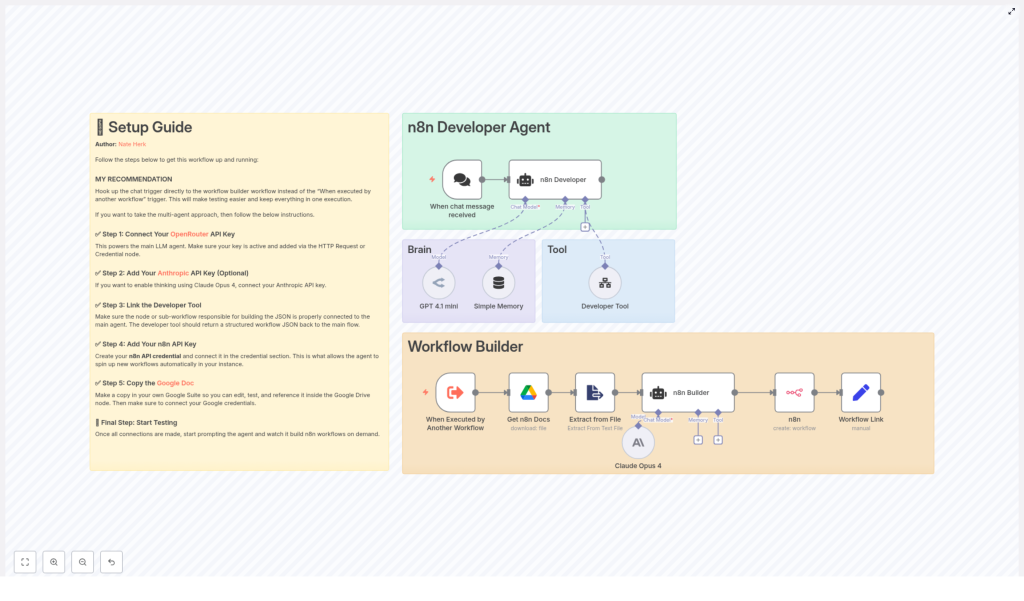
To feel confident using and extending this pattern, it helps to understand how the core components interact. At a high level, the template is made of these logical parts, each represented by one or more n8n nodes:
- Trigger: A chat input, webhook, or execute-workflow trigger that starts the process.
- Main agent: A chat or agent node that receives the user request and orchestrates tools and models.
- Language models: A primary LLM (for example OpenRouter / GPT 4.1 mini) and an optional thinker model (such as Claude Opus 4) for multi-step reasoning.
- Developer Tool: A sub-workflow or node that turns the natural language prompt into valid n8n workflow JSON, including nodes, connections, and settings.
- n8n API node: A node that creates the new workflow in your n8n instance and returns a link to it.
- Supporting services: Google Drive for docs and templates, extract-from-file utilities, and memory buffers to retain conversational state.
Together, these components form a pipeline: from a human-friendly prompt to a machine-usable workflow definition, and finally to a live workflow ready for review and execution.
What you need before you start
Before you begin configuring the template, make sure you have:
- An n8n instance with API access and credentials set up
- API keys for your chosen LLM providers (for example OpenRouter, and Anthropic if you plan to use Claude Opus)
- Access to Google Drive if you want to use documents as templates or references
- Basic familiarity with n8n nodes and importing workflows
With these in place, you are ready to turn the template into a working n8n Developer Agent that fits your environment.
Step-by-step: turning the template into your Developer Agent
1. Decide how people will talk to the agent
Your first choice is how users will trigger the Developer Agent. This decision shapes how accessible and secure the system will be:
- For quick experiments: Use a chat trigger or manual execution. This keeps the feedback loop tight while you learn.
- For production use: Consider a secure, authenticated webhook or an internal tool interface that only approved users can access.
Start simple. You can always upgrade the trigger later as adoption grows.
2. Connect and configure your primary LLM
The main agent node is the brain of the Developer Agent. Connect your OpenRouter (or other LLM) API key to the chat or agent node that will handle user prompts.
Then, carefully design the system prompt. This is where you set expectations for the model. Be clear that the agent must:
- Output a complete, importable n8n workflow JSON
- Follow a specific JSON schema that your Developer Tool expects
- Respect any naming conventions or structural rules you want to enforce
A precise system prompt reduces ambiguity and leads to more reliable workflows on the first try.
3. Add an optional thinker model for deeper reasoning
If your workflows tend to be complex or multi-step, you can enhance the main agent with a secondary “thinker” model such as Claude Opus 4. This model does not replace the primary LLM, it supports it.
Use the thinker model to:
- Refine the architecture of the workflow
- Check compatibility between nodes
- Plan multi-step logic before the final JSON is generated
The main agent can consult this reasoning assistant, then translate the refined plan into the final workflow JSON. This is optional, but powerful when you want higher quality on more advanced automations.
4. Link or build the Developer Tool
The Developer Tool is where your natural language request becomes a real n8n workflow object. It constructs the JSON with top-level properties such as:
namenodesconnectionssettingsstaticData
To keep it robust and reliable, design the Developer Tool to:
- Break the user request into logical steps
- Choose appropriate nodes, for example Webhook, Google Drive, HTTP Request, Function, Set, and others as needed
- Produce a fully valid JSON object that n8n can import or your API can accept
A best practice is to require the Developer Tool to return only the JSON, with no commentary or extra text. Then, add a validation step before sending it to the n8n API node. This combination gives you both flexibility and control.
5. Create the workflow through the n8n API
Once the JSON is ready and validated, the next step is to create the workflow in your n8n instance using the n8n API node.
Configure the node with your n8n API credentials and use it to POST the workflow JSON to your instance. After a successful request, capture the workflow ID from the response and build a direct link for the user.
This gives people a smooth experience: they describe the workflow, then immediately receive a clickable link to review, test, or edit the result.
6. Use Google Drive and file extraction as your knowledge base
As you mature your Developer Agent, you can feed it more context about your standards. If you keep templates or documentation in Google Drive, connect:
- A Google Drive node to fetch the relevant document
- An extract-from-file node to convert the file into plain text
The agent can then reference this text to:
- Enforce naming conventions
- Follow internal standards for error handling or logging
- Reuse approved patterns across new workflows
This turns your existing documentation into a live guide that shapes each generated workflow.
Keeping your Developer Agent safe, stable, and trustworthy
As you rely more on automated workflow generation, good safeguards become essential. Build these into your template from the start so you can scale with confidence.
Validation and safety best practices
- JSON validation: Always validate the JSON before creating a workflow. Check the
nodesarray,connectionsobject, and top-level settings to avoid malformed imports. - Credential placeholders: Never embed real credentials in generated workflows. Use placeholders and add production credentials manually afterward.
- Access control: Restrict who can request workflows. Secure your chat or webhook triggers with authentication or internal-only access.
- Audit trail: Store generated workflows and request metadata in a database or drive so you can review, roll back, or learn from past generations.
- Rate limits and cost management: Monitor LLM usage, apply sensible rate limits, and keep an eye on cost as adoption grows.
Troubleshooting common issues
As you experiment, you might run into a few predictable problems. Use these quick checks to stay in flow:
- Workflow fails to import: Inspect the JSON for missing commas, duplicate node IDs, or invalid node types.
- API errors when creating workflows: Confirm that your n8n API key has the right permissions and that the instance URL is correct and reachable.
- Inconsistent outputs: Tighten the Developer Tool’s constraints. Provide explicit node lists and fixed parameter templates to reduce unnecessary creativity from the LLM.
Each issue you solve makes your Developer Agent more robust. Over time, you build not just a workflow, but a reliable automation partner.
Growing into team-wide automation: scaling and governance
Once the Developer Agent proves valuable for you, it is natural to share it with your team. At that point, governance becomes key. You can extend the template with structures that keep quality high as usage grows.
- Approval workflow: Have generated workflows stored as drafts that require human approval before going into production.
- Template library: Maintain a curated set of approved templates for common use cases such as file processing, CRM sync, or Slack notifications.
- Monitoring and observability: Connect your workflows to logging and alerting systems so you can track failures and performance metrics.
This is where the Developer Agent evolves from a personal helper into a shared automation platform that supports your entire organization.
Quick reference: who does what in the template
As you work with the template and customize it, this quick reference can help you keep each node’s role clear:
- Chat trigger / Execute Workflow trigger: Accepts user input and starts the pipeline.
- Main agent node: Orchestrates LLM calls and tools, and composes system prompts.
- Developer Tool node: Returns the final n8n workflow JSON object ready to import.
- n8n API node: Creates the workflow in your n8n instance and provides a direct link.
- Memory and sticky notes: Store conversational context and human-facing setup instructions.
Once you are familiar with these responsibilities, adjusting or extending the template becomes much easier.
Your next step: start small, then expand
The n8n Developer Agent pattern is powerful, but you do not need to implement everything at once. The most important step is the first one: getting a basic version running so you can see the impact for yourself.
Here is a simple path to follow:
- Spin up a sandbox n8n instance where you can experiment safely.
- Connect a single LLM provider via the main agent node.
- Set up a simple trigger, such as a chat trigger or manual execution.
- Run a basic prompt like “Create a workflow that watches a Google Drive folder and emails new file details.”
- Review the generated workflow, refine your prompts and validation, and repeat.
As your confidence grows, you can layer in more features: templates from Google Drive, approval gates, stronger validation, and team-level access controls.
Ready to try it? Use the workflow template included with this guide as your starting point. Import it, connect your credentials, and begin shaping an automation system that builds workflows for you.
Get the template & request expert help
If you would like a customized workflow tailored to your exact use case, reach out. We can convert your specification into a validated n8n workflow JSON that is ready to import and run, so you can focus on strategy while your automations handle the execution.
