


Automating Job Application Parsing with n8n & RAG
Every new job application represents possibility: a potential teammate, a fresh perspective, a chance to grow your business. Yet in many teams, that possibility gets buried under manual copy-paste work, scattered resumes, and inconsistent notes.
If you are spending hours parsing resumes, updating spreadsheets, and chasing missing details, you are not just losing time. You are losing focus, energy, and the space you need for higher-value work like interviewing, strategy, and building relationships with candidates.
This guide walks you through a practical way out of that cycle. You will build a scalable New Job Application Parser using n8n, OpenAI embeddings, a Pinecone vector store, and a RAG (Retrieval-Augmented Generation) agent. Once set up, this workflow quietly handles the heavy lifting in the background, so you can focus on what actually moves your team forward.
From manual chaos to calm, automated flow
Before we dive into nodes and settings, it helps to look at what we are really trying to change.
Most hiring workflows start with good intentions and end with clutter. Resumes arrive through forms or email, someone pastes details into a sheet, another person tries to summarize experience, and important information slips through the cracks. It is repetitive, error-prone, and hard to scale.
Automation changes that story. When you design a workflow once, it keeps working for you every single day. Your job applications are parsed consistently, stored in a structured format, and instantly searchable. You reclaim hours each week and build a foundation you can keep improving over time.
The template in this article is not just a one-off trick. It is a stepping stone toward a more automated hiring pipeline, where smart tools handle the repetitive work and you spend your time on judgment, insight, and connection.
Why this n8n + RAG architecture unlocks smarter hiring
This setup brings together low-code automation and modern AI so your workflow is both accessible and powerful. Here is how each piece contributes to the bigger picture:
- n8n gives you a visual, low-code canvas to orchestrate the entire process, from incoming webhooks to final Slack alerts.
- OpenAI embeddings convert unstructured resume and cover letter text into semantic vectors, making it easy to search by meaning instead of just keywords.
- Pinecone stores those vectors in a scalable vector database that supports fast, accurate semantic queries.
- RAG agent uses retrieved context from Pinecone plus a language model to parse, extract, and summarize candidate information with high accuracy.
Instead of yet another spreadsheet-only workflow, you get a modern, context-aware system that grows with your hiring volume and your automation ambitions.
Imagine the workflow in action
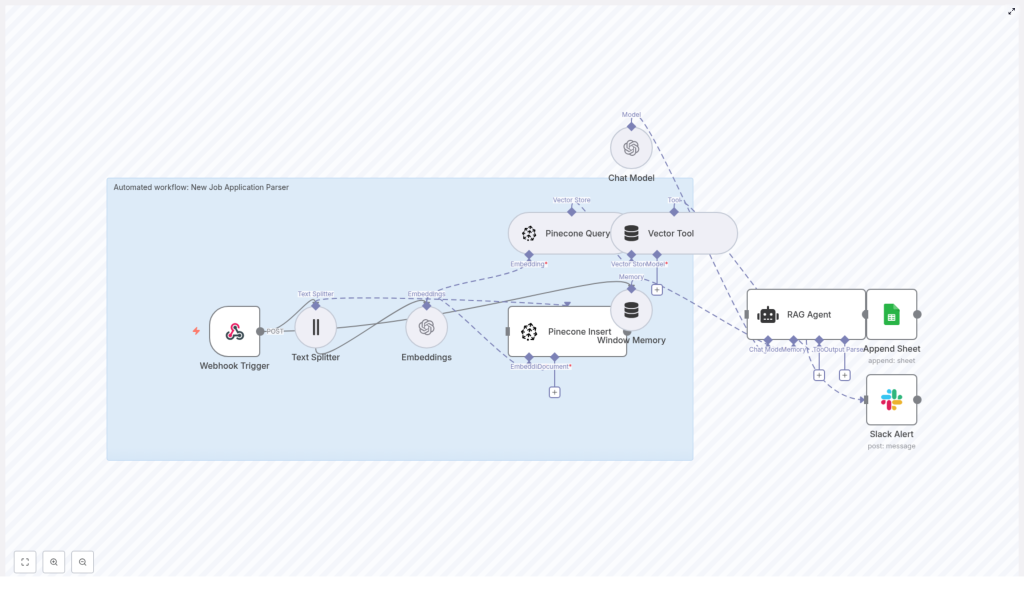
Here is the journey your data takes once this n8n template is running:
- Webhook Trigger receives a POST request whenever a new application arrives.
- Text Splitter breaks long resumes and cover letters into manageable chunks while preserving context.
- Embeddings transform each text chunk into a vector using OpenAI’s
text-embedding-3-smallmodel. - Pinecone Insert stores those vectors in a Pinecone index, along with useful metadata.
- Pinecone Query later retrieves the most relevant chunks for a given applicant.
- Vector Tool passes that context into the RAG agent whenever it needs to reason about an application.
- Window Memory keeps short-term conversational context available for the agent if you extend the flow into multi-step interactions.
- Chat Model (OpenAI) powers the RAG agent’s reasoning and summarization.
- RAG Agent combines retrieved context and the chat model to extract structured data and a concise summary.
- Append Sheet (Google Sheets) logs the final structured result to a “Log” sheet for tracking and analysis.
- Slack Alert kicks in if anything fails so your team is never left guessing.
This is your new baseline: applications in, structured insights out, with full traceability and clear notifications if something needs attention.
Adopting an automation mindset
Before you start clicking through nodes, it helps to approach this as an ongoing journey, not a one-time task. Your first version of the workflow does not need to be perfect. It just needs to work reliably and save you time.
From there, you can refine prompts, tweak chunk sizes, adjust retrieval parameters, or plug in your ATS. Each improvement compounds the value of your automation. Think of this template as your initial framework that you will customize and extend as your hiring process evolves.
Step 1 – Create your n8n workflow
You can either import the provided n8n JSON template or recreate the nodes visually inside n8n. Once you have the template or a blank workflow, wire it so the data flows cleanly from trigger to output.
Connect the nodes in this core sequence:
- Webhook Trigger → Text Splitter → Embeddings → Pinecone Insert
Then set up the retrieval and parsing path:
- Pinecone Query → Vector Tool → RAG Agent
Finally, connect your output and error handling:
- RAG Agent → Append Sheet (Google Sheets)
- Configure workflow
onErrorto send a Slack Alert
Once these connections are in place, you have a complete pipeline ready for configuration and testing.
Step 2 – Configure your credentials
To bring this workflow to life, plug in the services that power embeddings, storage, logging, and alerts. In n8n, add or select the following credentials:
- OpenAI – Provide your API key so n8n can access the embeddings and chat model.
- Pinecone – Set your API key, environment, and index name. For example, use
new_job_application_parseras the index name. - Google Sheets – Configure OAuth2 so the workflow can append parsed results to your “Log” sheet.
- Slack – Add a bot token that allows posting error messages to a dedicated channel, such as
#alerts.
This step is where your workflow connects to the real world. Once credentials are set, you are ready to handle real applications end-to-end.
Step 3 – Split text and create embeddings
Resumes and cover letters can be long, and language models work best with focused chunks of text. That is where the Text Splitter and Embeddings nodes come in.
Text Splitter configuration
Configure the Text Splitter node to use character-based chunking:
- chunkSize:
400 - overlap:
40
This setup keeps enough overlap between chunks to preserve context, while keeping each piece small enough to embed efficiently. It is a balanced starting point that you can later tune if needed.
Embeddings configuration
For the Embeddings node, use OpenAI’s text-embedding-3-small model. It provides a strong combination of quality and cost efficiency for this type of semantic retrieval workflow.
Each chunk from the Text Splitter is converted into a vector representation that Pinecone can store and search. This is what enables your RAG agent to pull in the most relevant pieces of an application when it is time to parse and summarize.
Step 4 – Set up your Pinecone index and insertion
Next, you will prepare Pinecone so it can act as the memory layer for your job applications.
Create the index
In Pinecone, create an index named new_job_application_parser. Make sure the index dimension matches the embedding model you are using. Pinecone’s documentation provides the correct dimension for text-embedding-3-small, so confirm that value when creating the index.
Insert vectors with metadata
In the Pinecone Insert node, store each embedding along with helpful metadata so you can trace everything back later. Typical metadata fields include:
- applicantId
- source filename or source type
- chunk index
This metadata makes it easy to retrieve and understand which parts of a resume you are looking at, and it keeps your system auditable as it scales.
Step 5 – Design your RAG agent prompt and tools
Now you will guide the AI so it knows exactly what to extract and how to present it. This is where your automation starts to feel truly intelligent.
RAG agent system message
Provide a clear system message for the agent, for example:
You are an assistant for New Job Application Parser. Use the retrieved context to extract name, email, phone, skills, years of experience, education, and a concise summary. Output JSON only.This instruction sets expectations, tells the model what fields to return, and enforces a consistent JSON format that your downstream systems can rely on.
Connect the Vector Tool
Wire the Vector Tool to your Pinecone Query node so the RAG agent can request and use relevant chunks on demand. With this setup, the agent does not have to guess. It retrieves the right context from Pinecone, then applies reasoning on top of that information.
The result is a structured, reliable parsing of each application, ready for logging, scoring, or integration with your ATS.
Sample webhook payload to get you started
To test your Webhook Trigger and the rest of the flow, use a sample payload like this:
{  "applicantId": "12345",  "name": "Jane Doe",  "email": "jane@example.com",  "resumeText": "<full resume text here>",  "coverLetter": "<cover letter text here>"
}
Sending this payload into your workflow lets you validate splitting, embedding, insertion, retrieval, and parsing in a single run.
What a successful RAG agent output looks like
When everything is wired correctly, the RAG agent should produce a concise JSON object that captures the essentials of each candidate. For example:
{  "applicantId": "12345",  "name": "Jane Doe",  "email": "jane@example.com",  "phone": "(555) 555-5555",  "skills": ["Python","NLP","ETL"],  "experienceYears": 5,  "education": "MSc Computer Science",  "summary": "Senior data engineer with 5 years' experience in NLP and ETL pipelines."
}
Once you have this structure, you can feed it into dashboards, internal tools, or other automations. It is the foundation for deeper analytics and smarter decision making.
Logging results and staying informed
A great automation not only does the work, it keeps you in the loop. This template uses Google Sheets and Slack to provide that visibility.
Google Sheets logging
Configure the Append Sheet node to write the RAG agent’s JSON output into a “Log” sheet. You might map it to columns like:
- Applicant ID
- Skills
- Experience years
- Education
- Summary
- Status or Result
This creates an immediate, searchable record of every parsed application for auditing and quick review.
Slack alerts for reliability
In your workflow settings, configure onError to send a Slack Alert. If any node fails, your team receives a message in the chosen channel, such as #alerts, so you can act quickly instead of discovering issues days later.
Protecting candidate data – security and PII
Job applications contain sensitive personal information, so it is important to design your automation with privacy in mind. As you build and extend this workflow, keep these practices in place:
- Limit how long you retain raw resumes and cover letters in your vector index. Store only what you truly need.
- Avoid unnecessary metadata that could expose more PII than required.
- Encrypt credentials and store secrets as n8n environment variables, not in plain text.
- Set strict access controls on Google Sheets and Pinecone so only authorized team members can see candidate data.
- Whenever possible, log summarized or parsed results instead of full resume text in shared locations.
By building security into your workflow now, you create an automation you can confidently scale.
Optimization tips as your volume grows
Once your initial setup is working, you can start tuning it for cost, speed, and accuracy. Here are practical ways to refine the system:
- Tune chunk size and overlap – Larger chunks preserve more context but increase token usage and storage. Smaller chunks are cheaper but can lose coherence. Experiment around the starting point of
chunkSize: 400andoverlap: 40. - Adjust retrieval size (top_k) – In Pinecone queries, control how many chunks are returned to the RAG agent. Too many can introduce noise, too few can miss important details.
- Reduce redundant embeddings – Cache or deduplicate resumes when possible so you do not re-embed identical content.
- Monitor cost and latency – For routine parsing, consider smaller or lower-cost models when slight accuracy tradeoffs are acceptable.
These optimizations help you keep your automation lean, responsive, and budget-friendly as your hiring pipeline scales.
Testing, validating, and building confidence
Thoughtful testing helps you trust your automation enough to rely on it daily. Use this simple validation path:
- Send multiple sample webhook payloads and confirm that text splitting, embedding insertion, and RAG parsing all complete successfully.
- Review Google Sheets entries to ensure the JSON structure matches your expectations and that key fields like skills and experience are parsed correctly.
- Simulate failures, such as invalid API keys or temporary Pinecone downtime, and confirm that Slack alerts fire so your team knows exactly what happened.
Once you are confident in these basics, you can safely expand the workflow with more advanced steps.
Avoiding common pitfalls on your automation journey
As you experiment and refine, watch out for a few easy-to-miss issues:
- Overly small chunks – Very small chunk sizes can split sentences mid-thought, which reduces embedding quality and harms retrieval.
- Missing metadata – If you do not store metadata with vectors, linking parsed results back to the original application becomes difficult.
- Oversharing raw resumes – Placing full resume text in widely shared sheets or logs can introduce privacy and compliance risks. Prefer summarized or structured fields.
By addressing these early, you keep your workflow clean, maintainable, and respectful of candidate privacy.
Next steps – turning a parser into a full hiring pipeline
Once you trust your job application parser, you can start turning it into a more complete recruitment system. Here are natural extensions:
- Automatically create candidate records in your ATS (Applicant Tracking System) using the structured JSON output.
- Trigger recruiter notifications or tasks when candidates match certain skill sets or experience thresholds.
- Run automated skill-matching and scoring with a secondary LLM prompt that ranks candidates for specific roles
