

Build a Visa Requirement Checker with n8n & Vector AI
Every time someone asks, “Do I need a visa for this trip?” you face the same challenge: searching, checking, and double checking official guidance. It is important work, but it can quickly become repetitive and time consuming.
What if that effort could be transformed into a reliable, automated system that works for you 24/7, while you focus on higher value tasks, strategy, or serving customers directly?
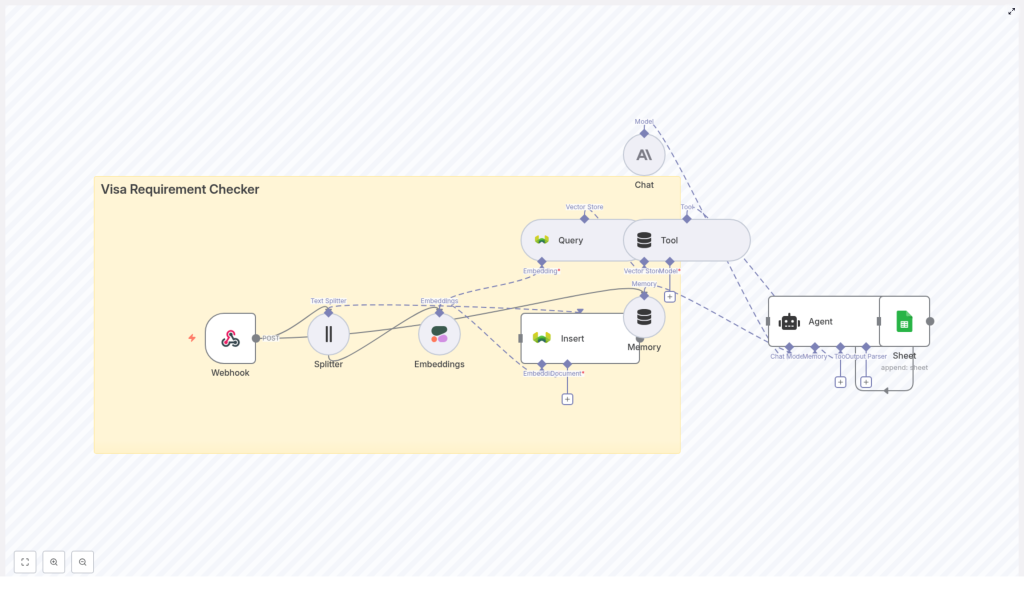
In this guide, you will walk through building a Visa Requirement Checker using an n8n workflow template that combines webhooks, text splitting, Cohere embeddings, a Weaviate vector store, an Anthropic chat model, and Google Sheets logging. Along the way, you will see how this setup can become a foundation for a more automated, focused way of working.
The problem: manual visa lookups drain time and focus
Visa rules are detailed, constantly changing, and often buried in long documents. Manually answering each question means:
- Repeating the same searches dozens of times.
- Risking human error or outdated information.
- Spending hours on tasks that could be automated.
Whether you support travelers, run an agency, or manage internal mobility, this work is important, but it does not need to be manual. Automation can turn a fragile, ad hoc process into a dependable service that scales with your needs.
The shift: from reactive answers to an automated knowledge system
Instead of answering each question from scratch, imagine you:
- Index your official visa guidance once.
- Let an AI powered workflow retrieve and summarize the right rules for each query.
- Log every interaction automatically for traceability and improvement.
This is the mindset shift: you are not just building a tool, you are building a reusable system. The n8n Visa Requirement Checker template is that system in a ready-to-use form. You can start small, then iterate and expand as your needs grow.
Why this n8n architecture unlocks reliable automation
The workflow uses a retrieval-augmented generation (RAG) pattern. Instead of relying on a language model to “guess” the answer, you store authoritative visa content as vectorized documents in Weaviate, then let an Anthropic chat model generate answers based on that trusted data.
Here is what this architecture gives you:
- Accuracy by grounding answers in your own curated visa documents.
- Context-aware responses thanks to embeddings and vector search.
- Automation at scale with n8n orchestrating the entire flow, from webhook to logging.
n8n becomes your automation backbone. It collects requests, preprocesses text, indexes content, runs queries, calls the LLM, and records results. Once this is in place, you have a reusable pattern you can apply to many other knowledge-heavy workflows, not just visas.
High-level journey of the workflow
Here is the overall flow your Visa Requirement Checker will follow:
- Receive a visa query or document via a POST webhook.
- Split the incoming text into chunks for high quality embeddings.
- Generate embeddings with Cohere and insert them into Weaviate.
- When a user asks a visa question, query Weaviate for the most relevant documents.
- Use an Anthropic chat model to synthesize a clear, conversational answer.
- Log the full interaction to Google Sheets for auditing and analytics.
Each step is handled by a dedicated n8n node, so you always have full visibility and control. You are not locked into a black box. You can inspect, tweak, and extend the workflow as your automation skills grow.
Key n8n components that power the template
Let us walk through the core nodes that make this template work. Understanding them will help you customize and build on the workflow with confidence.
Webhook: your entry point for data and questions
Node: Webhook
Purpose: Receive incoming HTTP POST requests.
In the template, the path is set to visa_requirement_checker, so your endpoint looks like:
https://<n8n-host>/webhook/visa_requirement_checkerThis is where you send both your source documents for indexing and your users’ questions. It is the front door of your automated system.
Splitter (Text Splitter): preparing content for better search
Node: Splitter
Purpose: Break long documents into smaller chunks to improve embedding quality and retrieval.
The template uses:
chunkSize: 400chunkOverlap: 40
You can adjust these values based on how dense or legalistic your content is. The goal is to preserve context while keeping each piece manageable for embeddings.
Embeddings (Cohere): turning text into searchable vectors
Node: Embeddings
Purpose: Convert text chunks into vector representations.
In the template, the model is set to default using your Cohere API credential. This step is what makes your content searchable in a semantic way, not just by keywords.
Insert & Query (Weaviate): your vector knowledge base
Nodes: Insert and Query
Purpose:
Insertstores embeddings and metadata in a Weaviate index namedvisa_requirement_checker.Queryretrieves the most relevant chunks for a given user question.
This is where your visa guidance becomes a living, searchable knowledge base that can grow over time.
Tool (Vector Store wrapper): connecting search to reasoning
Node: Tool
Purpose: Wrap the vector store query as a tool that an Agent node can call.
By exposing Weaviate as a tool, you allow your Agent to perform retrievals as part of its reasoning process. This is a powerful pattern you can reuse for other automations.
Memory (Windowed Buffer): keeping conversations coherent
Node: Memory
Purpose: Maintain a recent history of the conversation or session.
This helps the system handle follow up questions and keep context, so users experience a more natural, human-like interaction.
Chat (Anthropic): generating clear, grounded answers
Node: Chat
Purpose: Use a language model to synthesize the final response.
The template uses the Anthropic credential to provide a safe, conversational agent that responds based on the evidence retrieved from Weaviate.
Agent: orchestrating tools, memory, and the model
Node: Agent
Purpose: Coordinate decision making across tools, memory, and the chat model.
The Agent receives:
- Output from the vector store tool.
- Recent conversation history from Memory.
- Input from the Webhook JSON.
In the template, the promptType is set to define, with the input configured to use the webhook data. The Agent then calls the Chat node and formats the final answer.
Sheet (Google Sheets): building your audit trail and insights
Node: Sheet
Purpose: Append each processed interaction to a Google Sheet for traceability.
The node is configured with:
- sheetName:
Log - operation:
append
This gives you a growing dataset you can use for audits, analytics, and continuous improvement of your automation.
Step-by-step: from raw documents to live visa checker
Now that you understand the pieces, let us walk through setting everything up. Treat this as a journey: you start by organizing your knowledge, then gradually bring it to life through automation.
1. Prepare your source documents
Begin with the most important part: your data. Gather official visa guidance such as:
- Government websites.
- Embassy or consulate pages.
- Frequently asked questions and policy summaries.
For each document, record metadata like:
- Country.
- Visa type.
- Last updated date.
- Source URL.
This metadata is crucial. It keeps your answers traceable, so you always know where the information came from and how recent it is.
2. Configure your environment and credentials
Next, connect the services that will power your workflow. You will need:
- A Cohere API key for generating embeddings.
- A Weaviate host and API key, or a hosted Weaviate instance.
- An Anthropic API key, or an alternative LLM credential if you adapt the template.
- Google Sheets OAuth2 credentials for logging interactions.
- An n8n instance with public or tunneled webhook access, for example via ngrok or n8n cloud.
Once these are in place, you have the foundation for a production-ready automation stack.
3. Import the n8n template workflow
Use the provided JSON template to import the Visa Requirement Checker into your n8n instance. After importing:
- Check that all node connections follow the intended flow.
- Open each node and update the credentials to match your own API keys and accounts.
At this point, you already have a working structure. The remaining steps are about feeding it data and starting to use it.
4. Index your visa content in Weaviate
To index content, send a POST request to the webhook with a document payload that includes a title, content, and metadata. For example:
{  "title": "Visa requirements for US citizens traveling to France",  "content": "Citizens of the United States can travel to France for tourism for stays up to 90 days without a visa...",  "metadata": {  "country": "France",  "visa_type": "tourism",  "source": "https://example.gov"  }
}
Here is what happens automatically:
- The Webhook receives the document.
- The Splitter node breaks the content into chunks.
- The Embeddings node uses Cohere to vectorize each chunk.
- The Insert node stores those vectors and metadata in the
visa_requirement_checkerWeaviate index.
Repeat this step for all your key visa documents. Over time, you build a rich knowledge base that your Agent can draw on.
5. Handle user questions and interaction flow
Once your content is indexed, your automation is ready to answer real questions. When a user asks something like:
“Do US citizens need a visa to visit France for 2 months?”
the workflow runs as follows:
- The question arrives at the Webhook.
- The Agent triggers a
Queryto Weaviate through the Tool node. - The Query node returns the most relevant chunks from your indexed documents.
- The Chat node, powered by Anthropic, uses those chunks as context to craft a clear, concise answer that cites sources where appropriate.
- The Agent formats the final response and sends it back.
- The Sheet node appends the request and response to your Google Sheet log.
From the user’s perspective, they simply receive a direct, well grounded answer. From your perspective, you have a repeatable, scalable system that can handle many such questions without extra manual effort.
Designing your Google Sheets log for growth
A thoughtful logging structure turns your Visa Requirement Checker into a continuous improvement engine. A recommended schema for your Log sheet is:
- Timestamp.
- User question.
- Answer.
- Country.
- Visa type.
- Source URLs.
- Agent notes / confidence.
With this data, you can review patterns, identify gaps in your content, and refine prompts or retrieval settings over time.
Best practices to keep your checker accurate and scalable
To get the most from this template and maintain trust in your answers, keep these practices in mind:
- Chunking: Use a chunk size that preserves legal context without creating overly long embeddings. Values around 400 tokens or characters with small overlaps often work well for legal and policy text.
- Metadata: Always store source URLs and last updated dates. This supports verifiable answers and helps you prioritize re-indexing.
- Model safety: Use Anthropic or similar guardrails to reduce hallucinations. Encourage the model, via prompts, to quote or reference sources.
- Re-indexing: Schedule periodic re-indexing for countries or visa types that change frequently.
- Testing: Maintain a test set of common queries and edge cases to evaluate relevance and answer quality.
- Rate limits and cost: Monitor API usage for Cohere and Anthropic so you can scale responsibly.
Troubleshooting: refining your automation as you go
As you experiment and grow your system, you may run into a few common issues. Use them as opportunities to refine your workflow:
- No relevant results: Expand your document coverage or adjust Weaviate query parameters such as the vector or
kvalue to retrieve more candidates. - Low-quality answers: Provide more context by retrieving additional chunks, or tweak the Chat prompt to emphasize quoting and careful reasoning.
- Webhook issues: Confirm that your n8n host is reachable from the outside and that the webhook path matches
visa_requirement_checker.
Designing a clear, trustworthy answer format
Users appreciate concise answers with transparent sources. When you define the Agent’s final output, consider a structure like this:
Answer: No - US citizens do not need a visa for tourism stays up to 90 days in France.
Sources:
- French Government (https://example.gov) - updated 2025-01-10
Confidence: High
This format keeps responses short, clear, and backed by evidence, which builds trust in your automated system.
Security and compliance: automate

