


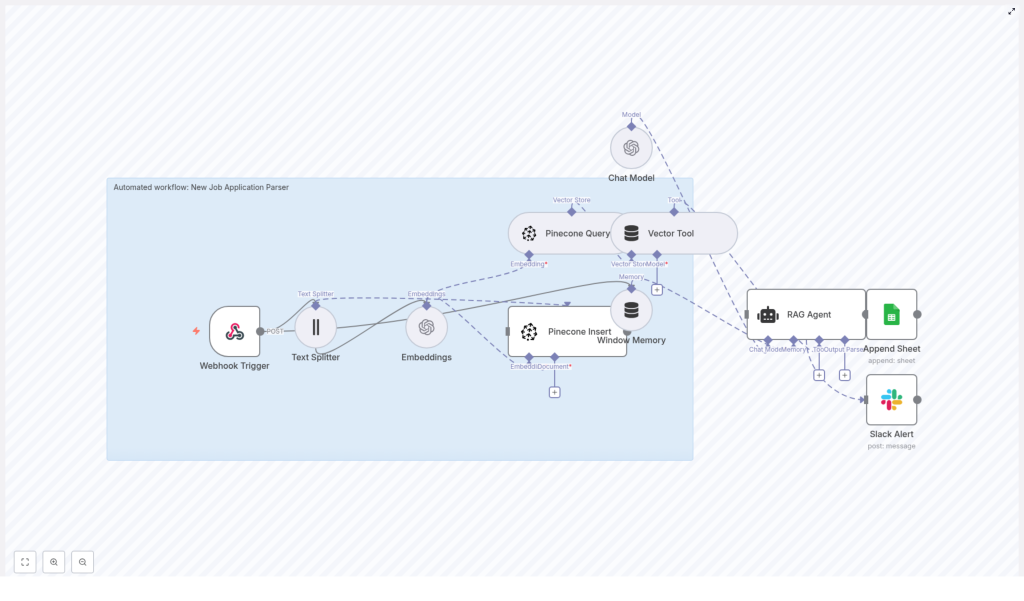
Automated Job Application Parser with n8n & RAG
The day the resumes broke Maya
Maya stared at the hiring dashboard and felt her stomach drop.
Two new roles had gone live a week ago. A mid-level backend engineer and a product marketing manager. The response had been incredible. Too incredible.
There were 327 new applications in the inbox, and more arrived every hour. PDFs, Word docs, cover letters pasted into forms, emails forwarded from referrals. Her recruiting team was already behind on other searches, and leadership wanted a short list of candidates by Friday.
She knew the drill. Download resumes, skim for relevant skills, copy names and emails into a spreadsheet, try to remember who looked promising, search for keywords like “PostgreSQL” or “B2B SaaS” and hope the right profiles bubbled up. It was slow, inconsistent, and painfully manual.
By mid-afternoon, Maya realized something simple. It did not matter how good their employer brand was if their hiring process could not keep up.
Discovering a different way to read resumes
That night, scrolling through automation forums, Maya came across an n8n workflow template titled “Automated Job Application Parser with n8n & RAG.” The promise sounded almost too good to be true.
- Automatically ingest job applications via a webhook
- Split and embed resume text using OpenAI embeddings
- Store everything in Pinecone, a vector database, for semantic search
- Use a Retrieval-Augmented Generation (RAG) agent to parse and structure the data
- Append results to Google Sheets and alert the team on errors in Slack
If it worked, her team could spend less time copying text into spreadsheets and more time actually speaking to candidates.
She bookmarked the template and thought, “If this can read resumes for me, I might actually get my evenings back.”
From chaos to a plan: designing the automated parser
The next morning, Maya sat down with Leo, a developer on the internal tools team. She laid out the problem.
“We are drowning in resumes,” she said. “I do not just want a keyword search. I need something that understands what a candidate has done, even if they phrase it differently.”
Leo had used n8n before for internal automations. The idea of combining it with a RAG workflow caught his attention.
“We can build this around that template you found,” he said. “n8n will orchestrate everything, OpenAI will handle embeddings and the RAG agent, and Pinecone will store the vector data so we can search semantically.”
They mapped out the high-level flow on a whiteboard:
- Receive job applications through a webhook in n8n
- Extract and split resume and cover letter text into manageable chunks
- Generate embeddings using OpenAI, then store them in Pinecone
- Use a RAG agent with memory and a vector tool to interpret the application
- Write a structured summary into Google Sheets
- Send a Slack alert if anything goes wrong
It was the same core workflow described in the template, but now it had a clear purpose: save Maya and her team from drowning in manual parsing.
Where the workflow begins: catching every application
The Webhook Trigger that replaced the inbox
First, Leo set up the Webhook Trigger node in n8n. Instead of applications landing in a messy email inbox, they would now be sent as POST requests from their careers site and ATS.
They configured a secure webhook URL and added a shared secret token so that only trusted sources could submit candidate data. Any form submission or email-to-webhook integration would send a payload that included:
- Candidate name and contact details
- Resume text or attachment content
- Cover letter text, if available
- Application metadata such as role and source
“This is our new front door,” Leo said. “Everything starts here.”
Teaching the system to read: chunking and embeddings
Breaking long resumes into smart pieces
Once the webhook caught an application, the workflow passed the content to a Text Splitter node. Maya had never thought about resumes in terms of “chunks” before, but Leo explained why it mattered.
“We cannot send entire long documents directly to the embedding model,” he said. “We want smaller sections that still make sense, so the semantic meaning is preserved.”
They set the Text Splitter with example settings of chunkSize=400 and chunkOverlap=40. That meant each resume and cover letter would be divided into segments of around 400 tokens, with a slight overlap so that context was not lost between chunks.
They agreed to tune these values later based on real resumes and the token limits of their chosen embedding model.
Turning text into vectors with embeddings
Next came the Embeddings node, powered by OpenAI. Leo picked text-embedding-3-small as a good balance of speed and quality for their use case.
“Think of embeddings as a way for the system to understand meaning, not just keywords,” he explained. “Two people might say ‘built a microservice architecture’ or ‘designed distributed backend systems’ and embeddings help us see that they are related.”
The Embeddings node was wired to serve two paths:
- Insert – to store the generated vectors in Pinecone for later search
- Query – to retrieve relevant chunks when the RAG agent needed context
With every new application, the workflow would now generate a semantic fingerprint of the candidate’s experience.
Building the memory: Pinecone and vector tools
Storing candidate context in Pinecone
To make all those embeddings useful, Leo connected a Pinecone Insert node. This was where resumes stopped being static documents and became searchable knowledge.
They created a Pinecone index named new_job_application_parser and decided which metadata fields to store alongside each vector:
candidate_iddocument_type(resume or cover_letter)source(email, portal, referral)- A snippet of the
original_text
Whenever the workflow needed to interpret or revisit a candidate, a Pinecone Query node would search this index by similarity. The query would use the current application context to fetch the most relevant chunks, ready to be handed to the RAG agent.
Window Memory and the Vector Tool
To make the system feel less like a stateless API and more like a thoughtful assistant, Leo added two more pieces.
- Window Memory, which buffered recent context so the RAG agent could maintain short-term state across steps
- Vector Tool, which wrapped Pinecone queries into a tool the agent could call when it needed more background
“This is what makes it Retrieval-Augmented Generation,” Leo said. “The agent does not just guess. It retrieves relevant chunks from Pinecone and uses them to answer.”
The turning point: giving the agent a job description
Configuring the RAG Agent and chat model
Now came the heart of the workflow, the part Maya cared about most. Could an AI agent actually parse an application the way a recruiter would?
Leo added a RAG Agent node and connected it to an OpenAI chat model. He set a clear system message:
You are an assistant for New Job Application Parser.
Then they crafted a prompt that told the agent exactly what to extract from each candidate:
- Candidate name
- Email and phone number
- Top skills and years of experience
- Role fit summary
- Recommended status, such as Pass, Review, or Reject
The agent would use Window Memory and the Vector Tool to pull the most relevant resume chunks from Pinecone, then synthesize a structured response.
From AI output to a living hiring log
To make the results usable for the team, they connected the RAG agent to an Append Sheet node. Each parsed application would become a new row in a “Log” sheet inside a Google Sheets document.
Every time an application came in, the sheet would update automatically with:
- Candidate details
- Key skills and experience summary
- Fit assessment and recommended status
- Any other fields they chose to add later
Where Maya once had a chaotic email inbox, she now had a searchable, structured dashboard that updated itself.
Preparing for what might go wrong
Error handling and Slack alerts
Maya had one lingering fear. “What if the agent fails on a weird resume format and we never notice?”
So Leo configured the RAG Agent node to route any errors to a Slack Alert node. If parsing failed or the agent returned an invalid response, the workflow would immediately send a message to their hiring Slack channel.
The alert included:
- Error details
- Candidate identifier or source
- Any relevant context to help debug
Instead of silent failures, they would get fast feedback and could correct issues before they affected many candidates.
Making it safe, compliant, and scalable
Configuration and privacy guardrails
As they moved from prototype to production, Maya and Leo reviewed how the workflow handled sensitive hiring data.
- Security – They stored all OpenAI, Pinecone, Google, and Slack credentials as secrets or OAuth credentials in n8n, never hard coded. The webhook endpoint was protected and incoming payloads were validated.
- Data retention – They documented how long candidate data would be kept and ensured it aligned with local regulations. For especially sensitive fields, they considered redacting or encrypting data before storing it in Pinecone or Sheets.
- Pinecone metadata – They indexed
candidate_id,source, anddocument_typeso they could later filter or delete records efficiently. - Chunking strategy – They experimented with
chunkSizeandchunkOverlapto balance relevance against storage and API usage. - Rate limiting and cost – Since they expected spikes when new roles opened, they monitored OpenAI and Pinecone usage, prepared to add batching or throttling, and watched costs per processed application.
- Testing – They fed the system a diverse set of resumes, from interns to senior engineers, to evaluate both retrieval quality and parsing accuracy.
Scaling and monitoring in the background
Once the first version was stable, Leo prepared for growth. If hiring volume increased, they could:
- Run n8n with horizontal scaling using workers or a managed instance
- Add observability tools to track failures, processing time, and request costs
- Place a lightweight queue, such as Redis or SQS, between the webhook and the processing steps so sudden bursts would not overload the system
For Maya, this meant one important thing. The workflow would not crumble the next time a hiring campaign went viral.
Beyond parsing: how the workflow kept growing
Within a few weeks, the automated job application parser had become part of their standard hiring toolkit. But the team quickly saw ways to extend it.
- Email integration – They added a node that parsed resume attachments from a dedicated recruiting inbox and forwarded the extracted text into the same pipeline.
- Resume/CV parsers – For roles where education and employment history were crucial, they combined the RAG workflow with specialized resume parsing services to get even more granular structured fields.
- Candidate scoring – Using the skills and years of experience extracted by the agent, they introduced a simple scoring node that calculated a fit score per role.
- Dashboarding – Parsed results were synced from Google Sheets into a BI tool and Airtable, making it easier for hiring managers to filter by skills, experience level, or score.
- Human in the loop – For high priority roles, they added a Slack approval step. Recruiters could quickly review or correct parsed data before final storage or before sending profiles to hiring managers.
The moment Maya noticed things had changed
One Friday afternoon, Maya opened the Google Sheet that the workflow had been quietly updating all week. For the new backend engineer role, every candidate had:
- Cleanly extracted contact information
- A list of top skills, including databases, languages, and frameworks
- A short summary of relevant experience
- A recommended status that helped her triage at a glance
She filtered by “Review” and “Pass,” scanned the summaries, and in less than an hour had a shortlist ready for the hiring manager. No more late nights copying text from PDFs.
The RAG-based workflow had not replaced her judgment. It had simply turned a flood of unstructured text into a structured, searchable, and reliable foundation for decision making.
How Maya and Leo put it into production
Quick checklist they followed
- Provisioned OpenAI and Pinecone accounts and stored credentials securely in n8n.
- Created a Google Sheets document for the “Log” and configured OAuth in n8n.
- Imported the n8n workflow template for the automated job application parser and adjusted nodes as needed.
- Configured webhook security, including shared secrets and payload validation, then tested with sample applications.
- Tuned chunk sizes and prompt instructions, iterating on the RAG agent until parsing results were consistently accurate across several resume samples.
- Enabled Slack alerts and watched the first 100 processed applications closely, fixing edge cases as they appeared.
What this n8n template really changed
Automating job application parsing with n8n, OpenAI embeddings, and a vector store like Pinecone did more than save Maya time. It:
- Reduced manual effort and copy-paste work for the hiring team
- Improved consistency in how resumes and cover letters were evaluated
- Enabled semantic search across candidate content, even when wording differed
- Provided a scalable, RAG-based foundation that could grow with their recruitment needs
The result was a hiring pipeline that felt modern, predictable, and ready for higher volume, without exploding costs or headcount.
Ready to turn your resume pile into structured insight?
If you recognize yourself in Maya’s story, you do not have to start from scratch. The n8n workflow template for an automated job application parser gives you a proven blueprint to:
- Ingest applications via webhook
- Split and embed resume text using OpenAI
- Store and search embeddings in Pinecone
- Run a RAG agent to extract structured candidate data
- Log everything in Google Sheets and stay informed with Slack alerts
Next steps:
- Import the template into your n8n instance
- Test it with at least 10 sample resumes and cover letters
- Iterate on prompts, chunk sizes, and metadata until the RAG agent reliably extracts the fields your team needs
- Join a 30 minute walkthrough or schedule a demo if you want help tuning parsing thresholds and output formats for your specific hiring pipeline
You do not have to choose between speed and thoughtful hiring. With the right n8n workflow and RAG setup, you can give your team both.
