


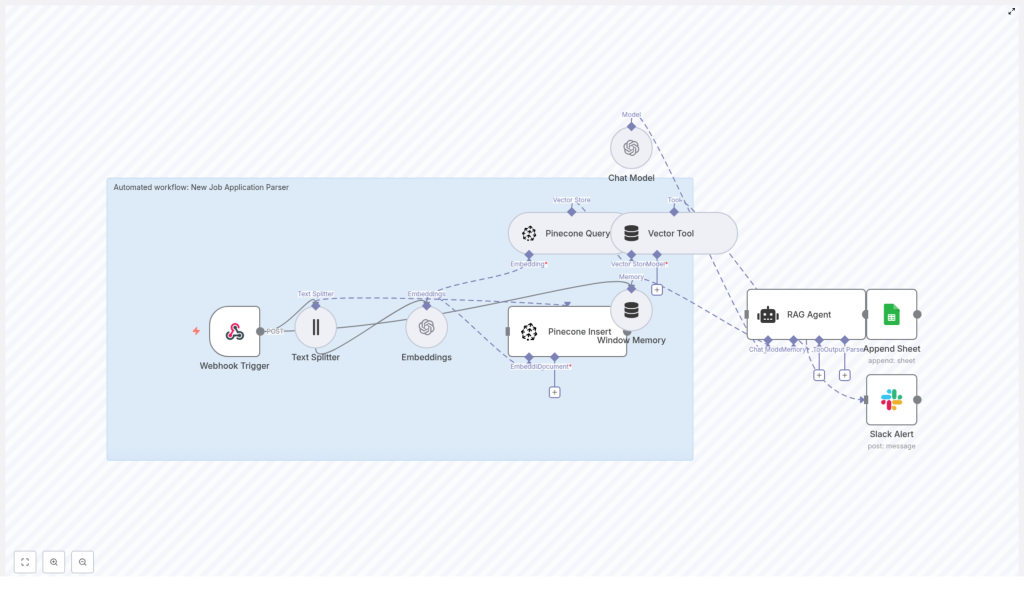
Automated Job Application Parser with n8n & Pinecone
This reference guide describes a production-ready n8n workflow template that automates job application parsing using OpenAI embeddings, Pinecone as a vector database, Google Sheets for structured logging, and Slack for operational alerts. The workflow accepts raw application payloads, splits and embeds text, indexes vectors in Pinecone, retrieves relevant context for retrieval-augmented generation (RAG), and persists structured results for recruiting teams.
1. Solution Overview
The automated job application parser is an end-to-end n8n workflow that:
- Ingests resumes and cover letters via an HTTP webhook.
- Splits unstructured text into manageable chunks for embedding.
- Generates semantic embeddings with OpenAI and stores them in Pinecone.
- Performs similarity search to retrieve relevant context for RAG.
- Uses an OpenAI chat model as a RAG agent to extract and summarize candidate data.
- Logs the parsed output into a Google Sheets “Log” worksheet.
- Emits Slack alerts if any step fails, so issues are surfaced quickly.
The workflow is designed for recruiting teams that process applications at scale and need consistent parsing, reliable searchability, and minimal manual intervention.
2. Architecture and Data Flow
The n8n template is organized as a linear but modular pipeline. At a high level, the execution path is:
- Webhook Trigger Receives a POST request with job application data (e.g. combined resume and cover letter text, candidate identifiers, and metadata).
- Text Splitter Splits the incoming application text into character-based chunks suitable for embedding.
- OpenAI Embeddings Calls an embedding model such as
text-embedding-3-smallfor each chunk. - Pinecone Insert Upserts the embeddings along with metadata into a Pinecone index (for example,
new_job_application_parser). - Pinecone Query + Vector Tool Queries the Pinecone index to fetch the most relevant chunks as context for downstream analysis.
- RAG Agent (OpenAI chat model) Uses the retrieved context and the original application text to extract structured fields, summarize the candidate profile, and produce a recommendation.
- Append Sheet (Google Sheets) Writes the parsed JSON fields into a central “Log” sheet as a new row.
- Slack Alert Handles error conditions by posting an alert message to a designated Slack channel with diagnostic details.
Each node is responsible for a clear transformation or action, which makes the workflow easier to debug, extend, and monitor.
3. Node-by-Node Breakdown
3.1 Webhook Trigger Node
Purpose: Entry point for new job applications.
- Method:
POST - Example path:
/new-job-application-parser - Typical payload fields:
- Raw application text (resume, cover letter, or combined text).
- Candidate identifiers (e.g.
candidate_id). - Optional metadata such as job ID, source, or filename.
This webhook can be integrated with a careers site, an Applicant Tracking System (ATS), or an email-to-webhook bridge. Ensure that the payload includes the full application text that needs to be analyzed. Any missing fields that are required downstream (for example, candidate ID) should be validated here or early in the flow, and failures should be routed to the Slack alert node.
3.2 Text Splitter Node
Purpose: Prepare long application documents for embedding by splitting into smaller text segments.
- Strategy: Character-based splitting.
- Recommended parameters:
chunkSize: 400 characters.chunkOverlap: 40 characters.
The Text Splitter node takes the raw application text from the webhook and outputs multiple items, one per chunk. Using overlap preserves continuity between chunks, which reduces the risk of splitting in the middle of important sentences or entities. This is especially relevant for resumes, where key skills and roles may span multiple lines.
Validation step: After configuration, confirm that the node outputs a reasonable number of chunks and that boundaries do not cut off crucial content. Adjust chunkSize and chunkOverlap if your typical resumes are significantly shorter or longer.
3.3 OpenAI Embeddings Node
Purpose: Convert each text chunk into a numerical vector representation.
- Model example:
text-embedding-3-small - Input: Chunked text from the Text Splitter node.
- Output: Embedding arrays (vectors) associated with each chunk.
Embeddings capture the semantic meaning of each chunk, allowing accurate similarity search across different resumes and cover letters. The node typically runs in a loop over all chunks. For higher throughput and better cost efficiency, configure batching if available, so multiple chunks are embedded in a single API call.
Error handling: Monitor for rate limit errors or transient API failures. If an error is thrown, route the execution path to the Slack alert node with the error message and any available candidate metadata.
3.4 Pinecone Vector Store – Insert / Upsert Node
Purpose: Persist embeddings in Pinecone for future retrieval.
- Index name example:
new_job_application_parser - Operation: Insert or upsert vectors with metadata.
For each embedded chunk, the workflow writes a vector into Pinecone. The following metadata is recommended:
candidate_id– a stable identifier for the applicant.source_filename– original file name if available.chunk_index– ordinal index of the chunk within the document.- Original text snippet or a reference to it, depending on your storage strategy.
This metadata enables downstream reconstruction of the original text, traceability of retrieved context, and easier debugging. Pinecone indexes support fast nearest-neighbor queries, which are essential for later RAG operations.
Edge cases: If metadata fields are missing, decide whether to skip the insert or to insert with partial metadata. For compliance-sensitive environments, avoid storing unnecessary PII directly in metadata if not required for retrieval.
3.5 Pinecone Query Node & Vector Tool
Purpose: Retrieve relevant chunks from Pinecone and expose them as a context tool for the RAG agent.
- Input: Query text or embedding representing the current application.
- Output: A set of the most similar chunks, including their metadata and text.
When processing or re-processing an application, the workflow calls Pinecone to fetch the top matching vectors. These retrieved chunks are then passed into a Vector Tool node, which formats them as contextual input for the OpenAI chat model.
The RAG agent uses this context to ground its extraction and classification in the actual candidate submission, which significantly improves accuracy for skills, experience, and role fit assessment.
3.6 RAG Agent Node (OpenAI Chat Model)
Purpose: Execute retrieval-augmented generation to extract structured fields, summarize the candidate, and produce a recommendation.
The RAG agent receives:
- Retrieved context from the Vector Tool (Pinecone query results).
- The original application text.
- A system instruction and user prompt that define the output schema.
Sample system and user prompt:
System: You are an assistant for New Job Application Parser.

User: Process the following application data and return a JSON with fields:
name, email, phone, skills, years_experience, summary, recommended_status.

Context: {{retrieved_context}}

Application Text: {{application_text}}

Return only valid JSON.
The instruction to “Return only valid JSON” is critical. It ensures that the node output can be parsed reliably by n8n and mapped directly into Google Sheets columns. If the model occasionally returns invalid JSON, consider adding stricter instructions or post-processing validation in n8n.
The agent typically extracts:
- Contact details (name, email, phone).
- Skills and technologies.
- Years of experience.
- A concise summary of the candidate profile.
- A recommended status or score indicating role fit.
3.7 Google Sheets – Append Sheet Node
Purpose: Persist parsed results in a structured, queryable format.
- Target sheet example:
Log - Operation: Append new row per processed application.
Map the JSON fields from the RAG agent output into dedicated columns. Common columns include:
NameEmailPhoneRole Applied(if provided in the payload)SkillsYears ExperienceSummaryRecommended StatusRAG Agent Raw Textor full JSON for auditing.
Restrict access to the Google Sheet to authorized HR staff and ensure that spreadsheet sharing settings align with your security policies.
3.8 Slack Alert Node
Purpose: Provide immediate visibility into failures or anomalies in the workflow.
- Trigger conditions: Any node error, invalid JSON from the RAG agent, or failed write to Pinecone or Google Sheets.
- Typical message fields:
- Error message and stack information if available.
candidate_idor other identifying metadata.- Node name where the failure occurred.
Use Slack alerts to quickly triage issues and rerun affected items. This is particularly important when dealing with high-volume recruitment pipelines.
4. Configuration Notes and Best Practices
4.1 Metadata Strategy
Metadata is essential for traceability and reusability of embeddings. When inserting vectors into Pinecone, include fields such as:
candidate_id– to group all chunks belonging to the same candidate.source_filename– to reference the original file if needed.chunk_index– to reconstruct document order.
This metadata allows you to:
- Rebuild the original text sequence from chunks.
- Filter or aggregate search results by candidate or source.
- Comply with data deletion requests by targeting specific candidates.
4.2 Tuning Chunk Size and Overlap
Adjust chunkSize and chunkOverlap based on your typical document length and the embedding model’s token limits.
- Larger chunks preserve more context but risk exceeding model limits and may reduce retrieval granularity.
- Smaller chunks increase granularity but may lose context and require more embedding calls.
- Overlap helps maintain continuity and avoid cutting off sentences or entities across boundaries.
Start with chunkSize = 400 and chunkOverlap = 40, then validate on a sample set of resumes and adjust as necessary.
4.3 Handling Rate Limits and Batching
Embedding APIs typically enforce rate limits. To operate reliably at scale:
- Use batch requests where supported so multiple chunks are embedded in one call.
- Configure retry logic or backoff in n8n if you encounter rate limit errors.
- Monitor usage to avoid unexpected cost spikes.
Batching is usually more cost-efficient and reduces latency for large volumes of applications.
4.4 Using n8n Window Memory
n8n’s Window Memory feature can store short-term state across related node executions. For this workflow, you can use it to:
- Maintain context for a candidate across multiple steps.
- Support follow-up actions that depend on previously processed data.
Configure Window Memory carefully to avoid storing unnecessary PII and to keep memory windows appropriately sized.
4.5 Error Handling Strategy
Implement a clear error handling path that routes failures to the Slack alert node. Recommended practices:
- Capture node error messages and include them in the Slack payload.
- Include
candidate_idand any relevant metadata for quick identification. - Optionally log errors to a separate Google Sheet or monitoring system for trend analysis.
Consistent error handling reduces downtime and helps maintain trust in the automation.
5. Security, Compliance, and Data Privacy
Candidate information is sensitive and often subject to legal and regulatory requirements. Apply the following guidelines:
- Encryption: Enable encryption in transit and at rest for Pinecone, Google Sheets, and any intermediate storage where possible.
- Access control: Limit access to the n8n instance, Pinecone index, and Google Sheets to authorized HR and technical staff only.
- Data minimization: Avoid storing unnecessary PII in logs or metadata, such as full Social Security numbers or other highly sensitive identifiers.
- Data retention and deletion: Define clear retention policies and implement processes to delete vectors and related records when candidates request data removal or when data retention periods expire.
6. Testing, Validation, and Quality Control
Before using the workflow in production, validate each step:
- Seed the system with several representative sample applications.
- Confirm that the RAG agent consistently extracts required fields (name, contact details, skills, experience, summary, and status).
- Set up automated tests that:
- Send synthetic webhook payloads.
- Assert that Pinecone receives embeddings.
- Verify that the correct columns are appended to the Google Sheets “Log” sheet.
- Monitor classification accuracy:
- Track false positives and false negatives in recommended statuses.
- Refine system prompts and examples to improve reliability.
7. Scaling and Cost Considerations
As application volume increases, optimize for performance and cost:
- Embedding frequency: If applications are updated frequently, consider embedding only new or changed sections rather than re-embedding entire documents.
- Pinecone index size: Use namespaces and upsert strategies to control index growth and to logically separate data (for example, by role or region).
- Model selection: Evaluate smaller or cheaper embedding models and chat models. In many cases, they provide acceptable quality at significantly lower cost.
Regularly review usage metrics and adjust parameters to maintain a balance between accuracy, latency, and budget.
8. Implementation Checkpoints in n8n
While building or debugging the template, verify the following checkpoints inside n8n:
- Webhook Trigger The webhook receives the POST payload and successfully passes the application text to the Text Splitter.
- Text
