


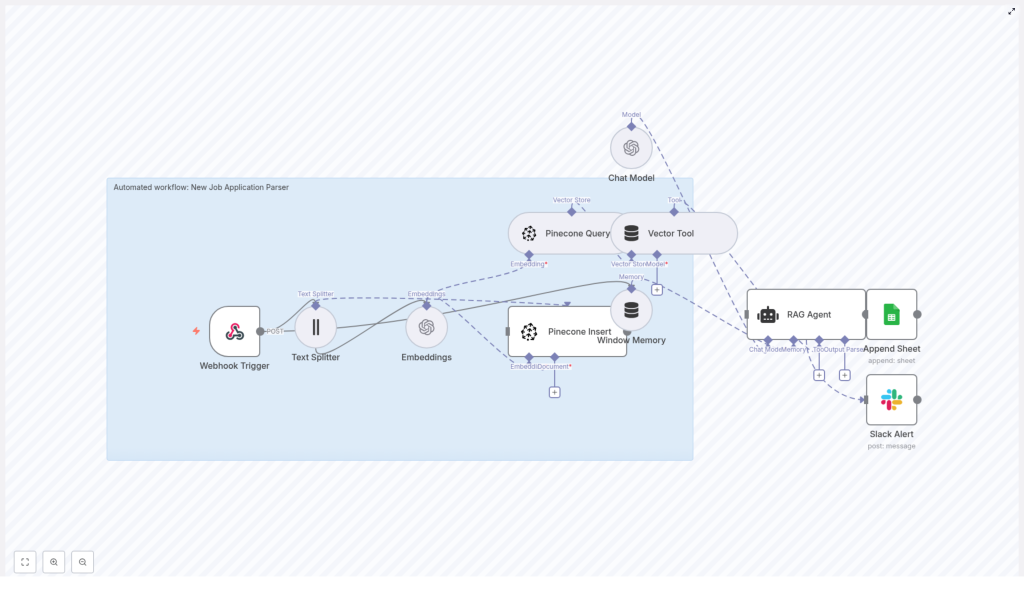
Automated Job Application Parser with n8n, Pinecone & OpenAI
Imagine a hiring process where your team spends most of its time talking to great candidates, not drowning in resumes. With a bit of thoughtful automation, that shift is absolutely possible.
This guide introduces an Automated Job Application Parser built with n8n, Pinecone, and OpenAI. It ingests incoming applications, turns them into vector embeddings, stores them in a scalable vector database, and uses a Retrieval-Augmented Generation (RAG) agent to summarize and score candidates. You get a powerful, production-ready workflow that lightens your workload and gives you more space to focus on the human side of hiring.
Think of this template as a starting point for your automation journey. You can use it as-is, extend it, or customize it to match your exact hiring needs. Along the way, you will sharpen your automation mindset and build reusable skills you can apply across your business.
The challenge: manual screening slows everything down
Recruiters and hiring managers often face the same problem: too many applications, not enough time. Manually reading each resume, copying details into spreadsheets, and trying to compare candidates consistently can be exhausting and error-prone.
Common pain points include:
- Hours spent scanning resumes for basic information
- Inconsistent evaluations between different reviewers
- Difficulty searching past candidates when a new role opens
- Slow response times that cost you top talent
Automation does not replace your judgment. It amplifies it. By offloading repetitive tasks to a reliable workflow, you free yourself to focus on conversations, culture fit, and long-term potential.
From overload to opportunity: adopting an automation mindset
Before diving into the template, it helps to reframe how you see your hiring process. Every repetitive step is an opportunity to:
- Standardize how you evaluate candidates
- Capture richer data that stays searchable over time
- Turn unstructured resumes into structured insights
- Build a scalable pipeline that grows with your company
With n8n, you do not need to be a full-time developer to achieve this. You can visually orchestrate tools like OpenAI and Pinecone, test quickly, and iterate. The Job Application Parser template is one practical step toward a more automated, focused workflow.
The vision: what this n8n template helps you achieve
At a high level, this workflow helps you:
- Extract and normalize candidate information such as skills, experience, and contact details
- Store semantic context using vector embeddings so you can search applications intelligently
- Generate instant summaries and match scores with a RAG workflow powered by OpenAI
- Log every application into Google Sheets for tracking and reporting
- Stay informed with Slack alerts when something goes wrong
Instead of manually parsing each application, your workflow runs in the background and presents you with clear, structured insights. You get a more consistent pipeline and a stronger foundation for future automation projects.
Architecture at a glance: how the pieces fit together
n8n sits at the center of this automation as the orchestrator. Around it, a set of tools work together to turn raw application data into meaningful summaries and scores.
- Webhook Trigger – Receives job applications via POST requests
- Text Splitter – Breaks long resumes or cover letters into manageable chunks
- Embeddings (OpenAI) – Converts text chunks into vector embeddings
- Pinecone – Stores and retrieves embeddings for fast semantic search
- Vector Tool + RAG Agent – Uses retrieved context to generate summaries and decisions
- Google Sheets – Logs results in a “Log” sheet for easy review
- Slack Alert – Notifies you when the workflow encounters an error
Each part is configurable, so as your needs evolve, you can extend the workflow rather than start from scratch.
End-to-end flow: what happens to each application
To understand the transformation from raw resume to actionable insight, follow the journey of a single application through the workflow:
- A new application is submitted and hits the n8n Webhook at
POST /new-job-application-parser. - The Text Splitter node breaks the resume and cover letter into 400-character chunks with a 40-character overlap to preserve context.
- Each chunk is passed to OpenAI Embeddings using the
text-embedding-3-smallmodel to generate vector representations. - The workflow inserts those embeddings into a Pinecone index named
new_job_application_parseralong with metadata such as applicant ID, chunk index, and source. - When you need a summary or decision, a Pinecone Query retrieves the most relevant chunks, and the RAG Agent uses them with a Chat Model to produce a human-friendly output.
- The final summary and decision are appended to a Google Sheet called “Log”, and if anything fails along the way, a Slack alert is sent so you can respond quickly.
This flow turns each application into a structured, searchable record without demanding more of your time.
Walking through the n8n configuration
1. Webhook Trigger: your entry point for applications
Start by creating a POST Webhook in n8n with the path /new-job-application-parser. This endpoint can be connected to:
- Your careers page form
- Your Applicant Tracking System (ATS) webhook
- An email-to-webhook forwarder
Here is a sample payload you might receive:
{  "applicant": {  "name": "Jane Doe",  "email": "jane@example.com",  "cover_letter": "I’m excited to apply...",  "resume_text": "...full resume text...",  "source": "LinkedIn"  }
}
This structure is flexible. You can adapt it to match the data your system already produces, as long as the follow-up nodes know where to find the text fields.
2. Text Splitter: preparing text for embeddings
Long resumes and cover letters need to be split into smaller pieces so that embeddings and retrieval stay accurate and cost-effective. Use a character-based text splitter with the following configuration:
chunkSize: 400chunkOverlap: 40
This balance keeps enough context in each chunk while avoiding overly long inputs. If your resumes are consistently shorter or longer, you can experiment with these values later to fine-tune performance.
3. Embeddings with OpenAI: turning text into vectors
Next, configure an OpenAI Embeddings node in n8n. Use the model:
text-embedding-3-small
Make sure your OpenAI API credential is set up in n8n. The node will generate embeddings for each chunk produced by the Text Splitter. These embeddings are the foundation for semantic search and RAG, so this step is central to the workflow.
4. Pinecone Insert and Query: building your vector database
Set up a Pinecone index named new_job_application_parser. You can create a new index or reuse an existing one if it fits your architecture.
In the Insert step:
- Store each embedding
- Attach metadata such as:
- Applicant ID
- Chunk index
- Source (for example, LinkedIn, careers site)
For retrieval, configure a Pinecone Query node that queries the same index and returns the top-k relevant chunks. These chunks will feed into the RAG Agent to provide context for summaries and decisions.
5. Vector Tool and RAG Agent: generating summaries and decisions
The next step is where automation starts to feel truly helpful. The Vector Tool wraps your Pinecone query so that a RAG Agent can call it as a tool inside n8n.
The RAG Agent combines three types of information:
- A system prompt that defines the role, for example, a hiring assistant
- The retrieved context from Pinecone
- Applicant metadata from the original webhook payload
Use a Chat Model configured in n8n to generate outputs such as:
- A concise candidate summary
- A list of top skills and keywords
- A recommended screening decision (Yes, Maybe, or No)
An example system message you can use:
You are an assistant for New Job Application Parser - summarize the candidate, list top skills, and recommend a screening decision (Yes/Maybe/No).You can refine this prompt over time as you see what kind of output works best for your team.
6. Append to Google Sheets: logging and visibility
To keep a clear record of every processed application, configure a Google Sheets node to append rows to a sheet named Log. This makes it easy to review, filter, and report on your pipeline.
A typical column mapping might include:
- Timestamp
- Applicant Name
- Decision (Yes / Maybe / No)
- Summary
- Source
From here, you can filter by decision, track throughput, and even share the sheet with stakeholders who do not use n8n directly.
7. Slack Alert: staying ahead of issues
Automation works best when you can trust it. To keep your workflow healthy, add a Slack node that triggers on any workflow failure.
Send a message to a channel like #alerts that includes:
- The error message
- A reference to the applicant or payload
This way, if something breaks, you know right away and can fix it before it impacts your hiring pipeline.
Security, privacy, and cost: building responsibly
As you automate more of your hiring process, it is important to keep security and compliance in focus. The good news is that n8n and the surrounding tools give you the flexibility to do this well.
Secure your webhooks
- Protect your webhook with a secret token or an IP allowlist.
- Validate incoming requests so you only process trusted data.
Respect data privacy
Resumes and applications contain sensitive personal information. To handle this responsibly:
- Define retention policies for Pinecone and Google Sheets
- Purge or anonymize old records when they are no longer needed
- Redact sensitive data in logs where possible
- Comply with regulations like GDPR and CCPA where applicable
Manage costs and rate limits
Embedding generation and vector database operations are powerful but not free. To keep costs under control:
- Batch requests where it makes sense
- Monitor usage of OpenAI and Pinecone
- Set rate limits on the webhook to avoid unexpected spikes
This mindset helps you build sustainable automations you can rely on long term.
Monitoring, scaling, and maintaining your workflow
Once your Job Application Parser is running, you can gradually evolve it from a helpful tool into a robust part of your hiring infrastructure.
- Enable detailed logging in n8n and export logs to a central system like Datadog or CloudWatch.
- Set up health checks for Pinecone and OpenAI connectivity and alert on outages.
- Scale Pinecone resources or shard indexes if you expect high volume.
- Use window memory sparingly in conversational flows and only persist what is needed for short-term context.
Each improvement you make here compounds over time, leading to a smoother and more resilient automation stack.
Growing beyond the basics: extensions and advanced ideas
Once you are comfortable with the core template, you can start experimenting and expanding. Here are some directions to explore:
- OCR pipeline: Accept PDFs or images and run OCR (for example, Tesseract or a cloud OCR service) before splitting text. This lets you handle scanned resumes and attachments.
- Structured resume parsing: Plug in dedicated parsers like Resumator or other third-party tools to extract structured fields such as education, experience, and skills, then store them as metadata in Pinecone.
- Automated screening rules: Combine RAG outputs with deterministic filters, such as years of experience or must-have skills, to create automated pass/fail gates for initial screening.
- Human-in-the-loop review: Insert a review step where recruiters confirm or adjust decisions before finalizing the application status, ensuring automation supports rather than replaces human judgment.
Each enhancement you add turns your workflow into a more powerful hiring assistant tailored to your organization.
Example RAG system prompt you can build on
Below is a sample system message you can use in your RAG Agent. Treat it as a starting point and refine it based on your own hiring criteria and tone.
You are an assistant for New Job Application Parser. Given the applicant metadata and retrieved resume snippets, produce:
1) A 3-sentence summary of the candidate
2) Top 5 skills and keywords
3) A recommended screening decision: Yes / Maybe / No (with short justification)

Applicant metadata: {{applicant}}
Retrieved snippets: {{context}}
As you see how the model responds, you can iterate on this prompt to better match your company’s values and expectations.
Bringing it all together: your next step in automation
Turning incoming job applications into searchable, summarized records lets your recruiting team focus on what matters most: connecting with the right people. The combination of n8n, OpenAI, and Pinecone gives you a flexible, cost-effective, and extensible stack for hiring automation.
This Job Application Parser template is more than a single workflow. It is a concrete step toward a more automated, focused, and scalable way of working. Once you see what it can do, you may find yourself looking at other processes and asking, “What else can I automate?”
Ready to try it?
- Import the n8n workflow template
- Configure your OpenAI, Pinecone, Google Sheets, and Slack credentials
- Send a test POST request to
/new-job-application-parserwith a sample payload
From there, iterate. Adjust prompts, tweak chunk sizes, refine metadata, and layer in new steps. Each improvement moves you closer to a hiring process that is both highly efficient and deeply human.
Try the template now: import the workflow into n8n, add your API keys, and send a test POST to /new-job-application-parser. Use it as your foundation, then build the hiring automation system you have always wanted.
