


Automate Notion API Updates with n8n & RAG
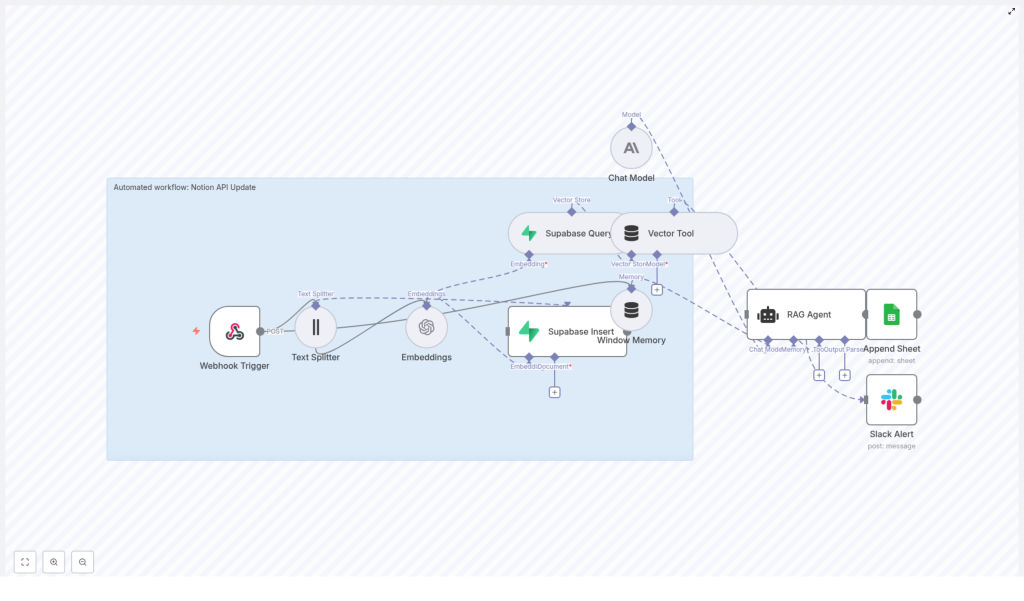
This reference guide describes a complete n8n workflow template, “Notion API Update”, that automates processing of incoming Notion-related data. The workflow accepts JSON payloads through a webhook, splits long text into chunks, generates embeddings, persists and queries vectors in Supabase, runs a retrieval-augmented generation (RAG) flow with Anthropic, logs outputs to Google Sheets, and sends Slack alerts on failures.
1. Workflow overview
The template is designed for teams that manage Notion content or other structured updates and want a reliable, reproducible pipeline for:
- Receiving updates via a secure HTTP endpoint
- Handling long text by chunking it before embedding
- Indexing content in a vector database for semantic retrieval
- Running a RAG-style agent using Anthropic’s chat model
- Recording outcomes in Google Sheets and alerting on errors via Slack
At a high level, the workflow implements the following processing stages:
- Receive an HTTP POST payload via Webhook
- Split the payload content using a Text Splitter
- Generate embeddings with OpenAI
- Insert vectors and metadata into Supabase
- Query Supabase to retrieve relevant context
- Expose the vector store to a RAG Agent via a Vector Tool
- Maintain short-term state with Window Memory
- Run an Anthropic chat model to generate context-aware output
- Append results to a Google Sheet
- Send Slack alerts on workflow or agent errors
2. Architecture and data flow
The architecture follows a linear, event-driven pattern with a single webhook entry point and downstream processing nodes. Data flows as JSON through each node, with additional binary or vector representations handled by the embedding and Supabase layers.
2.1 High-level node sequence
- Webhook Trigger (POST
/notion-api-update) - Text Splitter (character-based chunking)
- Embeddings (OpenAI
text-embedding-3-small) - Supabase Insert (vector indexing into
notion_api_update) - Supabase Query (semantic retrieval)
- Vector Tool (tool interface for the agent)
- Window Memory (short-term conversation or state buffer)
- Chat Model (Anthropic)
- RAG Agent (coordinates retrieval and generation)
- Append Sheet (Google Sheets logging)
- Slack Alert (error notifications)
Each node transforms or enriches the data, with clear separation between transport (webhook), preprocessing (splitter, embeddings), storage (Supabase), reasoning (RAG agent), and observability (Sheets, Slack).
3. Node-by-node breakdown
3.1 Webhook Trigger
Purpose: Expose an HTTP endpoint that external systems (for example, a Notion integration or middleware) can call to submit update payloads.
- Method:
POST - Path:
/notion-api-update - Input format: JSON payload (see example below)
The webhook node is the entry point for the entire workflow. It receives the JSON body and passes it downstream as $json to subsequent nodes. Typical payload fields include a Notion page identifier, title, content, and timestamp.
Security considerations:
- Protect the endpoint with a shared secret, IP allowlist, or HMAC verification header.
- Reject requests that fail signature or token checks to avoid unauthorized ingestion.
- Optionally validate payload structure (for example, required keys like
notionPageIdandcontent) before continuing.
3.2 Text Splitter
Purpose: Normalize long Notion content into smaller, overlapping segments suitable for embedding and vector search.
The node uses a character-based splitting strategy with the following configuration:
chunkSize: 400chunkOverlap: 40
This configuration aims to:
- Keep chunks small enough for cost-efficient embedding and performant retrieval.
- Preserve local context between segments through a 40-character overlap.
Edge cases:
- Very short content (fewer than 400 characters) will typically produce a single chunk.
- Extremely large content will result in multiple chunks; ensure downstream nodes are configured to handle arrays of items.
- Non-text fields should be filtered or preprocessed before reaching this node to avoid embedding irrelevant data.
3.3 Embeddings (OpenAI)
Purpose: Convert each text chunk into a high-dimensional vector representation for semantic similarity search.
- Model:
text-embedding-3-small(OpenAI) - Input: chunked text from the Text Splitter
- Output: embedding vectors associated with each chunk
These embeddings are later stored in Supabase and used for semantic retrieval. The chosen model balances cost and performance for typical Notion content.
Configuration notes:
- Ensure the OpenAI credentials are correctly configured in n8n (see credentials section).
- Confirm that the node is set to process all items produced by the Text Splitter, not just the first item.
3.4 Supabase Insert
Purpose: Persist embedding vectors and their associated metadata into a Supabase vector table.
- Target table:
notion_api_update
The workflow stores:
- The embedding vector for each chunk.
- Source metadata, for example:
page_id(fromnotionPageId)block_idor chunk identifier if applicabletitletimestamporupdatedAt
This metadata is critical for traceability, allowing you to map retrieved vectors back to the originating Notion page and segment.
Edge cases and behavior:
- If the Supabase insert fails (for example, due to schema mismatch or network issues), the workflow should surface the error and trigger the Slack alert node via n8n’s error handling.
- Ensure the table schema is compatible with the embedding size produced by
text-embedding-3-small.
3.5 Supabase Query and Vector Tool
Purpose: Retrieve semantically relevant chunks from Supabase and expose them as a tool to the RAG agent.
The Supabase Query node performs a similarity search against the notion_api_update vector table. It uses the incoming request context or newly generated embeddings to find related chunks.
The Vector Tool node then wraps this Supabase-backed vector store as a callable tool for the agent. Within the RAG flow, the agent can invoke this tool to fetch context during generation.
Key aspects:
- Configure the query to limit the number of retrieved chunks to a sensible value to avoid overwhelming the model context.
- Make sure the Vector Tool is correctly wired to the Supabase Query node output so the agent sees it as an available tool.
3.6 Window Memory
Purpose: Maintain a short-term memory buffer across calls so the agent can reference recent state or conversation history.
The Window Memory node stores a limited window of previous interactions or processing steps. This is particularly useful if the workflow is extended to multi-turn interactions or if multiple calls occur in a sequence for the same Notion entity.
Typical behavior:
- Stores recent messages or system state for a bounded number of turns or tokens.
- Provides this memory back to the agent as part of the context during generation.
3.7 Chat Model and RAG Agent
Purpose: Run a retrieval-augmented generation loop using Anthropic’s chat model, vector tool, and memory to produce a final status or summary.
- Chat model provider: Anthropic
- Role: Core language model used by the RAG agent
The RAG Agent orchestrates:
- Calls to the Vector Tool to fetch relevant context from Supabase.
- Use of Window Memory to maintain short-term state.
- Interaction with the Anthropic chat model to generate the final response.
Typical outputs include concise status messages, summaries of changes, or diagnostics about the incoming Notion update. The agent is guided by a system message and prompt template (see prompting section).
Error handling: If the chat model or agent encounters an error (for example, provider outage or invalid configuration), n8n’s error routing can direct execution to the Slack Alert node with the error payload.
3.8 Append Sheet (Google Sheets)
Purpose: Persist the agent’s output in a structured, human-readable log for auditing and reporting.
- Spreadsheet: identified by
SHEET_ID(environment variable) - Sheet name:
Log - Target column: at least a
Statuscolumn mapped from the agent output
The node appends a new row for each processed webhook request, making it easy to review historical automation actions or debug specific events.
Configuration notes:
- Ensure the Google Sheets OAuth credentials are correctly set up in n8n.
- Confirm that the column mapping matches the sheet structure (for example,
Statuscolumn exists).
3.9 Slack Alert (Error Handling)
Purpose: Provide immediate visibility into failures via Slack notifications.
- Channel:
#alerts(or your preferred alerts channel) - Trigger: n8n
onErrorexecution path
On errors in the RAG agent or any upstream node configured with error routing, this node sends a message to Slack that includes the error payload. This helps operators quickly identify and triage issues such as API failures, schema mismatches, or invalid payloads.
4. Example webhook payload
The webhook endpoint expects a JSON object similar to the following:
{  "notionPageId": "abc123",  "title": "Quarterly Goals",  "content": "Long Notion page content goes here...",  "updatedAt": "2025-10-18T12:34:56Z"
}
The Webhook Trigger passes this JSON to the Text Splitter node. The content field is split into chunks, embedded, and indexed. The metadata fields such as notionPageId, title, and updatedAt are propagated and stored along with the vectors in Supabase and used by the agent for context.
5. Credentials and configuration
The workflow relies on several external services. Configure the following credentials in n8n before running the template:
- OpenAI API Key – used by the Embeddings node for
text-embedding-3-small. - Supabase Project URL and Service Key – used by Supabase Insert and Supabase Query nodes to access the vector table.
- Anthropic API Key – used by the Chat Model node that powers the RAG agent.
- Google Sheets OAuth credentials – required by the Append Sheet node. The spreadsheet is identified via a
SHEET_IDenvironment variable. - Slack OAuth credentials – used by the Slack Alert node to send messages to the chosen channel.
Security best practices:
- Store API keys and secrets in n8n’s credentials store or environment variables, not directly in node parameters for shared workflows.
- Restrict access to the n8n instance and credentials configuration to authorized operators only.
6. Prompting and agent setup
The behavior of the RAG agent is largely controlled by its system message and prompt template. In the template, the agent receives the following configuration:
System: You are an assistant for Notion API Update
Prompt: Process the following data for task 'Notion API Update':

{{ $json }}
Key points:
- The
Systemmessage defines the agent’s role and high-level behavior. - The
Promptpasses the entire webhook JSON ({{ $json }}) into the context, so the agent can reason about all incoming fields.
Customization ideas:
- Enforce a specific output format, such as a JSON object with fields like
status,summary, oractionRequired. - Instruct the agent to summarize changes, detect conflicts, or suggest deduplication steps for repeated or overlapping updates.
- Specify constraints such as maximum length, tone, or inclusion of provenance details from Supabase metadata.
7. Best practices and tuning
7.1 Chunking strategy
- Chunk size and overlap: Adjust
chunkSizeandchunkOverlapbased on content type.- Long narrative content can benefit from slightly larger chunks.
- Highly structured content (tables, lists) may require smaller chunks to avoid mixing unrelated sections.
7.2 Embedding model selection
text-embedding-3-smallis cost-efficient and suitable for many Notion use cases.- If you need higher semantic accuracy, consider switching to a larger embedding model, taking into account cost and latency tradeoffs.
7.3 Vector schema design
- Include metadata such as
source_id,title, andcreated_atin the Supabase table. - Use these fields to display provenance in agent outputs or filter retrieval by date, page, or type.
7.4 Rate limiting and reliability
- Monitor API usage for OpenAI and Anthropic to avoid hitting provider limits.
- Configure retry or backoff strategies in n8n for transient failures where appropriate.
7.5 Error handling and observability
- Route unexpected errors to the Slack Alert node, including structured error details for faster debugging.
- Use Google Sheets logging
