


Automate Blood Test Email Alerts with n8n
Every day, medical teams are flooded with lab data that could change a patient’s life if it reached the right person at the right moment. Yet, too often, those results sit in inboxes or systems, waiting for someone to notice.
Automation gives you a different path. Instead of chasing data, you can design workflows that quietly work in the background, highlight what matters, and give your team time to focus on care, strategy, and growth.
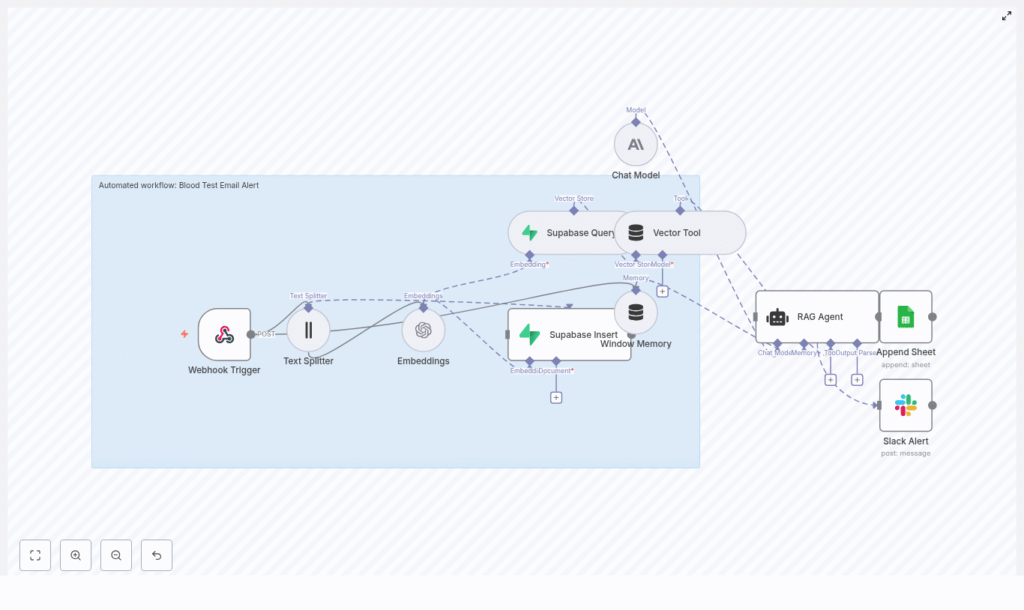
This guide walks you through a production-ready n8n workflow template, “Blood Test Email Alert”. It turns incoming blood test data into contextual alerts using embeddings, a Supabase vector store, a Retrieval-Augmented Generation (RAG) agent, and integrations with Google Sheets and Slack. Think of it as a practical first step toward a more automated, calmer, and more effective healthcare workflow.
From data overload to meaningful alerts
Blood test pipelines generate huge volumes of structured and semi-structured data. Without automation, it is easy to miss patterns, delay follow-ups, or lose context in long reports.
By introducing an n8n workflow at this stage, you are not just adding a tool, you are reshaping how your team interacts with information. A well-designed automation can:
- Detect important anomalies or patterns in blood test data
- Provide concise, contextual summaries for clinicians using Retrieval-Augmented Generation (RAG)
- Log decisions in Google Sheets for auditability and traceability
- Send real-time alerts to teams via Slack or email so nothing critical slips through
The result is more than faster notifications. It is a foundation for a scalable, reliable, and transparent alerting system that grows with your organization.
Adopting an automation-first mindset
Before diving into nodes and settings, it helps to approach this template with the right mindset. You are not just “setting up a workflow”, you are:
- Designing a repeatable process that protects your time and attention
- Building a reusable pattern for other medical automations
- Creating a documented, auditable path from raw data to decisions
Start simple, then iterate. Use this blood test alert workflow as your first building block. Once it is in place, you can extend it to other lab results, notification channels, or approval flows with far less effort.
How the n8n blood test alert workflow fits together
At a high level, this n8n template connects a few powerful components so they act like a single, intelligent assistant for lab results:
- Webhook Trigger receives incoming blood test data
- Text Splitter prepares long reports for embedding
- Embeddings (OpenAI) convert text into vectors
- Supabase Vector Store stores and retrieves those vectors
- Vector Tool (LangChain) exposes the vector store to the agent
- Window Memory keeps short-term conversational context
- Chat Model (Anthropic) acts as the LLM for reasoning
- RAG Agent combines context, memory, and prompts to decide alert status
- Append Sheet (Google Sheets) logs outputs for audits
- Slack Alert notifies your team on workflow failures
Together, these nodes transform raw JSON into a clear, contextual decision: whether to alert, why, and how to record it.
Step-by-step journey through the workflow
1. Webhook Trigger – where the data journey begins
The workflow starts with a Webhook Trigger node:
- Endpoint:
POST /blood-test-email-alert
This endpoint ingests raw payloads from labs, EHRs, or ingestion systems. It is your workflow’s front door. In production, make sure to:
- Validate and sanitize incoming JSON
- Allow only trusted sources, using tokens or an IP allowlist
Once this is in place, every blood test report that hits this endpoint can automatically move into your review and alerting process.
2. Text Splitter – preparing reports for smart retrieval
Long medical reports can be difficult for models to handle efficiently. The Text Splitter node solves this by breaking the report into overlapping chunks:
- ChunkSize: 400
- ChunkOverlap: 40
This chunking step improves embedding quality and ensures the RAG agent can retrieve specific passages without hitting token limits. In practice, this means more accurate context and better, more focused summaries.
3. Embeddings (OpenAI) – turning text into vectors
Next, each chunk is passed to the Embeddings node using OpenAI:
- Model:
text-embedding-3-small
Each chunk is converted into a vector representation. These vectors are then sent to Supabase for indexing. You can adjust the embedding model later if you want to balance cost and performance differently, but this model is a solid default for many use cases.
4. Supabase Insert and Supabase Query – storing and retrieving context
The workflow uses two Supabase nodes to manage your medical text embeddings:
- Supabase Insert: indexes new documents into the
blood_test_email_alertindex - Supabase Query: runs similarity searches to retrieve the most relevant chunks
When a new blood test report arrives, the Insert node stores its embeddings in the Supabase vector store. When the RAG agent needs context to reason about a new result, the Query node fetches the closest matches. This is what lets the agent ground its decisions in concrete, previously indexed information.
5. Vector Tool and Window Memory – giving the agent tools and memory
To make the RAG agent more capable, the workflow connects:
- Vector Tool (LangChain): exposes the Supabase vector store as a tool the agent can call
- Window Memory: keeps recent messages and context available across steps
These pieces help the agent behave more like a thoughtful assistant instead of a one-off responder. It can pull in relevant background information and remember what it has already considered in the current interaction.
6. Chat Model and RAG Agent – turning data into decisions
At the heart of the workflow is the combination of:
- Chat Model (Anthropic): the language model responsible for reasoning
- RAG Agent: which orchestrates memory, tools, and context
The agent uses a system prompt to stay focused:
“You are an assistant for Blood Test Email Alert”
Using this prompt, the retrieved context from Supabase, and the window memory, the RAG agent produces clear, actionable output, such as:
- Whether an alert should be sent
- The reasoning behind that decision
- A concise summary suitable for email or internal review
This is where your workflow starts to feel transformative. Instead of a raw report, you get a structured, explainable decision that your team can trust and audit.
7. Append Sheet (Google Sheets) – building your audit trail
Every decision needs a record. The Append Sheet node sends the final status and agent output into a Google Sheet named “Log”.
- Use a stable SHEET_ID for production
- Ensure the sheet has appropriate columns for status, reasoning, timestamps, and identifiers
This log becomes your lightweight audit trail, which is especially helpful for compliance, quality checks, and continuous improvement. Over time, you can analyze this data to refine prompts, thresholds, or escalation rules.
8. Slack Alert (on error) – never miss a failure
Automation is powerful, but only if you know when something goes wrong. The workflow includes a Slack Alert node on the onError path.
- All failures trigger a message to
#alerts - The error payload is included so engineers can quickly investigate
This safety net means you can scale your automation with confidence, knowing that silent failures are far less likely.
Configuration tips for a smooth deployment
To bring this template to life in your environment, configure a few key elements:
- Store all API keys as credentials in n8n:
- OpenAI
- Supabase
- Anthropic
- Google Sheets
- Slack
- Create the Supabase table and vector index in advance:
- indexName:
blood_test_email_alert
- indexName:
- Set the Webhook path to
blood-test-email-alertand secure it using tokens or an allowlist - For Google Sheets, use a service account or OAuth credentials and verify that the “Log” sheet is ready for production data
- If your stack is not HIPAA compliant, disable or secure PHI-containing payloads, redact patient identifiers, or process data only in compliant environments
Spending a bit of time on this setup phase pays off later with a stable, maintainable automation that you can build on confidently.
Testing your n8n blood test alert workflow
Before you rely on this workflow in production, walk through a simple test journey:
- Send a test POST request to your webhook URL with a representative blood test report JSON.
- Verify that the Text Splitter creates multiple chunks and that embeddings are generated.
- Check Supabase to confirm that:
- Embeddings are inserted into the
blood_test_email_alertindex - A Supabase Query returns relevant passages for the RAG agent
- Embeddings are inserted into the
- Open your “Log” Google Sheet and confirm that the agent’s status and explanation are appended as new rows.
- Simulate failures, such as:
- Sending an invalid payload
- Temporarily removing an API key
and check that Slack posts alerts to
#alerts.
Once these tests pass, you have a reliable baseline. From there, you can iterate on prompts, thresholds, or additional logic to better match your team’s workflow.
Security and compliance considerations
Blood test data often counts as protected health information (PHI). Treating it carefully is non-negotiable. If you handle PHI in this workflow:
- Use a HIPAA-compliant stack and sign BAAs with vendors where required
- Minimize stored PHI in vector stores or avoid storing direct identifiers altogether
- Encrypt data at rest and in transit, and rotate secrets regularly
- Limit access to logs and keep an audit trail, for example, using the Google Sheets “Log”
By designing with security in mind from the start, you can scale your automation without sacrificing trust or compliance.
Scaling and optimizing your workflow over time
Once your blood test alert automation is running smoothly, you can refine it for performance and cost efficiency.
- Batch embeddings to improve throughput and reduce API calls
- Tune chunk size and overlap based on average report length and complexity
- Implement rate limiting to protect downstream APIs and avoid quota exhaustion
- Monitor Supabase storage and periodically prune or archive old vectors that are no longer needed
These optimizations help your workflow stay fast, predictable, and affordable as volumes grow.
Example: minimal webhook payload
Here is a simple JSON payload you can use to test your webhook:
{  "patient_id": "anon-12345",  "report_text": "Hemoglobin: 13.2 g/dL\nWBC: 6.1 x10^9/L\nComments: Results within normal range"
}
Start with a minimal example like this, then gradually move toward more complex, real-world reports once you are confident the pipeline is working.
Turning this template into your automation foundation
This n8n template is more than a one-off blood test notifier. It is a flexible foundation for automated medical alerts that are:
- Context-aware, thanks to embeddings, a vector store, and RAG
- Auditable, with every decision logged in Google Sheets
- Integrated into your team’s daily tools through Slack and email
By implementing it, you take an important step toward an automation-first workflow where repetitive tasks are handled for you, and your team can focus on high-value work and patient care.
From here, you can:
- Extend the same pattern to other lab tests or clinical reports
- Add approval steps or routing rules based on severity
- Experiment with different prompts or models to improve summaries
Next steps: start small, then build your automation ecosystem
You do not need to automate everything at once. Start with this template, prove the value, and grow from there.
Here is a simple action plan:
- Deploy the template in n8n.
- Connect your OpenAI, Supabase, Anthropic, Google Sheets, and Slack credentials.
- Run a few test payloads and validate the end-to-end flow.
- Review your Google Sheets logs and Slack alerts, then refine prompts or thresholds.
- Prepare for production by aligning with your local healthcare data regulations and compliance needs.
As you gain confidence, use the same approach to automate more of your workflows, from intake forms to discharge summaries and beyond.
Call to action: Download this n8n template, test it with sample data, and subscribe for weekly automation guides and best practices to secure and scale your healthcare automations. Each small automation you ship today becomes a building block for a more focused, resilient, and efficient operation tomorrow.
If you have questions or need a custom implementation, share your environment details and we can help you adapt the workflow to your specific requirements.
