


Record Crypto Prices with n8n & Supabase: Turn Raw Data Into Action
Every day, more crypto data flows past you than any one person or team could ever fully track. Prices spike, markets shift, and insights appear for a moment before disappearing into the noise. The people and teams who win are not the ones who work the longest hours, but the ones who design systems that work for them.
This is where automation becomes a catalyst for growth. In this guide, you will walk through an n8n workflow template that turns incoming crypto price data into a living, searchable knowledge base. You will capture price records, convert them into embeddings, store them in a Supabase vector database, and use a RAG (retrieval-augmented generation) agent to enrich the data, log it to Google Sheets, and alert your team in Slack when something goes wrong.
The goal is not just to build a workflow. It is to create a repeatable system that frees your time, sharpens your decision making, and gives you a foundation you can extend as your research or business grows.
The Problem: Drowning in Crypto Data
Researchers, traders, and operations teams all face the same challenge: crypto data is abundant, but usable insight is scarce. You might already be collecting prices and notes in different tools, but:
- Logs are scattered across sheets, databases, and chat threads
- Searching historic data is slow and often limited to basic keyword searches
- Manual reporting and monitoring take time away from deeper analysis
As the volume of information grows, relying on manual workflows becomes a bottleneck. You need reliable logging, fast semantic search across historic data, and tooling that scales with your ambition, not your workload.
The Shift: From Manual Tracking To Automated Insight
Instead of typing notes into spreadsheets and chasing down context later, imagine a system where:
- Every crypto price record is captured automatically through a webhook
- Rich notes are transformed into embeddings that can be semantically searched
- Supabase stores everything in a vector index that grows as your data grows
- An Anthropic-powered RAG agent enriches and validates records on the fly
- Google Sheets keeps an easy-to-share log, and Slack alerts you when errors occur
This n8n workflow template is that system. It is a practical, low-code way to build a “memory” for your crypto data, so you can stop firefighting and start focusing on strategy, research, and higher-value work.
The Stack: Tools That Work Together For You
The power of this template comes from how each component plays a specific role in your automation journey:
- n8n for low-code orchestration and automation
- Cohere embeddings to convert price records and notes into vectors
- Supabase as a vector-enabled store for scalable retrieval
- Anthropic chat model + RAG agent to reason about and enrich stored data
- Google Sheets for simple, shareable reporting
- Slack for instant error alerts and operational awareness
Each part is replaceable and configurable, but together they create a powerful foundation for automated crypto data management.
Architecture: How The Workflow Flows
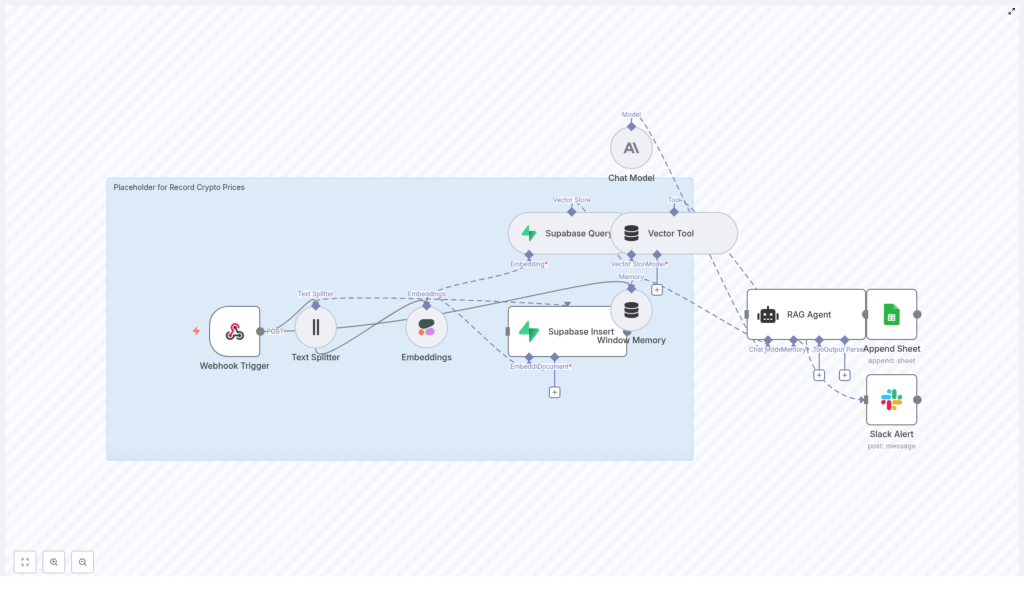
Before diving into the steps, it helps to see the big picture. The n8n workflow follows a clear journey from raw input to structured insight:
- Webhook Trigger receives crypto price data via POST
- Text Splitter breaks long notes into chunks for better embedding
- Embeddings (Cohere) convert each chunk into a vector
- Supabase Insert stores vectors and metadata in a vector index
- Supabase Query + Vector Tool fetch context when the RAG agent needs it
- Window Memory maintains recent context across interactions
- Chat Model (Anthropic) + RAG Agent interpret and enrich the data
- Append Sheet (Google Sheets) logs results in a simple, auditable format
- Slack Alert notifies you if anything fails along the way
Now let’s walk through how to build this flow in n8n and make it your own.
Step-by-Step: Building Your Crypto Logging System In n8n
1. Capture Inputs With The Webhook Trigger
Your automation journey starts with a single endpoint. In n8n, add a Webhook node and configure it to accept POST requests, for example at /record-crypto-prices.
The webhook will receive structured JSON such as:
{  "request_id": "abc-123",  "symbol": "BTC-USD",  "price": 62500.12,  "timestamp": "2025-10-20T14:32:00Z",  "notes": "Exchange A aggregated bid-ask snapshot"
}
Make sure the payload includes required fields like symbol, price, and timestamp. Keep the body compact and validate the presence of essential keys before moving to the next node. This small upfront discipline pays off later in reliability and easier debugging.
2. Prepare Text With The Text Splitter
Price data is compact, but your notes can be long and detailed. To make them easier to embed and search, add a Text Splitter node after the webhook.
Recommended starting configuration:
- chunkSize = 400
- chunkOverlap = 40
These values help balance context and precision. Shorter chunks can improve retrieval accuracy for specific queries, while slightly longer ones preserve more context for summarization. You can tune these numbers over time as you see how the system behaves with your actual data.
3. Turn Text Into Vectors With Cohere Embeddings
Next, add an Embeddings (Cohere) node to convert each text chunk into a vector representation. Use an embeddings model tuned for English, such as embed-english-v3.0.
For each chunk, send along key metadata so you can filter and understand results later. Typical metadata fields include:
symboltimestampsourceor origin of the datarequest_idfor traceability
This step is where your unstructured notes gain a new capability: semantic searchability. You are effectively teaching your system to “understand” your comments about crypto events, not just store them.
4. Store Everything In Supabase As A Vector Store
With embeddings and metadata ready, connect a Supabase Insert node. Configure it to write to a vector index, for example with indexName: record_crypto_prices.
Key configuration tips:
- Use mode = insert for straightforward ingestion
- Consider using upsert logic if duplicate messages or retries are possible
- Store chunk-level IDs so you can map each vector back to the original payload and
request_id
At this point, you have a scalable vector store that can grow with your data, giving you fast, flexible retrieval over historic crypto price records and notes.
5. Retrieve Context With Supabase Query + Vector Tool
To enable intelligent reasoning on top of your stored data, add a Supabase Query node. This node will search your vector index and return the most relevant vectors for a given query.
Then, expose this query as a Vector Tool to your RAG agent. This allows the agent to:
- Look up prior notes similar to a new event
- Pull in contextual information for anomaly detection or validation
- Answer follow-up questions using your own historical dataset
This is where your system starts to feel less like a log and more like a knowledge partner.
6. Maintain Context With Window Memory
To keep conversations and reasoning coherent, add a Window Memory node. This maintains a sliding window of recent context, such as:
- Previous questions or instructions
- Recently retrieved vectors
- Recent outputs from the agent
By feeding this memory into the chat model, you help the RAG agent avoid repetition and make smarter decisions without re-running unnecessary searches.
7. Power The Brain: Anthropic Chat Model And RAG Agent
Now connect an Anthropic chat model as the core LLM behind your RAG agent. This is the reasoning engine that interprets your data and generates meaningful output.
Configure the agent with a clear system message, for example:
You are an assistant for Record Crypto Prices.
Then define prompts that explain how the agent should use retrieved context. Typical tasks include:
- Summarizing price events and notes
- Validating records or flagging anomalies
- Enriching entries with human-readable commentary before logging
By combining embeddings, Supabase, and Anthropic in a RAG pattern, you are no longer just storing data. You are transforming it into structured insight that can be shared, audited, and acted on.
8. Log Results In Google Sheets For Visibility
Once the RAG agent produces its final output, connect an Append Sheet (Google Sheets) node. This creates a simple, shareable log that non-technical stakeholders can access immediately.
Each new row might include:
symbolpricetimestampstatusor outcome- An optional note field with enriched commentary from the agent
Google Sheets becomes your lightweight reporting layer and audit trail, without the need to build a custom dashboard on day one.
9. Stay Ahead Of Issues With Slack Error Alerts
Automation should give you peace of mind, not anxiety. To keep the system trustworthy, configure the onError path of your RAG agent (or critical nodes) to send a message via a Slack node.
Send alerts to a dedicated #alerts channel that include:
- The error message
- The step or node that failed
- Any relevant request identifiers
This simple habit helps you catch issues like expired credentials, Supabase failures, or model timeouts before they silently impact your data pipeline.
Best Practices To Keep Your Workflow Strong
As you scale this template and integrate it deeper into your operations, a few best practices will help you maintain reliability and control costs.
Security & Credentials
- Protect your webhook with a shared secret, IP allowlist, or both
- Use OAuth for Google Sheets where possible
- Store API keys for Cohere, Anthropic, and Supabase as secure environment variables
Idempotency & Duplicates
- Include a unique
request_idin every payload - Use upserts or deduplication logic in Supabase to avoid duplicate entries if retries occur
Chunk Tuning
- Start with
chunkSize = 400andchunkOverlap = 40 - Experiment with shorter chunks for fine-grained retrieval
- Test slightly longer chunks if you care more about preserving full-context summaries
Embedding Cost & Throughput
- Batch embeddings to reduce cost and stay within rate limits
- Balance batching with your latency needs for near real-time scenarios
Index Lifecycle Management
- Periodically prune or archive stale records
- Re-embed data if you move to a newer embeddings model or change your chunking strategy
Testing & Resilience
- Simulate POST payloads directly to the webhook during development
- Intentionally break things, such as invalid credentials or timeouts, to confirm Slack alerts are working
Monitoring & Scaling As You Grow
As your workflow gains adoption, you can scale it step by step rather than all at once. For higher volumes, consider:
- Queueing incoming webhooks with Redis or a message broker before processing
- Parallelizing embedding calls while respecting provider rate limits
- Using Supabase auto-scaling or managed vector databases for heavy query loads
- Storing raw payloads in object storage like S3 for full-fidelity audit logs and reprocessing
You are not locked into a single architecture. This template is a strong starting point that can evolve with your needs.
RAG Or Direct Vector Queries: Choosing The Right Tool
Both direct queries and RAG have their place. Use each intentionally:
- Direct vector queries are ideal when you need fast similarity search, such as finding prior notes that resemble a new price event.
- RAG is ideal when you want the LLM to synthesize context, validate anomalies, or generate human-readable summaries that you append to Google Sheets or pass downstream.
You can mix both approaches in the same system, using direct queries for quick lookups and RAG for deeper interpretation.
From Template To Transformation: Your Next Steps
This n8n workflow is more than a tutorial. It is a blueprint for how you can reclaim time, reduce manual work, and build a trustworthy memory for your crypto research or operations.
With a few adjustments, you can extend it to:
- Track more metadata for richer analysis
- Improve deduplication and idempotency logic
- Optimize cost with smarter batching and pruning strategies
- Plug in additional downstream tools as your stack grows
The most important step is the first one: get the template running, send a test payload, and see your data move through the system. From there, you can iterate, refine, and shape it into a workflow that truly matches how you work.
Call to action: Import this workflow template into your n8n instance, connect your Cohere, Anthropic, Supabase, Google Sheets, and Slack credentials, then POST a sample payload like the example above. Use it as a foundation, experiment with improvements, and let it become a stepping stone to a more automated, focused workflow.
