


n8n Copper Person Sync Workflow: Turn Manual CRM Tasks Into Seamless Automation
Every growing business reaches a point where manual CRM updates start to slow things down. Copying data into Copper, double checking fields, and pinging your team on Slack can quietly eat away at your focus and energy.
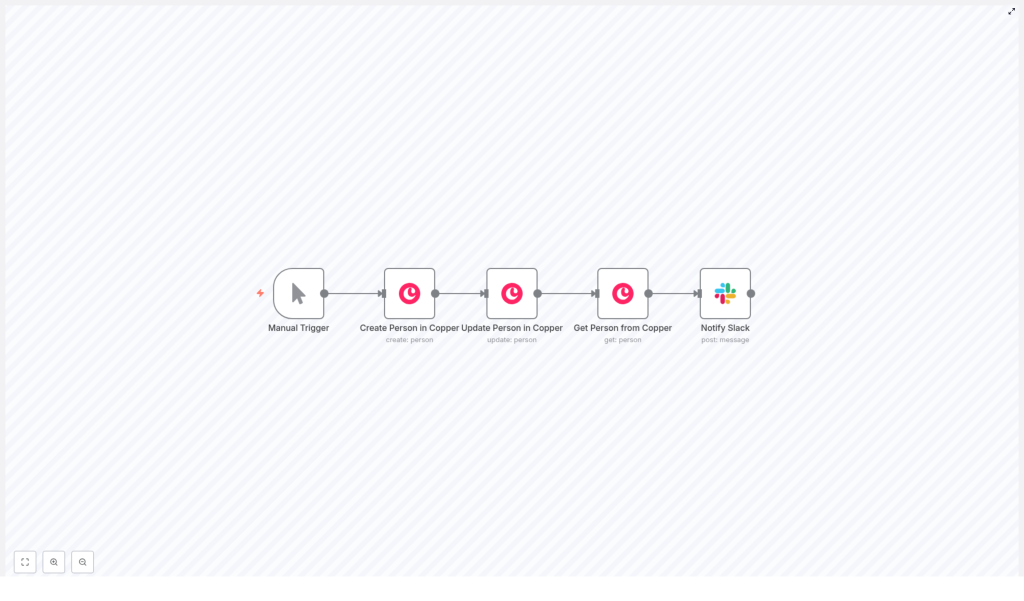
With n8n, you can turn that routine work into a simple, reliable automation that runs in the background while you focus on higher value tasks. This n8n Copper Person Sync Workflow automatically creates a person in Copper, enriches their details, verifies the final record, and then notifies your team in Slack.
Think of it as a small but powerful step on your journey toward a more automated, distraction-free workflow.
The problem: Manual person management holds you back
Manually managing people in Copper might feel manageable at first, but as your leads, customers, and team grow, it becomes a bottleneck:
- Data entry is slow and easy to get wrong.
- Important details like phone numbers or emails can be missed or mistyped.
- Your team often has to ask, “Is this record up to date?”
- Notifications rely on someone remembering to post in Slack.
Every extra click and copy-paste steals time from work that actually moves your business forward. Automation is not just about saving minutes, it is about reclaiming your attention so you can focus on strategy, relationships, and growth.
The shift: From reactive tasks to proactive automation
When you adopt an automation mindset, you start asking a different question:
“What if this task happened automatically, every time, without me?”
This is where n8n shines. It lets you design workflows that connect Copper, Slack, and your other tools so that data flows where it needs to go with minimal effort from you.
This Copper Person Sync workflow is a great starting point. It is simple enough to understand in one sitting, yet powerful enough to become the foundation for more advanced automations later. Once you see it working, you can begin to imagine and build your own variations.
The workflow: A 5-step journey from new person to team notification
The template is built around five n8n nodes that work together in a clear sequence. Each one represents a step in the journey from “new person” to “team informed and ready to act.”
- Manual Trigger – start the workflow on demand during testing or demos.
- Create Person in Copper – create a new person record with name and work email.
- Update Person in Copper – enrich that person with additional details like phone number.
- Get Person from Copper – retrieve the final record and confirm the values.
- Notify Slack – send a confirmation message to a Slack channel with the person ID.
In just a few clicks, this flow creates, updates, verifies, and broadcasts a new person record. It is a compact example of how automation can replace repetitive work with a consistent, reliable process.
Step-by-step: Configuring each node in n8n
1. Manual Trigger – start small, test confidently
Begin with the Manual Trigger node. This lets you run the workflow on demand while you are building and testing.
Later, when you are ready for production, you can swap this for a trigger that fits your use case, such as:
- A webhook that fires when a form is submitted.
- A scheduler that runs at set intervals.
- Another automation event, similar to a Zapier trigger.
Starting with a manual trigger keeps things simple so you can see exactly what happens at each step before you automate it fully.
2. Create Person in Copper – lay the foundation
Next, configure the Copper node to create a person. This is the foundation of your workflow, where a new contact is born inside Copper.
In the template, the node is pre-filled with sample data:
- Name:
Harshil - Email:
harshil@n8n.io(category: work)
Key settings to verify:
- Resource:
person - Operation:
create - Credentials: Your Copper API credentials, either API key or OAuth depending on your setup.
Once this node runs, Copper returns a new person record with a unique id. That identifier becomes the thread that connects the rest of your workflow.
3. Update Person in Copper – enrich your data
Creating a record is just the beginning. The real value comes when you enrich that record with more complete information.
In the Update Person in Copper node, you map the id from the previous step to the personId field using an expression like:
{{$json["id"]}}
This tells n8n to take the id from the output of the Create node and use it to update the same person in Copper.
In the example, the workflow adds a work phone number:
- Phone:
1234567890(category: work)
You can extend this with any other fields you need. This step ensures that every new person is not just created, but also enriched with useful contact details your team can rely on.
4. Get Person from Copper – verify and prepare for messaging
To build trust in your automation, it helps to verify that everything worked as expected. That is the role of the Get Person from Copper node.
Configure it with the Get operation and map the personId in the same way as the Update node, using the {{$json["id"]}} expression from the previous step.
This node fetches the final, updated person record from Copper. It is useful for:
- Confirming that your updates were applied correctly.
- Preparing clean data for your Slack notification.
- Debugging and understanding the exact payload Copper returns.
5. Notify Slack – keep your team in the loop
Automation is not only about the data, it is also about communication. The final step is to let your team know that a person has been processed and is ready in Copper.
In the Slack node, use the following example configuration:
- Resource:
message - Operation:
post - Channel:
#general - Text:
Person processed in Copper: {{$json["id"]}}
You can easily expand this message to include the person’s name, email, phone number, or even a direct link to the Copper record. That way, your sales, support, or marketing teams can act instantly, without hunting for information.
Best practices to keep your Copper automation clean and reliable
Once your first version is running, you can start refining it so it scales with your business. Here are some practical best practices to apply as you grow.
Deduplicate before you create
Duplicate records can quickly clutter your CRM and confuse your team. Before you create a new person, add a step that checks whether they already exist.
You can do this by:
- Using a Find Person node in n8n.
- Calling Copper’s search API to look up existing records by email or other identifiers.
If a match is found, you can branch the workflow to update the existing person instead of creating a new one. This simple habit keeps your Copper instance clean and more trustworthy.
Error handling and retries
Even the best APIs occasionally fail. It is important to design your workflow to handle errors gracefully.
- Enable error workflows in n8n so failed executions are captured.
- Use the Execute Workflow node to implement retry logic for transient errors.
- Send alerts via email or Slack when an operation fails, so you can investigate quickly.
With good error handling, you can rely on your automations even as they become more central to your operations.
Respect rate limits and use batching
When you start processing many people at once, Copper’s API rate limits become important.
- For bulk imports, add short delays between requests to avoid throttling.
- Use batch processing patterns in n8n to process groups of records efficiently.
This approach keeps your syncs stable and prevents interruptions during high volume operations.
Secure your credentials
Security should grow alongside your automation stack.
- Store Copper and Slack credentials in n8n’s built-in credentials manager.
- Avoid hard coding API keys or tokens directly in nodes or public templates.
- Limit access to n8n and Copper based on team roles and responsibilities.
This way, you gain the benefits of automation without compromising data security.
Use environment variables for flexible setups
As your automation moves from development to staging to production, environment-specific details can change.
- Store channel names, default email domains, or phone formats in n8n environment variables.
- Reference those variables in your nodes so you can reuse the same workflow across environments.
This small optimization makes your workflows more portable, maintainable, and easier to scale.
Extending the workflow: Turn a starter template into your own system
Once your core Copper Person Sync is running, you can treat it as a building block. Here are some practical ways to extend and customize it.
- Add a Find Person step before creation to check for existing records and branch based on whether a match is found.
- Use a Transform or Set node to standardize phone number formats, name casing, or to parse complex incoming payloads before they reach Copper.
- Log errors centrally in Google Sheets, Airtable, or a database so you have an audit trail for debugging and compliance.
- Enhance Slack messages with richer content or interactive elements such as buttons like “Open in Copper” or “View details.”
Each improvement brings you closer to a tailored automation system that reflects how your team actually works.
Troubleshooting: Simple checks when something feels off
As you experiment and extend the workflow, you may run into occasional issues. Here are some quick checks that often resolve them.
- If a node fails with authentication errors, double check your Copper API credential type and regenerate keys if needed.
- When using expressions such as
{{$json["id"]}}, confirm that the previous node actually outputs anidfield. You can see this in the node output panel in n8n. - If payloads are not in the format you expect, insert a Set node to normalize or reshape fields before they are sent to Copper.
These small debugging habits make you more confident and faster at building new automations.
Real-world use cases: Where this template fits into your day
This Copper person sync workflow can support many different teams and processes. Here are a few ways to put it to work immediately:
- Sales: Automatically add leads from a web form into Copper and notify your sales Slack channel so reps can follow up fast.
- Customer success: Enrich newly created contacts with profile data from other systems and keep your team aligned on the latest customer information.
- Marketing: Batch create people from event signups, then send a Slack alert to the campaign owner when the import is complete.
Each use case starts with the same core pattern, then grows into something tailored to your business.
Security and compliance: Automate with responsibility
As you automate more of your CRM processes, it is important to stay mindful of privacy and compliance.
- Sync only the data you genuinely need, especially when it involves personally identifiable information (PII).
- Ensure access controls are properly set up in n8n and Slack so only the right people can see sensitive data.
- If your organization is subject to GDPR or similar regulations, record consent where needed and design workflows that can support data deletion or export on request.
Thoughtful automation can actually strengthen your compliance posture by making processes more consistent and auditable.
Your next step in the automation journey
The n8n Copper Person Sync Workflow is more than just a five node example. It is a practical starting point for transforming how you handle CRM data, communicate with your team, and protect your time.
With this template, you can:
- Eliminate repetitive manual CRM tasks.
- Keep your Copper data current and enriched.
- Give your team instant visibility through Slack notifications.
From here, you can iterate. Add deduplication, validation, richer notifications, and new integrations as your needs evolve.
Action plan: Put the template to work
To start using this workflow in your own n8n instance:
- Import the provided workflow JSON into n8n.
- Connect your Copper and Slack credentials using the credentials manager.
- Run the workflow with the Manual Trigger to see each step in action.
- Add a Find Person node for deduplication so you avoid creating duplicates.
- When you are ready for production, replace the Manual Trigger with a webhook or another trigger that fits your process.
If you need help adapting the template to your exact use case, reach out to your team, collaborators, or automation experts who can help you tailor the workflow around your unique processes.
Want to keep growing your automation skills? Subscribe for more n8n automation tutorials and Copper CRM tips so you can continue building workflows that save time and support your personal and business growth.
