


Build a Reddit Upvote Alert with n8n and Weaviate
Picture this: you post something brilliant on Reddit, go make coffee, and by the time you are back, it is quietly blowing up. But instead of celebrating, you are refreshing the page like it is 2012, trying to see if the upvotes are “real” or just your mom and a bot.
Good news. You do not have to babysit Reddit anymore.
This guide shows you how to use an n8n workflow template to automatically:
- Catch Reddit upvote events the moment posts start gaining momentum
- Enrich the content with embeddings and store it in Weaviate for smart, semantic search
- Run a RAG agent to summarize what is happening and why it matters
- Log everything neatly in Google Sheets and ping your team in Slack when things go wrong
In other words, you get a Reddit early-warning system that does the boring parts for you, while you pretend it is all “strategic monitoring.”
What this n8n Reddit Upvote Alert workflow actually does
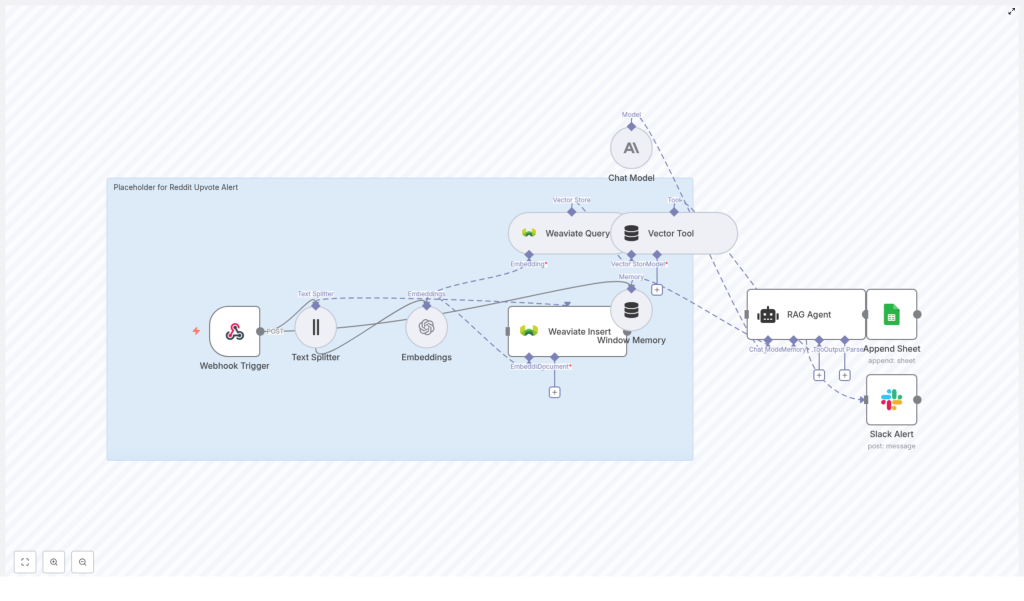
This workflow template, called “Reddit Upvote Alert”, is a production-ready automation that connects Reddit events to a full semantic pipeline. At a high level, it:
- Listens for Reddit upvote events through a Webhook Trigger
- Splits long post content into chunks that are friendly for embeddings
- Generates embeddings with the
text-embedding-3-smallmodel - Stores vectors in Weaviate using a dedicated index
- Uses a RAG agent with a vector tool and memory to create intelligent summaries
- Logs everything in Google Sheets for tracking and analysis
- Sends Slack alerts if something breaks or special conditions occur
So instead of manually checking “Did that post get more upvotes yet?” every 10 minutes, you get structured alerts, searchable context, and a clear history of what happened.
How the architecture fits together
Here is how the pieces plug into each other inside n8n:
- Webhook Trigger – Receives a POST request whenever your upstream system detects a Reddit post crossing a certain upvote threshold.
- Text Splitter – Breaks long Reddit text into smaller character-based chunks so your embeddings stay efficient and meaningful.
- Embeddings node – Uses
text-embedding-3-smallto convert each chunk into a vector. - Weaviate Insert / Query – Writes those vectors into a Weaviate index and later queries them for semantic context.
- Window Memory – Gives your RAG agent short-term memory so it can keep track of the conversation context.
- Vector Tool + RAG Agent – Lets the agent pull relevant context from Weaviate and craft a smart, concise alert with a chat model.
- Append Sheet – Logs the final result in a Google Sheets tab called
Log. - Slack Alert – Sends a message to a Slack channel if errors occur or special conditions are met.
Think of it as a tiny, polite robot that watches Reddit for you, remembers what happened, and leaves a paper trail in Sheets.
Step-by-step: setting up the Reddit Upvote Alert template in n8n
Now let us turn this from “cool idea” into a working workflow. Follow these steps inside your n8n instance.
1. Create the Webhook endpoint
Start with the Webhook Trigger node:
- Method:
POST - Path:
reddit-upvote-alert
Configure Reddit or your middleware so that whenever a monitored post crosses your chosen upvote threshold, it sends a JSON payload to this webhook URL.
This is the entry point for the whole automation, so once this is live, Reddit events will start flowing into your workflow.
2. Split long Reddit text into chunks
Next, add a Text Splitter node and set it to use a character-based splitter. In the template, the recommended values are:
chunkSize = 400chunkOverlap = 40
This keeps your chunks short enough for embedding and context retrieval, while a bit of overlap helps preserve coherence so your searches still make sense.
3. Generate embeddings for each chunk
Send the output of the Text Splitter into an Embeddings node and configure it to use the text-embedding-3-small model.
Each chunk of text turns into a vector representation. These vectors are what Weaviate uses later to find semantically similar content, not just exact keyword matches.
4. Store embeddings in Weaviate
Add a Weaviate Insert node and connect your embeddings to it. Use:
- Index name:
reddit_upvote_alert
Store useful metadata along with each vector, such as:
- Post ID
- Subreddit
- Timestamp
- Score or upvote count
The template also includes a Weaviate Query step that the agent uses later to retrieve relevant context during execution.
5. Configure memory and the vector tool
To help your agent sound like it knows what is going on, add:
- Window Memory – This acts as a short-term memory buffer so the agent can keep track of previous messages and context.
- Vector Tool – Point this tool at your Weaviate query node so the agent can ask for relevant chunks of content when needed.
With these two pieces, your agent can both remember the conversation and pull in extra information from Weaviate when crafting alerts.
6. Set up the RAG Agent
Now for the brains of the operation. Add a RAG Agent node and configure it with your preferred chat model. In the template, an Anthropic chat model is used.
Provide a system message so the agent knows its job. For example:
“You are an assistant for Reddit Upvote Alert.”
The agent receives:
- Retrieved context from Weaviate via the vector tool
- Short-term memory from the Window Memory node
- Your instructions in the system prompt
From that, it generates a concise summary or alert about the Reddit event, including what happened and why it matters.
7. Log results in Google Sheets
Connect the output of the RAG Agent to an Append Sheet node. Use a Google Sheet with a tab named Log and map columns such as:
- Status
- Post ID
- Summary
- Upvotes
- Subreddit
- Timestamp
This gives you a running history of all alerts and agent outputs for future analysis, audits, or “look what Reddit did last week” presentations.
8. Add error handling and Slack notifications
Finally, connect the onError output of the RAG Agent (or other key nodes) to a Slack Alert node.
Configure the Slack node to post to a channel such as #alerts with a helpful message, for example:
Reddit Upvote Alert error: {$json.error.message}
That way, when something breaks, you hear about it in Slack instead of discovering it three days later while wondering why your sheet is suspiciously quiet.
What you need before you start
Before importing and running the template, make sure you have these credentials and services ready:
- n8n instance (cloud or self-hosted)
- OpenAI API key (or another embeddings provider) referenced in n8n as
OPENAI_API - Weaviate instance (managed or self-hosted)
- Anthropic API key (or another chat model provider) used for the Chat Model node
- Google Sheets OAuth2 credentials
- Slack bot token for sending notifications
Once these are configured in n8n, you can plug them into the nodes in the template without changing the logic.
Recommended configuration and tuning tips
Chunk size and overlap strategy
The default Text Splitter settings in the template are:
chunkSize = 400chunkOverlap = 40
This is a solid starting point, balancing embedding cost with context quality. You can:
- Increase
chunkSizefor shorter posts if you want fewer, larger chunks - Decrease
chunkSizefor very long threads to keep each chunk manageable
Choosing an embedding model
The workflow uses text-embedding-3-small by default, which is a good cost-quality tradeoff for production.
If your use case needs extremely precise retrieval and you have the budget, you can switch to a higher quality model. Otherwise, this model is usually enough to catch trends and find relevant content.
Weaviate indexing best practices
When inserting vectors into Weaviate, always include helpful metadata. For example:
- Post ID
- Subreddit
- Author (if appropriate)
- Timestamp
- Upvote count
Use the index name reddit_upvote_alert so your data stays scoped to this workflow. This makes it easier to filter queries by subreddit, time range, or other attributes later.
Designing the RAG Agent system message
A concise, clear system prompt makes your agent far more useful. For example:
“You are an assistant for Reddit Upvote Alert. Use retrieved context to summarize the event into a two-sentence alert with upvote count and suggested actions.”
You can tweak the length, tone, or level of detail, but keep it explicit about what the agent should output.
Security, privacy, and moderation reminders
Automation is fun until someone leaks an API key in a screenshot. A few things to keep in mind:
- Keep API keys out of logs, screenshots, and public workflows.
- Follow Reddit’s API and user privacy policies. Do not store sensitive user data unless you have proper consent.
- If your upstream can generate a lot of events, add rate limiting on the webhook endpoint to avoid overloads.
If you plan to store user-generated content for the long term, double check privacy rules and platform terms to stay compliant.
Troubleshooting your Reddit Upvote Alert workflow
Common issues and how to fix them
- Authentication failures
Check that your credentials in n8n are set and named correctly. For example:OPENAI_API,WEAVIATE_API,ANTHROPIC_API,SHEETS_API,SLACK_API. - Weaviate insert errors
Confirm that the schema exists in Weaviate and that the index name matches exactly:reddit_upvote_alert. - Timeouts with large payloads
Make sure the Text Splitter runs early in the flow to reduce request sizes, and consider increasing node timeouts if your content is very long.
Monitoring and logging
Use n8n execution logs to inspect failed runs and see where things went sideways.
Between:
- Slack error notifications from your Slack Alert node
- Google Sheets rows appended by the Append Sheet node
you get both real-time alerts and an audit trail of what the agent produced for each event.
Use cases and easy extensions
Once the core template is running, you can extend it in all sorts of ways. For example:
- Notify community managers when posts start trending so they can respond, moderate, or engage quickly.
- Aggregate trends by subreddit or topic using vector queries and scheduled batch jobs for analytics.
- Upgrade the RAG Agent to suggest follow-up actions, such as promoting a popular post on other social channels.
All of that starts from the same base workflow that listens to upvotes and enriches the content with embeddings and Weaviate.
Get started with the Reddit Upvote Alert template
If you are tired of manually hunting for trending posts or copy-pasting links into spreadsheets, this workflow is your ticket out of repetitive-task purgatory.
The n8n + Weaviate Reddit Upvote Alert template gives you a scalable, semantic way to track Reddit activity, summarize what is happening, and keep a clean log of it all.
To start using it:
- Import the “Reddit Upvote Alert” template into your n8n instance.
- Plug in your credentials for OpenAI, Weaviate, Anthropic (or other chat model), Google Sheets, and Slack.
- Set up your Webhook Trigger endpoint and connect your Reddit or middleware system to POST events to it.
- Turn the workflow on and watch your alerts appear in Sheets and Slack.
If you want to refine the RAG prompt, adjust the Weaviate schema, or tune chunk sizes, you can customize the template without changing its overall structure.
Note: When storing user-generated content, always make sure you comply with privacy regulations and platform terms of service.
