


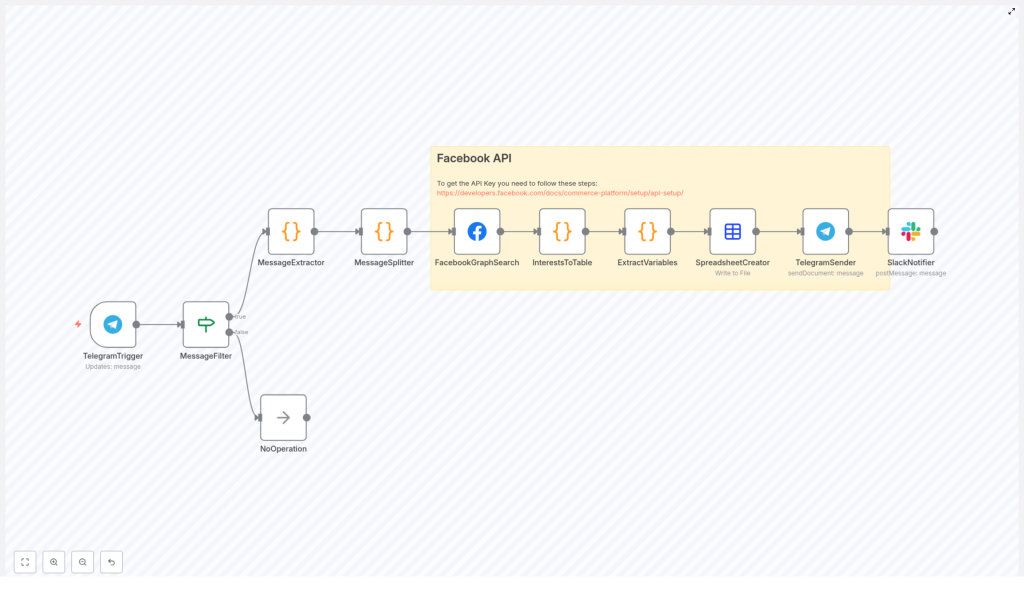
Interest Lookup Workflow with n8n & Facebook API
Imagine turning a simple chat message into a complete, ready-to-use audience research report. No more clicking through interfaces, copying results, or repeating the same search over and over. With a single hashtag in Telegram, you can launch a fully automated n8n workflow that talks to the Facebook Graph API, compiles ad interests into a clean CSV, and shares the report with your team in Telegram and Slack.
This guide walks you through that transformation step by step. You will see how a small automation can remove friction from your day, free up your focus, and become a powerful building block for a more automated, scalable marketing workflow.
From manual searching to focused, automated research
Marketers, founders, and growth teams know the feeling: you need Facebook ad interests that match a new campaign idea, and you need them fast. You open Facebook Ads Manager or the Graph API explorer, type in a few keywords, export, clean, repeat. It is slow, repetitive, and easy to make mistakes.
Now imagine a different approach. You type a quick message in a Telegram channel, something like #interest coffee. A few moments later, a CSV appears in the same channel, and your team gets a Slack notification that the report is ready. No extra tabs, no manual exports, no lost time.
That is the shift this n8n interest lookup workflow is designed to create. It replaces manual lookup with a simple, reliable trigger and a repeatable pipeline. Once it is running, you can focus on strategy, creative, and experimentation instead of mechanics.
Adopting an automation mindset
This workflow is more than a one-off tool. It is a mindset change. Each time you find yourself repeating the same steps to research audiences, you have an opportunity to automate and reclaim that time.
By building this interest lookup workflow in n8n, you are:
- Turning Telegram into a powerful command center for research
- Standardizing how interests are searched, structured, and shared
- Creating a reusable pattern that you can extend to other APIs and channels
Think of it as your first step toward a more automated marketing stack. Once you see how easily a chat message can trigger a complex sequence, it becomes natural to ask: what else can I automate?
What this n8n template helps you achieve
At its core, this workflow listens for a specific hashtag in a Telegram channel, uses that message as a search query for the Facebook Graph API, converts the response into a CSV, and distributes the result back to your team.
Key capabilities you gain
- Trigger Facebook ad interest lookups directly from Telegram using a hashtag like
#interest - Filter messages so the automation only runs in a specific Telegram channel
- Extract and parse the hashtag and the search phrase from the message
- Call the Facebook Graph API to search for ad interests
- Flatten and normalize the API response into a structured CSV file
- Send the CSV back to Telegram and notify a Slack channel when the report is ready
All of this runs automatically once configured. Your role becomes sending clear queries and using the results, not wrestling with interfaces.
The journey of a single hashtag: workflow overview
To understand the power of this template, follow the path of a single message, for example: #interest coffee lovers.
- You post the message in your chosen Telegram channel.
- n8n listens to new messages via a Telegram Trigger node.
- An IF node checks that the message is in the right channel and starts with
#interest. - Code nodes safely extract and split the message into hashtag and search phrase.
- The Facebook Graph API node searches for ad interests based on your phrase.
- Another code node flattens the nested JSON response into table-like rows.
- A final code node extracts the important fields for each interest.
- The Spreadsheet node converts the data into a CSV file.
- Telegram receives the CSV as a document in the original channel.
- Slack gets a notification that the report has been delivered.
From your perspective, it feels almost magical: one hashtag, one message, one report. Under the hood, n8n is quietly orchestrating every step.
Node-by-node: building the workflow in n8n
Let us break down the workflow so you can confidently adapt and extend it. You will see that each node has a clear purpose, and together they form a powerful, linear pipeline.
1. TelegramTrigger – listening for opportunities
Start with the Telegram Trigger node. This is how n8n listens for new messages in your Telegram channel.
Configuration steps:
- Connect your Telegram bot using its API token.
- Set a webhook ID so Telegram can push updates to n8n.
The node receives the full Telegram message object, including:
chat.idfor the channel or conversationmessage.textfor the message content- Additional metadata that you can use later if needed
This is your entry point. Every new message is a potential trigger for automation.
2. MessageFilter (IF) – focusing on the right messages
Next, use an IF node, often named MessageFilter, to make sure the workflow only runs when it should. This keeps your automation focused and prevents accidental triggers.
Configure two conditions:
- Chat ID check: the
chat.idmust equal your target channel, for example-1001805495093. - Hashtag check: the message text must start with
#interest.
If both conditions are true, the workflow continues. If not, the flow can end in a simple NoOperation node. This small guardrail makes the automation predictable and safe.
3. MessageExtractor (Code) – safely reading the text
To work with the message content, add a Code node called MessageExtractor. Its job is to safely pull out the text from the incoming JSON, even if the structure changes slightly.
let inputData = items[0].json;
let messageContent = '';
if (inputData.message && inputData.message.text) {  messageContent = inputData.message.text;
}
return [{ json: { messageContent } }];
The output is a clean messageContent field that you can reuse in the next nodes. This step keeps your workflow resilient and easier to debug.
4. MessageSplitter (Code) – turning a message into a query
Now you need to separate the hashtag from the actual search phrase. A second Code node, often named MessageSplitter, uses a regular expression to do exactly that.
The regex used is:
/#(\w+)\b(.*)/This pattern:
- Captures the tag word, for example
interest - Captures everything after the hashtag as the search phrase
The node outputs two fields:
extractedContent– the hashtag keywordremainingContent– the phrase you want to send to Facebook as the query
At this point, your human-friendly message is transformed into a machine-friendly search term.
5. FacebookGraphSearch – tapping into Facebook ad interests
Now comes the core of the workflow: querying the Facebook Graph API for ad interests that match your search phrase.
Add the Facebook Graph API node, often named FacebookGraphSearch, and configure it to call the ad interest search endpoint:
search?type=adinterest&q={{ $json.remainingContent }}&limit=1000000&locale=en_USImportant details:
- You must connect a valid Facebook Graph API credential with the required permissions for ad interest search.
- The
qparameter is dynamically filled from$json.remainingContent, which comes from your Telegram message. limitandlocalecan be adjusted based on your needs and API constraints.
With this node in place, every Telegram query becomes a structured ad interest search against Facebook.
6. InterestsToTable (Code) – flattening nested JSON
Facebook returns a nested JSON structure, which is powerful but not very CSV friendly. To make it easier to work with, add a Code node named InterestsToTable.
This node iterates over the response and flattens keys and subkeys into an array of row-like objects, often shaped as:
ItemSubItemValue
By converting nested structures into a simple table format, you gain a lot of flexibility. It becomes straightforward to select and normalize only the fields that matter most to your targeting decisions.
7. ExtractVariables (Code) – focusing on meaningful fields
Next, add a Code node called ExtractVariables. This node takes the flattened rows and produces a clean, consistent object for each interest.
Typical fields you will want to output are:
nameaudience_size_lower_boundaudience_size_upper_boundpathdescriptiontopic
The result is an array of well-structured interest objects that are ready to be exported or analyzed. This is where your raw API data becomes a usable report.
8. SpreadsheetCreator – turning data into a CSV report
To share your results easily with your team, use the Spreadsheet node, often called SpreadsheetCreator.
Configuration tips:
- Set the node to convert the array of interest objects to a CSV format.
- Choose a filename such as
report.csv. - Ensure the node outputs a binary file that can be attached in messaging apps.
This step turns your automation into something tangible: a report that anyone can open, filter, and use, regardless of their technical background.
9. TelegramSender – delivering results where work happens
Now that your CSV exists, it is time to send it back to the channel that requested it. Add a Telegram node, often named TelegramSender.
Configure it to:
- Use the
sendDocumentoperation - Set
chatIdto your target channel ID - Attach the CSV file from the previous node
- Optionally include a friendly caption, for example: “Here is your interest report for ‘coffee lovers’.”
The people who requested the data get it exactly where they started: in the same Telegram thread, without leaving their flow.
10. SlackNotifier – keeping the wider team in sync
Finally, add a Slack node, often named SlackNotifier, to post a short confirmation message in a Slack channel of your choice.
This is optional, but powerful for visibility. You can send a simple notification like:
New Facebook interest report delivered to Telegram for query: "coffee lovers".
Now your team does not need to constantly check Telegram. They can see at a glance when new research is ready.
Setup and permissions: preparing your tools
Before you run the workflow, make sure all your services are connected and authorized. Investing a few minutes here saves countless hours later.
- Telegram: Add your Telegram bot to the target channel and grant it permission to read messages and send documents.
- Facebook Graph API: Ensure your Facebook app has access to the Marketing API or the adinterest search endpoint. Follow Facebook documentation on developers.facebook.com to create an app, request access, and generate tokens.
- Slack: Use a Slack token or app with permission to post messages to the selected channel.
Once these connections are in place, the workflow can run end to end with a single message.
Testing, learning, and improving your workflow
Automation is not just about getting it right once. It is about iterating and making the workflow more robust and useful over time. Here are some practical ways to test and refine.
- Validate your filters: Send different messages in your Telegram channel and confirm that the IF node only passes through messages that match your hashtag and channel ID.
- Inspect API responses: Use temporary debug nodes or log statements in your Code nodes to examine the Facebook response before flattening. This helps you adapt to any changes in the API structure.
- Start small with limits: Use a smaller
limitin the Graph API call during development to avoid long responses and to speed up testing. - Handle rate limits: If you plan to run frequent or bulk lookups, monitor API quotas and consider adding retries or short pauses to stay within limits.
Each test run is a chance to learn, refine, and build your confidence with n8n.
Security and best practices for sustainable automation
As your automation footprint grows, security and reliability become even more important. Integrating a few best practices early keeps your workflow safe and maintainable.
- Use n8n credentials: Store API keys and tokens in n8n credentials, not directly in Code nodes or environment variables that are easy to expose.
- Sanitize inputs: Treat Telegram input as untrusted. Clean or validate it before using it in queries to reduce the risk of injection-like issues.
- Respect privacy and policies: Follow Facebook terms, avoid storing sensitive personal data, and respect advertising and privacy rules.
- Separate environments: Use different tokens for development, staging, and production, and rotate them periodically.
These habits help you scale your automation safely as more workflows and teams depend on it.
Ideas to optimize and extend your interest lookup template
Once the basic workflow is live, you have a strong foundation. From here, you can experiment and adapt it to your unique processes.
- Cache common searches: Store frequent queries and results in a database so repeated requests can be served instantly without new API calls.
- Use multiple hashtags: Support additional tags like
#audienceand map them to different locales, limits, or search strategies. - Send summaries: Before attaching the full CSV, post a short summary message with the top 3 to 5 interests and their audience sizes.
- Sync to analytics tools: Automatically push results to Google Sheets, a data warehouse, or your BI tool for long term analysis.
Each enhancement turns this template into a more powerful part of your marketing and automation ecosystem.
Troubleshooting common issues along the way
As with any integration, you might encounter a few bumps. Here is how to quickly diagnose and correct the most common ones.
- Empty Facebook results: Check the
qparameter and confirm that your app has the correct permissions for ad interest search. Sometimes a small change in query wording can make a difference. - Missing fields in the CSV: Inspect the flattening logic in InterestsToTable and ExtractVariables. Facebook may adjust response keys between API versions, so you might need to update your mapping.
- Telegram upload failures: Verify that the bot is in the correct channel, has
