


Convert Email to Webpage & Telegram Alert
Ever tried to show someone an email and ended up forwarding, screenshotting, redacting, and then regretting your life choices? This n8n workflow exists so you never have to do that again.
With this automation, every new email can magically turn into a short-lived HTML webpage, get a neat Telegram notification with a preview link, then quietly self-destruct after a while. No messy inbox forwarding, no permanent storage, and no “who has access to this again?” confusion.
What this n8n template actually does
This workflow listens to your inbox, grabs new emails, converts the HTML body into a private GitHub Gist, and sends a Telegram message with a handy preview button. After a delay that you define, it cleans up both the Gist and the Telegram message.
In practice, that means you can:
- Open an email in your browser without needing to forward it or store it on your server long term
- Share invoice previews or sensitive content with teammates in a controlled, temporary way
- Surface important emails directly into a Telegram channel or chat for quick visibility
Everything is short-lived, controlled, and automated, so you can spend less time copy-pasting and more time doing things that are not copy-pasting.
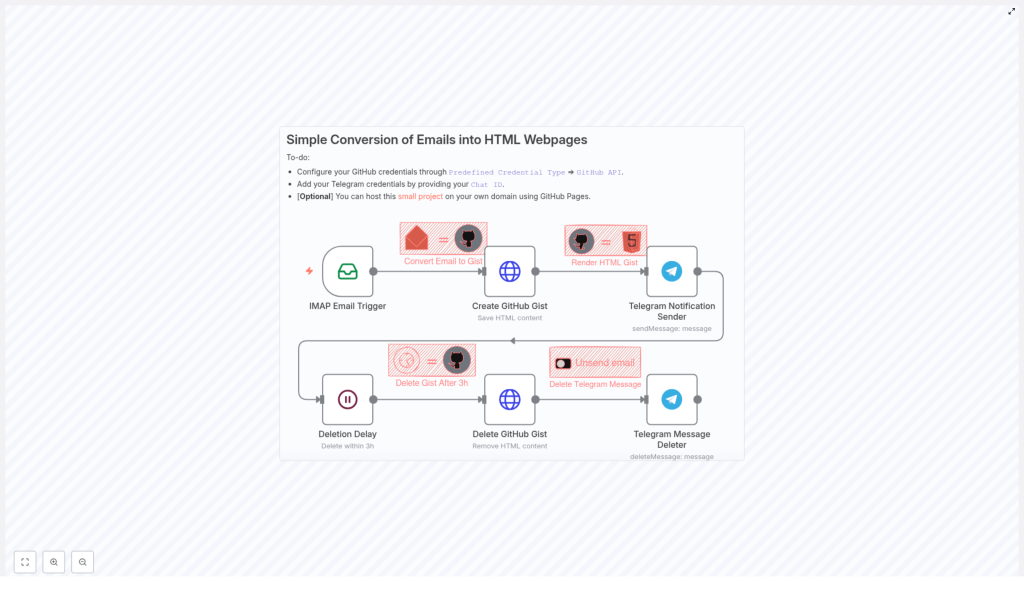
How the workflow flows (high-level overview)
Here is the bird’s-eye view of the automation:
- IMAP Email Trigger – Watches your mailbox for new, unread emails.
- Create GitHub Gist – Saves the email’s HTML content as a private Gist named
email.html. - Telegram Notification Sender – Sends a Telegram message with a button that opens the rendered Gist page.
- Deletion Delay – Waits for a set period (for example, 3 hours) so the link is temporary.
- Delete GitHub Gist & Telegram Message – Deletes both the Gist and the Telegram message once the delay is over.
So from “new email arrives” to “everything is cleaned up,” the entire lifecycle is automated.
Step-by-step setup in n8n
Let’s walk through how to configure each node so you can get from “inbox chaos” to “clickable previews” in a few minutes.
1. IMAP Email Trigger – listen for new emails
Start with the IMAP Email Trigger node. This is the part that keeps an eye on your inbox so you do not have to hit refresh every 3 seconds.
- Set the mailbox to monitor, for example
INBOX. - Use the options to fetch only
UNSEENmessages so you do not process the same email twice.
The node outputs the email in a resolved format, including fields like:
html– the email HTML bodyfrom– sender detailsto– recipient details
These fields will be referenced by the later nodes, so make sure the trigger is working correctly before moving on.
2. Create GitHub Gist (HTTP Request) – turn email into a webpage
Next, add an HTTP Request node to create a private Gist via the GitHub API. This is where your email body becomes a temporary HTML page.
Configure it to:
- Use your predefined GitHub API credentials in n8n for authentication
- Send a
POSTrequest to the Gist API endpoint - Provide a JSON body that includes the HTML content as
email.html
Example request body (works nicely with n8n expressions):
{  "description": "{{ $json.date }} - from {{ JSON.stringify($json.from.value[0].address).slice(1, -1) }}",  "public": false,  "files": {  "email.html": {  "content": "{{ JSON.stringify($json.html).slice(1, -1) }}"  }  }
}
Make sure you add the right header:
Accept: application/vnd.github+json
The Gist is created privately (public: false), so it will not show up in your public profile. You will share a link to a rendering endpoint or a GitHub Pages proxy that displays the HTML in a more user-friendly way.
3. Telegram Notification Sender – ping yourself (or your team)
Now that your email lives in a Gist, it is time to notify the right people via Telegram.
Use the Telegram node to send a message to a chat or channel, and:
- Enable HTML parse mode so your message formatting looks nice
- Include an inline keyboard with a button that links to the public rendering of the Gist
Example message template:
📧 <b>You've got mail!</b>

A new email arrived from: <code>{{ $node["IMAP Email Trigger"].json.from.value[0].address }}</code>

🔗 Preview: [Open email](<gist-render-url>)
If you do not want Telegram to show a big link preview, set disable_web_page_preview to true.
For security and sanity, use environment variables for your chat ID, for example:
$env.TELEGRAM_CHAT_IDinstead of hard-coding IDs directly in the node
The node will also return a message_id, which you will need later when you clean up the Telegram message.
4. Deletion Delay – let the link live a little
To keep things ephemeral, insert a Wait (or similar delay) node after sending the Telegram message.
- Set the delay to your preferred lifetime, for example 3 hours.
During this time, the Gist and the Telegram message remain available. Once the timer is up, the workflow continues and starts the cleanup phase.
5. Delete GitHub Gist & Telegram Message – cleanup crew
After the delay, it is time to remove all traces of the temporary preview.
- Delete the GitHub Gist
Use another HTTP Request node to send aDELETErequest to:https://api.github.com/gists/{{id}}Make sure you pass the correct Gist ID from the earlier Gist creation step.
- Delete the Telegram message
Use the Telegram node with thedeleteMessageoperation, providing:- The chat ID (for example from
$env.TELEGRAM_CHAT_ID) - The saved
message_idfrom when the message was first sent
The notification disappears from the chat once this runs.
- The chat ID (for example from
Result: no leftover links, no permanent message history, just a clean audit trail if you decide to log events elsewhere.
Where the HTML gets hosted
By default, the Gist HTML can be accessed via direct Gist URLs, but the template example uses a simple renderer that turns the Gist into a friendlier webpage.
The renderer (from the original repo) lets you use a URL like:
http://your-domain/?iloven8n=project&id={{gist_id}}By hosting a lightweight renderer, you can:
- Control the styling and layout of the preview
- Add authentication if you want stricter access
- Limit who can view it based on IP, token, or any other rule you like
This gives you a lot more flexibility than just linking to raw Gist content.
Security & privacy considerations
Even though the content is temporary, it is still email, so treat it carefully.
- Store your GitHub API credentials and Telegram bot token safely using n8n credentials or environment variables, not hard-coded strings.
- Keep gists private (
public: false) and use short expiration windows, for example 1 to 6 hours. - If you need stronger access control, host an authenticated renderer on your own domain instead of sending users directly to raw Gist URLs.
- Watch out for attachments and remote images in email HTML, since they might trigger external resource calls. Consider sanitizing or inlining resources where possible.
With a bit of care, you get the convenience of previews without turning your email into a public art installation.
Troubleshooting & handy tips
If something does not work on the first try, here are the usual suspects:
- Gist not created? Check that your GitHub token has the
gistsscope enabled. - No emails are triggering? Confirm your IMAP credentials, mailbox name (case can matter), and that you are filtering by
UNSEENcorrectly. - Telegram message will not delete? The message must have been posted by your bot, and the bot needs permission to delete messages in that chat or channel.
- High email volume? Use n8n features like splitInBatches or rate limiting so your workflow and APIs do not get overwhelmed.
Ideas for leveling up this workflow
Once you have the basic “email to temporary webpage” workflow running, you can start adding extras.
- Sanitize or strip tracking pixels and external requests from the email HTML for better privacy.
- Extract attachments and upload them to a secure file store instead of embedding them in the HTML.
- Adjust retention dynamically based on email priority, for example instant deletion for low-priority messages, longer retention for important ones.
- Log deletion events to a secure audit store to help with compliance or internal reviews.
Think of this template as a base layer you can customize to match your team’s security and workflow needs.
Putting it all together
This n8n template gives you a compact, practical way to:
- Convert incoming emails into short-lived web previews
- Notify teams or channels via Telegram with direct preview links
- Automatically clean up both the content and the notifications after a set time
Perfect when you want quick collaboration without long-term storage or inbox clutter.
To get started:
- Import the workflow into your n8n instance.
- Configure your GitHub and Telegram credentials.
- Set up the IMAP Email Trigger with your email account.
- Run a test email and click your shiny new preview link.
If this workflow saves you from even one more “can you forward me that email?” thread, it is already doing its job.
Feel free to star the project repository, share your improvements, or reach out if you need help tailoring the automation to your own use case.
Ready to deploy? Import the template, wire up your credentials, send a test message, and enjoy watching repetitive email tasks quietly disappear into the automation void.
