


Build a CI/CD Pipeline Auditor with n8n & AI
Learn how to build an automated CI/CD pipeline auditor using n8n, OpenAI, and email notifications. This step-by-step guide explains the concepts, walks through the workflow node by node, and shows you how to customize and secure the setup.
What you will learn
By the end of this tutorial, you will know how to:
- Set up an n8n workflow that accepts CI/CD pipeline configuration files through a form
- Use OpenAI to generate structured, audit-style documentation for a pipeline
- Send the audit results via email and return a formatted HTML report
- Customize prompts, templates, and notifications for your team
- Apply basic security and compliance practices when using AI with pipeline files
This guide is ideal if you want to automate pipeline documentation, streamline audits, and reduce manual review work in your DevOps process.
Why automate CI/CD pipeline audits?
Engineering teams often struggle to keep CI/CD pipelines well documented and auditable. Manual reviews are slow, inconsistent, and easy to deprioritize when delivery pressure is high. At the same time, missing or outdated documentation:
- Slows down onboarding for new engineers
- Increases operational risk when pipelines change
- Makes audits and compliance checks harder
Using n8n and an AI model like OpenAI, you can automatically:
- Ingest a pipeline configuration file (for example GitHub Actions, GitLab CI, Jenkinsfile, or Azure Pipelines)
- Generate a concise, structured audit report
- Send the report to the right stakeholders via email
- Return an HTML report that can be viewed directly in a browser
How the n8n CI/CD Pipeline Auditor works
At a high level, the workflow does the following:
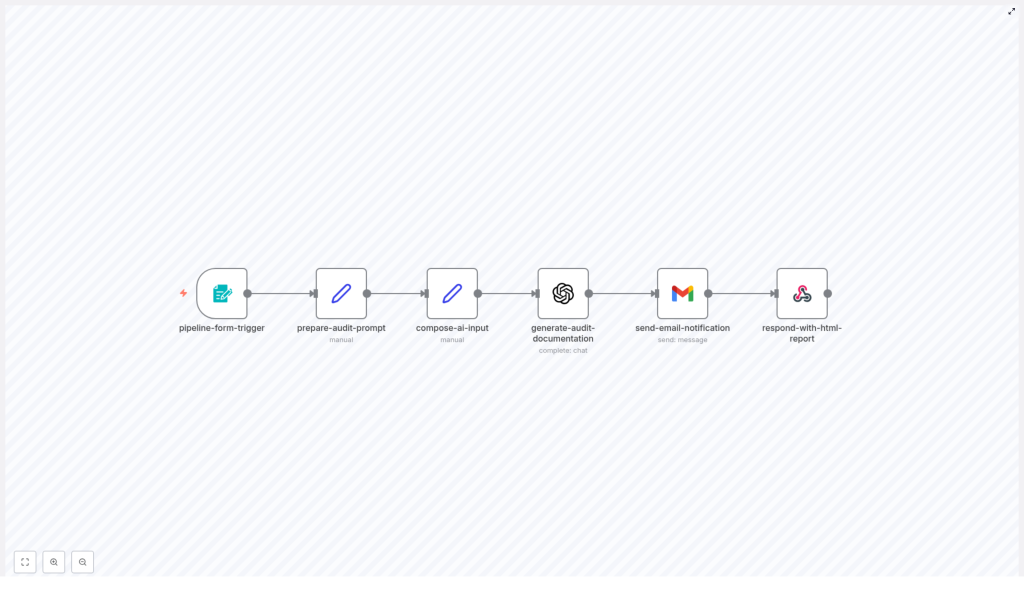
- Collects pipeline details from a webhook-based form
- Builds a clear, structured prompt for the AI model
- Combines the user inputs and the pipeline file into a single AI request
- Uses OpenAI to generate audit documentation
- Sends the results by email
- Returns a polished HTML report in the webhook response
Expected outputs from each run
For every pipeline file submitted, the workflow produces:
- Clear, structured audit documentation for the CI/CD pipeline
- An email notification to the specified recipient, including the audit content
- An HTML report that can be viewed directly from the webhook response
- Documentation that follows a consistent structure, controlled by your prompt template
Prerequisites and setup
Before you build or run the workflow, make sure you have:
- An n8n instance (cloud or self-hosted)
- An OpenAI API key configured in n8n credentials
- Email credentials or OAuth set up in n8n (for example Gmail or another SMTP provider)
- Basic access control for the webhook endpoint, especially if it will be exposed externally
Managing credentials and secrets
To keep your setup secure:
- Store all credentials in the n8n credentials store, not directly in nodes, prompts, or logs
- Ask users to remove or mask secrets (tokens, private keys, passwords) from pipeline files before submission, or
- Add an automatic redaction step to the workflow so sensitive values are removed before content is sent to OpenAI
These practices reduce the risk of leaking sensitive data to third-party services.
Step-by-step: building the workflow in n8n
This section walks through each node in the workflow and explains how they connect. You can follow along in n8n and recreate the pipeline auditor from scratch or use these steps to understand and customize the existing template.
1. Collect input with pipeline-form-trigger
The workflow starts with a webhook-based form node. This node exposes a URL where users can submit pipeline information. Typical fields include:
- Pipeline file content – the full CI/CD configuration file pasted or uploaded
- Pipeline name – a human-readable name for the pipeline
- Pipeline type – for example:
- GitHub Actions
- GitLab CI
- Jenkinsfile
- Azure Pipelines
- Other
- Notification email – the address where the audit report should be sent
You can embed this form in an internal portal, share the webhook URL with your team, or trigger it from other systems for automated audits.
2. Design the AI instructions with prepare-audit-prompt
Next, you need a node that creates a deterministic, well-structured prompt for the AI model. The prepare-audit-prompt node typically contains static text that explains to the model:
- Who the pipeline is for (target audience)
- What problem the pipeline solves and the use case
- How to summarize the pipeline overview (triggers, stages, jobs, and key steps)
- Which details to highlight, such as environment variables and secrets references
- Expected outcomes, like builds, artifacts, deployments, and notifications
- Setup and rollout instructions
- Customization tips for different teams or environments
- Security and compliance recommendations
Because the prompt is the main control for the AI output, keeping it clear and structured will give you consistent, high-quality documentation.
3. Combine user input and prompt in compose-ai-input
The compose-ai-input node merges everything the model needs into a single input. It usually does the following:
- Takes the prompt text from
prepare-audit-prompt - Adds dynamic values from the form, such as the pipeline name and type
- Appends the full pipeline configuration file
The result is one structured string that the AI model can analyze. This helps ensure that the audit report is tailored to the specific pipeline, not just generic documentation.
4. Generate documentation with generate-audit-documentation (OpenAI)
The generate-audit-documentation node is an OpenAI node configured to call a chat model such as GPT-4. It uses the combined input from compose-ai-input as the message content.
Recommended OpenAI settings include:
- Model: a capable chat model, for example GPT-4
- Temperature: around 0.2 to 0.7 for a balance between reliability and variety
- Max tokens: a relatively high limit so the model can produce comprehensive documentation
The node returns the generated audit text, which you will use both in the email and in the HTML response.
5. Notify stakeholders with send-email-notification
Once the AI has generated the audit, the send-email-notification node sends an HTML email to the address provided in the form. In this email, it is useful to include:
- A clear subject line referencing the pipeline name
- A short summary or header describing the audit
- The full audit content in a readable HTML layout
This way, stakeholders can review the documentation directly from their inbox, without needing to access the webhook response or n8n itself.
6. Return a web-ready report with respond-with-html-report
The final node in the workflow responds to the original webhook request. It typically returns:
- A polished HTML report that includes the generated audit content
- Metadata such as the pipeline name, type, and a timestamp
This is especially useful when the form is used directly in a browser or embedded into internal documentation portals, where users expect to see the results immediately on screen.
Understanding the audit report structure
The AI-generated audit usually follows a consistent structure. By default, you can expect sections such as:
- Who is this pipeline for? – describes the intended audience, for example backend engineers, DevOps teams, or data engineers
- What problem it solves / Use case – summarizes the business or technical goal of the pipeline
- Pipeline overview – outlines triggers, jobs or stages, and key steps in the workflow
- Environment variables and secrets referenced – lists configuration values that must be set for the pipeline to work
- Expected outcomes – explains what the pipeline produces, such as artifacts, deployments, or notifications
- Setup and rollout instructions – provides guidance on how to enable and roll out the pipeline
- Customization tips – offers ideas for adapting the pipeline to different environments or teams
- Security and compliance considerations – highlights potential risks and best practices
This structure is fully controlled by the prompt text in the prepare-audit-prompt node. Adjusting that prompt lets you align the documentation with your organization’s templates, compliance requirements, or internal style guide.
Example prompt (trimmed)
Here is a shortened example of the kind of instructions you might use in the prompt node:
"""
Analyze the provided CI/CD pipeline file and produce concise, actionable documentation for DevOps stakeholders.
Include: who is this for, what problem it solves, pipeline overview, expected outcomes, setup instructions, customization tips, and security considerations.
"""
Customization ideas for your workflow
Once the basic workflow is working, you can extend it to better fit your environment.
Improve safety with automated redaction
Add a node that scans the pipeline text for patterns that look like secrets, such as API keys or tokens, and masks them before sending the content to OpenAI. This reduces the risk of exposing sensitive data.
Use repository webhooks as triggers
Instead of (or in addition to) manual form submissions, you can:
- Connect GitHub or GitLab webhooks to the workflow
- Trigger an audit automatically when a pipeline file changes
This turns the workflow into a continuous documentation and audit tool for your CI/CD configurations.
Send multi-channel notifications
Beyond email, you can route audit summaries to:
- Slack or Microsoft Teams channels for quick visibility
- Jira or similar tools to create tickets for follow-up actions
Add quality gates and checks
You can extend the prompt or add additional logic so that the workflow:
- Checks for the presence of tests, security scanning, or manual approvals
- Flags missing critical steps in the documentation
- Optionally fails a run or opens a ticket when important checks are missing
Version and store reports
For long-term audits and compliance, consider:
- Saving each generated report to a central repository or object storage like S3
- Tagging reports with commit hashes or pipeline versions
- Building a simple index or dashboard of past audits
Security and compliance best practices
AI-assisted workflows that process configuration files can introduce new security considerations. To keep your system compliant and safe:
- Redact secrets before sending any content to third-party APIs like OpenAI
- Use role-based access control for the n8n form and webhook so only authorized users can submit pipelines
- Store generated reports securely in an access-controlled location and keep audit logs of who ran which reports
- Document data retention and make sure your handling of PII and secrets aligns with your organization’s policies
Rollout checklist
Use this checklist when you are ready to move from experimentation to a real rollout:
- Deploy n8n and configure OpenAI credentials
- Create and secure the webhook or form, and verify that access control is in place
- Test the workflow with a non-sensitive pipeline file and confirm:
- The AI generates a useful audit
- The email is delivered with the expected content
- The HTML report is returned correctly by the webhook
- Add redaction logic or clear consent messaging for pipelines that may contain secrets
- Iterate on the prompt and email or HTML templates based on feedback from stakeholders
Final tips and next steps
When you first introduce this workflow, start with a low-risk approach:
- Limit access to internal users
- Require redaction of secrets before submission
- Review a sample of generated reports to check for consistency and accuracy
As you gain confidence, you can expand usage and add features like automated quality gates or integration with change management systems. For example, you might automatically create change requests when a pipeline lacks certain approvals or security checks.
Call to action: Try deploying this workflow in a staging environment and run it against a few representative pipelines. If you want a copy of the n8n workflow or need help tailoring the prompts and templates to your stack, contact your DevOps automation team or reply to this post to request support.
