


Ride-Share Surge Predictor with n8n & Vector AI
Dynamic surge pricing is central to balancing marketplace liquidity, driver earnings, and rider satisfaction. The n8n template “Ride-Share Surge Predictor” provides a production-grade workflow that ingests real-time ride data, converts it into vector embeddings, stores it in Supabase, and applies an LLM-driven agent to produce context-aware surge recommendations with full logging and traceability.
This article explains the architecture, the key n8n nodes, and practical implementation details for automation and data teams who want to operationalize surge prediction without building a custom ML stack from scratch.
Business context and objectives
Modern ride-share operations generate a continuous stream of heterogeneous events, including:
- Driver locations and availability
- Rider trip requests and demand scores
- Weather and traffic conditions
- Local events and anomalies
The goal of this workflow is to transform these incoming signals into a searchable knowledge base that supports:
- Fast semantic retrieval of similar historical conditions using vector search
- Automated, explainable surge pricing recommendations
- Extensibility for new data sources such as traffic feeds, public event APIs, and custom pricing rules
By combining embeddings, a vector store, conversational memory, and an LLM-based agent inside n8n, operators gain a flexible, API-driven surge prediction engine that integrates cleanly with existing telemetry and analytics stacks.
End-to-end workflow overview
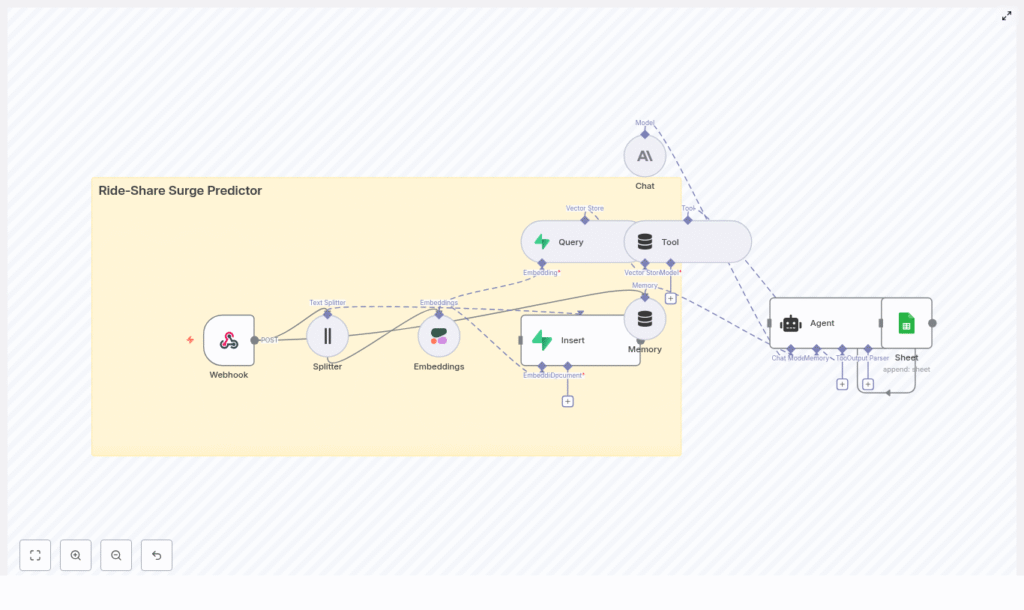
The n8n template implements a streaming pipeline from raw events to logged surge recommendations. At a high level, the workflow performs the following steps:
- Ingest ride-related events through a Webhook node.
- Preprocess and chunk large text payloads using a Text Splitter.
- Embed text chunks into vectors with a Cohere Embeddings node.
- Persist embeddings and metadata into a Supabase vector store.
- Retrieve similar historical events via a Query node and expose them to the agent as a Tool.
- Maintain context with a Memory node that tracks recent interactions.
- Reason with an LLM Agent (Anthropic or other provider) that synthesizes context into a surge multiplier and rationale.
- Log all predictions, inputs, and references to Google Sheets for monitoring and auditing.
This architecture is designed for low-latency retrieval, high observability, and easy iteration on prompts, metadata, and pricing logic.
Key n8n nodes and integrations
Webhook – ingest real-time ride events
The Webhook node is the primary entry point for the workflow. Configure it to accept POST requests from your ride telemetry stream, mobile SDK, event bus, or data router.
Typical payload fields include:
timestamp– ISO 8601 timestamp of the eventcity– operating city or marketdriver_id– pseudonymized driver identifierlocation.latandlocation.lon– latitude and longitudedemand_score– model or heuristic output representing demand intensityactive_requests– number of active ride requests in the areanotes– free-form context such as weather, events, or incidents
Example payload:
{  "timestamp": "2025-08-31T18:24:00Z",  "city": "San Francisco",  "driver_id": "drv_123",  "location": {"lat": 37.78, "lon": -122.41},  "demand_score": 0.86,  "active_requests": 120,  "notes": "Multiple concert events nearby, heavy rain starting"
}
Text Splitter – normalize and chunk rich text
Some events contain long textual descriptions such as incident reports, geofence notes, or batched updates. The Text Splitter node breaks these into smaller segments to improve embedding efficiency and retrieval quality.
In this template, text is split into 400-character chunks with a 40-character overlap. This configuration:
- Controls embedding and storage costs by avoiding overly large documents
- Preserves semantic continuity through modest overlap
- Improves the granularity of similarity search results
Cohere Embeddings – convert text to vectors
The Embeddings (Cohere) node transforms each text chunk into a high-dimensional vector representation. These embeddings power semantic similarity and contextual retrieval.
You can substitute Cohere with another supported embedding provider, but the overall pattern remains the same:
- Input: normalized text chunks and relevant metadata
- Output: embedding vectors plus references to the source text and attributes
Supabase Vector Store – persistent semantic memory
Insert – write embeddings to Supabase
Using the Insert node, the workflow stores embeddings in a Supabase project configured as a vector store. The recommended index name in this template is ride-share_surge_predictor.
A suggested Supabase table schema is:
id: uuid
embedding: vector
text: text
metadata: jsonb (city, timestamp, event_type, demand_score)
created_at: timestamptz
Metadata is critical for operational filtering. For example, you can query only by a given city or time window, or restrict retrieval to specific event types.
Query – retrieve similar historical events
When the agent needs historical context to evaluate a new event, the workflow uses a Query node to run a similarity search on the Supabase index. The query typically filters by:
- City or region
- Time range
- Demand profile or event type
The query returns the most relevant documents, which are then passed to the reasoning layer.
Tool – expose the vector store to the agent
The Tool node wraps the vector search capability as a retriever that the LLM agent can call when constructing a surge recommendation. This pattern keeps the agent stateless with respect to storage while still giving it access to a rich, queryable history of past conditions and outcomes.
Memory – maintain short-term conversational context
To handle bursts of activity or related events arriving in quick succession, the workflow uses a Memory node that stores a windowed buffer of recent interactions.
This short-term context helps the agent:
- Consider recent predictions and outcomes when generating new multipliers
- Avoid contradictory recommendations within a small time horizon
- Maintain consistency in reasoning across related events
For cost control and prompt efficiency, keep this memory window relatively small, for example the last 10 to 20 interactions.
Chat + Agent – LLM-driven surge reasoning
The core decision logic resides in the Chat and Agent nodes. The agent receives a structured prompt that includes:
- The current event payload
- Relevant historical events retrieved from Supabase
- Recent interaction history from the Memory node
- Business rules and constraints, such as minimum and maximum surge multipliers or special event overrides
Using an LLM such as Anthropic (or any other n8n-supported model), the agent produces:
- A recommended surge multiplier
- A confidence score or qualitative confidence descriptor
- A rationale that explains the decision
- References to the retrieved historical events that influenced the recommendation
You can swap the underlying LLM to match your preferred provider, latency profile, or cost envelope without changing the overall workflow design.
Google Sheets – logging, auditability, and analytics
Every prediction is appended to a Google Sheets document for downstream analysis and governance. Typical logged fields include:
- Raw input features (city, timestamp, demand score, active requests, notes)
- Recommended surge multiplier
- Model confidence or certainty
- Key references from the vector store
- Timestamp of the prediction
This logging layer supports monitoring, A/B testing, incident review, and compliance requirements for pricing decisions. You can also mirror this data into your central data warehouse or BI tools.
Decision flow inside the surge predictor
When a new ride-share event reaches the Webhook, the agent follows a consistent decision flow:
- Embed the event text and associated notes into a vector representation.
- Run a vector search in Supabase to find similar past events, typically constrained by city and demand profile.
- Retrieve recent interaction history from the Memory node to understand short-term context.
- Construct a prompt for the LLM that includes:
- Current event data
- Similar historical events and their outcomes
- Recent predictions and context
- Business rules such as allowed surge ranges and special-case handling
- Generate a surge multiplier, confidence estimate, explanation, and referenced documents.
- Write the full result set to Google Sheets and optionally push notifications to dashboards or driver-facing applications.
This pattern ensures that surge pricing is both data-informed and auditable, with clear traceability from each recommendation back to its underlying context.
Implementation guidance and scaling considerations
Supabase and vector search performance
- Use a dedicated Supabase project for vector storage and enable approximate nearest neighbor (ANN) indexing for low-latency queries.
- Design metadata fields to support your most common filters, such as city, region, event type, and time buckets.
- Monitor query performance and adjust index configuration or dimensionality as needed.
Embedding and LLM cost management
- Batch embedding inserts when processing high traffic volumes to reduce API overhead.
- Filter events upstream so only high-impact or anomalous events are embedded.
- Cache frequent or repeated queries at the application layer to avoid redundant vector searches.
- Keep the Memory window compact to minimize prompt size and LLM token usage.
- Define thresholds that determine when to call the LLM agent versus applying a simpler rule-based fallback.
Data privacy, security, and governance
Ride-share data often includes sensitive information. To maintain compliance and trust:
- Remove or pseudonymize PII such as exact driver identifiers before embedding.
- Use metadata filters in Supabase to query by city or zone without exposing raw identifiers in prompts.
- Maintain immutable audit logs for pricing-related predictions, either in Google Sheets or a secure logging pipeline.
- Align retention policies with local regulations on location data storage and access.
Extending the template for advanced use cases
The n8n surge predictor template is designed as a foundation that can be extended to match your operational needs. Common enhancements include:
- Enriching the vector store with:
- Public event calendars and ticketing feeds
- Weather APIs and severe weather alerts
- Traffic congestion or incident data
- Building an operations dashboard that surfaces:
- High-confidence surge recommendations
- Associated rationales and references
- Key performance indicators by city or time of day
- Implementing a feedback loop where:
- Driver acceptance rates and rider conversion metrics are captured
- These outcomes are fed back into the vector store as additional context
- Future predictions incorporate this feedback to refine surge behavior over time
Troubleshooting and tuning
When operationalizing the workflow, the following issues are common and can be mitigated with targeted adjustments:
- Low relevance in vector search results Adjust:
- Chunk size or overlap in the Text Splitter
- Embedding model choice or configuration
- Metadata filters to ensure appropriate scoping
- Slow query performance Consider:
- Enabling or tuning ANN settings in Supabase
- Reducing vector dimensionality if feasible
- Indexing key metadata fields used in filters
- Higher than expected inference or embedding costs Mitigate by:
- Reducing embedding frequency and focusing on high-value events
- Implementing caching and deduplication
- Using a more cost-efficient LLM for lower-risk decisions
Getting started with the n8n template
To deploy the Ride-Share Surge Predictor workflow in your environment:
- Import the template into your n8n instance.
- Configure integrations:
- Set up Cohere or your chosen embedding provider.
- Provision a Supabase project and configure the vector table and index.
- Connect an LLM provider such as Anthropic or an alternative supported model.
- Authorize Google Sheets access for logging.
- Set up the Webhook endpoint and send sample payloads from your event stream or a test harness.
- Validate outputs in Google Sheets, review the predictions and rationales, and iterate on:
- Prompt instructions and constraints
- Metadata schema and filters
- Chunking and embedding parameters
- Run a controlled pilot in a single city or zone before scaling to additional markets.
Call to action: Import the Ride-Share Surge Predictor template into your n8n workspace, connect your data sources and AI providers, and launch a pilot in one city to validate performance. For guided configuration or prompt tuning, reach out to your internal platform team or consult our expert resources and newsletter for advanced automation practices.
By combining vector search, short-term memory, and LLM-based reasoning within n8n, you can deliver surge pricing that is more adaptive, transparent, and defensible, without the overhead of building and maintaining a bespoke machine learning platform.
