


AI Image Processing & Telegram Automation with n8n
This article presents a production-ready n8n workflow template that connects Telegram, OpenAI image generation, and downstream processing into a single, automated pipeline. The workflow listens for user messages in Telegram, transforms those messages into AI image prompts, generates images with OpenAI, aggregates the results, and sends the final image back to the originating chat. Throughout, it follows automation best practices for security, reliability, and cost management.
Use Case and Value Proposition
Integrating n8n, OpenAI, and Telegram creates a powerful channel for interactive, AI-driven visual experiences. Typical applications include:
- On-demand marketing image generation for campaigns or social content
- User-requested artwork and creative visual responses
- Automated visual replies for support or FAQ scenarios
- Scheduled or triggered content delivery to Telegram audiences
By orchestrating these components in n8n, automation professionals can centralize control, enforce governance, and scale usage without custom backend code.
Architecture Overview of the n8n Workflow
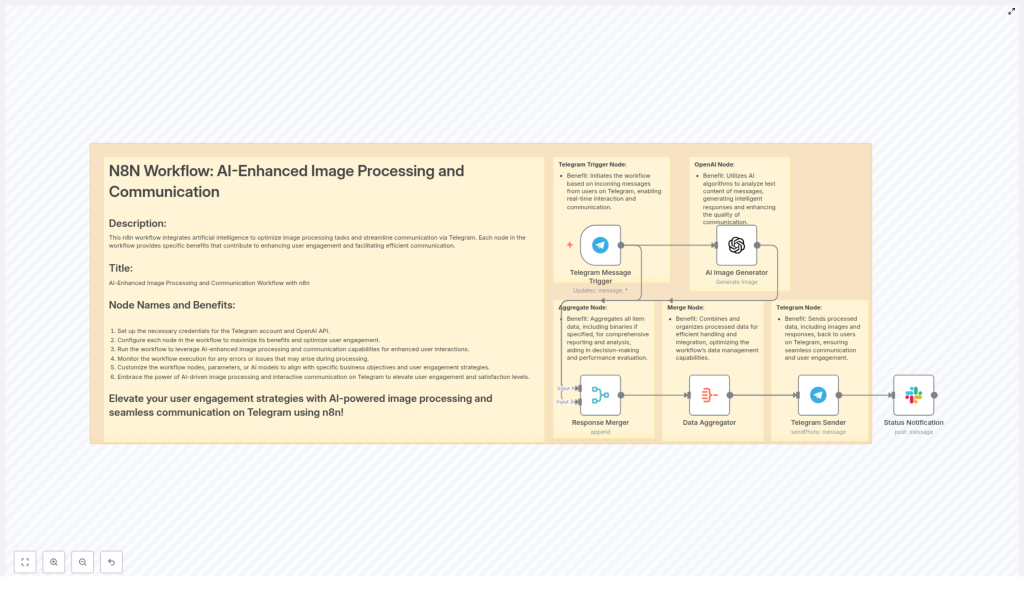
The template is structured around a clear event flow from Telegram to OpenAI and back. Key nodes and their responsibilities are:
- Telegram Message Trigger – Captures incoming Telegram messages that initiate the workflow.
- AI Image Generator (OpenAI) – Uses the message text as a prompt to generate an image.
- Response Merger – Joins metadata from the trigger with the AI output for downstream use.
- Data Aggregator – Aggregates item data and binary image content into a single payload.
- Telegram Sender – Sends the generated image back to the original chat via
sendPhoto. - Status Notification (optional) – Posts completion or error notifications to Slack or another monitoring channel.
This modular design allows you to extend the workflow with additional steps such as moderation, logging, or personalization without disrupting the core logic.
Preparing the Environment and Credentials
1. Create and Secure API Credentials
Before configuring nodes, ensure that all external integrations are provisioned and securely stored.
- OpenAI
Generate an API key in the OpenAI dashboard. Where possible, restrict its usage to image generation endpoints and apply organization-level policies for rate limits and cost control. - Telegram
Use BotFather to create a Telegram bot and obtain the bot token. Set up webhook or polling access according to your n8n deployment model. - n8n Credentials
Store all secrets in the n8n Credentials store. Apply role-based access controls so that only authorized users and workflows can access production credentials.
Centralized credential management is crucial to maintain security, simplify rotation, and support compliance requirements.
Configuring the Workflow in n8n
2. Telegram Message Trigger Configuration
The Telegram Trigger node is the entry point of the workflow. Configure it to capture the right events and sanitize user input.
- Set the trigger to watch for updates of type message.
- Optionally filter for specific commands, for example
/generate, or enforce message format rules. - Extract the message text that will be used as the AI image prompt, for example via
{{$json["message"]["text"]}}or the relevant path in your Telegram payload. - Sanitize the incoming text to mitigate prompt injection, abuse, or malicious content.
At this stage, you should also confirm that chat and user identifiers are available, as they are required later when sending the image back to the correct conversation.
3. AI Image Generator (OpenAI) Node
Next, configure the OpenAI node to transform user prompts into images.
- Map the prompt parameter to the Telegram message text, for example:
={{ $json["message"]["text"] }}or the equivalent expression based on your trigger output. - Select the appropriate image generation model, size, and quality settings. Use conservative defaults initially to manage cost and latency.
- Consider setting explicit limits on the number of images per request and applying standard defaults for style or aspect ratio.
Careful parameter selection here helps balance user experience with performance and cost.
4. Merging Metadata and Aggregating Data
Once the image is generated, the workflow must merge context from the trigger with the AI output and prepare a single payload for Telegram.
- Merge Node
Combine the original Telegram message metadata (such aschatIdanduserId) with the OpenAI node output that contains the binary image data. - Aggregate Node
Aggregate items to build a unified structure that includes both JSON fields and binary data. Ensure that the node is configured to include binaries, not only JSON properties.
This aggregation step ensures that the Telegram Sender node receives both the correct target identifiers and the image payload in a single, consistent item.
5. Telegram Sender Node
Finally, configure the Telegram Sender node to return the generated image to the user.
- Set the operation to
sendPhoto. - Map the
chatIddynamically from the trigger output. A common pattern is:
={{ $json["data"][1].message.from.id }}
Adjust the index or path based on your actual merged structure. - Reference the binary property that contains the image data, for example
data, ensuring that the property name matches what is produced by the OpenAI node and preserved by the Aggregator.
At this point, the core loop from Telegram prompt to AI image to Telegram response is complete.
Prompt Engineering and User Experience
Designing Effective Prompts
Prompt quality has a direct impact on image output. To improve consistency and usability:
- Encourage concise, descriptive prompts for users.
- Provide example prompts in bot responses or help commands.
- Use template prompts that incorporate user input, such as:
"Create a high-resolution, colorful illustration of a sunrise over a city skyline in a modern flat style", and allow users to vary specific attributes.
Standardizing prompt structure helps maintain brand consistency and reduces the need for manual tuning.
Error Handling, Reliability, and Cost Management
Error Handling and Retry Logic
Robust automation requires explicit handling of failure scenarios. In n8n, consider:
- Using error handling nodes or separate error workflows to capture exceptions from the OpenAI or Telegram nodes.
- Implementing exponential backoff for OpenAI rate limit or timeout errors.
- Notifying users when generation fails and optionally providing a retry mechanism or fallback response.
- Logging errors to Slack, a database, or another monitoring system for later analysis.
These patterns reduce user frustration and simplify operational debugging.
Cost and Rate Limit Considerations
AI image generation can be resource intensive. To maintain budget control:
- Define per-user or per-chat quotas and enforce them in the workflow logic.
- Default to lower-resolution images and offer high-resolution output as a premium or restricted option.
- Cache responses for repeated prompts where business logic allows, in order to avoid unnecessary regeneration.
- Batch requests where possible, especially for scheduled or bulk operations.
Combining these techniques with metrics and alerts helps keep usage within acceptable limits.
Security and Compliance
Security should be integrated into the workflow design from the start.
- Sanitize prompts to prevent injection of harmful content and avoid including sensitive personal data in prompt text.
- Use n8n credential storage rather than hardcoding secrets in nodes or environment variables.
- Restrict access to production workflows and credentials using role-based permissions.
- If you persist generated images, ensure that storage, retention, and access policies align with your privacy and compliance requirements.
These practices are particularly important for public-facing bots and regulated environments.
Testing, Validation, and Deployment
Before promoting the workflow to production, conduct structured testing:
- Validate with a wide range of prompts to confirm mapping correctness and image quality.
- Simulate network failures and OpenAI errors to verify retry and error handling behavior.
- Enable detailed logging for early-stage deployments to identify edge cases and performance bottlenecks.
- Run a pilot with a limited user group to measure engagement, latency, and cost per image.
This iterative approach ensures that the automation behaves predictably under real-world usage patterns.
Advanced Extensions and Enhancements
Personalization
For recurring users, personalization can significantly improve experience:
- Persist user preferences such as style, aspect ratio, or color palette in a database or key-value store.
- Automatically apply these preferences to subsequent prompts so users receive consistent results without repeating configuration details.
Interactive Telegram Flows
Enhance interactivity by leveraging Telegram features:
- Use inline keyboards to let users choose styles, resolutions, or categories.
- Offer a "re-roll" option that regenerates an image based on the same or slightly modified prompt without requiring a new text message.
These patterns create a more conversational and engaging AI experience.
Moderation Pipeline
For public or large-scale deployments, add a moderation layer:
- Integrate automated content moderation (for prompts and outputs) before sending images to users.
- Optionally route flagged content to a manual review queue or a dedicated Slack channel.
Moderation is critical to reduce risk and maintain compliance with platform and organizational policies.
Key n8n Expression References
Below are some commonly used expressions in this template that you can adapt to your own payload structure:
- Map incoming text to the OpenAI prompt
={{ $json["message"]["text"] }} - Dynamic chat ID for Telegram Sender
={{ $json.data[1].message.from.id }}
Adjust the index and path to align with your merged output. - Binary data reference for image sending
Ensure that the binary property, for exampledata, exists on the aggregated item and is selected in the Telegram Sender node.
Monitoring and Observability
To operate this workflow reliably at scale, implement observability from day one:
- Send Slack or email notifications for both successful sends and failures, depending on your monitoring strategy.
- Track usage metrics such as requests per day, images per user, and cost per image.
- Configure alerts for budget thresholds or abnormal error rates.
- Store logs and representative prompts for ongoing quality review and prompt optimization.
Continuous monitoring enables proactive tuning of both technical and business parameters.
Quick Troubleshooting Checklist
- Images are not delivered
Confirm that the binary image data is present, correctly named, and passed into the Telegram Sender node. - OpenAI node returns errors
Verify that the API key is valid, usage limits have not been exceeded, and the correct endpoint/model is configured. - Chat or user IDs are missing
Inspect the raw output of the Telegram Trigger node and adjust mapping expressions such as$json["message"]["chat"]["id"]or$json.data[1].message.from.idas required.
Conclusion and Next Steps
By combining n8n, OpenAI image generation, and Telegram, you can build an automated, interactive image delivery pipeline that is both flexible and production ready. With secure credential management, well-designed prompts, robust error handling, and clear monitoring, this workflow can serve as a foundation for a wide range of AI-driven user experiences.
To get started, import the template into your n8n instance, connect your OpenAI and Telegram credentials, and run a series of test prompts. Iterate based on real user feedback, cost metrics, and performance data to refine the solution for your environment.
Start now: Import the template, configure credentials, execute a test run, and then enhance the workflow with personalization, moderation, and advanced reporting as your use case matures.
If you need a tailored walkthrough, help with cost optimization, or integration into a broader automation stack, our team can support you in designing and deploying a robust AI image processing pipeline on Telegram.
