


Arabic Kids Story Workflow Template: Let n8n Do Storytime For You
Imagine this: it is 9 PM, a small human is demanding a new bedtime story, and your brain is serving nothing but error messages. You have told the “clever rabbit” story 47 times this month. You are out of ideas, out of energy, and dangerously close to inventing a plot hole that will haunt you forever.
Now imagine instead that fresh, kid-friendly Arabic stories magically appear on your Telegram channel, complete with cute illustrations and audio narration, all on autopilot. No last-minute scrambling, no creative burnout, and no “Baba, that is the same story but with a different cat.”
That is exactly what the Arabic Kids Story Workflow template for n8n does. It combines n8n automation with OpenAI text and image generation plus Telegram delivery to create charming, educational stories in Arabic, with visuals and audio, on a schedule you choose.
Below, you will find what this workflow actually does, how the pieces fit together, a simple setup guide, and some tips to keep your content safe, fun, and parent-approved.
What This n8n Template Actually Does
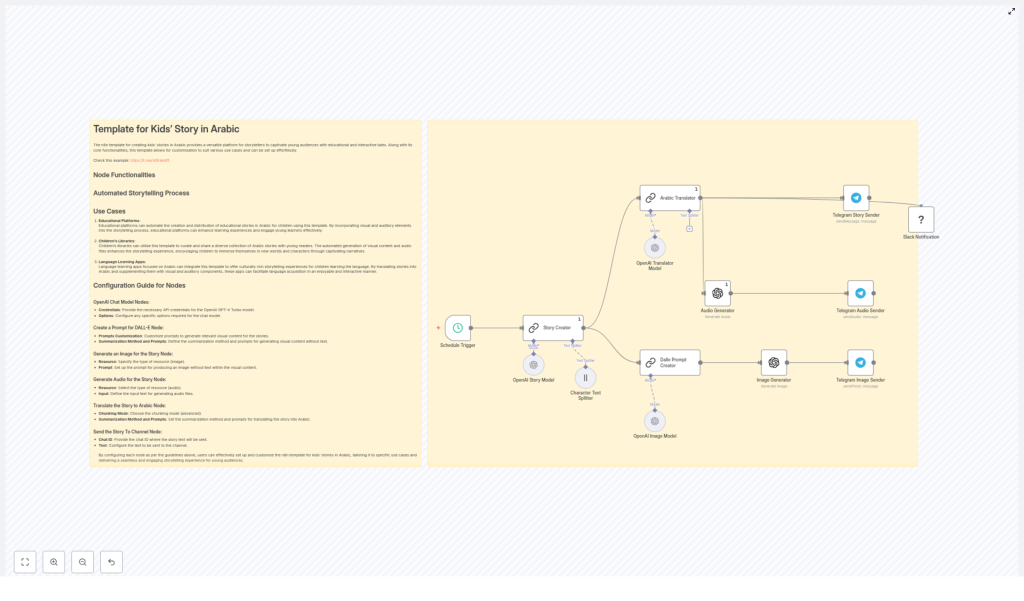
This workflow is like a tiny production team living inside n8n. Each node plays a specific role so that by the end you have a full story “package” ready to publish: text in Arabic, matching images, and audio narration, all sent straight to Telegram.
Key Outcomes You Get
- Original short stories for kids generated with GPT-4-style models.
- Simple, child-friendly Arabic that is easy to read and listen to.
- Illustrations created from DALL·E-style prompts, without any on-image text.
- Audio narration files for accessibility and multi-sensory learning.
- Automatic publishing to Telegram channels, plus optional Slack notifications for your team.
In other words, it takes what would normally be a long, repetitive process and turns it into a workflow you can forget about while it quietly does the work for you.
Meet the Workflow Cast: Node-by-Node Tour
Here is how the template is structured behind the scenes. Think of it as your automated story factory.
1. Schedule Trigger – The Story Alarm Clock
The Schedule Trigger starts everything off. You can configure it to run, for example, every 12 hours, every morning, or whatever rhythm fits your audience. Once it fires, the whole workflow kicks into action and a new story begins its journey.
2. Story Creator – The Imagination Engine
The Story Creator node uses an OpenAI summarization/chain setup to write a short, imaginative story of around 900 characters. The prompts are tuned for:
- Kid-friendly language and concepts
- Playful, gentle tone
- A clear moral or learning point at the end
This is your basic “once upon a time” generator, but with guardrails so it stays suitable for children.
3. Arabic Translator – The Kid-Friendly Rewriter
Next, the story goes to the Arabic Translator node. This is not just a literal translation step. The prompt tells the model to:
- Use easy Arabic words
- Keep sentences short and clear
- Highlight the moral lesson in a way kids can understand
The result is Arabic text that is both accurate and genuinely accessible for young readers and listeners.
4. Character Text Splitter – The Story Chopper
Long text and some services do not always get along. The Character Text Splitter solves that by breaking the story into smaller chunks. These chunks are easier to handle for:
- Audio generation
- Additional translation or localization steps
- Creating multiple image prompts for different scenes
Think of it as politely cutting the story into bite-sized pieces for downstream nodes.
5. Dalle Prompt Creator + Image Generator – The Art Department
Now we move into visuals. The workflow uses a Dalle Prompt Creator node to summarize the characters and scenes into short, non-text prompts. These prompts focus on:
- Physical descriptions (colors, clothing, animal vs human, mood)
- Clear scene descriptions
- Explicit instructions like “no text in the image”
Those prompts are then passed to the Image Generator node, which creates illustrations that match the story. Because you are asking for no text in the images, the visuals stay universal and clean, perfect for kids and for different reading levels.
6. Audio Generator – The Narrator
The Audio Generator node takes the Arabic text and turns it into audio narration files. Depending on your TTS provider, you can aim for traits like:
- Gender-neutral voice
- Calm, steady pace
- Warm, friendly tone
The final audio can be uploaded to Telegram or stored for later use, which is great for kids who prefer listening or for parents who want hands-free storytime.
7. Telegram Senders – The Delivery Crew
Once you have text, images, and audio, the workflow uses several Telegram sender nodes to deliver everything to your chosen channel:
- Story text in Arabic
- Generated images
- Audio narration files
Your subscribers or parents see a neat, complete story package without knowing there is an army of nodes working in the background.
8. Optional Slack Notification – The Editorial Ping
If you work with a team, you can enable an optional Slack notification node. Every time a new story is published, a message appears in your chosen Slack channel. It is perfect for editors, educators, or anyone who likes to know what the robots are doing.
How To Set It Up (Without Losing Your Mind)
The good news is that this is a ready-made n8n template. You do not need to rebuild everything from scratch, just plug in your credentials and adjust a few prompts.
Basic Setup Steps
- Install n8n
Make sure you have n8n running in your environment (self-hosted or cloud). Then import the template JSON into the n8n editor. - Add OpenAI credentials
In the relevant nodes, provide your OpenAI API key, including access to GPT-4 Turbo (or similar) and the image generation endpoint. - Configure Telegram
Set your Telegram bot credentials and the destination chat ID for the channel or group where you want stories to appear. - Tune the Schedule Trigger
Decide how often you want new stories to go out. Update the Schedule Trigger to match your preferred publishing frequency (for example, every 12 hours). - Review and customize prompts
Adjust the prompts in the story generator and Arabic translator nodes to match:- Target age group
- Tone (playful, educational, calming, etc.)
- Cultural context and sensitivity
- Run a full test
Use the Manual Trigger in n8n to test the entire flow. Confirm that:- Stories are generated correctly
- Images match the story and contain no text
- Audio sounds natural enough
- Everything arrives properly in Telegram
Once the test looks good, you can let the schedule run automatically and enjoy your new robot storyteller.
Prompt & Content Tips For Better Stories
Automation is powerful, but prompts are where the magic really happens. A few tweaks can turn “ok” stories into “please read it again” stories.
Tuning Story Prompts
- Be explicit about length, tone, and moral.
For example: “Write a short, gentle, playful story for young children, about 900 characters, with a clear lesson about sharing.” - Mention the age range you are targeting so the language and themes stay appropriate.
Simplifying Arabic Output
- In the translator prompt, ask for “easy words” and short sentences.
- Request an explicit moral sentence at the end, such as: “The lesson is that kindness is important.”
- Encourage localization, not robotic translation, by saying “localize and simplify” instead of “translate word-for-word.”
Designing Better Image Prompts
- Always include “no text in the image” to avoid random labels or signs.
- Describe colors, clothing, species, and mood (for example, “happy brown cat wearing a blue scarf in a sunny park”).
- Keep prompts short and focused so the model does not get confused.
Improving Audio Narration
- If your TTS service allows it, specify traits like gender-neutral voice and calm pace.
- For longer stories, consider chunking the text, which can improve pacing and reduce glitches.
Customization Ideas To Make It Yours
The template works out of the box, but you can easily adapt it to your brand, curriculum, or audience.
- Change the story focus
Adjust the story generator prompt to emphasize:- Cultural folktales and legends
- Science or nature concepts
- Vocabulary-building themes for language learners
- Store and archive assets
Integrate a CMS, Google Drive, or another storage service to save:- Story text
- Generated images
- Audio files
This creates a reusable library of stories.
- Add more languages or dialects
Insert extra translation nodes to support:- Different Arabic dialects
- Other languages for bilingual stories
- Include moderation checks
Add safety filters or review steps before publishing, to make sure every story is appropriate for kids and aligns with your guidelines.
Best Practices For Child-Friendly Automation
Even with automation, you are still responsible for what reaches young readers. A few simple rules go a long way.
- Keep the language simple and sentences short, especially for younger children.
- Avoid complex or sensitive topics. Focus on universal lessons like kindness, curiosity, honesty, and sharing.
- Include authorship and contact details in your Telegram channel or platform so parents and educators know who is behind the content.
- Regularly review story samples to catch any odd AI artifacts or phrasing that needs adjusting.
Troubleshooting & Quick Fixes
Sometimes the robots get a bit too creative. Here is how to nudge them back in line.
If images contain unwanted text:
- Update your image prompts to clearly say “no text in the image”.
- Refine the Dalle Prompt Creator instructions and re-run that part of the workflow.
If audio sounds strange or robotic:
- Try different TTS voices or settings, if available.
- Split the story into smaller segments so the TTS engine handles pacing more naturally.
If Arabic translations feel stiff or too literal:
- Update the translator prompt to say “localize and simplify for children” instead of “translate literally.”
- Ask for a natural storytelling style rather than direct translation.
Privacy & Compliance Considerations
Because this workflow is geared toward children’s content, it is important to handle data responsibly.
- Avoid collecting unnecessary personal data (PII) from users or subscribers.
- Store and use API credentials securely in n8n.
- Follow relevant local laws and regulations for child-directed services and online content.
Where This Template Really Shines
The Arabic Kids Story Workflow template is useful in many settings where regular, engaging stories are needed without constant manual effort.
- Educational platforms that share short moral tales for Arabic learners.
- Children’s libraries and cultural organizations that want scheduled, illustrated story posts.
- Language learning apps that supplement lessons with audio stories and visuals.
Try It Out: Let Automation Handle Storytime
This n8n template pulls together generation, translation, illustration, audio, and distribution into a single automated workflow. You can run it on a schedule or trigger it on demand whenever you need fresh content.
Next step: Import the template into your n8n instance, connect your OpenAI and Telegram credentials, and run a test story today. See how it feels to have storytime handled for you, then tweak the prompts until it matches your tone and audience perfectly.
If you want help with prompt engineering, moderation rules, or custom integrations, you can reach out for professional setup and fine-tuning so the workflow fits your brand and educational goals.
Bonus tip: Keep a simple log of generated stories and review them regularly. This makes it easy to refine prompts, maintain consistency, and build a safe, delightful library of Arabic stories for kids.
