


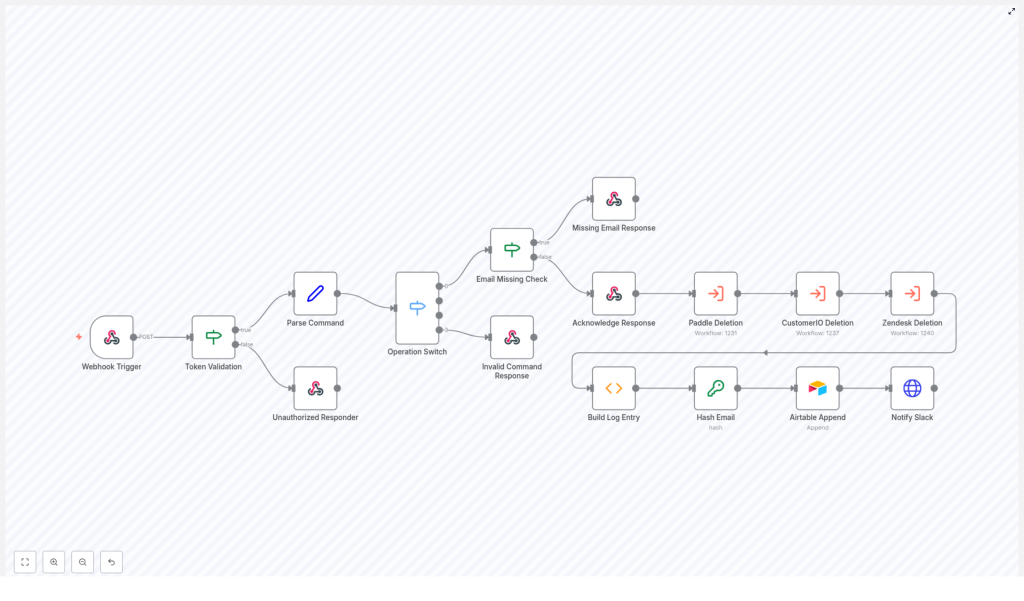
GDPR Data Deletion Workflow with n8n
Imagine this: it is 4:59 p.m., you are mentally halfway out the door, and a GDPR data deletion request pops into your inbox. You sigh, open five different tools, copy-paste the same email over and over, hope you do not miss anything, and silently pray no regulator ever asks for an audit trail.
Now imagine instead that you type a simple command, walk away, and an automated n8n workflow quietly does all the boring stuff for you. It deletes data across Paddle, CustomerIO, and Zendesk, logs everything neatly in Airtable, and even posts a friendly update in Slack. That is what this GDPR data deletion workflow template is built to do.
In this guide, we will walk through how the n8n workflow works, how it keeps you compliant and sane, and how you can plug it into your own setup without needing a week-long automation retreat.
Why bother automating GDPR data deletion?
Under GDPR, data subject requests are not “nice-to-have” tasks, they are legal obligations. Every time a user asks you to delete their data, you have to:
- Find that user across multiple tools and services
- Delete or anonymize their data correctly
- Make sure you did not miss a system
- Be able to prove you did it, later, if needed
Doing this manually is slow, repetitive, and extremely easy to mess up. It is also painful to audit later. An automated GDPR data deletion workflow in n8n helps you:
- Reduce human error by standardizing the process
- Respond faster to deletion requests
- Keep a clear, auditable log of what happened and when
- Respect privacy by only storing hashed identifiers instead of raw emails
In short, the workflow does the boring bits on repeat so you do not have to.
What this n8n GDPR deletion workflow actually does
This template is a complete, end-to-end GDPR data deletion workflow built with n8n nodes wired together for security, automation, and auditability. At a high level, it:
- Accepts deletion requests through a Webhook Trigger (for example, from Slack or an internal admin UI)
- Validates that the request is authorized using a Token Validation step
- Parses the incoming command to extract the operation and email address
- Routes the request based on the operation using an Operation Switch
- Runs deletion sub-workflows for Paddle, CustomerIO, and Zendesk
- Builds an audit log entry summarizing what happened
- Hashes the email with SHA256 so you do not store plaintext personal data
- Appends the hashed record to Airtable for your compliance trail
- Sends a Slack notification back to the requester with the result and a link to the log
The design balances three things that do not usually like each other: automation, auditability, and privacy.
The journey of a GDPR deletion request
Let us walk through what happens from the moment someone types a command like:
/gdpr delete user@example.comAll the way to “OK, this is logged and done.”
1. Webhook receives the request and checks the token
Everything starts with the Webhook Trigger node. It accepts POST requests, for example from Slack, and receives a payload that looks roughly like this:
{  "token": "foo",  "text": "delete user@example.com",  "response_url": "https://hooks.slack.com/..."
}
Right after that, the workflow runs a Token Validation step. It checks whether the token in the payload matches your expected secret. If it does not match, the workflow does not even try to delete anything.
Instead, it returns a 403 via an Unauthorized Responder node and stops there. No valid token, no deletion. This keeps random internet strangers from “helping” you clean your database.
2. Parse the command into operation and email
Once the token is confirmed, the workflow moves on to the Parse Command node. This node:
- Splits the
textfield into two parts: the operation and the email - Normalizes the operation to lowercase, for example
delete - Checks that an email address is actually present
If the token was invalid earlier, you already got a 403 and nothing else happens. If the token is fine but the command is malformed, the workflow will handle that in the next steps.
3. Route the operation and handle bad commands
Next up is the Operation Switch node. This is where the workflow asks: “What are we trying to do here?”
If the operation is not recognized, for example it is not delete, the workflow triggers an Invalid Command Response node. That node sends a friendly message like:
“Sorry, I did not understand your command. You can request data deletion like so: /gdpr delete <email>.”
So instead of silently failing or doing something weird, it guides the user back to the right format.
4. Check for an email and acknowledge the request
Even if the operation is valid, the workflow still needs a target. If no email is provided, it sends back a Missing Email Response with clear instructions on how to fix the command.
If an email is present, the workflow immediately sends an Acknowledge Response to the requester. This is a short confirmation like “On it!” sent via the original response_url.
The key idea is that this acknowledgment happens before any long-running deletion tasks finish. The user gets instant feedback, and your workflow can take its time doing the actual cleanup behind the scenes.
5. Run the actual deletions in Paddle, CustomerIO, and Zendesk
Once the request is validated and acknowledged, the workflow triggers three Execute Workflow nodes, one after another:
- Paddle Deletion
- CustomerIO Deletion
- Zendesk Deletion
Each of these executes a focused sub-workflow that:
- Finds the user by their email address in the respective service
- Issues the relevant delete or anonymize API calls
Some services do not truly delete accounts and instead only allow suspension or anonymization. In those cases, you can standardize what “deletion” means in your policy and have the sub-workflow map to that action.
Design tip: Make each sub-workflow idempotent. That means if you run the same deletion request multiple times, it does not break anything or perform duplicate work. If the user is already deleted or anonymized, the workflow should simply confirm that state instead of throwing errors.
6. Build a structured audit record
Once all the service-specific deletions are done, the workflow uses a Build Log Entry function node to summarize what happened. It collects the results from Paddle, CustomerIO, and Zendesk, then produces fields such as:
- Result – for example
DoneorError - Notes – service messages concatenated into a readable summary
- Processed – an ISO timestamp of when the deletion completed
This gives you a clean, standardized record for every deletion request, instead of scattered logs and guesswork.
7. Hash the email for privacy-first logging
Before anything gets stored, the workflow passes through a Hash Email node. This node takes the user’s email and applies SHA256 hashing, then stores only the hash, not the plaintext email.
Why this matters:
- You can still link multiple audit records for the same user by matching the hash
- You avoid keeping raw personal data sitting in your logging system
- You maintain traceability without building an accidental side-database of user emails
It is a neat way to keep your logs useful and your legal team less nervous.
8. Append the record to Airtable for your audit trail
With the hash and summary ready, the workflow uses an Airtable Append node to store the log entry in a dedicated Log table. The record typically includes:
- The hashed email identifier
- The deletion outcome (Done or Error)
- The timestamp of processing
- Any service-specific messages or notes
Because the email is hashed, the Airtable log provides traceability while minimizing stored PII. If you ever need to demonstrate compliance, you can show exactly what happened and when, without revealing user emails in your audit table.
9. Notify the requester in Slack
Finally, the workflow sends a status update through a Notify Slack HTTP Request node. It posts a concise message back to the original response_url that includes:
- The overall status, for example OK or Error
- A link to the Airtable audit record
The requester gets a clear “this is done” message, along with a direct path to the log if they need more detail. No one has to wonder whether the deletion actually happened.
Error handling and monitoring so nothing slips through
GDPR deletion workflows are not a place for silent failures. This template includes patterns you should keep and extend:
- Fail fast on bad inputs Return early with clear responses for:
- Invalid tokens
- Missing emails
- Unrecognized commands
- Log per-service responses Collect the outcome of each third-party deletion (Paddle, CustomerIO, Zendesk) and include that in the audit record so you can see exactly which services succeeded or failed.
- Use retries for flaky APIs When talking to third-party APIs, implement retries and exponential backoff for transient errors. Internet hiccups should not derail your compliance.
- Alert humans when things go wrong If a deletion fails repeatedly, alert a human operator or a support channel so someone can step in and resolve the issue.
Best practices for a safe, privacy-friendly workflow
Security tips
- Keep your webhook token secret and rotate it periodically
- Expose the webhook over HTTPS-only endpoints
- Restrict inbound IPs where possible
- Limit who can trigger deletions, for example with Slack app scopes, admin UI roles, or mTLS
Privacy tips
- Hash emails with SHA256 or otherwise pseudonymize identifiers before storing them in logs
- Record only what you need for compliance: timestamps, actions taken, and outcomes
Operational tips
- Make deletion workflows idempotent so repeated requests are safe and do not cause errors
- Have a human review path for tricky edge cases or contested deletions
- Log request and response payloads temporarily for debugging, then rotate or redact them on a schedule
How to test and deploy this n8n GDPR template
Before you unleash this workflow on real users, run it through a proper test cycle.
Testing checklist
- Use a staging environment for n8n
- Set up test accounts in Paddle, CustomerIO, and Zendesk
- Confirm that:
- Token mismatches return a 403 and do not run any deletions
- Malformed commands return helpful guidance instead of cryptic errors
- Successful delete flows create a hashed audit record in Airtable
- Slack receives both the initial acknowledgment and the final status message
Deployment tips
When everything looks good in staging:
- Deploy the workflow on a secure n8n instance
- Keep an eye on logs for early failures or misconfigurations
- Optionally, add a scheduled job that periodically checks that your Airtable audit records match the actual account states in your services
Wrapping up: less manual work, more reliable compliance
Automating GDPR data deletion with n8n turns a messy, manual chore into a repeatable, auditable process. By:
- Validating every request
- Coordinating deletions across Paddle, CustomerIO, and Zendesk
- Hashing email addresses before logging anything
- Storing outcomes in Airtable with timestamps and notes
- Notifying requesters through Slack
You get both speed and clear evidence of compliance, without living in constant fear of the next deletion request.
Want to skip the “build from scratch” phase? Grab the n8n template, plug in your credentials, customize the service deletion sub-workflows to match your own stack, and test everything in staging before going live.
Next steps and how to get help
If you would like help adapting this GDPR data deletion workflow for your specific tools, adding extra compliance controls, or wiring in RBAC, reach out to our team or drop a comment. We are happy to help you spend less time on repetitive deletion tasks and more time on work that is actually interesting.
Happy automating!
