


Build an AI-Powered Road Trip Stop Planner with n8n
Designing a memorable road trip requires more than simple point-to-point routing. It involves aligning routes, pacing, and stops with individual preferences and constraints. This article presents a reusable n8n workflow template that transforms unstructured trip descriptions into high-quality, AI-driven recommendations. The solution integrates text splitting, Cohere embeddings, a Supabase vector store, Anthropic’s chat models, and Google Sheets logging to deliver a robust, production-ready “Road Trip Stop Planner.”
Why augment route planning with AI and embeddings?
Conventional route planners optimize for distance and travel time. They rarely capture user intent such as scenery preferences, activity types, or travel style. By introducing AI and vector search into the pipeline, you can:
- Translate free-form trip notes into structured, queryable representations
- Leverage similarity search to surface relevant, context-aware stops
- Retain user preferences over time for increasingly personalized itineraries
- Iterate quickly on recommendations using logged sessions and analytics
The core idea is to convert user input into embeddings, store them in a vector database, and then use an agent-driven LLM to synthesize those results into practical itineraries.
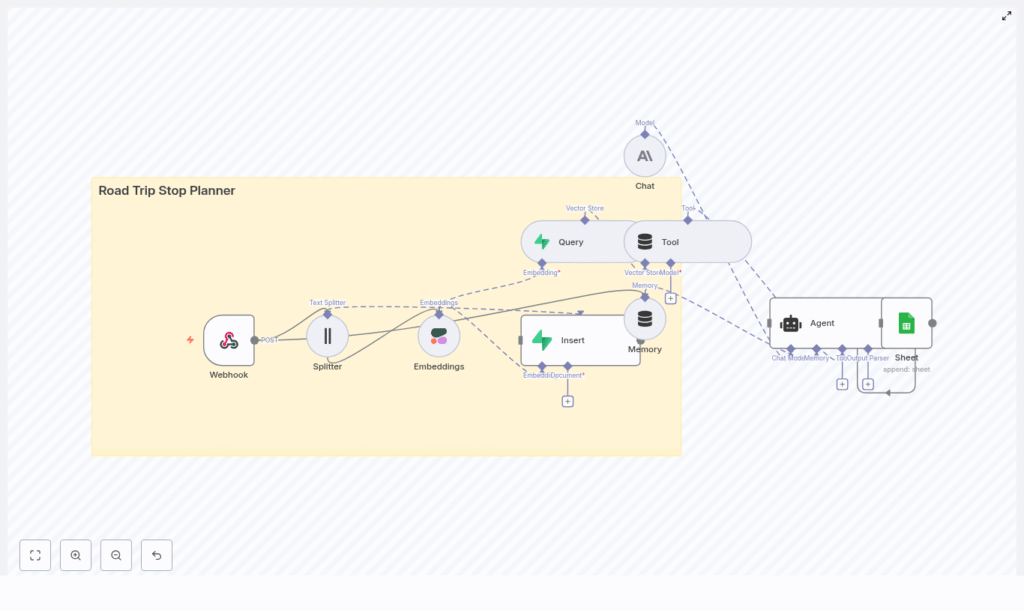
Solution architecture at a glance
The n8n workflow implements an end-to-end data flow from incoming request to final recommendation. At a high level, the architecture consists of:
- Webhook – Accepts trip submissions from external clients
- Text Splitter – Prepares long inputs for embedding
- Cohere Embeddings – Generates semantic vectors
- Supabase Vector Store – Persists and indexes embeddings
- Query & Tool Node – Retrieves relevant context for the agent
- Anthropic Chat & Memory – Maintains conversation context and generates responses
- Agent – Orchestrates tools, memory, and LLM to produce the itinerary
- Google Sheets – Logs sessions for audit and analytics
This modular design makes it straightforward to extend or swap components, for example by changing the LLM provider or adding new tools.
Data flow in detail
1. Ingesting trip requests with a Webhook
The workflow starts with an n8n Webhook node configured to accept POST requests. This provides a simple API endpoint that mobile apps, web forms, or backend services can call. A typical JSON payload looks like:
{  "user_id": "12345",  "trip": "San Francisco to Los Angeles via Highway 1. Interested in beaches and scenic viewpoints.",  "date_range": "2025-06-20 to 2025-06-25"
}
The webhook passes this payload into the workflow, where it becomes the basis for both embeddings and downstream AI reasoning.
2. Preparing content with a character-based text splitter
Long, unstructured trip descriptions are rarely optimal for direct embedding. The workflow uses a character-based text splitter node to segment the input into manageable chunks. Recommended configuration:
chunkSize: 400 characterschunkOverlap: 40 characters
This approach preserves local context while controlling token usage and embedding cost. The overlap helps ensure that important details are not lost at chunk boundaries.
3. Generating semantic embeddings with Cohere
Each text chunk is then passed to a Cohere Embeddings node. The model converts the text into high-dimensional vectors that capture semantic relationships rather than exact wording. To maintain predictable retrieval behavior, use a single embedding model consistently for both write (insert) and read (query) operations.
The resulting vectors are enriched with metadata such as:
user_idoriginal_textdate_range
This metadata becomes important for filtering and analytics in later stages.
4. Persisting vectors in Supabase
After embedding, the workflow inserts each vector into a Supabase project configured with a vector store. A dedicated index, for example road_trip_stop_planner, is used to keep the data organized and queryable.
Best practice is to store both the vector and all relevant metadata in the same row. This enables:
- Efficient similarity search on the embedding
- Filtering by user, date, or other attributes
- Traceability back to the original text input
5. Querying the vector store and exposing it as a tool
When a user requests recommendations, the new query text is embedded with the same Cohere model. The workflow then performs a similarity search against the Supabase vector index. The top results are returned as the most relevant trip notes, historical preferences, or related content.
These results are wrapped in a Tool node that the agent can call. In practice, the Tool node abstracts the retrieval logic and presents the agent with structured context, such as stop descriptions, tags, or previous user feedback.
6. Maintaining conversation context with Anthropic Memory & Chat
To support multi-turn interactions and evolving user preferences, the workflow includes a memory buffer. This memory captures:
- Recent user questions and clarifications
- Previously suggested stops and user reactions
- Corrections or constraints (for example, “avoid long hikes”)
The Anthropic chat model acts as the underlying LLM, consuming both the retrieved vector store context and the memory state. It is responsible for generating natural, coherent, and instruction-following responses that align with the user’s trip objectives.
7. Orchestrating decisions with the Agent node
The Agent node in n8n brings together tools, memory, and the LLM. It is configured to:
- Call the vector store Tool for relevant context
- Use the memory buffer to track the ongoing conversation
- Generate a final response in the form of a structured itinerary or recommendation set
Typical outputs include:
- A list of primary recommended stops with approximate distances and suggested visit durations
- Contingency options for detours or schedule changes
- Personalized notes, such as packing suggestions or timing tips
The agent’s configuration and prompt design determine how prescriptive or exploratory the recommendations are, which can be tuned based on user feedback.
8. Logging and analytics with Google Sheets
For observability and continuous improvement, the workflow appends each planning session to a Google Sheet. The Google Sheets node typically records:
user_id- Timestamp of the request
- Original trip description
- Final agent response
This log enables manual review, A/B testing of prompts, monitoring of failure patterns, and downstream analytics. It also provides a straightforward audit trail for support or QA teams.
Deployment requirements and configuration
To run this n8n workflow template in production, you will need:
- An n8n server or n8n cloud instance
- A Cohere API key for generating embeddings
- A Supabase project with vector store capabilities enabled
- An Anthropic API key (or another chat-capable LLM configured similarly)
- Google Sheets OAuth credentials for logging and analytics
In n8n, configure credentials or environment variables for each external service. Before going live, ensure that:
- The webhook endpoint is reachable and correctly secured
- Google Sheets scopes allow append access to the target spreadsheet
- Supabase schema and indexes are aligned with the vector store configuration
Optimization strategies and best practices
Embedding and chunking choices
- Chunk size: 400 characters with 40-character overlap is a balanced default. Smaller chunks can reduce noise but will increase the number of embeddings and storage.
- Model consistency: Use the same Cohere embedding model for both insert and query operations to avoid distribution mismatches.
Index and data governance
- Namespace indexes per project or version, for example
road_trip_stop_planner_v1, to simplify migrations and rollbacks. - Include rich metadata such as location tags, trip themes, or user segments to enable more precise filtering and experimentation.
Privacy, security, and cost control
- Privacy: Remove or encrypt sensitive PII before generating embeddings if long-term storage is required.
- API security: Store all external API keys in n8n credentials, not in plain text. Protect the webhook endpoint with secret headers or tokens, and consider IP allowlists for production.
- Rate limits and cost: Monitor Cohere and Anthropic usage. Batch embedding requests where possible and tune chunk sizes to balance accuracy with cost.
Troubleshooting common issues
Issue: Weak or irrelevant recommendations
This typically stems from suboptimal chunking or insufficient metadata. To improve relevance:
- Experiment with smaller chunk sizes and reduced overlap
- Add richer metadata such as geographic coordinates, stop categories, or user preference tags
- Verify that the same embedding model is used for both insertion and querying
Issue: Slow vector queries
If responses are slow, investigate:
- Supabase instance sizing and performance settings
- Limiting the number of nearest neighbors returned (top-K)
- Implementing caching for repeated or similar queries
Issue: Security and access concerns
For secure production deployments:
- Keep all secrets in n8n credentials or environment variables
- Use a shared secret or token in request headers to protect the webhook
- Consider IP whitelisting or API gateway protection for the public endpoint
Example agent prompt for road trip planning
The agent’s behavior is heavily influenced by its prompt. Here is a sample instruction you can adapt:
"User is driving SF to LA, prefers beaches and scenic viewpoints. Suggest 5 stops with brief descriptions and recommended time at each stop. Prioritize coastal routes and include at least one kid-friendly stop."
Adjust the prompt to control the number of stops, level of detail, or constraints such as budget or accessibility.
Extending the Road Trip Stop Planner
The workflow is designed to be extensible. Common enhancements include:
- Map integrations: Connect to Mapbox or Google Maps APIs to generate clickable routes, visual maps, or distance calculations.
- User profiles: Store persistent user preferences in relational tables, then use them as filters or additional context for the agent.
- Feedback loops: Let users rate suggested stops, then incorporate ratings into the ranking logic or embedding metadata.
- Rich media metadata: Attach photos or short video notes as additional metadata to refine embeddings and improve stop selection.
Conclusion
This n8n-based Road Trip Stop Planner illustrates a practical pattern for turning free-text trip notes into actionable, tailored itineraries using embeddings, vector search, and an AI agent. The workflow is modular, auditable, and well suited for iterative improvement as your dataset and user base grow.
Ready to implement it? Deploy the workflow to your n8n instance, configure the required API credentials, and send a sample trip payload to the webhook endpoint. From there, you can refine prompts, adjust chunking, and evolve the planner into a fully personalized travel assistant.
Call to action: Export this template into your n8n environment, run a test trip, and share your findings so the planner can be continuously improved.
