


Enrich HubSpot Contacts with ExactBuyer & n8n
Ever created a new contact in HubSpot, stared at their lonely little email address, and thought, “Cool, but who are you?” If you are tired of copy-pasting names, job titles, and company info from LinkedIn or email signatures, this workflow is your new best friend.
In this guide, you will learn how to use a ready-to-go n8n workflow template that automatically enriches new HubSpot contacts using ExactBuyer’s contact enrichment API. No more manual data entry, no more detective work, just clean, useful CRM data delivered on autopilot.
We will walk through what the workflow does, how to set it up, how each node is configured, and how to handle errors without losing your sanity. You will also get tips for testing, monitoring, and customizing the automation for your own CRM setup.
What this n8n + HubSpot + ExactBuyer workflow actually does
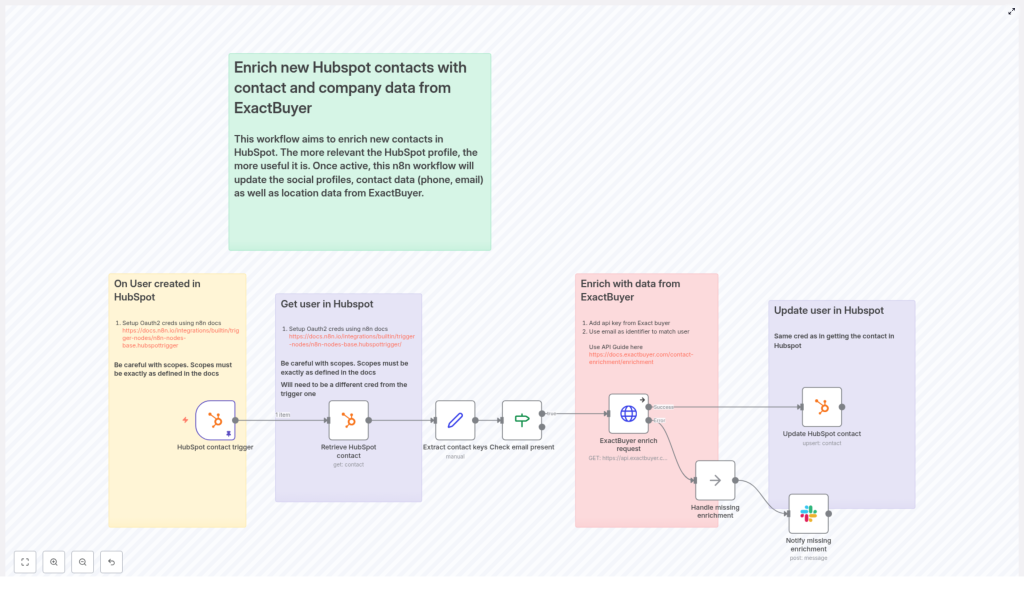
Here is the big picture: every time a new contact appears in HubSpot, this n8n template quietly springs into action.
- It listens for new HubSpot contacts using a HubSpot Trigger node.
- It grabs the full contact data using a standard HubSpot node.
- It extracts the contact’s ID and primary email with a Set node.
- It checks if an email exists and only continues if it does, using an If node.
- If there is an email, it calls ExactBuyer’s enrichment endpoint via an HTTP Request node.
- It then maps the enriched data back into HubSpot contact properties and updates the record.
- If ExactBuyer returns no enrichment data, it can notify a Slack channel and follow a no-op or error branch.
The end result: your HubSpot contacts get automatically filled in with useful details like job title, company name, phone number, and more, without you doing any repetitive copy-paste gymnastics.
Why bother enriching HubSpot contacts at all?
Because “email only” contacts are not very helpful, and your sales and marketing teams deserve better.
Contact enrichment adds missing attributes such as:
- Job title
- Company name and size
- Phone numbers
- Location
- Education, gender, and other profile details
Using n8n automation with ExactBuyer means:
- Less manual data entry and fewer boring admin tasks.
- Faster time-to-value for new leads, since you get context immediately.
- Better segmentation, lead scoring, and personalization in your CRM workflows.
- More accurate and complete HubSpot data that powers reliable automation.
In short, this workflow trades repetitive work for a one-time setup and ongoing peace of mind.
Before you start: what you need in place
To use this n8n template without frustration, make sure you have the following:
- n8n running, either cloud or self-hosted.
- A HubSpot account with developer OAuth credentials and the right webhook scopes.
- An ExactBuyer API key that can access the enrichment endpoint.
- Optional but recommended: a Slack webhook or API credential for notifications when enrichment fails.
HubSpot OAuth scopes to pay attention to
HubSpot can be picky about scopes, so make sure they match what n8n expects. This workflow typically needs:
- Read permissions for contacts.
- Write permissions for contacts.
In many setups, one credential is used for the webhook trigger and a separate OAuth credential is used for the HubSpot nodes that read or update contacts. The template calls this out as a best practice for security and operational separation. Just make sure both sets of credentials are correctly configured in n8n.
Quick setup walkthrough: from template to working automation
Here is a simplified flow of how to get this template running. After this overview, we will go node by node with configuration tips.
- Import the provided n8n workflow template into your n8n instance.
- Configure HubSpot OAuth credentials for both the trigger and the contact operations.
- Add your ExactBuyer API key in n8n credentials and connect it to the HTTP Request node.
- Optionally, plug in Slack credentials or a webhook URL for enrichment failure alerts.
- Run through the testing checklist to confirm everything works end to end.
Once that is done, you can lean back and let the workflow clean up your contact data for you.
Node-by-node configuration guide
1. HubSpot Trigger – listen for new contacts
Start with the HubSpot Trigger node. This is what wakes your workflow up when a new contact appears in HubSpot.
- Subscribe to contact.creation events.
- Use your developer credentials for the webhook subscription.
- Double check that:
- The webhook is marked as active in HubSpot.
- The portalId and subscription details are valid.
Once this is set, every new contact will automatically trigger the workflow, so no more “did I remember to run that script?” moments.
2. Retrieve HubSpot contact details
Next, use a standard HubSpot node to fetch the full contact data that the trigger event refers to.
- Set the operation to get.
- Pass in the contactId from the webhook payload.
- Use the separate OAuth2 credential mentioned in the template, not the same one as the trigger, if you are following the security separation pattern.
This gives you the complete contact record so you can extract the email and other keys needed for enrichment.
3. Extract contact ID and email with a Set node
Now it is time to create clean variables for the values you care about. Use a Set node to pull out the contact ID and email.
Example expressions from the template:
user_id = {{ $json.vid }}email = {{ $json.properties.email?.value }}
These variables are then used when calling the ExactBuyer enrichment endpoint.
4. Check that an email exists (If node)
Enriching a contact without an email is like trying to look someone up with only their favorite color. So the workflow uses an If node to verify that an email is present before calling the API.
- Perform a simple notEmpty string validation on the
emailfield. - If the email is missing, the workflow skips the enrichment call and can follow a different branch.
This keeps you from wasting API calls and avoids unnecessary errors.
5. Call ExactBuyer’s enrichment endpoint (HTTP Request node)
Now for the fun part: enriching the contact. Use an HTTP Request node to call the ExactBuyer API.
Endpoint:
https://api.exactbuyer.com/v1/enrichConfiguration tips:
- Use HTTP header auth with your ExactBuyer API key stored in n8n credentials.
- Send the email as a query parameter.
- Include required fields to narrow results. Example from the template:
?email={{ $json.email }}&required=work_email,personal_email,emailTo handle failures gracefully, configure the node to:
- Continue on error using
onError: continueErrorOutput.
This lets you branch into a “no enrichment found” path or send alerts instead of crashing the whole workflow.
6. Update the HubSpot contact with enriched data
Once ExactBuyer responds, the workflow uses another HubSpot node to update the contact record with the new information.
Example mappings from the template:
firstName: {{ $json.result.first_name }}lastName: {{ $json.result.last_name }}jobTitle: {{ $json.result.employment?.job?.title }}companyName: {{ $json.result.employment?.name }}companySize: {{ $json.result.employment.size }}phoneNumber: {{ $json.result.phone_numbers?.[0]?.E164 }}country: {{ $json.result.location?.country }}gender: {{ $json.result.gender }}school: {{ $json.result.education?.[0]?.school?.name }}
Important: only update fields that are actually present in the response. Make sure your mapping logic avoids overwriting existing HubSpot values with null or empty values. That way, enrichment adds value instead of accidentally deleting useful data.
Error handling, Slack alerts, and staying sane
Even the best APIs sometimes come back with “sorry, nothing found” or temporary errors. The template includes a simple but effective error handling pattern so you know what is going on.
There is a no-op branch labeled something like “Handle missing enrichment,” which connects to a Slack node that sends a notification when ExactBuyer returns no data.
Recommended best practices:
- Send a Slack message with:
- The contact’s email.
- The HubSpot contact ID.
- Optionally, a short note that enrichment data was missing.
- Log failures in a persistent store (like a database or log index) for later analysis.
- Implement retries with exponential backoff for transient HTTP 5xx or 429 rate limit errors.
- Respect ExactBuyer API rate limits and consider batching or queueing enrichment if you are processing large volumes.
This keeps your automation robust and gives you visibility when enrichment is not available instead of quietly failing in the background.
Testing checklist before going live
Before you unleash this workflow on your production HubSpot portal, walk through this quick testing list:
- In HubSpot, confirm the webhook subscriptions show delivered events for contact.creation.
- Create a test contact in HubSpot using an email that you expect ExactBuyer to resolve.
- In n8n, verify that the HTTP Request node returns a
resultobject with the expected fields. - Check in HubSpot that the contact properties are:
- Correctly updated with enriched values.
- Not overwritten with nulls where enrichment did not provide data.
- Test the missing-enrichment path by creating a contact with an unknown email and confirming that:
- The Slack notification is sent.
- The workflow behaves as expected without breaking.
Once everything looks good, you can safely move from test contacts to real leads.
Security and compliance: handling PII responsibly
Since this workflow deals with personally identifiable information (PII), it is important to keep security and compliance in mind.
- Store all API keys and OAuth tokens in n8n credentials, which are encrypted at rest.
- Limit HubSpot and ExactBuyer credentials to the minimum scopes necessary.
- Maintain data retention and deletion processes in HubSpot to satisfy GDPR and CCPA requests.
- Document consent sources for enriched contacts where required by your legal or compliance team.
This way you get the benefits of enrichment without creating headaches for your legal department.
Customization ideas to level up your automation
Once the basic contact enrichment flow is running, you can extend it in several useful ways.
- Company enrichment: call ExactBuyer’s company endpoints and update HubSpot Company records alongside contacts.
- Selective enrichment: only enrich high-value leads, for example based on:
- Lead source.
- Lifecycle stage.
- Company size.
- Audit trail: store raw ExactBuyer responses in a separate table or store for data quality checks and historical snapshots.
- Workflow segmentation: use enrichment confidence scores or specific enriched attributes to drive branching logic in HubSpot workflows.
n8n’s modular design makes it easy to add new branches, filters, or additional integrations as your process matures.
Monitoring and maintenance tips
Even automated workflows need a bit of occasional care. To keep this integration healthy in the long run:
- Track enrichment success rate and the volume of Slack alerts related to missing data.
- Monitor ExactBuyer API usage and costs so you do not accidentally surprise your finance team.
- Rotate API keys periodically and verify that new credentials are working.
- Review your field mappings every quarter or whenever HubSpot properties change.
A bit of monitoring now saves you from mysterious “why is nothing updating?” moments later.
Wrapping up: from manual busywork to automated enrichment
Using this n8n workflow template to enrich HubSpot contacts with ExactBuyer gives you richer lead profiles, better personalization, and fewer repetitive tasks clogging up your day.
The workflow is modular and easy to extend. You can add rate limiting, extra validation, company enrichment, or more advanced branching logic with minimal changes. With proper credential management, testing, and monitoring, it will run reliably in production and quietly keep your CRM in good shape.
Next steps:
- Import the workflow template into your n8n instance.
- Configure your HubSpot OAuth credentials and ExactBuyer API key.
- Run through the testing checklist and then let the automation handle new contacts for you.
Get the n8n template or contact us if you want help adapting it to your specific CRM processes.
Call-to-action: Import this workflow into n8n, connect your HubSpot and ExactBuyer credentials, and start enriching new contacts so your sales outreach feels smart instead of guessy.
