


Lead Qualification from Form: Let n8n Score Your Leads While You Sip Coffee
Picture this: your form is happily collecting leads all day, your inbox is overflowing, and your sales team is trying to guess which ones are worth a call. Meanwhile, you are stuck copy-pasting emails into tools, checking if they are real, then deciding who gets what. Again. And again. And again.
That is exactly the kind of repetitive task that makes automation look like a superhero. This n8n template, “Lead Qualification from Form”, takes your form submissions, verifies emails with Hunter, scores leads with MadKudu, and pings your team on Telegram and Slack when someone looks seriously promising.
No more manual triage, no more guessing who is “hot” and who is “meh”. Just a clean, low-code workflow that quietly does the boring parts for you.
What this n8n lead qualification template actually does
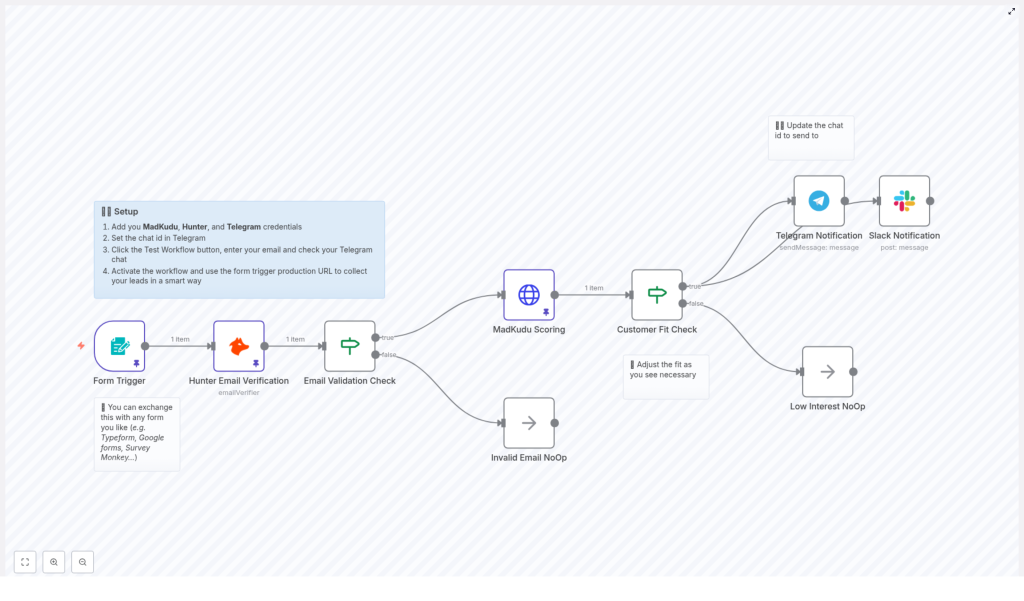
Under the hood, the workflow connects your form to a smart qualification pipeline. Here is the short version of what happens every time someone hits “Submit”:
- Form Trigger – Your form sends data to an n8n webhook. It can be Typeform, Google Forms (via webhook), a custom HTML form, or any tool that posts JSON.
- Hunter Email Verification – The workflow checks if the email address is deliverable using Hunter. No more chasing fake inboxes like
test123@nowhere.com. - MadKudu Lead Scoring – If the email is valid or deliverable, n8n calls MadKudu to get enrichment and a
customer_fit.scorefor the lead. - Customer Fit Check – The template compares that score against a threshold. By default it is set to 60, but you can tweak it for your own ICP.
- High-fit Leads – If the score passes the bar, n8n sends notifications to your Telegram and Slack channels with the key MadKudu signals so sales has instant context.
- Low-fit or Invalid Leads – These are quietly ignored (or routed to nurture if you extend the flow) so your team is not spammed with noise.
In other words, the template builds you a mini lead ops assistant that never sleeps and never forgets to notify the team.
Why bother automating lead qualification at all?
If you have ever tried to manually sort leads, you already know the answer. But for the record, here are the key reasons to automate this with n8n:
- Faster response to hot leads – High-intent prospects do not wait around. Instant scoring and notifications help your team jump in quickly.
- Cleaner data – Hunter keeps your database from turning into a graveyard of undeliverable emails.
- Scalable triage – You can handle more inbound volume without hiring a small army to sort spreadsheets.
- Better sales context – MadKudu’s company fit signals give reps the “why this lead matters” before they even say hello.
So instead of spending hours filtering, tagging, and guessing, you can let n8n do the heavy lifting while you focus on strategy and conversations.
Quick setup guide: from form to fully automated lead scoring
The template is ready to go, you just need to plug in your tools and preferences. Here is a simplified walkthrough of the setup.
Step 1: Add your credentials in n8n
First, connect the services that this workflow uses:
- Hunter – Your email verifier API key.
- MadKudu – Your API key or HTTP header configuration.
- Telegram – Bot token for sending notifications.
- Slack – Workspace token or app credentials for posting messages.
Store everything in the n8n credential manager. Do not hardcode secrets directly in nodes unless you enjoy security audits.
Step 2: Connect your form with the Form Trigger
The template ships with a demo form trigger. Swap that out for your real form:
- Use the Webhook node URL that n8n gives you.
- Configure your form tool (Typeform, Google Forms via webhook, custom HTML form, etc.) to POST JSON to that URL.
- Make sure the payload includes at least the email field and any other details you want to pass to MadKudu.
Once this is wired up, every new submission will automatically kick off the workflow.
Step 3: Tune email verification and scoring logic
Next, you control which leads are allowed to move forward.
Hunter verification checks:
- MX records
- SMTP response
- Disposable email detection
In the template, only leads where Hunter’s status is valid or deliverable are passed on. Others can be safely ignored or routed elsewhere if you extend the flow.
MadKudu scoring then enriches the lead with company data and a customer_fit.score. The template checks if this score is greater than 60 by default. You can adjust that threshold to better match your ideal customer profile (ICP).
Step 4: Configure Telegram and Slack notifications
This is the fun part where your sales team starts getting “hot lead” alerts instead of cold spreadsheets.
- In the Telegram node, set the chat ID to your sales group or channel.
- In the Slack node, choose the channel where you want lead alerts to appear.
The notifications include:
- The lead’s email address
- Top MadKudu signals, such as funding, location, industry, or company size
That way, reps instantly see why the lead is worth their time instead of asking “Where did this come from?” in the channel.
Smart ways to pick thresholds and use signals
You do not need to nail your scoring strategy on day one. Start simple and refine over time.
- Begin with a moderate threshold – A range of 50-60 is a good starting point while you learn what “good fit” looks like for your pipeline.
- Use top signals for messaging – MadKudu’s signals, like funding round, industry, or geography, are perfect for tailoring outreach.
- Do not waste borderline leads – Instead of dropping them, route medium-fit leads into a nurture sequence or separate list.
Over time, you can increase the threshold as your volume grows or your ICP becomes more precise.
Where this workflow really shines
This n8n template is especially useful if:
- You are a SaaS startup trying to reply quickly to high-intent signups.
- Your marketing team is generating lots of inbound leads and needs a scalable way to qualify them.
- Your sales team wants richer context before reaching out so calls feel informed, not random.
- Your operations team is tired of manual lead triage and wants to automate the repetitive bits.
Basically, if you have more leads than time, this template helps you focus on the ones that actually matter.
Customizing and extending the template
The workflow is designed to be a starting point, not a rigid system. You can easily adapt it to your stack and process.
- Swap the form source – Replace the default Form Trigger with Typeform, Google Forms, or a CMS webhook.
- Add more enrichment – If you are not using MadKudu or want additional data, plug in tools like Clearbit or FullContact.
- Push to your CRM – Send high-fit leads directly into HubSpot, Salesforce, Pipedrive, or your CRM of choice.
- Advanced routing – Use conditional branches to assign very high-priority leads by region, potential ARR, or segment.
- Log everything – Store lead activity in Google Sheets or a database for analytics, reporting, or audit trails.
With n8n’s visual editor, you can experiment without writing a full backend service every time you want to change your lead flow.
Testing your workflow before going live
Before you unleash this on your real traffic, give it a proper test run.
- Use Test Workflow mode in n8n and submit sample form entries with different types of emails to validate Hunter responses and MadKudu scores.
- Check your notifications to confirm that Telegram and Slack messages arrive in the correct channels with the expected content.
- Verify low-fit behavior so that leads below your threshold either follow the no-op path or your chosen nurture route.
A few test leads now can save you from a lot of “Why did this one not show up?” questions later.
Security and compliance tips
Automation is great, but you still need to keep data safe and compliant.
- Protect your API keys by storing them in n8n credentials and rotating them regularly.
- Handle PII carefully and make sure your lead forms and storage respect GDPR, CCPA, and any other relevant regulations.
- Limit sensitive data exposure by anonymizing or hashing fields if you store them outside tightly controlled systems.
That way you get all the benefits of automation without unexpected legal “surprises”.
Troubleshooting common issues
If something is not working as expected, here are some quick checks:
- No webhook hits – Confirm your form is posting to the correct public webhook URL and that the n8n workflow is activated.
- Weird Hunter results – Check your Hunter quota and test with known good and bad emails to see if the behavior is consistent.
- MadKudu errors – Make sure the API key and endpoint are correct. Inspect the response object in n8n to debug missing properties.
- No notifications – Double check Telegram bot tokens and chat IDs, and ensure your Slack app has permission to post in the selected channel.
Most issues come down to credentials, permissions, or misconfigured URLs, so start there.
Real-world example: from form fill to “hot lead” ping
Here is how a typical run looks in practice:
A visitor fills in your marketing signup form and hits submit. The workflow:
- Receives the submission through the n8n webhook.
- Uses Hunter to verify the email is valid.
- Calls MadKudu, which returns a
customer_fit.scoreof, say, 81, along with signals like funding amount, industry, and company size. - Sees that 81 is above your threshold, so it fires off messages to your sales Telegram group and Slack channel.
The notification might look something like:
“⭐ New hot lead: [email] – ✔ Company raised $13.5M, ✔ Located in Germany, …”
Your sales team gets a clear, enriched snapshot of why this lead is exciting, and can prioritize outreach accordingly.
Wrapping up: let n8n handle the boring parts
Manual lead qualification is one of those tasks that feels important, but also endlessly repetitive. With this n8n template, you automate the entire flow:
- Capture leads from your form
- Verify email deliverability with Hunter
- Enrich and score with MadKudu
- Notify your team instantly on Telegram and Slack
That leaves you and your sales team free to do what humans are actually good at: building relationships and closing deals, not sorting rows.
Import the “Lead Qualification from Form” n8n template, add your Hunter, MadKudu, Telegram, and Slack credentials, set your score threshold, and activate the workflow. If you get stuck, loop in your ops team or check the n8n docs for specific node details.
Want to plug this directly into your CRM or design a more advanced routing logic? Reach out and we can help you build a tailored n8n automation that fits your sales process perfectly.
