


AI Facebook Ad Spy Tool Explained: Automate Ad Analysis
The Marketer Who Was Tired Of Guessing
By the time Emma opened her laptop each morning, her competitors were already in her feed.
Emma ran a small but fast-growing performance marketing agency that specialized in AI tools and automation services. Her clients expected her to know which Facebook ads were working in their niche, what angles competitors were using, and which creatives were actually driving conversions.
She knew the answer was hidden in the Facebook Ad Library. The problem was time.
Every week she would:
- Manually search the Facebook Ad Library for keywords like “ai automation”
- Screenshot or copy-paste interesting ads into a Google Sheet
- Try to categorize them by type: video, image, or text
- Write her own summaries and insights for each ad
It was slow, repetitive, and easy to miss important patterns. Worse, she knew she was only scratching the surface. Hundreds of ads went unseen, and she had no systematic way to turn them into a real competitive intelligence database.
One evening, while browsing automation communities, she stumbled across something that made her stop scrolling.
A template called “AI Facebook Ad Spy Tool” built in n8n.
Discovering an Automated Ad Intelligence Engine
The description sounded almost too good to be true. An AI Facebook Ad Spy Tool that could scrape, analyze, and archive Facebook ads automatically, using:
- The Facebook Ad Library API for data collection
- Google Gemini and OpenAI GPT-4 models for analysis and rewriting
- Google Sheets as a central database for ad intelligence
It promised exactly what Emma needed: a way to turn raw Facebook ads into structured, searchable insights without spending her entire week in the Ad Library.
Curious, she imported the n8n template into her workspace. That is when the story of her ad research workflow changed.
First Run: Watching The Workflow Come Alive
Emma started simple. She adjusted the template to focus on her favorite niche: AI automation tools in the US market. Then she hit the manual execute button in n8n.
That single click triggered the entire workflow.
The Trigger That Started It All
The workflow began with a manual execution trigger. No schedules yet, no fancy triggers, just a clean, controlled run so she could see what was happening at each step.
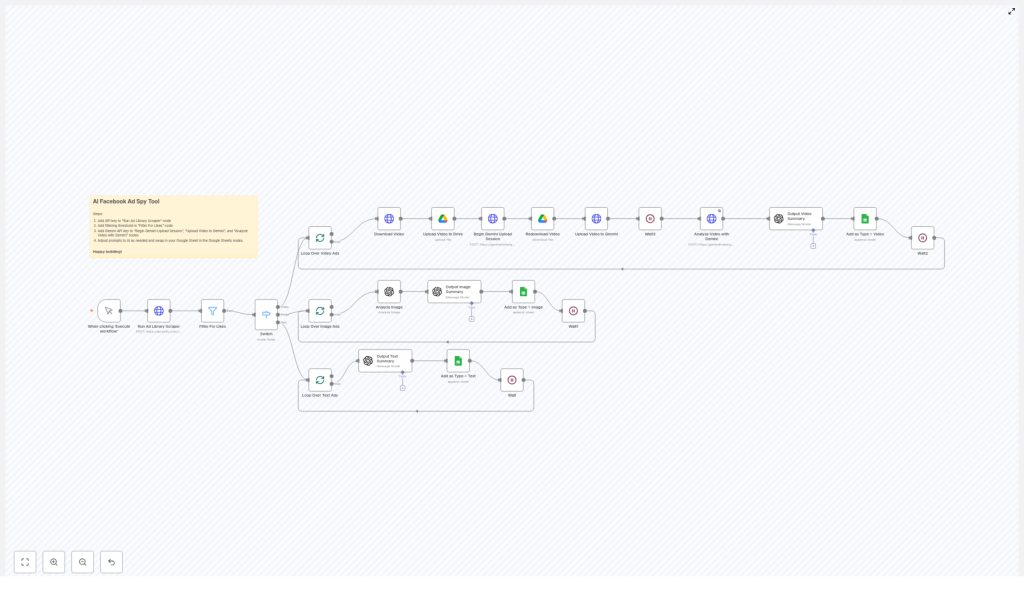
Immediately after execution, the first node kicked in: Run Ad Library Scraper.
Scraping Facebook Ads With Precision
The scraper used the Facebook Ads Library API to retrieve active ads that matched Emma’s criteria. In the example setup included in the template, it was configured to:
- Search for ads containing the exact phrase “ai automation”
- Limit results to the United States
- Look back over the last 7 days
- Fetch up to 200 ads
- Include active statuses and detailed ad information
Within seconds, Emma watched n8n pull in a stream of ads that she would previously have spent hours trying to collect. But the workflow did not stop there.
Raising The Bar: Filtering And Sorting What Matters
Emma knew not all ads are created equal. Some come from brand new pages with no traction, others from established advertisers with real budgets behind them. The template had already thought of that.
Filtering For Credible Advertisers
The next node in the chain was called Filter For Likes. Its job was simple but powerful: only allow ads from pages with more than a certain number of likes to pass through.
By default, the template used a threshold of 1000 likes. That meant Emma would only analyze ads from pages with a real audience and some level of credibility.
She realized she could adjust this number later if she wanted to tighten or relax the filter, but for now, the default made sense. Less noise, more signal.
Sorting Ads By Content Type
Once the weaker pages were filtered out, the remaining ads moved into a Switch node. This is where the workflow began to feel truly intelligent.
The Switch node categorized each ad into one of three main types:
- Video Ads
- Image Ads
- Text Ads
Each category followed its own tailored analysis path, optimized for that specific media type. Emma liked that the workflow did not treat all ads the same. A video needed different handling than a text-only ad, and this template respected that.
The Turning Point: AI Takes Over The Heavy Lifting
As the workflow branched into its three paths, Emma watched in real time as AI models began transforming raw ad data into something far more valuable.
When Video Ads Became Structured Insights
Video ads were always Emma’s biggest headache. Downloading them, hosting them, and then trying to explain what was happening in each one was tedious. The template automated the entire chain.
For Video Ads, the workflow executed a series of steps:
- Download Video – The video URL from the Facebook Ad Library was downloaded locally using the Download Video node.
- Upload To Google Drive – The video file was uploaded to Google Drive, giving Emma a stable, shareable link for her team and clients.
- Prepare Gemini Upload Session – A Gemini API upload session was initiated. The video was then redownloaded and uploaded to the Google Gemini AI platform.
- Wait For Processing – The workflow included a short waiting period to give Gemini time to process the video.
- AI Video Analysis – Gemini analyzed the video content and produced a detailed description of what was happening, what objects were visible, and the overall context of the ad.
- Strategic Summary With GPT-4.1 – The video metadata and Gemini’s description were then passed to OpenAI’s GPT-4.1. GPT generated a comprehensive summary of the ad and rewrote the copy with a focus on strategic intelligence, positioning, and angles.
- Append To Google Sheets – All enriched data, including links, descriptions, summaries, and rewritten copy, was appended to a Google Sheet. This became Emma’s growing ad intelligence database.
- Rate Limit Handling – Waiting nodes were built into the workflow to avoid hitting API rate limits and to keep everything running smoothly.
For the first time, Emma could see complex video ads broken down into clean, searchable insights without watching each video herself.
Image Ads Turned Into Deep Visual Intelligence
Next, Emma followed the path for Image Ads. These were often the backbone of her clients’ campaigns, and she wanted to know exactly what competitors were doing visually.
The workflow handled image ads like this:
- Visual Analysis With GPT-4o – Each image was sent to GPT-4o, which excelled at extremely detailed object and context recognition. It could identify elements in the image, infer the mood, and understand the visual strategy.
- Strategic Rewrite With GPT-4.1 – The original ad details and GPT-4o’s visual analysis were combined and passed to GPT-4.1. GPT then summarized the ad and rewrote the copy, focusing on key hooks, offers, and angles.
- Store Results In Google Sheets – Just like with video ads, the final output was stored in Emma’s connected Google Sheet, building a structured archive of image ad intelligence.
- Wait Nodes For Pacing – Waiting nodes were included to space out API calls and prevent any rate limiting.
Instead of just glancing at screenshots, Emma now had AI-generated breakdowns of what each image was communicating and how it was positioned.
Text Ads, Simplified And Enriched
Finally, the workflow handled Text Ads, which were the simplest from a technical standpoint but still valuable for messaging research.
The path for text-only ads was straightforward yet powerful:
- Send To GPT-4.1 – The ad text was passed directly to GPT-4.1 for summarization and rewriting.
- Save To Google Sheets – The summarized and rewritten copy, along with original details, was added to the same Google Sheet database.
- Include Wait Times – The workflow used wait nodes to avoid hitting rate limits during bursts of processing.
Within one run, Emma had a unified, AI-enriched view of video, image, and text ads, all neatly stored in one place.
Customizing The Workflow To Match Her Agency
After seeing the first successful run, Emma realized the template was not just a fixed tool. It was a flexible framework she could adapt to her own processes and branding.
Adding Her Own API Keys
To move from testing to production, she updated the workflow with her own credentials:
- Facebook Ads Library Scraper API key in the scraper node
- Google Gemini API key for video analysis
- OpenAI API key for GPT-4o and GPT-4.1 processing
Once these were in place, the workflow was fully connected to her own accounts and ready for regular use.
Tuning The Filters For Her Niche
The Filter For Likes node became one of her favorite levers. For broader market research, she kept the threshold at 1000 likes. For premium, high-budget campaigns, she experimented with higher thresholds to focus only on the biggest players.
By simply adjusting a number, she could control how strict the workflow was about which ads made it into her intelligence database.
Custom Prompts For On-Brand Insights
The real magic for Emma came from modifying the AI prompts in the OpenAI nodes. She tailored them so that GPT would:
- Use her agency’s preferred tone and terminology
- Highlight hooks, offers, and calls to action
- Identify target audience and positioning
- Suggest potential test angles for her own campaigns
This meant the summaries and rewrites were not generic. They felt like they were written by a strategist inside her own agency.
Connecting Her Own Google Sheets
Finally, she swapped out the example Google Sheet with her own document and custom sheet tabs. One tab for video ads, one for images, one for text, and another for high-performing patterns she wanted to track over time.
Every time the workflow ran, her sheets updated automatically, turning a static spreadsheet into a living intelligence system.
Life After Automation: The Benefits In Practice
Within a few weeks, Emma’s workflow looked completely different from the painful manual process she started with. The benefits of the AI Facebook Ad Spy Tool became obvious in her day-to-day work.
- Automation of manual research – She no longer spent hours searching and copying ads. The workflow did the scraping, filtering, and analysis for her.
- Unified analysis across media types – Video, image, and text ads were all processed within a single n8n workflow, each with its own optimized path.
- Deep content understanding – State-of-the-art AI models like Google Gemini, GPT-4o, and GPT-4.1 provided rich descriptions, context, and strategic rewrites.
- Centralized data in Google Sheets – All outputs were stored in one place, ready for reporting, dashboards, or further analysis.
- Flexible, prompt-driven insights – By editing prompts, Emma could change the style, depth, and focus of the insights without touching the overall workflow logic.
Instead of guessing what competitors were doing, she had a structured, constantly updated view of the market. Her clients noticed the difference in her strategy decks and creative recommendations.
Putting The Template To Work In Your Own n8n Setup
Emma’s story is not unique. Any marketer, founder, or growth-focused team that relies on Facebook ads can use this same n8n template to build a competitive intelligence engine.
To get started in your own environment:
- Import the AI Facebook Ad Spy Tool template into n8n.
- Add your API keys for the Facebook Ads Library Scraper, Google Gemini, and OpenAI.
- Adjust the search keywords, country, and date range in the scraper node to match your niche.
- Set your preferred likes threshold in the Filter For Likes node.
- Customize the AI prompts in OpenAI nodes to match your tone and strategic needs.
- Connect your own Google Sheets document and define the sheet tabs where data should be stored.
- Manually execute the workflow for a first test run, then later schedule it if you want regular updates.
Resolution: From Guesswork To Systematic Ad Intelligence
What started as Emma’s frustration with manual research turned into a repeatable, automated system that powered real strategic decisions.
The AI Facebook Ad Spy Tool is more than a simple scraper. It is a sophisticated n8n workflow that:
- Collects Facebook ads via the Ad Library API
- Intelligently analyzes each ad by type using Google Gemini and GPT models
- Rewrites and summarizes ad copy for fresh strategic insights
- Logs all enriched data in Google Sheets for easy review and analytics
If you want to move from scattered screenshots to a structured competitive intelligence system, this template gives you a head start.
Deploy it in your n8n environment, plug in your keys, refine the prompts, and let automation handle the heavy lifting while you focus on strategy.
