


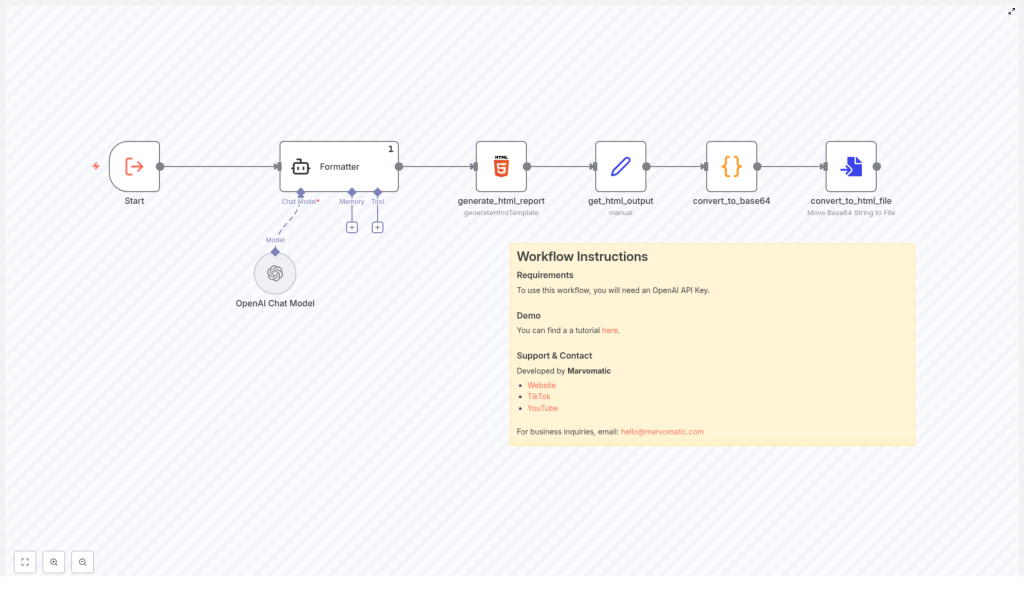
Automate Reports: N8N JSON-to-HTML Workflow
Ever spent your afternoon copy-pasting data from JSON into a “nice looking” report, only to realize you still have 7 more to go and your coffee is already cold? This n8n JSON-to-HTML workflow is here to save your sanity, your time, and possibly your keyboard.
In this guide, we will walk through what this workflow does, how it helps you turn raw JSON into polished HTML reports, and how to get everything running with minimal effort. You bring the data, n8n and OpenAI handle the formatting.
What This n8n JSON-to-HTML Workflow Actually Does
At its core, this workflow takes structured JSON data and transforms it into a clean, readable HTML report. No more manual formatting, no more fiddling with tags, and no more “why is this list suddenly a giant paragraph” moments.
Here is the basic idea:
- You feed the workflow JSON data (for example, analytics, summaries, logs, or reports).
- n8n processes that data and uses OpenAI to help generate well-structured, human-friendly content.
- The workflow converts everything into HTML so you can easily display it on a web page, email it, or store it as a report.
The result is a repeatable, automated reporting system that runs in the background while you focus on more interesting things than formatting bullet points.
Why Automate JSON-to-HTML Reports With n8n?
Manually turning JSON into something readable is the digital equivalent of sorting rice grains by hand. Technically possible, deeply unfun.
This workflow helps you:
- Save time by generating reports automatically from your existing data sources.
- Stay consistent with the same structure and style every time.
- Reduce errors that creep in when you copy, paste, and format by hand.
- Scale easily if you need to generate many reports, not just one or two.
If you are already using n8n for automation, this template plugs right into your workflow and turns reporting from a chore into something you barely think about.
What You Need Before You Start
Good news, the requirements list is short and painless:
Required
To use this workflow, you will need:
- An OpenAI API Key so the workflow can use OpenAI to help generate and format the content.
That is it. Once your OpenAI API key is ready, you are set to plug it into the template and start automating.
Quick Setup Guide: From JSON to HTML in n8n
Let us walk through how to get this JSON-to-HTML workflow template up and running in n8n. No advanced wizardry required.
1. Open the n8n Workflow Template
Start by opening the ready-made template:
View the n8n JSON-to-HTML template
This template is preconfigured so you do not have to build everything from scratch. You simply customize it for your data and use case.
2. Add Your OpenAI API Key
Inside n8n, create or select your OpenAI credentials and paste in your OpenAI API Key. The workflow uses this key to call OpenAI and help generate structured, readable report content from your JSON data.
3. Connect Your JSON Data Source
Next, plug your JSON data into the workflow. This might come from:
- Another n8n node that fetches data from an API
- A database query that returns JSON
- A file, webhook, or any other source you already use in n8n
The workflow will use this JSON as the raw material for your HTML report.
4. Generate the HTML Report
Once your data and OpenAI credentials are set, run the workflow. n8n and OpenAI will:
- Interpret and organize your JSON data
- Generate structured content using OpenAI
- Convert that content into a clean HTML report
You can then send this HTML via email, store it, display it in a dashboard, or pipe it into any other part of your automation.
See It in Action: Video Demo
Prefer watching instead of reading? There is a tutorial that walks you through the process step by step.
Check out the demo on YouTube: Marvomatic YouTube Channel
It is a great way to see how the n8n JSON-to-HTML workflow behaves with real data and how you can adapt it to your own setup.
Tips, Ideas, and Next Steps
Once you have the basic JSON-to-HTML automation running, you can start getting creative with it.
Ways You Might Use This Workflow
- Automatically generate daily, weekly, or monthly performance reports.
- Turn API responses into readable summaries for clients or teammates.
- Create internal dashboards that pull HTML reports from your data pipelines.
- Send formatted HTML reports via email using other n8n nodes.
Make Your Reports Even Better
- Tweak the prompts or settings used with OpenAI to match your brand voice or preferred style.
- Add extra nodes in n8n to filter, sort, or enrich your JSON before it becomes HTML.
- Combine this workflow with scheduling triggers so reports arrive automatically at set times.
The more you automate, the fewer repetitive tasks you have to do by hand, and the more your future self will thank you.
Support, Contact, and Creator Info
This JSON-to-HTML workflow template is developed by Marvomatic.
You can find more resources, content, and automation ideas here:
For business inquiries or collaboration ideas, feel free to reach out via email: hello@marvomatic.com
