


Maritime Vessel Tracking with AIS API & Automated Alerts
From Constant Monitoring To Calm Control
If you are responsible for vessels, cargo, or maritime operations, you already know how much energy goes into simply keeping an eye on what is happening at sea. Refreshing dashboards, checking speeds, watching for anomalies, and making sure the right people hear about issues in time can quietly consume hours of focus every week.
Now imagine a different reality. Instead of chasing data, you receive clear, timely alerts. Instead of manually checking vessel status, you rely on a workflow that does it for you every minute, without fail. Your time is freed up for higher level decisions, planning, and growth.
This is where an automated n8n workflow built around AIS vessel tracking, AWS SQS, and Slack alerts becomes more than just a technical setup. It becomes a foundation for a calmer, more focused way of working.
Shifting Your Mindset: Let Automation Watch The Water
Modern AIS APIs give you real-time access to vessel positions, speeds, and courses. The data is already there, updating constantly. The real opportunity is in how you choose to use it.
Instead of treating vessel tracking as a task you must constantly perform, you can treat it as a process that runs on its own. Your role then becomes designing the rules, deciding what matters, and letting automation handle the repetitive work.
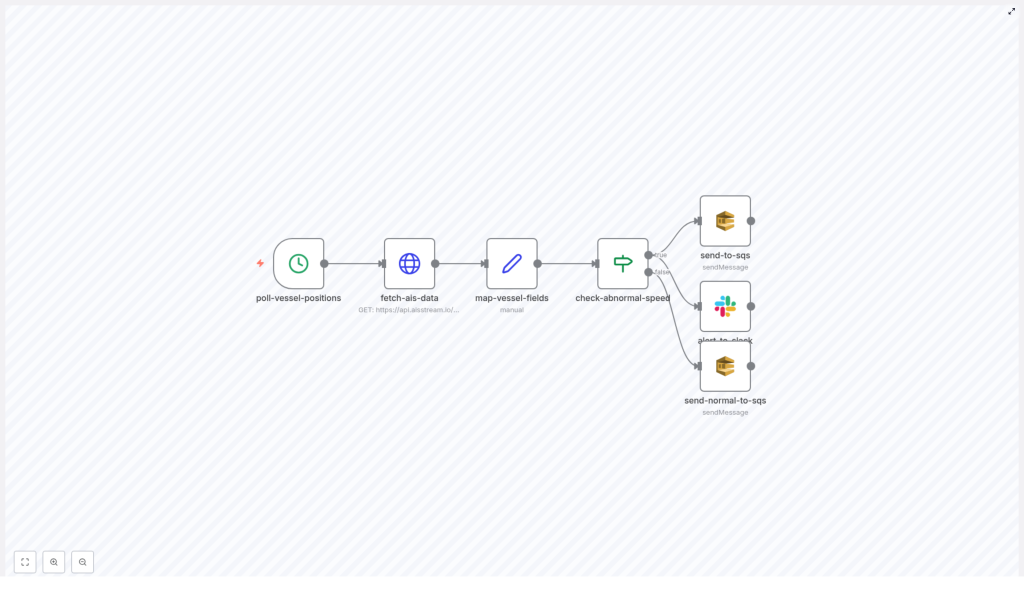
The n8n workflow template described here is a practical example of this mindset. It checks vessel data every minute, evaluates conditions like abnormal speed, and routes information to the right place automatically. Once it is running, you gain a reliable digital assistant that never gets tired, never forgets, and never misses a minute.
What This n8n AIS Workflow Helps You Achieve
This workflow is designed to:
- Continuously poll AIS vessel data in real time
- Detect abnormal speed (over 25 knots) automatically
- Send alerts to Slack when something looks off
- Route data into AWS SQS queues for scalable processing and logging
It is a simple, focused setup, yet it opens the door to much more. Once you have this running, you can extend it with additional checks, analytics, or integrations. It becomes a stepping stone to a more automated maritime operations stack.
The Journey Of The Workflow: From Data To Decision
Let us walk through the path your data takes in this n8n automation. Understanding this flow will help you adapt, customize, and build on top of it with confidence.
1. A Cron Trigger That Never Sleeps
The workflow begins with a Cron node configured to run every minute. This is your heartbeat. It ensures your system is always up to date with the latest vessel positions and conditions.
Instead of relying on manual refreshes or occasional checks, you gain a predictable, continuous rhythm of data collection. Every minute, the workflow wakes up and moves to the next step.
2. Fetching AIS Data With HTTP Request
Next, an HTTP Request node calls the AIS API endpoint:
https://api.aisstream.io/v0/vessels/367123450Your API key is passed securely in the request headers for authentication, and the response is returned in JSON format. This response contains detailed AIS information about the vessel, including position and movement data.
At this stage, you have raw power: rich AIS data arriving automatically every minute, ready to be shaped into something meaningful.
3. Mapping Vessel Fields For Clarity
Raw JSON is useful, but not always easy to act on. To turn this data into something clean and focused, the workflow uses a Set node to map and extract only the fields that matter most.
Typical fields you will map include:
- MMSI
- Vessel name
- Latitude
- Longitude
- Speed
- Course
- Timestamp
This step simplifies downstream logic. Instead of working with a complex response, your workflow now handles a clean, structured set of vessel details that are easy to evaluate, store, and send to other systems.
4. Evaluating Vessel Speed With An If Node
With the key fields mapped, the next step is to check for unusual behavior. An If node evaluates the vessel’s speed. The condition is simple and powerful:
- If the speed is greater than 25 knots, the vessel is flagged as having abnormal speed.
- If the speed is 25 knots or below, it is treated as normal movement.
This is where your expertise can grow the workflow. You can keep this threshold as is, or later adjust it based on your own risk tolerance, vessel type, or route conditions. The template gives you a solid starting rule that you can evolve over time.
5. Intelligent Routing: AWS SQS & Slack Alerts
Once the speed check is complete, the workflow branches into two clear paths, each designed to support a different operational need.
Abnormal Speed: Alert & Escalate
If the If node condition is true (speed over 25 knots), the workflow treats this as a potential issue that requires attention:
- The vessel data is sent to a dedicated AWS SQS queue for abnormal speed events. This lets you process, analyze, or archive these events in a scalable, reliable way.
- At the same time, the workflow posts a detailed alert message to a Slack channel. Your operations team sees the alert where they already work and communicate, which speeds up awareness and response.
Instead of hoping someone notices an issue in time, you build a system that proactively tells your team when something does not look right.
Normal Speed: Log & Learn
If the condition is false (speed at or below 25 knots), the workflow still treats the data as valuable:
- The vessel information is sent to a separate AWS SQS queue for regular position logging or any other downstream processing you choose.
Over time, this steady stream of normal data becomes a rich resource for historical analysis, performance tracking, or feeding into other automated workflows and dashboards.
Why This Approach Elevates Your Operations
This n8n AIS automation template is more than just a technical example. It gives you a repeatable pattern for turning raw data into actionable signals.
- Real-time monitoring – Continuous polling every minute keeps your vessel information fresh and reliable.
- Automated alerts – High speed or abnormal conditions are detected and surfaced automatically, so you can respond faster.
- Scalable messaging with AWS SQS – Queues handle both normal and abnormal events, making it easier to scale processing, integrate other systems, or store data long term.
- Seamless Slack integration – Alerts arrive where your team already collaborates, which keeps everyone aligned without adding extra tools to check.
Most importantly, you gain back time and mental bandwidth. The workflow quietly looks after the repetitive work, while you focus on strategy, safety, and growth.
What You Need To Build Your Own Setup
You can start using this automation with a few core components in place. Each one is straightforward to configure, and together they create a powerful tracking and alerting system.
- AIS API access with a valid API key from your provider.
- AWS account with SQS queues configured for:
- Abnormal speed events
- Normal position logging or general vessel data
- Slack workspace with:
- A dedicated channel for alerts
- Slack OAuth2 credentials so n8n can post messages on your behalf
- n8n as your automation platform, where you will:
- Set up the Cron, HTTP Request, Set, If, AWS SQS, and Slack nodes
- Configure the AIS API URL and headers
- Define your speed thresholds and alert text
Once these pieces are in place, the template gives you a ready made workflow that you can import, adapt, and extend.
Using The Template As A Launchpad For Further Automation
Think of this AIS tracking workflow as a starting point, not a finished product. It solves a clear problem: monitoring vessel speed and routing alerts automatically. From here, you can grow it in many directions.
Ideas for next steps include:
- Adding more conditions, such as geofencing or route deviations
- Forwarding processed data into dashboards or BI tools
- Triggering follow up workflows for incident management or reporting
- Integrating with other maritime systems or internal APIs
Each improvement you make compounds the value of your automation. Over time, you move from single workflows to a connected ecosystem that supports your entire maritime operation.
Start Your Automation Journey Today
Automating maritime vessel tracking with AIS APIs, AWS SQS, and Slack alerts is not just about technology. It is about reclaiming time, reducing stress, and building a more resilient way of working.
Whether you focus on logistics, fleet management, or maritime safety, this n8n workflow template gives you a practical, ready to use path toward smarter monitoring and faster response. From here, every new automation you add becomes easier.
If you are ready to shift from constant checking to confident oversight, start with this AIS API automation workflow and make it your own.
