


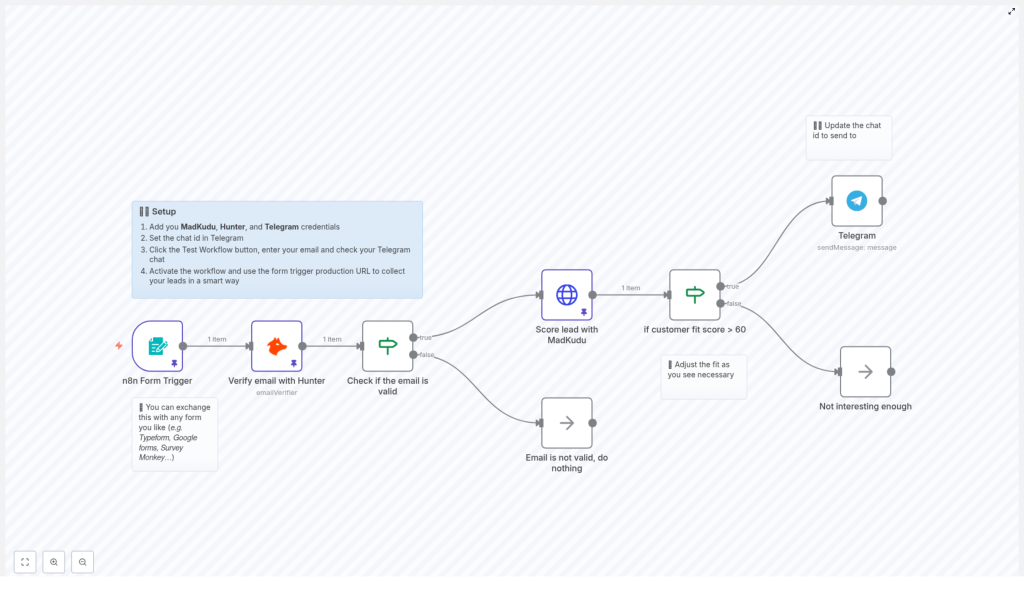
Automate Lead Scoring and Notifications with n8n Workflow
What You Will Learn
In this tutorial-style guide, you will learn how to use an n8n workflow template to:
- Capture leads using an n8n form trigger or any external form tool
- Validate email addresses automatically with Hunter
- Score and enrich leads using the MadKudu API
- Filter leads based on a customer fit score threshold
- Send instant Telegram notifications for high-potential leads
- Configure credentials and activate the workflow in n8n
By the end, you will understand each part of the workflow and how they work together to automate lead qualification and real-time sales alerts.
Concept Overview: How the Workflow Fits Into Your Sales Funnel
This n8n workflow is designed to streamline lead validation, scoring, and notification. It connects several tools and checks into one automated pipeline:
- Input: A form where a potential lead submits a business email
- Validation: Hunter verifies if the email is real and deliverable
- Scoring: MadKudu evaluates how good the lead is based on multiple attributes
- Filtering: Only leads above a certain score are considered high potential
- Notification: Telegram sends instant alerts to your sales or growth team
This approach helps you focus your attention on the leads most likely to convert while automatically dropping invalid or low-quality contacts.
Key Components Used in n8n
Form Trigger
The workflow begins with an n8n Form Trigger. This node creates a simple web form that collects at least one field: the lead’s business email. The form trigger URL can be embedded into your website or landing page.
You can also replace this form trigger with other tools such as:
- Typeform
- Google Forms
- SurveyMonkey
In those cases, you would use the appropriate n8n node or webhook from your form provider instead of the native form trigger, but the rest of the workflow logic remains the same.
Hunter Email Verifier
After a lead submits an email, the workflow uses the Hunter Email Verifier node to check that email address. Hunter returns information about whether the email is:
- Valid
- Invalid
- Risky or undeliverable
This step helps prevent sending follow-ups to fake or mistyped emails, which reduces bounce rates and keeps your list clean.
If Nodes for Decision Making
The workflow uses If nodes to make decisions based on the data returned by other nodes. There are two key decision points:
- Checking if the email is valid, based on Hunter’s verification result
- Checking if the MadKudu customer fit score is above a chosen threshold
These If nodes route leads down different paths, for example toward notification or toward a no-operation node where the workflow ends.
MadKudu API for Lead Scoring
Leads that pass the email validation step are sent to the MadKudu API node. MadKudu analyzes the lead using multiple attributes such as:
- Company revenue
- Industry
- Location
- Other behavioral or firmographic data (depending on your MadKudu setup)
MadKudu then returns a customer fit score. This score indicates how likely the lead is to convert, which helps you prioritize your outreach.
Telegram Node for Real-Time Alerts
High-scoring leads are sent to a Telegram node. This node sends an automated message to a specific Telegram chat ID, for example:
- A private chat with a sales manager
- A group chat for the sales team
This real-time notification ensures that hot leads are noticed quickly and followed up with in a timely manner.
No-Operation Nodes for Stopping the Flow
When a lead does not meet certain criteria, the workflow routes them to a no-operation (NoOp) node. These nodes are used to clearly mark where the workflow ends for:
- Invalid emails
- Leads that are “not interesting enough” based on their score
NoOp nodes do not perform any action, they simply act as clear endpoints for those branches.
Step-by-Step: How the n8n Workflow Runs
Step 1: A Lead Submits the Form
1. A visitor lands on your website or landing page and fills in a form that asks for their business email.
2. The form is powered by the n8n Form Trigger node (or a different form tool integrated into n8n). When the user submits the form, n8n receives the email data and starts the workflow.
Step 2: Validate the Email with Hunter
3. The email is passed to the Hunter Email Verifier node.
4. Hunter checks whether the email is legitimate and deliverable. It returns a status that indicates if the email is valid or not.
Example outcome:
- Valid: The email appears real and can receive mail
- Invalid: The email is fake, mistyped, or undeliverable
Step 3: Use an If Node to Filter Invalid Emails
5. The workflow now uses an If node to evaluate the result from Hunter.
- If the verification status is valid, the lead continues to the scoring step.
- If the email is not valid, the workflow routes the lead to a NoOp node, and the process ends for that input.
This makes sure that only legitimate contacts are processed further.
Step 4: Score the Lead with MadKudu
6. For valid emails, the workflow calls the MadKudu API node.
7. MadKudu enriches the lead and calculates a customer fit score using attributes like company revenue, industry, and location, among others.
8. This score is returned to n8n and attached to the lead’s data inside the workflow.
Step 5: Evaluate the Customer Fit Score
9. Another If node checks the customer fit score value from MadKudu.
10. The template uses a threshold of 60 as an example. The logic is:
- If the score is above 60, the lead is considered “interesting” or high potential.
- If the score is 60 or below, the lead is treated as not interesting enough for immediate follow-up.
Step 6: Send a Telegram Notification for High-Scoring Leads
11. Leads that pass the score threshold are sent to the Telegram node.
12. The Telegram node sends a message to a pre-configured chat ID. This could include details like:
- The lead’s email
- Their MadKudu fit score
- Any other useful context you choose to include in the message template
13. Your sales or growth team receives this notification in real time and can act on the lead quickly.
Step 7: End the Flow for Non-Qualified Leads
14. Leads that do not meet the scoring threshold are routed to a NoOp node labeled “Not interesting enough”.
15. No further actions are taken for these leads, which keeps your team’s focus on the most promising prospects.
How to Set Up the Workflow in n8n
To start using this template in your own n8n instance, follow these setup steps.
1. Add Required Credentials
In your n8n account, add credentials for each external service used in the workflow:
- MadKudu – for lead scoring and enrichment
- Hunter – for email verification
- Telegram – for sending notifications
Make sure your API keys or tokens are correct and active. These credentials will be linked to the corresponding nodes inside the template.
2. Configure the Telegram Chat ID
Next, set the Telegram chat ID in the Telegram node:
- Decide whether you want messages in a private chat or a group
- Retrieve the chat ID and paste it into the Telegram node configuration
This ensures that every high-scoring lead will trigger a notification in the right place.
3. Test the Workflow
Before going live, use the Test Workflow feature in n8n:
- Open the workflow in the n8n editor
- Click on the Test or Execute Workflow button
- Submit a sample email through the form trigger
- Check that:
- Hunter validates the email
- MadKudu returns a score
- Telegram sends a notification for high-scoring leads
If any part fails, review the node configuration and credentials, then test again.
4. Activate and Connect to Your Live Form
Once testing is successful:
- Activate the workflow in n8n
- Copy the Form Trigger URL from n8n
- Replace the form action or link in your public-facing form (or embed the n8n form directly)
From this point onward, new leads that submit their email will automatically be validated, scored, and, if qualified, will trigger Telegram alerts.
Benefits of Using This n8n Lead Scoring Template
- Higher Lead Quality: Invalid or undeliverable emails are filtered out early, so your team focuses on real prospects.
- Prioritized Outreach: MadKudu scoring highlights leads with the best customer fit, letting you allocate time and resources where they matter most.
- Real-Time Alerting: Telegram notifications keep your team informed instantly when a high-potential lead appears.
- Flexible Integrations: You can easily swap the input form provider or change the notification channel while keeping the same n8n logic.
Quick FAQ
Can I use a different form tool instead of the n8n Form Trigger?
Yes. You can replace the n8n Form Trigger with tools like Typeform, Google Forms, or SurveyMonkey. Use the appropriate integration or webhook in n8n, and connect it to the same validation and scoring steps.
Can I change the MadKudu score threshold?
Absolutely. The example uses a customer fit score of 60 as the threshold, but you can adjust this value in the corresponding If node to match your own lead qualification criteria.
What happens to low-scoring leads?
Leads that do not reach the chosen score are sent to a NoOp node labeled “Not interesting enough”. The workflow stops for those leads, which helps you avoid cluttering your notification channels with low-priority contacts.
Is this workflow suitable for B2B leads?
Yes. This setup is particularly useful for B2B lead generation where business email validity and firmographic scoring are critical for effective sales outreach.
Get Started With This n8n Workflow Template
If you want to automate your lead qualification process and make sure no high-potential lead slips through the cracks, this n8n workflow template is a powerful starting point. It combines email verification, lead scoring, and instant notifications into a single, easy-to-manage automation.
Set it up in your n8n instance, connect your tools, and start scoring leads automatically to boost your sales efficiency and conversion rates. If you need support with integration or customization, you can contact the n8n support team for expert help.
