


Automate AI Voice Calls with Airtable & telli Integration: A Story of One Marketer’s Breakthrough
The Day Emma Realized Her Calls Were Holding Her Back
By Tuesday afternoon, Emma’s coffee was cold and her call list was still only half done.
As the marketing manager at a fast-growing service company, her days were packed with lead follow-ups, appointment reminders, and customer feedback calls. Airtable kept her contacts organized, but the real problem was the time spent dialing numbers, leaving voicemails, and updating notes after each conversation.
Leads slipped through the cracks when she could not call fast enough. Clients missed appointments because reminder calls went out late. Feedback surveys were often forgotten when the team got busy. Emma knew automation could help, but she did not want to lose the human touch or rewrite her entire tech stack.
That changed the day she discovered an n8n workflow template that connected Airtable with telli, an AI voice-agent platform. It promised to automate AI voice calls directly from her CRM, using smart, conversational agents instead of manual dialing.
Discovering a Smarter Way to Call
Emma’s search started with a simple question: “How can I automate voice calls from Airtable?”
She came across an n8n template designed exactly for that. It integrated Airtable contacts with telli’s AI voice agents, allowing her to schedule and manage calls without lifting a phone. The idea was simple but powerful: every time a new contact appeared in Airtable, a workflow would automatically send that contact to telli, then schedule an AI-powered call.
Before she could try it, Emma made a checklist of what she needed.
What Emma Set Up Before Building Her Workflow
- A telli account with API access so she could use the AI voice-agent platform and its HTTP API endpoints.
- An Airtable base that already contained her leads and customers, with fields like name, phone number, email, and other useful details.
- n8n automation platform where she would import and customize the workflow template that connected Airtable and telli.
With those pieces ready, she opened n8n and started turning her manual phone routine into an automated, AI-driven voice system.
Building the Workflow: From Contact in Airtable to AI Voice Call
Emma’s goal was clear: whenever a new lead or contact appeared in Airtable, an AI voice agent from telli should call them, either to qualify them, remind them of an appointment, or collect feedback.
Instead of a dry checklist, the workflow became part of her story of reclaiming time and improving her customer communication.
1. The Trigger That Changed Everything
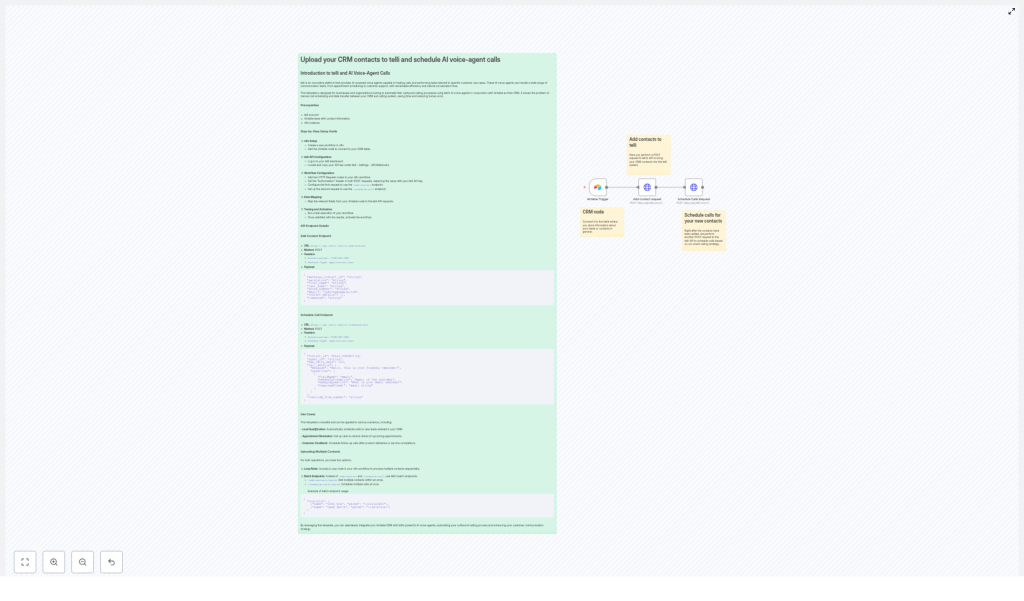
Emma started with the first key piece in n8n: an Airtable Trigger node.
She configured this node to watch her Airtable base for new or updated records. Any time a new contact was added, or an existing one changed in a way that signaled “ready for a call,” the Airtable Trigger node would fire. That event became the starting point of the whole automation.
Instead of manually checking Airtable every morning, the workflow now listened in real time.
2. Sending Contacts to telli With an HTTP Request
Once the trigger fired, Emma needed to get that contact into telli. For this, she added an HTTP Request node in n8n, configured to call telli’s /add-contact API endpoint.
She set the method to POST, added the correct headers, and mapped fields from Airtable into the JSON body.
telli Add Contact Endpoint Details
- URL:
https://api.telli.com/v1/add-contact - Method: POST
- Headers:
Authorization: YOUR-API-KEYContent-Type: application/json
- Payload Example:
{  "external_contact_id": "string",  "salutation": "string",  "first_name": "string",  "last_name": "string",  "phone_number": "string",  "email": "jsmith@example.com",  "contact_details": {},  "timezone": "string"
}
In her workflow, Emma mapped Airtable fields like first_name, last_name, phone_number, and email into this payload. She used her telli API key in the Authorization header to authenticate the request.
Each time the node ran, a new contact appeared in telli, ready to be called by an AI voice agent.
3. The Moment the AI Agent Started Calling
Creating contacts in telli was only half the story. Emma also needed to schedule actual calls. So she added a second HTTP Request node in n8n, this time pointing to telli’s /schedule-call endpoint.
telli Schedule Call Endpoint Details
- URL:
https://api.telli.com/v1/schedule-call - Method: POST
- Headers:
Authorization: YOUR-API-KEYContent-Type: application/json
- Payload Example:
{  "contact_id": TELLI-CONTACT-ID,  "agent_id": "string",  "max_retry_days": 123,  "call_details": {  "message": "Hello, this is your friendly reminder!",  "questions": [  {  "fieldName": "email",  "neededInformation": "email of the customer",  "exampleQuestion": "What is your email address?",  "responseFormat": "email string"  }  ]  },  "override_from_number": "string"
}
In n8n, Emma took the contact_id returned by the previous /add-contact call and used it in the schedule-call payload. She chose an agent_id that matched the AI agent she had configured in telli, and customized the message and questions to fit each use case.
Now, when a new contact landed in Airtable, the workflow automatically:
- Created that contact in telli through the
/add-contactendpoint. - Scheduled an AI voice call through the
/schedule-callendpoint.
For Emma, this was the turning point. The calls started happening in the background while she focused on strategy instead of spreadsheets and dial pads.
Where the AI Voice Workflow Really Shined
Once the n8n workflow was live, Emma began to see how flexible the Airtable and telli integration could be. She used the same structure for several key scenarios, just by adjusting the Airtable views, call messages, and agent configurations.
Lead Qualification on Autopilot
New leads used to sit in her CRM for hours or even days before someone had time to call. With the n8n template, Emma set up a dedicated Airtable view for “New Leads” and connected that to her workflow trigger.
As soon as a lead landed in that view, telli’s AI voice agent would call to:
- Welcome the lead.
- Ask a few qualification questions.
- Capture key details like email, company size, or service interest.
The responses were logged, and Emma could prioritize high-intent leads without spending time on basic screening calls.
Appointment Reminders Without Manual Dialing
Missed appointments were a constant headache. Emma created another Airtable view for upcoming appointments. Her workflow used that view to trigger reminder calls through telli.
The AI agent would say something like, “Hello, this is your friendly reminder about your appointment tomorrow,” and could even ask the customer to confirm or reschedule if needed, depending on the agent setup in telli.
Customer Feedback Calls That Actually Got Done
Post-service feedback used to be the first task to get dropped when the team got busy. With the integration in place, Emma created a simple rule: any completed service in Airtable would trigger a follow-up call through telli.
The AI agent would:
- Thank the customer for their business.
- Ask a few feedback questions.
- Capture responses in a structured way that could be reviewed later.
For Emma, this meant higher response rates and better insights, without adding work to her team’s day.
Scaling Up: Handling Many Contacts at Once
As the company grew, Emma’s workflows had to keep up. Processing one contact at a time was fine at first, but soon she needed to handle larger batches efficiently.
She explored two approaches inside n8n and telli to scale her automation.
Option 1 – Looping Through Contacts in n8n
For moderate volumes, Emma used an n8n Loop node to iterate through multiple contacts sequentially.
- The Airtable node fetched a list of contacts that matched her criteria.
- The Loop node processed each contact one by one.
- For each item, the workflow:
- Called the
/add-contactendpoint. - Then called the
/schedule-callendpoint using the returnedcontact_id.
- Called the
This approach gave her fine control over each contact and made it easy to add conditions or custom logic per lead.
Option 2 – Using telli Batch Endpoints
When Emma needed to handle larger lists, she turned to telli’s batch APIs to speed things up.
Instead of sending contacts one by one, she could:
- Use
/add-contacts-batchto add multiple contacts to telli in a single request. - Use
/schedule-calls-batchto schedule many calls at once.
In n8n, she built arrays of contacts and call configurations, then posted them to the batch endpoints. This reduced API overhead and made it easier to run large campaigns, such as seasonal promotions or mass feedback initiatives.
The Resolution: From Overwhelmed to Orchestrated
A few weeks after setting up the Airtable and telli integration with n8n, Emma’s workday looked completely different.
Her outbound calling was no longer a pile of to-dos. Instead, it was a coordinated system of AI voice calls that:
- Automatically reached out to new leads.
- Reminded clients about their appointments on time.
- Collected feedback after each service.
Errors from manual data entry dropped, and she gained back hours each week. Most importantly, her team could focus on higher-value conversations, while the AI handled routine but essential touchpoints.
The workflow did not just automate calls, it upgraded the entire customer contact strategy.
Where You Can Go From Here
If you are managing contacts in Airtable and want to automate AI voice calls with minimal friction, this n8n workflow template offers a direct path forward. By linking Airtable with telli through n8n, you can:
- Automate outbound calling with AI voice agents.
- Reduce manual work and human error.
- Customize call scripts, questions, and retry logic to match your customer journey.
You can extend the setup by exploring more of telli’s API features, refining your AI agent scripts, or adding conditions in n8n to route different contacts to different agents or call flows.
Ready to build your own story like Emma’s? Set up your n8n workflow today and streamline your communications with powerful AI voice calls powered by telli.
