


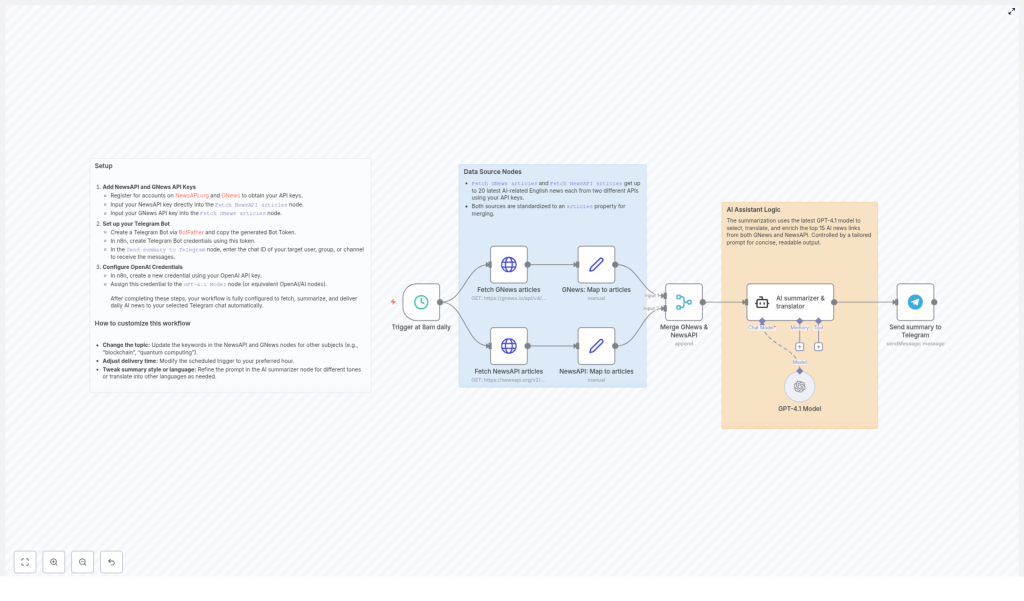
Daily AI News Summary Workflow with GPT-4 & Telegram
What You Will Learn
In this guide, you will learn how to use an n8n workflow template to:
- Fetch the latest AI news automatically from two news APIs
- Summarize and translate those news articles using GPT-4
- Send a clean, daily AI news digest to a Telegram chat
- Customize the topic, language, and delivery time to fit your needs
By the end, you will understand how each node in the workflow works, how the data flows from one step to the next, and how to adapt this template for other topics such as blockchain or quantum computing.
Key Concepts Before You Start
n8n Workflow Automation
n8n is a workflow automation platform that lets you connect APIs and services without writing full applications. In this template, n8n:
- Triggers the workflow at a specific time every day
- Calls external APIs to fetch news
- Passes article data to GPT-4 for summarization and translation
- Sends the final text to Telegram
News Sources: NewsAPI and GNews
The workflow uses two news providers to increase coverage and reliability:
- NewsAPI.org – a popular API for news articles from many sources
- GNews – another news API that provides similar content but from different feeds
Both APIs return AI-related English news articles, which are then combined and standardized inside n8n.
GPT-4 for Summarizing and Translating
GPT-4 is used as the core AI engine. In this workflow it:
- Selects the most relevant AI articles
- Summarizes them into a concise daily digest
- Translates the content into Traditional Chinese
- Keeps common technical terms in English for clarity
Telegram as the Delivery Channel
Telegram is used to deliver the final summary. The workflow sends the digest to any specified:
- Individual user chat
- Group
- Channel
Once set up, you will receive your AI news summary automatically every day.
Step 1 – Set Up Your API Keys
1.1 Register for NewsAPI and GNews
First, you need API keys for both news providers:
- Go to NewsAPI.org and create an account to get your NewsAPI key.
- Go to GNews and register to obtain your GNews API key.
1.2 Add Keys to the Correct n8n Nodes
In your imported n8n template, locate the news fetching nodes and insert your keys:
- Open the "Fetch NewsAPI articles" node and paste your NewsAPI key into the appropriate field.
- Open the "Fetch GNews articles" node and paste your GNews API key there.
These nodes will query the APIs for up to 20 of the latest AI-related English articles each day.
Step 2 – Configure Your Telegram Bot
2.1 Create a Telegram Bot
To send messages from n8n to Telegram, you need a bot:
- Open Telegram and start a chat with BotFather or visit the docs at BotFather.
- Follow the instructions to create a new bot.
- Copy the bot token that BotFather gives you. You will need it in n8n.
2.2 Add Telegram Credentials in n8n
- In n8n, create a new Telegram Bot credential and paste your bot token into it.
- Assign this credential to the "Send summary to Telegram" node.
2.3 Set the Telegram Chat ID
You must tell the workflow where to send the summary:
- Find the chat ID of the user, group, or channel where you want to receive the digest.
- In the "Send summary to Telegram" node, enter this chat ID in the corresponding field.
After this step, the workflow will be able to post the AI news summary directly into that Telegram chat.
Step 3 – Connect OpenAI (GPT-4) to n8n
3.1 Create OpenAI Credentials
- Obtain your OpenAI API key from your OpenAI account.
- In n8n, create a new credential entry for OpenAI and paste your API key.
3.2 Attach GPT-4 to the AI Node
The template uses a GPT-4 based node for summarization and translation:
- Locate the "GPT-4.1 Model" node (or the equivalent OpenAI / AI node in your n8n instance).
- Assign the OpenAI credential you just created to this node.
This node will receive the collected articles, process them, and return a structured daily summary in Traditional Chinese.
How the Workflow Runs in n8n
4.1 Daily Trigger
The workflow starts with a scheduled trigger:
- It is configured to run automatically every day at 8 AM.
- You can later adjust this time if you want a different delivery schedule.
4.2 Fetching AI News from Two Sources
Once triggered, n8n runs both news nodes:
- Fetch NewsAPI articles – calls the NewsAPI endpoint to get recent AI-related English articles.
- Fetch GNews articles – calls the GNews API for similar AI news.
Each node can fetch up to 20 of the latest AI news articles. Using both APIs increases the chance of covering more sources and perspectives.
4.3 Mapping Articles into a Common Format
Because NewsAPI and GNews return slightly different JSON structures, the workflow uses mapping nodes to standardize the data:
- Each source passes through a node that reshapes the response.
- The result is a unified
articlesproperty for each source.
This makes it easier for later nodes to treat all articles in the same way, regardless of which API they came from.
4.4 Merging the Two Article Lists
After mapping, a Merge node combines the standardized articles:
- Articles from NewsAPI and GNews are merged into a single dataset.
- The output is a consolidated list of AI articles ready for AI processing.
4.5 AI Summarization and Translation with GPT-4
The merged articles are then sent to the GPT-4 node, which performs several tasks in one step:
- Selects the 15 most relevant AI news articles from the merged list.
- Generates a concise daily summary that includes:
- The date at the beginning of the summary
- A brief explanation of each selected article
- The URL of each article for further reading
- Translates the content into Traditional Chinese, while:
- Preserving common technical terms in English to avoid confusion
The exact behavior is controlled by the prompt you configure in the GPT-4 node. You can adjust this prompt later to change tone, level of detail, or language.
4.6 Sending the Summary to Telegram
Finally, the output from GPT-4 is passed into the "Send summary to Telegram" node:
- The node uses your Telegram Bot credentials to authenticate.
- It sends the generated text to the chat ID you specified earlier.
At this point, your daily AI news digest appears automatically in Telegram at your scheduled time.
Customizing the Workflow for Your Needs
5.1 Change the Topic or Keywords
You are not limited to AI news. To track other fields:
- Open the "Fetch NewsAPI articles" node and update the search keywords or query parameters.
- Do the same in the "Fetch GNews articles" node.
For example, you can switch from "artificial intelligence" to topics such as:
- "blockchain"
- "quantum computing"
- Any other domain-specific keywords you want to monitor
5.2 Adjust the Delivery Time
If 8 AM is not ideal for you or your team:
- Open the schedule / trigger node at the start of the workflow.
- Change the configured time to your preferred hour or frequency.
You can, for instance, send summaries before your daily standup or at the end of the workday.
5.3 Modify Summary Style and Language
The GPT-4 node is very flexible. You can tailor the output by editing the prompt:
- Change tone – make the summary more formal, casual, or analytical.
- Change detail level – ask for shorter bullet points or more in-depth explanations.
- Change language – instead of Traditional Chinese, you can translate into any other language you prefer.
Just update the instructions in the AI summarizer node and test the workflow to see how the output changes.
Quick Recap
- The workflow triggers every day at a set time (default 8 AM).
- NewsAPI and GNews nodes fetch up to 20 English AI news articles each.
- Mapping nodes standardize the responses into a common
articlesstructure. - A Merge node combines all articles into one dataset.
- GPT-4 selects the top 15 articles, summarizes them, translates to Traditional Chinese, and includes URLs.
- The final summary is posted directly to your chosen Telegram chat using your bot.
- You can customize topic, time, style, and language by adjusting node settings and prompts.
FAQ
Do I need coding skills to use this n8n template?
No. You mainly configure nodes, enter API keys, and adjust some text prompts. The logic is already built into the template.
Can I change the number of articles summarized?
Yes. The template is set to select 15 articles, but you can modify the AI prompt or logic in the GPT-4 node to use a different number.
Is it possible to keep the summary in English only?
Yes. Edit the GPT-4 prompt and remove the translation instruction, or ask it to summarize directly in English or any other language you want.
Can I send the summary to multiple Telegram chats?
You can duplicate the "Send summary to Telegram" node and configure each copy with a different chat ID, or build a loop over a list of chat IDs if needed.
Get Started with the Template
Once you have your API keys and credentials ready, you can import and run the workflow template in n8n. It will handle your daily AI news intake automatically, keep you and your team informed, and push updates straight into Telegram.
Customize it for your own topics, languages, and timing to turn it into a reusable daily briefing system.
