


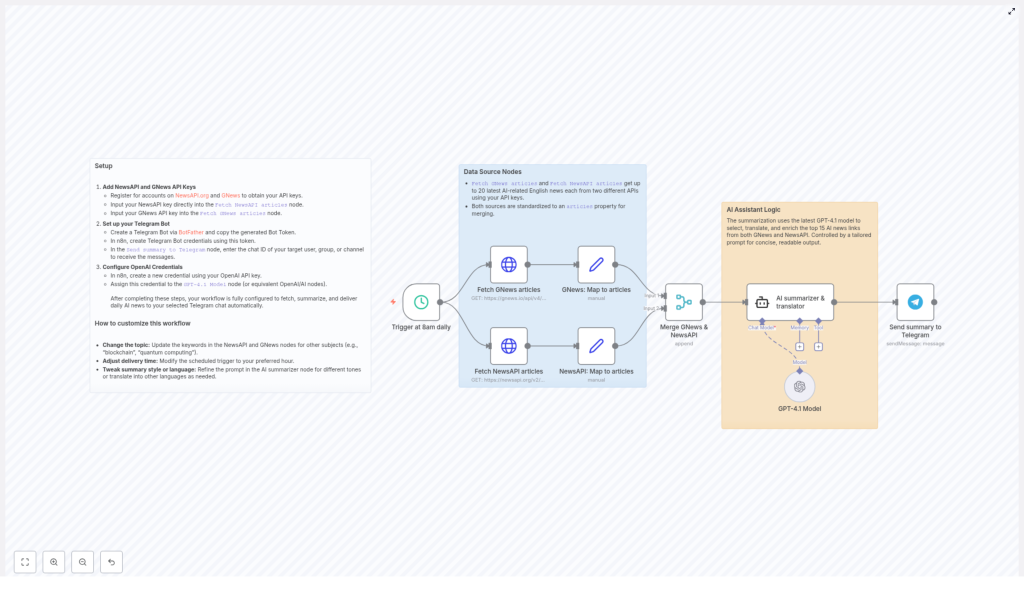
Automate Daily AI News Summaries in Traditional Chinese with n8n
1. Overview
This guide documents an n8n workflow template that automatically collects daily AI-related news, summarizes it with GPT-4, translates the content into Traditional Chinese, and sends the result to a specified Telegram chat.
The automation is designed for users who already understand basic concepts of APIs, webhooks, and n8n nodes. It focuses on reliability, clear data flow, and easy customization of topics, language, and schedule.
2. Workflow Architecture
The workflow is built in n8n and integrates several external services:
- News sources: NewsAPI and GNews for English-language AI news.
- LLM processing: OpenAI GPT-4 for summarization, article selection, and translation into Traditional Chinese.
- Messaging: Telegram Bot API for delivering the final daily summary.
The core flow can be summarized as:
- Trigger the workflow on a daily schedule (default: 8:00 AM).
- Fetch AI-related news from NewsAPI and GNews.
- Normalize both responses to a shared
articlesstructure. - Merge and deduplicate the article list.
- Use GPT-4 to select the top 15 relevant articles, summarize them, and translate the content into Traditional Chinese while preserving key technical English terms.
- Post the final formatted summary to a specified Telegram chat.
3. Prerequisites and Credentials
3.1 Required API Keys and Tokens
Before importing or running the template, you need the following credentials:
- NewsAPI API key for global news data.
- GNews API key for an additional news source.
- OpenAI API key for GPT-4 access.
- Telegram Bot Token and the Telegram chat ID where summaries will be delivered.
3.2 Obtaining API Keys
- NewsAPI: Sign up at newsapi.org and generate an API key from your account dashboard.
- GNews: Register at gnews.io and obtain your API key.
- OpenAI: Create or log in to your OpenAI account, generate an API key, and ensure your plan supports GPT-4 access.
- Telegram Bot:
- Open Telegram and start a conversation with BotFather.
- Use the
/newbotcommand to create a bot and obtain the Bot Token. - Invite the bot to your target chat (private or group) and obtain the chat ID using any Telegram chat ID lookup method or a simple helper bot.
3.3 Configuring Credentials in n8n
In the n8n UI, configure the following credentials and assign them to the appropriate nodes:
- NewsAPI credentials: Store your NewsAPI key and link it to the NewsAPI node.
- GNews credentials: Store your GNews key and link it to the GNews node.
- OpenAI credentials: Add your OpenAI API key and assign it to the GPT-4 node.
- Telegram credentials: Create a Telegram Bot credential using your Bot Token and assign it to the Telegram node.
Make sure you select the correct credential in each node, otherwise the workflow will fail at runtime with authentication errors.
4. Node-by-Node Breakdown
4.1 Schedule Trigger Node
- Node type: Schedule / Cron (Trigger)
- Purpose: Automatically start the workflow once per day.
- Default configuration:
- Frequency: Daily
- Time: 08:00 (server time or configured timezone)
This node is responsible for initiating the entire pipeline at 8 AM daily. You can adjust the time or frequency to align with your preferred schedule.
4.2 NewsAPI Node
- Node type: HTTP-based NewsAPI integration (REST API)
- Purpose: Fetch up to 20 recent global AI-related articles in English.
- Key parameters:
- Query / Keywords: AI-related terms (for example, “artificial intelligence”, “AI”, “machine learning”).
- Language:
en(English). - Page size / Limit: Up to 20 articles.
The response from NewsAPI typically includes fields such as title, description, url, publishedAt, and source. In the workflow, these fields are later normalized into a shared articles structure.
4.3 GNews Node
- Node type: HTTP-based GNews integration (REST API)
- Purpose: Retrieve an additional set of up to 20 AI-related news articles in English from another provider.
- Key parameters:
- Query / Keywords: Same or similar AI-related terms as used in NewsAPI.
- Language:
en. - Max results: Up to 20 articles.
GNews returns its own schema (for example, title, description, url, publishedAt, source). These fields are also normalized to the common articles property in a later step.
4.4 Data Mapping Nodes (Standardizing Article Data)
- Node type: Typically a Function, Set, or similar data transformation node.
- Purpose: Map both NewsAPI and GNews responses to a common schema under a unified
articlesproperty.
Both upstream API responses have slightly different structures. To simplify merging and downstream processing, each source is transformed so that the items are stored under a shared articles field with consistent keys, for example:
articles[i].titlearticles[i].descriptionarticles[i].urlarticles[i].publishedAtarticles[i].sourceName
This normalization step is critical because the merge node expects a uniform structure. If any field is missing from a source, the mapping node should handle it gracefully, typically by leaving it null or providing a fallback value.
4.5 Merge Node (Combining News Sources)
- Node type: Merge
- Purpose: Combine the standardized
articlesarrays from NewsAPI and GNews into a single comprehensive list.
The merge operation consolidates the two article lists into one unified dataset that will be passed to GPT-4. Depending on the template implementation, the merge may:
- Concatenate both lists into a single
articlesarray. - Preserve basic metadata from both sources.
At this point, the workflow has a combined set of AI-related news items, typically up to 40 articles in total (20 from each API), ready for analysis and summarization.
4.6 GPT-4 Node (Summarization and Translation)
- Node type: OpenAI (Chat / Completion) using GPT-4
- Purpose:
- Select the 15 most relevant AI news articles from the merged list.
- Summarize the selected articles with a focus on AI technology progress and applications.
- Translate the resulting summaries into Traditional Chinese.
- Preserve common technical terms in English for clarity.
- Format the output with article URLs and a short header containing the current date and a greeting.
The node uses the OpenAI credentials configured earlier and sends the normalized article data as context. The prompt is designed so GPT-4:
- Filters the articles down to the top 15 based on relevance to AI advancements and real-world applications.
- Produces concise, high-quality summaries.
- Outputs the text in Traditional Chinese, with technical English terms left untranslated where appropriate.
- Includes each article’s URL so readers can access the full original content.
- Begins the message with the current date and a friendly greeting for daily readability.
If the merged list contains fewer than 15 articles, GPT-4 will work with the available items. The prompt design should handle this scenario implicitly, so the model does not fail when fewer articles are provided.
4.7 Telegram Node (Summary Delivery)
- Node type: Telegram (Send Message)
- Purpose: Deliver the formatted AI news summary to the specified Telegram chat.
- Key parameters:
- Bot Token: Provided via the configured Telegram credentials.
- Chat ID: The target user, channel, or group chat where the summaries should be delivered.
- Message: The final GPT-4 output containing the Traditional Chinese summary and article URLs.
Once the GPT-4 node completes successfully, its text output is passed directly to the Telegram node. The node sends a single consolidated message to your Telegram chat each morning, making it easy to scan the latest AI news at a glance.
5. Detailed Execution Flow
5.1 Daily Trigger at 8 AM
The Schedule node activates the workflow every day at 8 AM. This is the only trigger in the template, which ensures a consistent daily cadence for news retrieval and summary delivery.
5.2 Fetching AI News Articles
Immediately after the trigger fires, the workflow calls both NewsAPI and GNews with your configured API keys. Each request is scoped to AI-related keywords and restricted to English-language results. Both APIs return up to 20 of the most recent relevant articles.
5.3 Normalization to a Common Schema
Since NewsAPI and GNews use slightly different response formats, the workflow uses mapping or transformation nodes to standardize all article items into a uniform articles property. This step ensures that downstream nodes can treat all items identically, regardless of source.
5.4 Merging Articles from Multiple Sources
The standardized article arrays from both APIs are merged into a single list. This gives GPT-4 a broader and more diverse set of news sources, improving coverage and reducing the risk of missing important AI developments.
5.5 AI-Driven Summarization and Translation
The merged article list is passed into the GPT-4 node, along with a carefully structured prompt. GPT-4 then:
- Evaluates the relevance of each article to AI technology progress and applications.
- Selects the top 15 articles when available.
- Generates a concise but informative summary for each selected item.
- Translates the summaries into Traditional Chinese, keeping technical English terminology intact where it aids understanding.
- Appends the original URLs so you can open full articles directly from the summary.
- Prefixes the output with the current date and a short greeting, making each daily message self-contained.
5.6 Telegram Delivery of the Final Summary
The Telegram node receives the GPT-4 output as the message body and sends it to your configured chat ID. The result is a single, well-structured message that arrives at roughly 8 AM daily, containing your curated AI news digest in Traditional Chinese.
6. Configuration and Customization
6.1 Changing the Topic or Domain
You can repurpose this workflow for other domains simply by modifying the query keywords in the NewsAPI and GNews nodes. For example:
- Replace AI-related keywords with
blockchainto track blockchain news. - Use
quantum computingor similar terms to monitor developments in quantum technologies.
Ensure that both source nodes use consistent or complementary queries so the merged list remains coherent.
6.2 Adjusting Delivery Time and Frequency
To change when the summary is sent:
- Open the Schedule / Cron node.
- Update the time (for example, from 08:00 to 07:30 or 21:00).
- Optionally modify the frequency (for example, multiple times per day or specific weekdays only) according to your needs.
6.3 Customizing Summary Style and Language
The GPT-4 node prompt controls how the summary is generated. You can edit it to:
- Change the tone (more formal, more casual, or more technical).
- Adjust the length (short bullet points vs. detailed paragraphs).
- Translate into a different language instead of Traditional Chinese (for example, Simplified Chinese, English, Japanese).
- Modify how URLs are displayed or how articles are formatted (numbered list, headings, etc.).
When changing the language, keep the instruction about preserving technical English terms if you still want them left untranslated for clarity.
6.4 Target Chat Configuration
In the Telegram node:
- Set the Chat ID to your own user ID, a group ID, or a channel ID.
- Ensure your bot is a member of the target group or channel if it is not a direct chat.
If the chat ID is incorrect or the bot lacks permission to post, the Telegram node will fail and the message will not be delivered.
7. Operational Notes and Edge Cases
7.1 Handling Fewer Articles than Expected
If one of the APIs returns fewer than 20 articles or is temporarily limited, the merged list may contain fewer than 40 items. GPT-4 is instructed to select up to 15 relevant articles, so it will simply work with whatever is available and generate a summary for that subset.
7.2 API Rate Limits and Failures
Because the workflow relies on third-party APIs, consider the following:
- If NewsAPI or GNews hit rate limits or experience downtime, that node may fail or return an empty result.
- If the OpenAI API is unavailable or returns an error, the GPT-4 node will fail and the Telegram message will not be sent.
- Authentication errors will occur if any API key or token is misconfigured or revoked.
In production, you may want to add additional error handling or notifications in n8n (for example, on-error workflows or fallback branches) so you are alerted if any external service fails.
7.3 Message Size Considerations
GPT-4 outputs a consolidated summary text that is then sent as a single Telegram message. In typical usage, this fits comfortably within Telegram’s message size limits, but if you significantly increase the number of articles or the verbosity of the summaries in the prompt, you should be aware of potential message length constraints.
