


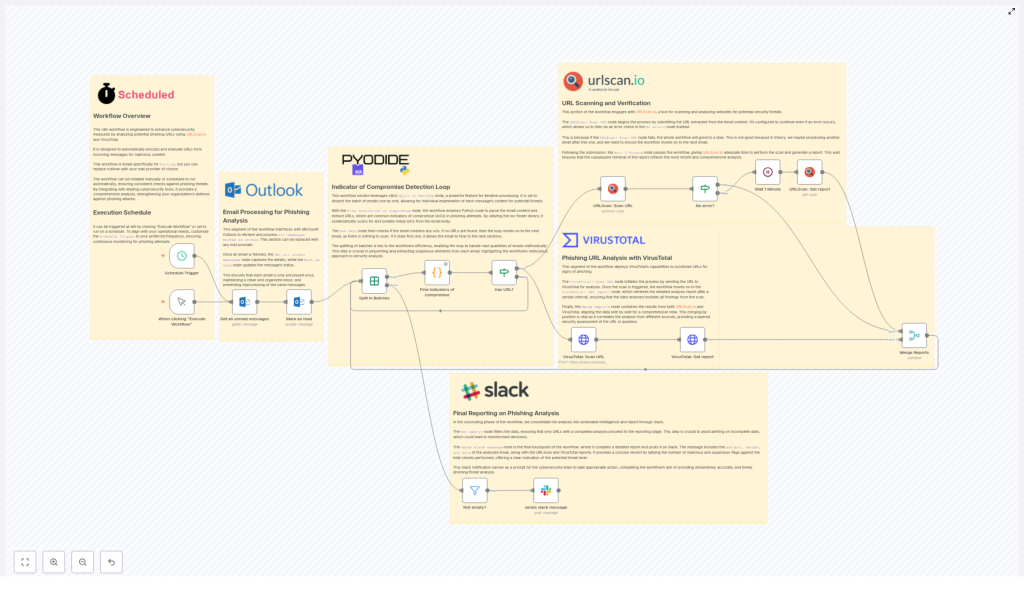
Automated Phishing URL Analysis with URLScan.io & VirusTotal
Imagine never copy-pasting sketchy links again…
You open your inbox on a Monday morning and there it is:
- An email from “Micros0ft Support” asking you to “reset your pasword now.”
- A link that looks like it was generated by a keyboard smash.
- Your internal voice saying, “I should probably check this… but also, I do not want to.”
Manually pulling out URLs, scanning them in different tools, waiting for results, and then writing up a report is the sort of repetitive task that slowly eats your soul. That is exactly what this n8n workflow template is here to fix.
This automated phishing URL analysis workflow takes incoming emails from Microsoft Outlook, extracts suspicious URLs, sends them to URLScan.io and VirusTotal, waits for the results, and then posts a clean, readable summary straight into Slack. You get the insights without the drudgery.
What this n8n workflow actually does
At a high level, this workflow automates phishing URL detection so your security team can focus on decisions, not copy-paste work. It connects Outlook, URLScan.io, VirusTotal, Python-based IoC detection, and Slack into a single, repeatable process.
Key capabilities
- Email source: Pulls in unread emails from Microsoft Outlook that are candidates for phishing analysis.
- Flexible automation: Can be triggered manually or scheduled to run at regular intervals for continuous monitoring.
- IoC detection with Python: Uses a Python script with the
ioc-finderlibrary to extract URLs from email content as indicators of compromise. - Dual scanning: Sends every extracted URL to both URLScan.io and VirusTotal for deeper analysis.
- Consolidated reporting: Merges results and posts a detailed alert in a Slack channel so your security team sees everything in one place.
In short, it acts like a very patient, very fast junior analyst who never forgets to check both tools and never complains about repetitive work.
How the workflow runs behind the scenes
1. Grab unread emails from Outlook
The workflow kicks off by using the Get all unread messages node to collect incoming emails from Microsoft Outlook. These are the messages that might contain suspicious URLs.
As each email is pulled in, it is immediately marked as read. That way, the workflow does not loop back and analyze the same message twice, which would be annoying for you and very confusing for your Slack channel.
2. Process emails one by one with IoC extraction
Next, the workflow uses the Split In Batches node to handle emails individually. This keeps things orderly and avoids mixing URLs from different messages.
For each email, a Python script powered by the ioc-finder library scans the content and extracts URLs. These URLs are treated as potential indicators of compromise (IoCs).
If an email does not contain any URLs, the workflow politely moves on to the next one. No URLs, no scans, no wasted API calls.
3. Scan URLs with URLScan.io
Every extracted URL is then sent to URLScan.io. This service performs a deep analysis of the website, looking at how it behaves and what it loads.
The workflow is smart enough to wait for URLScan.io to finish its work. It uses a two-step approach:
- Submit the URL for scanning.
- Wait for a defined period, then fetch the completed report.
This waiting period ensures that when you retrieve the report, you are not looking at a half-finished scan or stale data.
4. Run parallel analysis with VirusTotal
At the same time, the same URLs are sent to VirusTotal. VirusTotal aggregates results from multiple security vendors, which gives you a broad view of how different engines classify the URL.
Once VirusTotal finishes processing, the workflow retrieves the detailed report. That report is then paired with the URLScan.io findings so you can compare both perspectives side by side.
5. Merge the reports into a single view
To save you from flipping between browser tabs like it is 2009, the workflow merges the URLScan.io and VirusTotal results.
This combined view correlates findings from both tools, making it easier to understand whether a URL is harmless, suspicious, or outright malicious.
6. Send the final verdict to Slack
The last step is where the magic becomes visible to your team. Only URLs with completed analyses are forwarded to Slack using the sends slack message node.
Each Slack notification includes:
- Email metadata such as subject, sender, and date.
- Links to the URLScan.io report.
- Links to the VirusTotal report.
- A concise verdict that highlights suspicious or malicious detections.
Your security team gets a clean, actionable summary instead of a pile of raw data. No more digging through multiple tools just to confirm that, yes, that “invoice” link is bad news.
Why this automated phishing URL workflow is worth using
Less manual work, more actual security
- Automation: The workflow automatically scans suspicious URLs in emails, so you are not stuck copying links into tools all day.
- Comprehensive analysis: By combining URLScan.io and VirusTotal, you get a much clearer view of the threat landscape around each URL.
- Actionable alerts: Slack notifications give your security team immediate insight into potential threats, right where they already communicate.
- Scalability: The logic can be adapted to other mail providers or extended with additional threat intelligence tools as your needs grow.
The result is a more efficient, more consistent phishing detection process that does not rely on someone remembering to “check it later.”
Quick setup guide for the n8n workflow
You do not need to reinvent the wheel to get started. This template already wires everything together, you just plug in your own services and preferences.
Step 1 – Configure your email source
- Set up the
Get all unread messagesnode with your Microsoft Outlook credentials. - Define any filters you want, for example specific folders or conditions for emails that should be processed.
- Confirm that emails are marked as read after processing to avoid duplicates.
Step 2 – Enable IoC extraction with Python
- Ensure the Python node is configured and has access to the
ioc-finderlibrary. - Verify that the script is extracting URLs from the email body as indicators of compromise.
- Check that emails without URLs are skipped cleanly so the workflow can move on to the next message.
Step 3 – Connect URLScan.io
- Provide your URLScan.io API key in the relevant node or credentials section.
- Confirm that each URL is being submitted for scanning.
- Set an appropriate waiting period before the workflow fetches the scan report, so results are complete.
Step 4 – Connect VirusTotal
- Configure the VirusTotal node with your API key.
- Make sure URLs are sent correctly and that the workflow retrieves the detailed report afterward.
- Validate that VirusTotal results are correctly aligned with their corresponding URLs.
Step 5 – Merge results and format output
- Review the node that combines URLScan.io and VirusTotal reports.
- Ensure the merged data includes all relevant fields you care about for threat assessment.
- Adjust any formatting or mapping if you want specific data to be emphasized in the final output.
Step 6 – Set up Slack notifications
- Connect the
sends slack messagenode with your Slack workspace and target channel. - Customize the message layout to include email metadata, report links, and the verdict.
- Test with a sample email to confirm that only completed analyses are posted and that the message is readable and useful.
Step 7 – Choose how and when it runs
- Run the workflow manually at first to verify everything works as expected.
- Once you are comfortable, set up a schedule so it checks for new emails at regular intervals.
- Align the schedule and Slack notifications with your incident response process, so alerts arrive at the right time and place.
Tips, customization ideas, and next steps
This template gives you a strong baseline for automated phishing URL analysis, but you can easily adapt it to your environment.
Ideas to tailor the workflow
- Different mail providers: Swap out the Outlook node for another email integration while keeping the IoC detection and scanning logic intact.
- Additional tools: Extend the workflow with more threat intelligence services if you want more data points.
- Custom Slack formatting: Highlight certain verdicts, tag specific users, or route alerts to different channels based on severity.
- Scheduling tweaks: Run more frequently during business hours and less often overnight, depending on your response expectations.
By integrating email processing with automated URL scanning and streamlined reporting, this n8n workflow helps your organization strengthen its security posture and reduce the risk from phishing attacks, without burying your team in repetitive tasks.
Next move: Configure the nodes for your mail provider, plug in your URLScan.io and VirusTotal credentials, connect Slack, and deploy the workflow. Your future self, who is not manually pasting URLs into scanners, will be very grateful.
